This article is based on practical experience from software development teams and reflects common CI/CD adoption patterns in the industry. Original source attribution: 126kr.com / TailorDev.
Testing Is No Longer Optional
Not long ago, development teams had to actively argue that software testing was a core part of building software — not a budget-dependent luxury. That battle is largely won. Today it is widely accepted that shipping an application or a feature means delivering code, tests, and documentation together as a single unit.
Open Source projects have operated this way for decades. Platforms like GitHub have generalised those good practices across the broader industry, and hosted CI services such as Travis CI and CircleCI made automated testing more accessible by providing tight version-control integrations that developers could enable with minimal configuration.
What Continuous Integration Actually Means
Continuous Integration (CI) is the practice of using a build server to automatically:
- Build the software from its source code.
- Run the full test suite.
- Report the results back to the development team.
By connecting a CI service to a repository hosted on GitHub or GitLab (which includes built-in CI), developers get near-instant feedback on the health of the codebase. This feedback loop is primarily aimed at developers: it tells them whether their changes can be safely integrated with the current stable version of the software, typically indicated by a green (passing) or red (failing) build status.
In its strictest definition, CI requires developers to push changes to the mainline branch at least once per day, minimising long-running divergent work. In practice, most teams — including the team behind this article — use feature branches and merge them when the build is green rather than on a strict daily schedule.
Feature Branches and the Pull Request Workflow
Feature branches became standard with the rise of Distributed Version Control Systems (DVCS) like Git, and both GitHub and GitLab are built around them. A feature branch is a short-lived branch that encapsulates a single change — a bug fix, a new feature, or a refactor — keeping the mainline stable.
The typical workflow looks like this:
- Create a new branch from the latest state of the mainline.
- Develop and commit incrementally.
- Push the branch to the shared remote repository.
- Open a Pull Request (GitHub) or Merge Request (GitLab).
- The CI server runs the build and test suite, updating the branch status.
- Once the build is green and conflicts are resolved, merge into the mainline.
GitHub and GitLab both surface conflict detection and build status directly in the Pull Request / Merge Request UI, making it easy for the whole team to assess readiness at a glance. Many teams use a simple Git branching model that treats master (or main) as the mainline and uses rebase to keep history clean and avoid unnecessary merge commits.
Organisational Benefits: Ownership and Code Review
Adopting CI with a feature-branch workflow naturally introduces useful team conventions:
- Branch ownership: The developer who opens a feature branch is responsible for it until it is merged. This prevents orphaned branches and unclear accountability.
- Code review: Pull Requests and Merge Requests make peer review a natural part of the workflow. Both GitHub and GitLab provide inline commenting tools that make code review efficient.
- Build health accountability: The developer who breaks the build is responsible for fixing it. This simple rule removes ambiguity and encourages everyone to keep the mainline green.
The result is a mainline branch that can reasonably be treated as the current stable version of the software — buildable and deployable at any time.
From CI to Continuous Delivery and Continuous Deployment
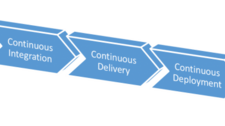
A stable, always-deployable mainline is the prerequisite for the next step: Continuous Delivery (CD).
Continuous Delivery means having the methods, tooling, and processes in place to release software to production at any time — safely, repeatably, and with confidence. It does not mean every commit goes to production automatically; it means every commit could.
Continuous Deployment goes one step further: every change that passes the pipeline is deployed to production automatically, without manual intervention. It is an extension of Continuous Delivery, not a replacement for it.
The key relationship: you cannot achieve reliable Continuous Delivery without Continuous Integration. CI is the foundation on which CD is built.
The Continuous Delivery Feedback Loop
While the CI feedback loop is primarily developer-facing, Continuous Delivery extends the feedback loop to multiple stakeholders:
- Developers learn whether a change behaves as expected in a production-like environment.
- Operations teams get confirmation that the software deploys correctly and that infrastructure is not overloaded.
- Business stakeholders can ship features to users more frequently, shortening the distance between idea and value.
- End users benefit from more frequent, smaller, lower-risk updates.
This multi-stakeholder feedback loop is closely connected to the broader DevOps cultural movement, which emphasises collaboration between development, operations, and quality assurance functions.
Practical CI/CD Setup: Environments and Deployment Scripts
In practice, teams implementing CD typically maintain multiple deployment environments:
- Development (dev): Updated automatically on every merge to the mainline. Used for integration testing.
- Staging: A production-like environment used for pre-release verification with customers or stakeholders.
- Production: The live environment, deployed manually (Continuous Delivery) or automatically (Continuous Deployment) depending on team policy.
Deployment scripts should be kept as simple as possible. A shell script that describes exactly the commands needed to build and deploy the software becomes the single source of truth for the deployment process. That process should also be documented in a README so any team member can understand it without tribal knowledge.
GitLab CI/CD pipelines can expose manual deploy buttons directly in the GitLab UI, allowing any authorised team member to trigger a deployment to a specific environment without SSH access or specialist knowledge. GitHub offers similar capabilities through its Deployments API and integrations with chat-ops tools.
Four Concrete Benefits of This Approach
- Automated, reproducible, documented deployments: The deployment script is the definitive record of how the software is built and shipped. There is no undocumented manual step hiding in someone’s head.
- Anyone can deploy at any time: When deployments are automated and exposed through a UI or chat-ops command, deploying is no longer a specialist task. This reduces bottlenecks and single points of failure.
- Smaller, more frequent releases: Shipping smaller chunks of work more often reduces risk. Each release is easier to reason about, easier to test, and easier to roll back if needed. As Eric S. Raymond put it: release early, release often.
- Faster bug resolution: Automated tests catch many issues, but real production data surfaces edge cases that tests miss. Frequent deployments mean bugs introduced in production are identified and fixed quickly, because the delta between releases is small. As Edsger Dijkstra observed, testing reveals the presence of bugs, not their absence — so fast feedback from production is invaluable.
Why Start Every Project With CI/CD?
Setting up CI/CD at the start of a project — rather than retrofitting it later — has compounding benefits:
- Quality controls are automated from day one. The team can focus on building value rather than manually verifying that nothing is broken.
- Standards are established early. Feature branches, code reviews, and green-build policies become habits before bad practices take root.
- The project remains accessible to new contributors. Documented, automated pipelines mean a new developer can get productive quickly without needing a lengthy onboarding session from a senior engineer.
- Handoffs are cleaner. When a consulting team or contractor finishes an engagement, a project with working CI/CD and clear deployment scripts is far easier for the client team to take ownership of than one with undocumented manual processes.
The upfront investment — typically a few days to configure pipelines, write deployment scripts, and set up environments — pays dividends throughout the life of the project. It is one of the highest-return early decisions a development team can make.
Summary
Continuous Integration ensures every code change is automatically built and tested, giving developers fast feedback and keeping the mainline stable. Continuous Delivery extends that stability into a reliable, repeatable release process that every stakeholder benefits from. Together, they form the backbone of a healthy engineering culture — reducing risk, improving collaboration, and allowing teams to focus on delivering value rather than managing chaos. Starting with CI/CD is not perfectionism; it is pragmatism.
Further reading: Continuous Integration training resources