Introduction
DevOps is no longer just a trend or a buzzword; it is the backbone of modern software delivery. Whether you are a developer looking to bridge the gap between code and operations, or a system administrator wanting to modernize your skillset, the demand for competent DevOps engineers remains at an all-time high. Yet, the path to becoming one is often obscured by an overwhelming array of tools, cloud platforms, and methodologies.
If you have tried searching for a learning path, you have likely encountered a wall of information that makes you question where to start. Is it Docker? Is it AWS? Is it coding? This confusion is common because the ecosystem moves fast. The secret to success is not to learn every tool, but to learn the foundational principles that allow you to adapt to any tool.
To navigate this successfully, you need a structured path that respects your time and builds your confidence. Platforms like DevOpsSchool provide the hands-on exposure and clear guidance required to navigate these complexities. This roadmap is designed to strip away the noise and focus on what truly matters for your career growth.
Why DevOps Learning Feels Confusing
The primary reason learners feel overwhelmed is the sheer volume of technologies marketed as “essential.” a beginner might see a job description asking for Kubernetes, Terraform, AWS, Azure, Python, Go, Ansible, and Jenkins all at once.
This is a classic trap. You see an advanced job description and assume you must learn it all to get started. The reality is that organizations use a subset of these tools. The confusion stems from:
- Tool Fatigue: You see a new tool released every week and feel pressure to learn it.
- The “Jack-of-all-Trades” Myth: The misconception that a DevOps engineer is a master of networking, coding, security, and cloud architecture on day one.
- Cloud Complexity: The shift toward multi-cloud and serverless architectures has made the learning curve steeper than it was a few years ago.
You do not need to master the entire ecosystem. You need to master the concepts of automation, version control, and infrastructure. Tools change; principles do not.
What Skills Matter Most in DevOps
To thrive, you must focus on core competencies. While specific tools change, the categories remain consistent.
| Skill Category | Why It Matters |
| Linux | Nearly all servers and container runtimes operate on Linux. It is the foundation. |
| Networking | Understanding IP, DNS, and HTTP is critical for troubleshooting application connectivity. |
| Git | It is the universal language of collaboration and code versioning. |
| CI/CD | This represents the core “DevOps” philosophy of continuous integration and deployment. |
| Containers | Docker and containerization are the standard for packaging applications. |
| Cloud | AWS, Azure, or GCP are the environments where software lives. |
| Monitoring | You cannot fix what you cannot measure; observability is vital. |
| Security | Security is no longer an afterthought; it is integrated into the pipeline (DevSecOps). |
| Automation | If you do it twice, automate it. This is the heart of the role. |
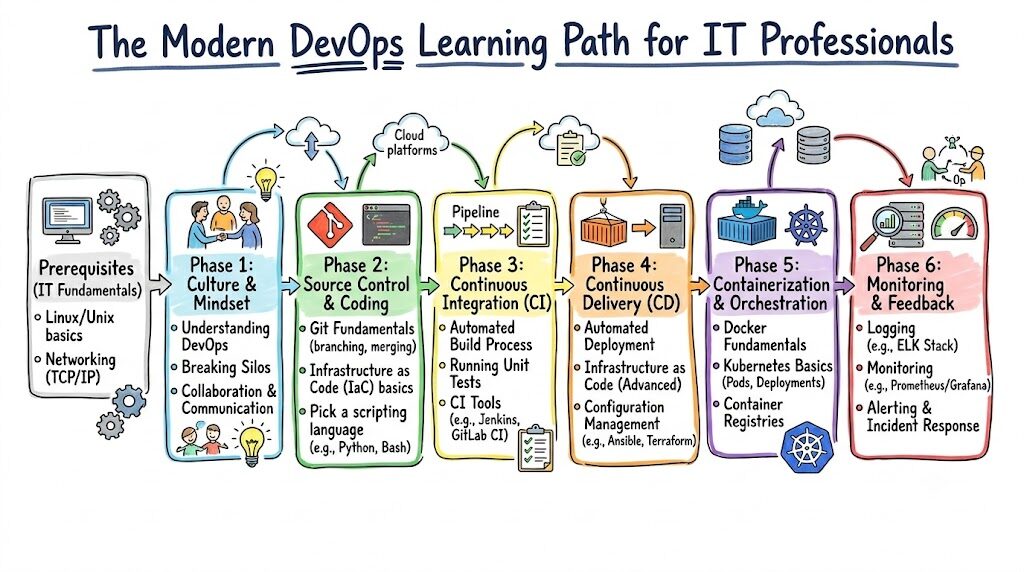
Overview Table: DevOps Learning Roadmap
Follow this sequence to ensure you are building a house on a strong foundation, not on shifting sand.
| Stage | Learning Goal |
| Stage 1 | Master Linux Fundamentals |
| Stage 2 | Understand Networking Basics |
| Stage 3 | Learn Git and Version Control |
| Stage 4 | Learn Scripting (Bash or Python) |
| Stage 5 | Understand CI/CD Fundamentals |
| Stage 6 | Learn Docker Containers |
| Stage 7 | Master Cloud Platform Basics (AWS/Azure/GCP) |
| Stage 8 | Learn Kubernetes Orchestration |
| Stage 9 | Learn Monitoring and Observability |
| Stage 10 | Build Real-World Projects |
Stage #1: Learn Linux Fundamentals
If you skip Linux, you are building a house without a foundation. You do not need to be a kernel developer, but you must be comfortable in the terminal.
What to focus on:
- File system hierarchy and permissions.
- Basic command-line utilities (ls, grep, cat, chmod, chown).
- Process management (ps, top, kill).
- Package management (apt, yum/dnf).
- User and group management.
Beginner Scenario: Do not just read. Install a Linux distribution on your laptop or a virtual machine and force yourself to perform tasks—like managing users or installing a web server—entirely through the command line.
Stage #2: Learn Networking Basics
Most DevOps issues are actually networking issues in disguise. If your application cannot talk to the database, you need to understand why.
What to focus on:
- IP Addresses and Subnets: How devices communicate.
- DNS: How domain names map to IP addresses.
- Ports and Protocols: Understanding TCP/UDP, and common ports (80, 443, 22).
- HTTP/HTTPS: How web traffic works.
Analogy: Think of an IP address as a house address and a Port as the specific room in that house. If you send a package (data) to the right house but the wrong room, it will never be delivered.
Stage #3: Learn Git and Version Control
DevOps is about collaboration. Git is how teams manage changes to infrastructure and application code.
What to focus on:
- Basic commands: init, clone, add, commit, push, pull.
- Branching strategies: Understanding how to create and merge branches.
- Handling conflicts: Learning how to resolve code disagreements.
Advice: Stop using email to share code. Create a profile on a platform like GitHub or GitLab and start pushing your configuration files there.
Stage #4: Learn Scripting Basics
Automation is the defining characteristic of DevOps. You cannot automate without scripting.
What to focus on:
- Bash Scripting: Essential for automating Linux tasks.
- Python: The industry standard for automation, tooling, and cloud interaction.
Advice: Start small. Write a script to back up a folder or clean up old log files. Do not try to write massive applications. Start with simple tasks that solve your own problems.
Stage #5: Learn CI/CD Fundamentals
Continuous Integration and Continuous Deployment (CI/CD) is the “conveyor belt” of software. It takes code from a developer’s laptop to a production server automatically.
What to focus on:
- The concept of a pipeline: Code -> Build -> Test -> Deploy.
- Basic tools: Jenkins, GitHub Actions, or GitLab CI.
Real-world example: Manually copying files to a server via FTP is risky. A CI/CD pipeline ensures that every time you save your code, it is tested and deployed consistently, reducing human error.
Stage #6: Learn Docker
Containers solved the “it works on my machine” problem. They allow you to package an application with all its dependencies.
What to focus on:
- Dockerfiles: How to build images.
- Docker Compose: How to run multi-container applications (like a web server and a database).
- Container lifecycle: Running, stopping, and inspecting containers.
Practical tip: Dockerize a simple static website or a Python application. Understand how the container isolates the environment from the host system.
Stage #7: Learn Cloud Basics
The cloud is the playground for DevOps. Pick one provider—AWS, Azure, or GCP—and learn the fundamentals.
What to focus on:
- Compute (EC2/Virtual Machines).
- Storage (S3/Blob Storage).
- Networking (VPC, Security Groups).
- Identity and Access Management (IAM).
Advice: Do not try to learn all three cloud providers at once. Pick one. The concepts are transferable. If you learn AWS, picking up Azure later is much easier.
Stage #8: Learn Kubernetes Basics
Once you have many containers, you need a manager. That is Kubernetes (K8s).
What to focus on:
- Nodes and Pods.
- Deployments and Services.
- Basic kubectl commands.
- The concept of scaling applications.
Warning: Do not start here. If you jump into Kubernetes before understanding containers and networking, you will feel lost. Kubernetes is complex; respect the learning curve.
Stage #9: Learn Monitoring & Reliability
You must know if your system is healthy. This is the domain of Site Reliability Engineering (SRE).
What to focus on:
- Logging: Collecting logs to understand what happened.
- Metrics: Tracking CPU, memory, and latency.
- Alerting: Notifying the team when something breaks.
Tools: Prometheus and Grafana are excellent starting points.
Stage #10: Build Real Projects
You cannot learn DevOps just by watching videos. You must build.
Project Ideas:
- The CI/CD Pipeline: Build a pipeline that automatically deploys a simple website to a cloud server whenever you push to GitHub.
- Docker Deployment: Containerize an existing application and run it locally.
- Monitoring Dashboard: Set up a dashboard that monitors the health of your Docker containers.
Real-World Example: Beginner Learning Randomly
Consider “Alex.” Alex starts by trying to learn Kubernetes on day one because they heard it pays well. They spend weeks struggling with installation errors, networking concepts they do not understand, and complex configurations. They burn out, feel discouraged, and quit because they tried to build the roof before laying the foundation.
Real-World Example: Structured DevOps Learner
Consider “Sam.” Sam follows a roadmap. They spend two weeks mastering Linux, two weeks on networking, and then move to Git. By the time Sam reaches Kubernetes, they understand what a process is, how ports work, and how code moves. When they encounter an error in Kubernetes, they have the troubleshooting skills to solve it. Sam gets hired because they can explain why something works, not just how to run a command.
Common Mistakes Beginners Make
- Skipping Linux: It remains the most critical skill.
- Tool Obsession: Focusing on memorizing tool commands rather than understanding the underlying architecture.
- Lack of Hands-on Practice: Watching tutorials without doing the labs.
- Learning Kubernetes Too Early: Jumping into orchestration before understanding containers.
- Ignoring the “Ops” side: Focusing too much on the Dev side and neglecting system administration basics.
Best Practices for Learning DevOps
- Consistency over Intensity: 30 minutes every day is better than a 10-hour binge once a week.
- Focus on Fundamentals: Protocols, operating systems, and networking concepts stay relevant forever; specific tool versions change annually.
- Document Your Journey: Write down what you learn. It helps retention and helps you during interviews.
- Practice Daily: Set up a local lab environment.
- Use Structured Resources: Find a path, such as the one offered by DevOpsSchool, to keep you on track.
Role of DevOpsSchool in Structured Learning
The journey to becoming a DevOps engineer is long, and having a guide is beneficial. DevOpsSchool provides resources that bridge the gap between theoretical knowledge and practical execution. By focusing on hands-on labs and real-world scenarios, they help learners avoid the pitfalls of “tutorial hell.” Whether you need to master CI/CD pipelines or get comfortable with cloud architecture, structured mentorship ensures you are not just learning tools, but learning how to think like a DevOps engineer.
Career Opportunities After Learning DevOps
Once you have mastered the roadmap, the career opportunities are diverse:
- Junior DevOps Engineer: Focusing on pipeline maintenance and cloud infrastructure.
- Cloud Engineer: Specializing in cloud architecture and resource optimization.
- SRE (Site Reliability Engineer): Focusing on uptime, performance, and automation.
- Platform Engineer: Building internal tools and platforms for developers.
- DevSecOps Engineer: Specializing in security within the DevOps lifecycle.
The market values professionals who can solve problems, not just those who can type commands.
Industries Hiring DevOps Talent
- SaaS Platforms: Companies building software require constant deployment cycles.
- Banking & Finance: High demand for secure, automated, and reliable infrastructure.
- Healthcare: Systems must be compliant, secure, and always available.
- E-Commerce: Scalability is essential for handling traffic spikes.
- Telecom: Managing massive, distributed networks requires deep automation skills.
Future of DevOps Learning
we are seeing the rise of AI-assisted operations. You will use AI to help write scripts or debug logs, but the human understanding of why the system is failing will be more important than ever. Platform Engineering is also becoming central, where DevOps engineers build platforms that abstract away complexity for developers. Staying relevant means keeping an open mind to these shifts while keeping your core skills sharp.
FAQs (15 Questions)
- How do I start learning DevOps ? Start with Linux and networking. Do not rush.
- What should I learn first? Linux is the absolute baseline.
- Is Linux mandatory? Yes, it is the environment where 90% of DevOps work happens.
- Do I need coding? You need scripting (Bash/Python). You do not need to be a software developer.
- Is Kubernetes required? Eventually, yes. But learn containers (Docker) first.
- How long does DevOps take to learn? It varies, but expect 6–12 months of consistent study to become job-ready.
- Can freshers learn DevOps? Yes, but focus on fundamentals rather than advanced tools.
- Should I learn cloud first? Learn the basics of Linux and networking before diving into cloud-specific services.
- Which cloud provider is best? AWS is the most popular, but Azure and GCP are excellent. Pick one.
- Do I need to know networking? Absolutely. Networking is the language of cloud infrastructure.
- How do I practice without a budget? Use free tiers on cloud providers or run virtual machines locally.
- Is DevOps dying? No, it is evolving into SRE and Platform Engineering.
- Do I need a degree? Not strictly, but strong technical fundamentals are non-negotiable.
- How do I keep up with changes? Read technical blogs and practice new tools in small, isolated labs.
- Is it better to learn one tool or many? Learn one tool well (e.g., Jenkins) to understand the concept, then transfer that knowledge to others.
Final Thoughts
DevOps is a journey, not a race. There is no shortcut to experience. Focus on understanding the “why” behind every command you type. The most successful engineers are not the ones who know every tool, but the ones who can look at a broken system, identify the bottleneck, and automate a solution. Build your foundation, practice daily, and stay curious. Consistency is your greatest asset.