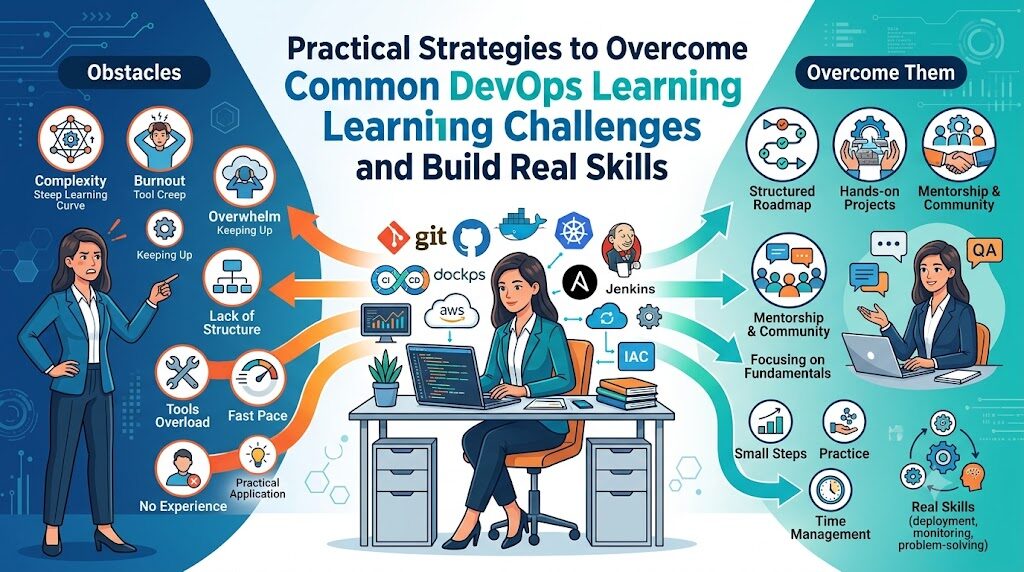
Introduction
Entering the world of software delivery and cloud engineering often feels overwhelming because DevOps is not a single tool or language, but a multidisciplinary approach sitting at the intersection of development, operations, cloud infrastructure, security, and continuous automation. Many beginners fall into the trap of attempting to learn complex orchestration and deployment tools like Kubernetes or Terraform without a firm grasp of underlying operating systems, networking, and version control—leading to superficial knowledge, quick burnout, and intense frustration when real-world production environments break.
What Makes DevOps Learning Challenging?
The modern software delivery model has evolved rapidly over the past decade. Historically, software engineers wrote code, packaged binary files, and passed them over a organizational wall to operations teams who deployed and managed those applications on physical hardware. DevOps unified these roles, requiring engineers to understand the complete lifecycle of an application from line one of source code to production deployment and continuous telemetry.
Several factors make learning this discipline challenging:
- Broad Technology Ecosystem: Beginners must become comfortable across multiple domains, including operating systems, networking, version control, cloud computing, security, and systems engineering.
- Rapid Pace of Technological Change: The landscape of operational software evolves continuously. Tools that were industry defaults five years ago are frequently updated or replaced by cloud-native frameworks.
- Interconnected Dependencies: A failure in an automated workflow could stem from a misconfigured permission policy in the cloud, an invalid syntax inside a configuration file, an unhandled application exception, or an improperly routed subnet.
- Requirement for Deep Troubleshooting Skills: Unlike pure application development, where you can frequently isolate bugs using a local debugger, operational failures require an understanding of running processes, network packets, container runtimes, and system logs across multiple cloud servers.
- The Gap Between Local and Production Environments: Code that runs perfectly on a personal laptop may fail inside a containerized cloud environment due to differences in architecture, permission structures, environment variables, or resource limitations.
True mastery in this field requires both technical breadth and strong analytical problem-solving skills. You must learn to look past isolated error messages and analyze complete delivery workflows step by step.
Common DevOps Learning Challenges and Solutions
Challenge 1: Understanding the DevOps Concept Clearly
A primary barrier for early learners is confusing the overall methodology with specific software applications. Many beginners assume that installing a tool like Jenkins, writing a Dockerfile, or configuring a server with Ansible means they have successfully implemented DevOps.
DevOps is fundamentally a cultural, operational, and engineering discipline designed to reduce the friction between writing software and delivering value to users reliably. Automation tools are simply the mechanisms used to enforce these principles. When learners focus entirely on tools while ignoring software delivery principles, they struggle to design workflows that solve actual operational problems.
How to Overcome It
- Shift your focus toward understanding the Software Development Lifecycle (SDLC). Learn how code moves from a local developer environment into testing environments and ultimately into production.
- Study core cultural and technical principles: continuous feedback, automated testing, small release iterations, infrastructure repeatability, and shared responsibility between development and operations teams.
- Analyze real-world business scenarios to see how automated testing and deployment lower release risks and shorten recovery time when failures occur.
+-------------------------------------------------------------------+
|                  SOFTWARE DEVELOPMENT LIFECYCLE                  |
|                                                                   |
|   +----------+     +----------+     +----------+     +--------+   |
|   | Plan &   | --> | Build &  | --> | Test &   | --> | Deploy |   |
|   | Design   |     | Code     |     | Integrate|     | & Monitor  |
|   +----------+     +----------+     +----------+     +--------+   |
|                                                                   |
+-------------------------------------------------------------------+
Challenge 2: Learning Too Many Tools at Once
The CNCF (Cloud Native Computing Foundation) landscape contains hundreds of tools, frameworks, and services. Beginners often look at these ecosystem diagrams and feel overwhelmed, assuming they must learn every tool listed to become employable. Attempting to master multiple continuous integration platforms, cloud providers, container tools, and configuration management tools at the same time leads to superficial understanding and quick burnout.
+-------------------------------------------------------------------+
|                    THE DevOps TOOL PARADOX                       |
|                                                                   |
|   Learning 10 Tools Simultaneously  ==>  Superficial Understanding |
|   Learning Core Concepts First       ==>  Tool Adaptability       |
+-------------------------------------------------------------------+
Code language: PHP (php)
How to Overcome It
Organize your learning path sequentially. Focus on one category of the technology stack at a time, mastering a single industry-standard tool within that category before moving to the next.
| Learning Stage | Recommended Focus | Primary Objective |
| Fundamentals | Linux Administration & Networking | Command line fluency, process management, shell navigation, TCP/IP basics |
| Source Control | Git & GitHub / GitLab | Branching strategies, pull requests, merge conflict resolution, repository management |
| Automation & CI/CD | GitHub Actions or Jenkins | Building automated workflows, running test suites, publishing artifacts |
| Containers | Docker | Packaging applications, container image layers, multi-stage builds, container networking |
| Cloud Computing | AWS, Azure, or GCP | Core cloud services: Compute (EC2), Storage (S3), Virtual Networks (VPC), IAM |
| Infrastructure as Code | Terraform | Writing declarative infrastructure templates, managing platform state, modularizing code |
| Orchestration | Kubernetes | Managing container workloads, pods, services, deployments, ingress rules, persistent storage |
| Telemetry | Prometheus & Grafana | Collecting metrics, configuring alerts, creating visualization dashboards |
| Security | DevSecOps Principles | Secret management, static code analysis, vulnerability scanning in pipeline builds |
Challenge 3: Weak Linux and Networking Fundamentals
A major reason learners run into issues with complex tools like Docker, Kubernetes, or Terraform is a lack of foundational operating system and networking knowledge. Production applications do not run in isolated vacuums; they run on Linux-based kernel architectures connected over complex virtual networks. Trying to configure container networking without understanding ports, IP addresses, routing, and DNS leads to confusion when services fail to communicate.
How to Overcome It
- Spend dedicated time working exclusively in a Linux terminal. Move away from graphical user interfaces for basic task execution.
- Master core Linux management tasks: managing system users and file permissions, monitoring CPU and memory usage, inspecting running system daemons, analyzing system logs, and writing functional shell scripts.
- Study fundamental networking protocols and concepts: TCP/IP model, OSI layers, DNS resolution, HTTP/HTTPS request-response cycles, SSH key authentication, firewalls, Subnetting, and CIDR blocks.
- Practice diagnosing networking issues locally using standard diagnostic CLI utilities such as
curl,netstat,dig,ss,traceroute, andping.
Challenge 4: Difficulty Understanding Automation
Automation is the engine of modern IT operations, yet many beginners struggle to transition from manual step-by-step instructions to programmatic, automated workflows. This usually happens when learners try to use complex automation tools before mastering basic scripting concepts. If you cannot automate a simple task using a basic shell script, writing complex Ansible playbooks or Python automation scripts will feel exceptionally difficult.
How to Overcome It
- Start by automating daily, repetitive tasks on your local workstation using simple Bash or Zsh scripts.
- Learn basic programming constructs in Python or Shell: loops, conditional logic, variable declarations, functions, and command-line arguments.
- Practice converting multi-step terminal workflows into executable scripts that include proper error handling and logging.
- Gradually transition from imperative scripting (where you explicitly code every step) to declarative tools (where you define the desired final state of the infrastructure).
Challenge 5: Understanding CI/CD Pipelines
Continuous Integration and Continuous Deployment (CI/CD) pipelines automate the validation, testing, and release of software code changes. Beginners often view CI/CD configuration files (such as YAML pipelines) as arbitrary lists of commands, failing to see how steps link together to validate code quality and security.
+-----------------------------------------------------------------------------------+
|                           STANDARD CI/CD PIPELINE FLOW                            |
|                                                                                   |
|  [Source Code] --> [Build Stage] --> [Test Stage] --> [Security] --> [Deploy]    |
|        |                  |                |               |            |         |
|   Git Push            Compile/Bundle    Unit Tests      Vulnerability  Push to    |
|   Trigger             Artifacts         & Integration   Scans (SAST)   Production |
+-----------------------------------------------------------------------------------+
How to Overcome It
- Map out your application delivery workflow on paper before writing pipeline configuration files.
- Build simple pipelines step-by-step. Start with a pipeline that triggers on code pushes and runs basic unit tests.
- Once the initial stage succeeds, add incremental jobs: linting code, running security scans, building container images, publishing artifacts to registries, and triggering automated deployments to target environments.
- Learn how environment variables, secret management systems, and workflow triggers operate within modern CI/CD systems.
Challenge 6: Lack of Hands-On Practice
Passive learning—watching video tutorials, reading technical documentation, or following along with pre-written scripts—creates a false sense of mastery. Real software environments are messy, and true learning happens when unexpected errors occur. Learners who only follow video tutorials often struggle when faced with a real terminal environment where a single typo or environment difference breaks the deployment.
How to Overcome It
- Follow the 30/70 rule: spend 30% of your time studying theoretical concepts and 70% actively building, breaking, and fixing hands-on projects.
- Intentionally introduce failures into your test labs. Misconfigure a permission policy, delete a configuration file, or shut down a required network path, then practice diagnosing and resolving the issue using log files and debugging utilities.
- Build projects from scratch without copying repository files. Write configuration files line by line, referring to official tool documentation whenever you run into issues.
Challenge 7: Difficulty Learning Cloud Platforms
Cloud platforms such as AWS, Microsoft Azure, and Google Cloud Platform (GCP) offer hundreds of integrated services. Beginners frequently get lost in complex management consoles, struggling to understand how identity management, virtual private clouds, load balancers, and compute instances fit together. Fear of incurring unexpected cloud billing charges also prevents many learners from experimenting freely.
How to Overcome It
- Focus on mastering core cloud building blocks before exploring specialized managed services:
- Compute: Virtual machines, autoscaling groups, serverless execution units.
- Networking: Virtual private networks, public and private subnets, routing tables, internet gateways.
- Storage: Block storage volumes, object storage buckets, shared file systems.
- Security: Identity and Access Management (IAM) policies, security groups, key management.
- Set up budget alerts and billing caps on your personal cloud accounts immediately upon account creation to prevent unexpected charges.
- Practice setting up complete cloud architectures manually inside the cloud web console first to understand service interactions, then destroy those resources and rebuild them using Infrastructure as Code (IaC) tools like Terraform.
Challenge 8: Kubernetes Complexity
Kubernetes has become the industry standard for container orchestration, but its steep learning curve frequently discourages beginners. Introducing concepts like Pods, Deployments, Services, Ingress Controllers, Persistent Volumes, ConfigMaps, and Custom Resources simultaneously makes the technology feel overwhelmingly complex.
+-------------------------------------------------------------------+
|                   KUBERNETES DEPLOYMENT STACK                     |
|                                                                   |
|  [Ingress Controller]  --> Routes external traffic into cluster   |
|         |                                                         |
|    [Service]           --> Load balances traffic across Pods      |
|         |                                                         |
|   [Deployment]         --> Manages application replicas           |
|         |                                                         |
|     [Pods]             --> Runs container instances               |
+-------------------------------------------------------------------+
How to Overcome It
- Ensure you thoroughly understand standalone Docker containerization, container networking, and local volume mounting before attempting to learn Kubernetes.
- Use lightweight, single-node Kubernetes distributions like Minikube, K3s, or Kind on your local computer to experiment without incurring cloud costs.
- Master primary API objects in sequence:
- Pods: Running individual application containers.
- Deployments: Managing application scaling, declarative updates, and rollbacks.
- Services: Exposing applications internally or externally across the cluster.
- ConfigMaps & Secrets: Injecting configuration settings and sensitive credentials safely into application runtime environments.
- Learn to troubleshoot cluster issues using standard command line options like
kubectl logs,kubectl describe, andkubectl exec.
Challenge 9: Keeping Up With Changing Technologies
The continuous rapid evolution of cloud-native tools creates industry fatigue among both new learners and experienced engineers. Trying to learn every tool, plugin, and framework that gains traction on social media or developer forums creates constant distraction and prevents deep conceptual learning.
How to Overcome It
- Prioritize universal patterns and foundational engineering over individual tool implementations. Tools change frequently, but concepts like load balancing, immutable infrastructure, version control, state management, and telemetry remain continuous.
- Follow established engineering blogs, open-source technical forums, and structured educational roadmaps rather than chasing every newly released tool hype cycle.
- Pick a core, production-proven technology stack and stay focused on it until you can reliably build and deploy complete end-to-end applications.
Challenge 10: Lack of Real-World Experience
Passing a certification exam or completing guided online courses does not automatically guarantee readiness for production enterprise environments. Standard training courses often operate in simplified environments, whereas enterprise production environments include complex legacy systems, strict security restrictions, regulatory compliance rules, and large-scale data handling demands.
How to Overcome It
- Build complete, production-grade applications end-to-end instead of isolated project components.
- Implement production operational features within your personal lab setups: multi-environment delivery pipelines (dev, staging, production), centralized structured logging systems, proactive alerting rules, automated backup strategies, and strict least-privilege security configurations.
- Study real-world incident post-mortems published by engineering organizations. Analyzing how large production outages happen and how engineers fix them builds valuable systems troubleshooting perspective.
DevOps Learning Challenges vs. Solutions
| Challenge | Real-World Impact | Actionable Solution |
| Tool Overload | Confusion, anxiety, superficial knowledge | Follow a structured roadmap; focus on core concepts before switching tools |
| Lack of Hands-On Practice | Fragile skills, failure in technical interviews | Apply the 30/70 learning rule; build and debug custom projects from scratch |
| Weak Operating System Fundamentals | Inability to debug runtime errors in containers/cloud | Spend dedicated time mastering Linux CLI navigation, process isolation, and networking |
| Cloud Service Complexity | High bills, security misconfigurations | Master core services (Compute, Storage, Networking, IAM) and set hard budget limits |
| Automation Difficulties | High error rates, manual work reliance | Master basic Bash and Python scripting before implementing complex IaC frameworks |
| Career Uncertainty | Difficulty landing entry-level positions | Build a documented public GitHub portfolio showcasing complete, end-to-end project deployments |
Building an Effective DevOps Learning Strategy
To overcome these learning obstacles efficiently, you need a structured, disciplined methodology. Approaching your education systematically prevents tool fatigue and ensures every technical skill you learn reinforces the rest of your foundation.
+-------------------------------------------------------------------+
|                 SUSTAINABLE LEARNING METHODOLOGY                  |
|                                                                   |
|   1. Conceptual Understanding  --> Read documentation & design    |
|   2. Manual Implementation     --> Configure via CLI/Console      |
|   3. Automated Execution       --> Convert to Code/Pipelines      |
|   4. Failure Simulation        --> Break systems intentionally     |
|   5. Observability & Telemetry --> Log, measure, and analyze      |
+-------------------------------------------------------------------+
Code language: PHP (php)
Start With Fundamentals
Before writing complex declarative deployment files, ensure you understand basic computing mechanics. Become comfortable working in the Linux terminal, understand basic operating system process management, practice manipulating text streams with standard tools, and understand fundamental networking principles like IP subnets, routing tables, and DNS resolution.
Follow a Structured Roadmap
Avoid jumping randomly between topics based on trending technical discussions online. Pick a logical learning progression—moving step-by-step from operating systems to source control, automation scripting, cloud infrastructure, containerization, deployment pipelines, and observability. Stick to this plan until you complete every phase.
Practice Daily
Consist engineering practice builds strong operational muscle memory. Dedicate at least 60 to 90 minutes every day to writing automation code, building pipelines, or debugging lab infrastructure. Regular, hands-on practice retains technical knowledge much better than long, passive study sessions on weekends.
Build Real Projects
Apply everything you learn by building real, multi-tier software projects. Rather than running simple isolated containers, build complete environments: deploy a web application backed by a database, secure it with SSL/TLS certificates, provision the host infrastructure via code, automate updates using a deployment pipeline, and collect performance metrics using observability dashboards.
Learn From Failures
Treat system failures, runtime errors, and broken configurations as valuable learning opportunities rather than frustrating setbacks. When a deployment fails, resist the urge to destroy and recreate the environment immediately. Take time to read system logs, trace executed network requests, analyze system events, and identify the exact root cause of the failure.
Recommended DevOps Learning Roadmap
+-----------------------------------------------------------------------------------+
|                        FOUNDATIONAL TO ADVANCED ROADMAP                           |
|                                                                                   |
|  [Phase 1: Linux & Net] -> [Phase 2: SCM & Code] -> [Phase 3: Cloud & Automation] |
|                                                                 |                 |
|  [Phase 6: DevSecOps]   <- [Phase 5: Orchestration] <- [Phase 4: Containers]      |
+-----------------------------------------------------------------------------------+
| Stage | Focus Skills | Learning Goal |
| Phase 1: Foundation | Linux, Bash, Networking, SSH, Git | Achieve fluency navigating the command line, writing shell scripts, and managing source repositories |
| Phase 2: Development Basics | Python or Go, REST APIs, JSON/YAML data structures | Learn to interact programmatically with web APIs, process structured configuration data, and automate local tasks |
| Phase 3: Cloud & Automation | AWS/Azure/GCP, Terraform, Ansible | Provision cloud infrastructure programmatically and automate server configuration management |
| Phase 4: Containers & CI/CD | Docker, GitHub Actions, Jenkins | Package applications into lightweight containers and build automated continuous delivery pipelines |
| Phase 5: Orchestration | Kubernetes, Helm, Ingress Controllers | Manage, scale, and maintain containerized workloads inside resilient production clusters |
| Phase 6: Observability | Prometheus, Grafana, OpenTelemetry, ELK Stack | Implement centralized log collection, performance metric tracking, and automated alerting systems |
| Phase 7: DevSecOps & Advanced | HashiCorp Vault, Trivy, SonarQube, GitOps (ArgoCD) | Integrate automated security checks into workflows, manage secrets securely, and apply GitOps release models |
Practical DevOps Projects to Overcome Learning Barriers
Building practical, multi-tier projects is the best way to consolidate your operational knowledge. Below are five real-world project blueprints designed to move you from fundamental concepts to enterprise-grade execution.
Project 1: Build an Automated CI/CD Pipeline
- Objective: Automate the complete build, test, and package workflow for a web application using GitHub Actions or Jenkins.
- Architecture: Configure a repository hook so that every new code commit automatically triggers a pipeline job. The pipeline checks out the source code, runs automated unit test suites, performs static code analysis to check for security vulnerabilities, builds a production-ready application artifact or container image, and publishes that artifact to an enterprise registry.
- Key Skills Learned: Pipeline syntax design, secret key protection, build optimization, artifact versioning, and continuous automated testing.
+---------------------------------------------------------------------------------------+
|                                PROJECT 1: CI/CD PIPELINE                              |
|                                                                                       |
|  [Developer Commit] --> [GitHub Trigger] --> [Run Unit Tests] --> [SAST Code Scan]   |
|                                                                          |            |
|  [Production Registry] <-- [Publish Image] <-- [Build Docker Image] <----+            |
+---------------------------------------------------------------------------------------+
Project 2: Deploy a Multi-Tier Application Using Docker
- Objective: Containerize a modern full-stack web application consisting of a frontend interface, a backend API service, and a relational database.
- Architecture: Write efficient, multi-stage
Dockerfilesfor both the frontend and backend services to keep final container image sizes minimal. Create adocker-compose.ymlmanifest to orchestrate communication between services, manage local environment variables safely, and attach persistent local storage volumes to prevent database data loss when containers restart. - Key Skills Learned: Containerization best practices, multi-stage builds, isolated container networks, data persistence, and local environment orchestration.
Project 3: Deploy and Scale Applications on Kubernetes
- Objective: Transition a containerized web application onto a production-ready Kubernetes cluster.
- Architecture: Package your application resources using declarative Kubernetes YAML manifests. Deploy multiple replicas of your application using a
Deploymentcontroller, expose them internally using a clusterService, configure anIngresscontroller to route external HTTP traffic, store application configurations inConfigMaps, and manage sensitive database credentials usingSecrets. - Key Skills Learned: Kubernetes API resource management, traffic routing, rolling application updates, resource requests/limits, and cluster debugging.
Project 4: Automate Multi-Tier Cloud Infrastructure Using Terraform
- Objective: Eliminate manual cloud provisioning by writing declarative, reusable Infrastructure as Code (IaC).
- Architecture: Write Terraform modules to provision a custom Virtual Private Cloud (VPC) on AWS or Azure. Create public and private subnets, route tables, internet gateways, NAT gateways, and secure compute instances. Configure state file storage remotely using an S3 bucket with state locking enabled via DynamoDB to allow safe multi-engineer collaboration.
- Key Skills Learned: Declarative infrastructure design, cloud architecture, state management, module isolation, and resource dependency handling.
+---------------------------------------------------------------------------------------+
|                       PROJECT 4: TERRAFORM CLOUD INFRASTRUCTURE                        |
|                                                                                       |
|  +---------------------------------------------------------------------------------+  |
|  | AWS Virtual Private Cloud (VPC)                                                 |  |
|  |                                                                                 |  |
|  |   +---------------------------------+   +-----------------------------------+   |  |
|  |   | Public Subnet                   |   | Private Subnet                    |   |  |
|  |   | [Internet Gateway] -> [ALB]     |   | [NAT Gateway] -> [Compute Nodes]  |   |  |
|  |   +---------------------------------+   +-----------------------------------+   |  |
|  +---------------------------------------------------------------------------------+  |
|                                                                                       |
|  [Terraform State File] <--> Remote Storage (S3 Bucket + Lock DB)                     |
+---------------------------------------------------------------------------------------+
Code language: PHP (php)
Project 5: Create a Complete Observability and Alerting Stack
- Objective: Gain full operational visibility into server metrics, container health, and application execution logs.
- Architecture: Deploy Node Exporter onto your servers to collect hardware metrics, scrape target metrics continuously using Prometheus, and design custom operational dashboards inside Grafana to monitor system performance. Configure Alertmanager to route instant notifications to Slack or email whenever CPU usage spikes, memory runs low, or application endpoints stop responding.
- Key Skills Learned: Metrics collection, query language usage (PromQL), system monitoring dashboard design, log aggregation, and proactive incident response alerting.
Common Mistakes DevOps Learners Make
Avoiding common learning traps saves time and accelerates your path toward engineering proficiency.
Learning Only Tools
- The Mistake: Memorizing specific commands and UI workflows for popular tools without understanding the underlying computing concepts behind them.
- The Solution: Focus on fundamental engineering principles first. Understand how web servers process HTTP requests, how networks route packets, and how operating systems assign memory before configuring high-level operational software.
Ignoring Fundamentals
- The Mistake: Attempting to build complex cloud automation workflows while struggling to navigate basic Linux file systems or debug simple shell permissions errors.
- The Solution: Spend dedicated time mastering Linux system administration, core networking protocols, and basic programming fundamentals before moving on to cloud-native platforms.
Avoiding Hands-On Practice
- The Mistake: Watching hours of video tutorials without opening a terminal window to write and test code yourself.
- The Solution: Immediately apply every theoretical concept you read about. Build environments locally, intentionally cause errors, and practice troubleshooting systems until you resolve them.
Following Too Many Courses Simultaneously
- The Mistake: Enrolling in multiple competing educational platforms at once, leading to fragmented context switching and learning fatigue.
- The Solution: Pick one structured, comprehensive curriculum or roadmap and complete it fully before incorporating supplementary study materials.
Expecting Quick Results
- The Mistake: Assuming you can master modern cloud platforms, deployment pipelines, container orchestration, and security in just a few weeks.
- The Solution: Treat your education as a multi-month, continuous journey. Focus on steady, daily progress rather than trying to rush through complex technical subjects.
How Mentorship Helps Overcome DevOps Learning Challenges
While self-study through open-source documentation and online video tutorials is valuable, navigating the modern cloud ecosystem alone often leads to wasted time and frustration. Having access to experienced technical mentors fundamentally changes how quickly and efficiently you learn.
Mentors bring years of hands-on production experience to your learning process. They help you look past tool marketing hype, guide you toward industry-proven patterns, and keep you focused on skills that matter in enterprise environments.
+-------------------------------------------------------------------+
|               SELF-DIRECTED vs. MENTOR-GUIDED LEARNING             |
|                                                                   |
|   Self-Directed: Unstructured -> Trial & Error -> Edge Cases Focus|
|   Mentor-Guided: Structured Roadmaps -> Production Patterns ->    |
|                  Direct Troubleshooting Support                   |
+-------------------------------------------------------------------+
Code language: PHP (php)
Key advantages of guided mentorship include:
- Faster Problem Solving: Instead of spending days stuck on an obscure networking error or configuration bug, a mentor can help you identify root causes quickly and teach you how to systematically debug similar issues in the future.
- Structured Learning Path: Experienced mentors keep your study focused on core foundational concepts, preventing you from wasting weeks studying advanced edge cases before mastering the basics.
- Production Perspective: Mentors share real-world context that documentation leaves out—explaining why certain enterprise architectures are chosen, how real engineering teams manage production incidents, and how security policies are enforced at scale.
- Constructive Code and Architecture Reviews: Receiving feedback on your automation scripts, Terraform modules, and pipeline configurations helps you adopt clean, maintainable, production-ready coding standards early in your career.
- Career and Interview Preparation: Beyond pure technical guidance, mentors help you present your projects effectively, articulate architectural decisions clearly, and prepare for modern engineering interviews.
How DevOpsSchool Helps Learners Overcome DevOps Challenges
Navigating the complex landscape of cloud technology, container tools, and automation frameworks requires a structured learning environment backed by experienced real-world practitioners. DevOpsSchool is designed specifically to help learners transition from feeling overwhelmed by tools to building confident, enterprise-ready systems engineering skills.
+-------------------------------------------------------------------+
|                   DEVOPSCHOOL LEARNING ECOSYSTEM                  |
|                                                                   |
|   [Industry Curriculum] --> [Hands-On Production Labs]           |
|                                     |                             |
|   [Career Mentorship]   <-- [Real-World Project Portfolios]       |
+-------------------------------------------------------------------+
Here is how their educational framework helps address key learning obstacles:
- Structured, Real-World Curriculum: Rather than treating operational tools as isolated subjects, their training paths present software delivery as a cohesive, end-to-end discipline—connecting operating systems, version control, cloud platforms, automation, containerization, and monitoring into a logical progression.
- Mentor-Led Interactive Sessions: Learning is guided by veteran industry architects and SRE mentors who bring decades of production experience. Learners get real-time feedback, direct troubleshooting support, and guidance on production best practices.
- Project-Based Learning Framework: Theory is immediately reinforced through practical lab environments. Learners work through multi-tier deployment scenarios, build automated CI/CD pipelines, manage cloud environments via code, and provision Kubernetes clusters from scratch.
- Focus on Enterprise Practices: The training goes beyond basic command usage, introducing enterprise-grade requirements such as DevSecOps pipeline integration, centralized logging, high-availability architecture design, and automated disaster recovery execution.
- Comprehensive Career Support: Beyond technical training, the program helps learners build impressive public project portfolios, prepare for technical interview scenarios, and build the confidence needed to succeed in modern engineering roles.
Measuring Progress During DevOps Learning
Evaluating your technical growth by the number of individual tools you have installed can be misleading. True progress is measured by your ability to design robust systems, automate manual steps, and systematically troubleshoot infrastructure issues when things go wrong.
Use this self-assessment matrix to track your practical engineering development:
| Progress Area | Entry-Level Proficiency | Intermediate Competence | Production-Ready Mastery |
| Linux & Systems | Navigates directories, views file content, edits text files | Manages process permissions, writes basic Bash automation scripts | Debugs kernel parameters, inspects system resource bottlenecks, automates complex administration |
| Automation & IaC | Manages local scripts, executes basic commands manually | Writes basic declarative Terraform templates and Ansible playbooks | Builds modular, reusable infrastructure code with remote state management and automated validation |
| Cloud Computing | Launches basic virtual machine instances using the web console | Configures custom virtual networks, subnets, and identity policies | Designs fault-tolerant, multi-region cloud architectures with dynamic autoscaling |
| Deployment & CI/CD | Triggers manual builds, runs basic unit tests inside pipelines | Builds multi-stage pipelines that run test suites and build container images | Implements advanced release models (Blue/Green, Canary) with automated rollbacks and security gates |
| Containerization | Runs simple containers locally using standard Docker commands | Writes multi-stage Dockerfiles and orchestrates environments using Docker Compose | Manages, scales, and secures container workloads inside production Kubernetes clusters |
| Observability | Inspects application console logs manually after runtime errors | Configures metric dashboards to monitor server health continuously | Implements centralized log processing, distributed request tracing, and proactive alerting rules |
| Troubleshooting | Relies on web searches to resolve basic error messages | Reads system logs systematically to identify failing components | Traces complex issues across network boundaries, permissions, and runtime environments efficiently |
Future Challenges in DevOps Learning
As software delivery systems evolve, the technical skills required to manage cloud infrastructure continue to shift. Staying ahead means understanding these emerging industry trends:
- AI-Assisted Operations (AIOps): Artificial intelligence is increasingly integrated into software delivery workflows—automating log analysis, predicting capacity needs, and detecting system anomalies automatically. Learners must adapt to managing and tuning AI-assisted operational systems.
- Platform Engineering and Internal Developer Platforms (IDPs): Industry practices are shifting toward building Internal Developer Platforms that give application developers self-service access to infrastructure resources. Engineers must learn to package complex cloud infrastructure into clean, developer-friendly internal interfaces.
- Increasing Multi-Cloud Complexity: Organizations increasingly spread applications across multiple cloud platforms to avoid vendor lock-in and improve availability. Understanding how to manage hybrid, multi-cloud architectures consistently using declarative infrastructure code is becoming a crucial skill.
- Shift-Left Security (DevSecOps): Security is no longer an afterthought handled right before production releases. Modern engineers must integrate container vulnerability scanning, static code analysis, and secret detection directly into automated delivery pipelines.
- FinOps and Cloud Cost Optimization: As enterprise cloud expenditures grow, engineers are expected to design cost-efficient architectures—optimizing instance sizing, using spot resources effectively, and eliminating idle cloud capacity.
+-------------------------------------------------------------------+
|                  EMERGING INDUSTRY PARADIGMS                      |
|                                                                   |
|   Platform Engineering --> Building Internal Developer Platforms  |
|   DevSecOps            --> Automated Pipeline Security Checks     |
|   FinOps               --> Architectural Cost Optimization        |
|   AIOps                --> Intelligent Anomaly & Log Analytics    |
+-------------------------------------------------------------------+
Frequently Asked Questions (FAQs)
1. Why is DevOps difficult to learn for beginners?
It is challenging because it requires broad technical domain knowledge rather than mastery of a single skill. Beginners must understand operating systems, computer networking, source control management, cloud architecture, automated testing, containerization, and security simultaneously, which can feel overwhelming without a structured roadmap.
2. How long does it take to learn DevOps effectively?
For a complete beginner dedicating 15–20 hours per week to disciplined, structured study, it typically takes 6 to 9 months to build solid, production-ready operational skills. Professionals with prior backgrounds in Linux administration or software development can often transition within 4 to 6 months.
3. What skills should I learn first?
Start with core computing fundamentals: Linux operating system administration, command-line fluency, shell scripting, basic networking protocols (TCP/IP, DNS, HTTP, SSH), and version control using Git. Mastering these core concepts first makes learning cloud platforms, continuous integration pipelines, and container tools significantly easier.
4. Can beginners learn DevOps without prior coding experience?
Yes. You do not need to be an expert software developer to start a career in this field. However, you do need to understand fundamental programming concepts (variables, loops, conditional execution, functions) and become comfortable writing automation scripts in languages like Bash or Python to handle operational tasks efficiently.
5. Why do many learners struggle with Kubernetes?
Learners usually struggle with Kubernetes because they attempt to learn it before fully understanding standalone Docker container concepts, networking fundamentals, storage mounting, and application runtime mechanics. Understanding basic containerization and networking principles first makes cluster orchestration much easier to understand.
6. Is cloud knowledge necessary for DevOps engineering?
Yes. Modern production software delivery relies heavily on cloud infrastructure providers like AWS, Azure, and Google Cloud Platform. Understanding core cloud services—compute instances, object storage, virtual networking subnets, load balancing, and identity access management—is essential for building modern automated deployment systems.
7. How important are hands-on projects when applying for jobs?
Hands-on projects are essential. Hiring managers value practical, verifiable systems engineering ability over theoretical knowledge or test certifications alone. Building a public GitHub repository featuring documented, end-to-end projects demonstrates that you can design systems, write clean automation code, and solve real production problems.
8. Should I focus on learning tools or core concepts first?
Focus on core engineering concepts first. Tools evolve continuously, but fundamental patterns like load balancing, process management, version control, state management, containerization, and continuous telemetry remain consistent. Once you understand the underlying concepts, adapting to specific enterprise software tools becomes straightforward.
9. How can I stay motivated while dealing with complex technical topics?
Set up a structured daily learning routine, focus on one technical subject at a time, and apply what you learn by building small, tangible projects. Joining structured learning communities, engaging with industry mentors, and tracking your incremental progress through hands-on milestones helps maintain momentum and prevents burnout.
10. What is the best way to practice DevOps skills locally without high cloud costs?
You can practice almost all core operational skills locally for free using open-source platforms. Use local virtual machine managers like Multipass or Vagrant to build Linux environments, build containers using Docker Desktop, run single-node Kubernetes clusters using Minikube or K3s, and use local emulation tools like LocalStack to test cloud infrastructure scripts safely without running up cloud bills.
11. What is the difference between software development and DevOps?
Software development focuses primarily on writing application logic to solve user business problems. DevOps focuses on building the underlying infrastructure, automation systems, testing pipelines, release workflows, and monitoring frameworks that allow application code to be delivered to production environments reliably, securely, and continuously.
12. How much coding is actually required daily in a DevOps role?
Coding in an operational context focuses primarily on writing infrastructure templates (Terraform, CloudFormation), pipeline definitions (YAML, Groovy), configuration management playbooks (Ansible), and operational automation scripts (Bash, Python, Go). While you are rarely building front-end interfaces or consumer features, writing clean, maintainable automation code is a daily requirement.
13. What is the difference between DevOps and Platform Engineering?
DevOps is an operational methodology focused on breaking down organizational silos and automating software delivery workflows. Platform Engineering is a specialized discipline that applies these principles to build self-service Internal Developer Platforms (IDPs)—allowing application developers to manage, test, and deploy their own cloud infrastructure safely without manual intervention from operations teams.
14. Are certifications enough to secure an entry-level job?
Certifications prove that you have dedicated time to studying specific cloud or tool concepts, but they are rarely enough on their own to guarantee employment. Employers look for practical engineering competence. Combining recognized industry certifications with a documented portfolio of real-world, hands-on projects is the best strategy to prove job readiness.
15. How do I transition into DevOps from a traditional System Administrator or Software Developer role?
If you come from a System Administration background, focus on expanding your developer-centric skills: version control workflows, Python or Go programming, and building automated CI/CD deployment pipelines. If you come from a Software Development background, focus on strengthening your systems infrastructure foundation: deep Linux command-line management, virtual networking, cloud infrastructure provisioning, and container runtime mechanics.
Final Thoughts
Mastering software delivery and cloud engineering is a continuous journey that requires patience, persistent hands-on practice, and a focus on fundamental computing concepts. Feeling overwhelmed by the sheer volume of modern cloud-native tools is completely normal when starting out. The key to overcoming these initial learning hurdles is to stop trying to memorize every new software tool that enters the market. Instead, build a solid engineering foundation step by step. Master the Linux operating system, understand computer networking principles, write clean automation scripts, practice building automated continuous delivery pipelines, and build real-world infrastructure using code. When errors occur and deployments fail in your lab environments, embrace those moments as your most valuable learning opportunities. Systematically reading log files, tracing network paths, and identifying the root cause of infrastructure failures builds the real troubleshooting confidence required of world-class engineers. With a structured learning framework, daily hands-on practice, and guidance from experienced industry mentors, you can navigate this complex landscape smoothly and build a successful, long-term engineering career.