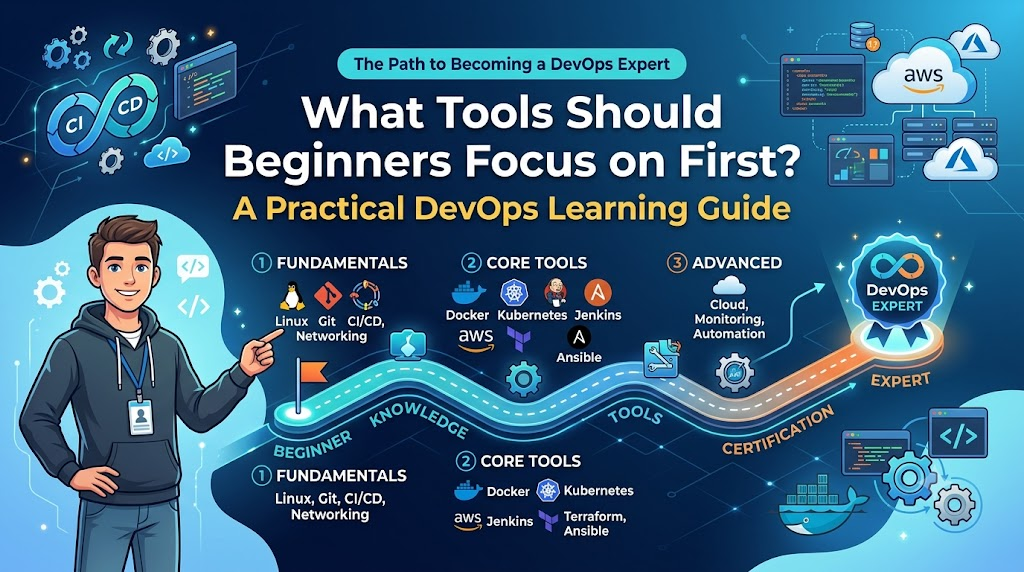
One of the first things you notice when you start learning DevOps is that there are a lot of tools.
Git, Docker, Jenkins, Kubernetes, Terraform, Ansible, GitHub Actions, Prometheus, Grafana, Helm, Argo CD, cloud platforms—the list can seem endless.
This creates a common problem for beginners: Where should I actually start?
Trying to learn everything at once usually leads to shallow knowledge. You know a few commands from several tools, but you don’t understand how those tools fit together or why you would use one in the first place.
A better approach is to learn DevOps in layers.
Start with the technologies that teach you the fundamentals. Then add tools that automate those fundamentals. Finally, move into infrastructure, orchestration, and observability.
This guide gives you a practical order to follow and explains what you should actually learn from each tool.
The Short Answer
If you are starting DevOps from scratch, a sensible learning order is:
Linux → Git → GitHub/GitLab → Bash → Docker → CI/CD → Jenkins or GitHub Actions → Terraform → Kubernetes → Prometheus/Grafana
You don’t have to become an expert in each tool before moving forward.
The goal is to understand the underlying concept well enough that you can use the tool to solve a real problem.
For example:
- Linux teaches you how servers work.
- Git teaches you how teams manage changes.
- Bash teaches you basic automation.
- Docker teaches you containers.
- CI/CD teaches you software delivery automation.
- Terraform teaches you Infrastructure as Code.
- Kubernetes teaches you container orchestration.
- Prometheus and Grafana introduce monitoring and observability.
Once these concepts are clear, advanced tools become much easier to understand.
First Understand the DevOps Workflow
Before installing ten different tools, understand what DevOps is trying to accomplish.
A simplified software delivery workflow looks like this:
Developer writes code
        ↓
Code stored in Git
        ↓
Build
        ↓
Test
        ↓
Package
        ↓
Deploy
        ↓
Monitor
        ↓
Improve
A more practical implementation might look like:
GitHub
   ↓
CI/CD Pipeline
   ↓
Build + Test
   ↓
Docker Image
   ↓
Container Registry
   ↓
Kubernetes
   ↓
Application
   ↓
Prometheus + Grafana
Infrastructure supporting that environment may be created and managed using Terraform.
Once you understand this picture, the tools stop looking like unrelated technologies.
They become pieces of the same system.
1. Start With Linux
If you’re serious about learning DevOps, Linux should be one of your first priorities.
You don’t need to become a Linux administrator before learning anything else. But you should be comfortable opening a terminal, connecting to a server, inspecting files, checking processes, reading logs, and troubleshooting basic problems.
What Should a Beginner Learn?
Start with these commands:
pwd
ls
cd
cp
mv
rm
mkdir
cat
less
head
tail
grep
find
Then learn:
- Users and groups
- File permissions
- Processes
- Services
- Environment variables
- Package management
- SSH
- Disk usage
- Memory usage
- Basic networking
- Log files
For example, if you want to check disk usage:
df -hTo check memory:
free -hTo inspect running processes:
ps auxTo watch a log file as it changes:
tail -f application.logCode language: CSS (css)These are simple commands, but they become extremely useful when you’re troubleshooting a real server.
Why Linux Comes First
Imagine a Docker container isn’t responding.
You may need to investigate:
- Is the process running?
- Is the port listening?
- Is the disk full?
- Is the application crashing?
- Is the network reachable?
- Are permissions preventing access?
Without basic Linux knowledge, you’ll often end up running commands from a tutorial without understanding the result.
That’s why Linux is a foundation, not just another item on a DevOps tool list.
2. Learn Git
After Linux, learn Git properly.
Git is not specifically a DevOps tool, but it is central to modern software development and DevOps workflows.
Infrastructure code, application code, pipeline definitions, configuration, and documentation can all be managed through Git.
Start with:
git clone
git status
git add
git commit
git pull
git push
git branch
git switch
git merge
git logCode language: PHP (php)
But don’t stop at commands.
Understand the workflow.
Create branch
     ↓
Make changes
     ↓
Commit
     ↓
Push
     ↓
Pull Request
     ↓
Review
     ↓
Merge
You should also learn how to:
- Create branches
- Resolve merge conflicts
- Revert changes
- Use
.gitignore - Work with remote repositories
- Review pull requests
- Tag releases
A good Git learner doesn’t just know how to commit code.
They understand how changes move through a team.
3. Choose GitHub or GitLab
Once Git makes sense, start using a repository platform such as GitHub or GitLab.
Don’t try to learn every Git hosting platform at the same time.
Choose one.
Learn how to:
- Create repositories
- Push code
- Create branches
- Open pull requests
- Review changes
- Manage issues
- Protect important branches
- Store project documentation
- Configure CI/CD workflows
If you learn GitHub first and later encounter GitLab, the transition won’t be particularly difficult because the underlying Git concepts remain the same.
4. Learn Basic Bash Scripting
Bash is another important foundation.
You don’t need advanced shell programming skills at the beginning.
You should be able to automate repetitive command-line tasks.
For example:
#!/bin/bash

echo "Checking disk usage..."
df -h

echo "Checking memory..."
free -h

echo "Checking failed services..."
systemctl --failedCode language: PHP (php)
Learn:
- Variables
- Conditions
- Loops
- Functions
- Arguments
- Exit codes
- Pipes
- Redirection
- Environment variables
- Command substitution
You should understand why commands can be chained together:
grep "ERROR" application.logCode language: JavaScript (javascript)and:
cat application.log | grep "ERROR"Code language: JavaScript (javascript)More importantly, understand how a script can use the exit status of a command to decide whether an operation succeeded.
That knowledge becomes useful later when you write deployment scripts and CI/CD pipelines.
5. Learn Docker
Once you have the basics of Linux, Git, and scripting, Docker becomes much easier to understand.
Docker introduces the concept of containers.
A simplified workflow is:
Application
     ↓
Dockerfile
     ↓
Docker Image
     ↓
Docker Container
A beginner should understand the difference between these three things:
Dockerfile
Instructions for building an image.
Image
A packaged application environment.
Container
A running instance of an image.
Start with commands such as:
docker build
docker run
docker ps
docker images
docker logs
docker exec
docker stop
docker rm
You should also learn:
- Port mapping
- Volumes
- Networks
- Environment variables
- Image tags
- Registries
- Container logs
For example:
docker run -p 8080:8080 my-app:1.0Code language: CSS (css)The exact port depends on the application, but the important concept is that the container’s application port is being mapped to a port accessible from outside the container.
6. Don’t Jump to Kubernetes Yet
This is an important point.
Many beginners see Kubernetes everywhere and immediately start learning it.
That often creates unnecessary difficulty.
Kubernetes manages containers, so you should first understand:
- What a container is
- How images work
- How ports work
- How applications start and stop
- How environment variables work
- How container logs work
- Basic networking
Once those concepts are comfortable, Kubernetes becomes much easier.
Otherwise, you are learning Kubernetes terminology and Docker terminology at the same time without understanding either properly.
7. Learn CI/CD Concepts
Now move into CI/CD.
Before choosing Jenkins, GitHub Actions, GitLab CI, or another platform, understand what a pipeline is supposed to do.
A simple pipeline could be:
Developer Pushes Code
        ↓
Checkout Source
        ↓
Build
        ↓
Run Tests
        ↓
Build Docker Image
        ↓
Push Image
        ↓
Deploy
        ↓
Verify
This is the important concept.
The tool used to implement it is secondary.
Continuous Integration
Continuous Integration focuses on integrating code changes frequently and automatically validating them.
Typical pipeline activities include:
- Building the application
- Running tests
- Performing static checks
- Running security checks
- Producing build artifacts
Continuous Delivery and Deployment
The next step is getting validated software into an environment.
With Continuous Delivery, software is kept ready for release.
With Continuous Deployment, qualifying changes can be automatically deployed.
The exact implementation varies between organizations.
For a beginner, focus on understanding the workflow rather than getting stuck on terminology.
8. Choose Jenkins or GitHub Actions
Now choose one CI/CD implementation.
Jenkins
Jenkins is useful for learning traditional CI/CD concepts and pipeline mechanics.
You can learn:
- Jobs
- Agents
- Pipelines
- Stages
- Credentials
- Build triggers
- Artifacts
- Pipeline failures
GitHub Actions
GitHub Actions is convenient when your code is already hosted on GitHub.
You can learn:
- Workflows
- Jobs
- Steps
- Actions
- Runners
- Secrets
- Environment variables
- Deployment workflows
Which One Should You Choose?
For learning, either is fine.
If your goal is to understand CI/CD concepts, Jenkins is a good choice.
If you’re already building projects on GitHub, GitHub Actions can provide a smoother starting point.
Don’t spend months learning both.
Learn one properly and understand the concepts well enough to transfer your knowledge later.
9. Learn Terraform
After understanding application delivery, move toward infrastructure.
Terraform introduces Infrastructure as Code.
Instead of creating infrastructure manually through a cloud console, you describe the desired infrastructure in configuration files.
The workflow is roughly:
Terraform Configuration
        ↓
terraform plan
        ↓
Review Changes
        ↓
terraform apply
        ↓
Infrastructure
Start with:
- Providers
- Resources
- Variables
- Outputs
- Data sources
- Modules
- State
- Plan
- Apply
- Destroy
For example:
terraform init
terraform plan
terraform apply
One concept beginners should take seriously is Terraform state.
Terraform is not simply a script that creates infrastructure and forgets about it.
It maintains information about resources so it can determine what needs to change.
That is why state management becomes an important operational concern as your Terraform usage grows.
10. Learn Kubernetes
Now you’re ready for Kubernetes.
Start with the fundamentals rather than trying to learn the entire ecosystem.
Focus on:
- Pods
- Deployments
- Services
- Namespaces
- ConfigMaps
- Secrets
- Ingress
- Volumes
- Health probes
- ReplicaSets
A basic Kubernetes application might look like:
Deployment
     ↓
Pods
     ↓
Application Containers
     ↓
Service
     ↓
Application Access
Start with common commands:
kubectl get pods
kubectl get deployments
kubectl get services
kubectl describe pod <pod-name>
kubectl logs <pod-name>
kubectl exec -it <pod-name> -- /bin/sh
kubectl apply -f deployment.yamlCode language: HTML, XML (xml)
Don’t memorize these commands without understanding what they show you.
For example:
kubectl describe pod <pod-name>Code language: HTML, XML (xml)is useful because it can provide information about scheduling, containers, events, and other details when a pod isn’t behaving as expected.
11. Learn Monitoring With Prometheus and Grafana
Once you can deploy applications, learn how to observe them.
Two commonly encountered tools are Prometheus and Grafana.
A simplified setup looks like:
Application
     ↓
Metrics
     ↓
Prometheus
     ↓
Query
     ↓
Grafana
     ↓
Dashboard
Learn to understand metrics such as:
- CPU usage
- Memory usage
- Request rate
- Error rate
- Response latency
- Application availability
But don’t fall into the trap of building dashboards just because dashboards look impressive.
A useful monitoring question is:
If this metric changes, what decision or action should it trigger?
For example, knowing that CPU is high is useful only when you understand whether the increase represents normal workload growth, a resource bottleneck, a runaway process, or something else.
That mindset is much more important than learning how to create attractive Grafana panels.
Where Does Ansible Fit?
Ansible is worth learning, but it doesn’t need to be your first DevOps tool.
It is commonly used for configuration management and automation.
A simplified workflow is:
Ansible Control Node
        ↓
SSH
        ↓
Servers
        ↓
Configuration / Tasks
Learn:
- Inventory
- Playbooks
- Tasks
- Modules
- Variables
- Templates
- Roles
- Idempotency
It’s also useful to understand the difference between Terraform and Ansible.
| Tool | Main Focus |
|---|---|
| Terraform | Provisioning and managing infrastructure |
| Ansible | Configuring systems and automating operational tasks |
There can be overlap, but they generally address different parts of the infrastructure lifecycle.
What Should Beginners Learn Later?
Once your foundation is strong, you can start exploring:
- Helm
- Argo CD
- GitOps
- HashiCorp Vault
- Advanced Kubernetes
- Service meshes
- Advanced observability
- OpenShift
- Multi-cloud architecture
- Kubernetes operators
- Advanced security tooling
These aren’t bad tools.
They are simply not where most beginners should start.
A useful rule is:
Understand the problem before learning the abstraction that solves it.
For example, understand Kubernetes deployments before learning Helm.
Understand deployment workflows before jumping into GitOps platforms.
Understand networking before trying to understand service meshes.
A Practical Beginner Project
If you really want to learn these tools, don’t study each one independently.
Build one project and keep improving it.
Suppose you have a small web application.
Step 1: Put It in Git
Create a repository:
my-app/
├── src/
├── tests/
├── Dockerfile
└── README.md
Commit the project to Git.
Step 2: Containerize It
Create a Dockerfile and build an image:
docker build -t my-app:1.0 .Code language: CSS (css)Run it:
docker run -p 8080:8080 my-app:1.0Code language: CSS (css)Test the application.
Step 3: Create a CI Pipeline
Configure your CI tool to:
Push
 ↓
Build
 ↓
Test
 ↓
Docker Build
If the test fails, the pipeline should fail.
That’s your first real automation workflow.
Step 4: Add Terraform
Use Terraform to create the infrastructure required for your application.
Keep the Terraform configuration in Git.
Now your infrastructure changes can also go through version control and review.
Step 5: Deploy With Kubernetes
Create a basic Deployment and Service.
Start with the simplest working setup.
Once that works, introduce:
- Configuration
- Secrets
- Health checks
- Resource requests and limits
- Scaling
Don’t add these concepts simply because they’re available. Add them when you understand the problem they solve.
Step 6: Add Monitoring
Introduce Prometheus and Grafana.
Monitor your application and infrastructure.
Then deliberately break something in your test environment and see whether your monitoring helps you identify the problem.
That last step is particularly valuable.
Monitoring should help you answer:
What happened?
When did it happen?
How serious is it?
What should I investigate next?
A Simple Learning Roadmap
Here’s a practical progression:
Phase 1 — Foundations
Learn:
Linux + Git + Basic Networking + Bash
Goal: Become comfortable working from a terminal and managing code.
Phase 2 — Application Packaging
Learn:
Docker
Goal: Understand how applications are packaged and run as containers.
Phase 3 — Delivery Automation
Learn:
CI/CD + Jenkins or GitHub Actions
Goal: Automatically build and test your application.
Phase 4 — Infrastructure
Learn:
Terraform + Cloud Fundamentals
Goal: Understand how infrastructure is provisioned and managed as code.
Phase 5 — Orchestration
Learn:
Kubernetes
Goal: Deploy and operate containerized applications.
Phase 6 — Observability
Learn:
Prometheus + Grafana + Logs
Goal: Understand application and infrastructure behavior in operation.
How Deep Should You Go?
You don’t need equal depth in every tool.
A sensible target looks like this:
| Technology | Beginner Target |
|---|---|
| Linux | Strong fundamentals |
| Git | Strong |
| GitHub/GitLab | Comfortable |
| Bash | Basic to intermediate |
| Docker | Strong fundamentals |
| CI/CD | Strong concepts |
| Jenkins/GitHub Actions | Practical |
| Terraform | Strong fundamentals |
| Kubernetes | Strong fundamentals |
| Prometheus/Grafana | Practical |
| Ansible | Basic to intermediate |
| Helm | Basic initially |
| GitOps | Understand the concepts first |
Your objective should not be:
“I know 30 DevOps tools.”
A much better objective is:
“I can take an application from source code through automated testing, packaging, infrastructure provisioning, deployment, and monitoring.”
That is a much stronger demonstration of DevOps capability.
Common Beginner Mistakes
Learning Everything at Once
Trying to learn multiple CI/CD tools, container platforms, cloud providers, IaC tools, and Kubernetes technologies simultaneously usually produces shallow knowledge.
Choose one tool per major concept.
Starting With Kubernetes
Kubernetes is valuable, but it shouldn’t be your foundation.
Learn containers and networking first.
Memorizing Commands
Knowing a command is useful.
Knowing why you are using it and how to interpret the result is much more valuable.
Ignoring Networking
Learn the basics of:
- IP addresses
- Ports
- DNS
- TCP/IP
- HTTP/HTTPS
- Load balancing
- Firewalls
- Proxies
You don’t need to become a network engineer, but you should understand enough to troubleshoot connectivity.
Treating Security as an Advanced Topic
Start good security habits immediately.
For example:
- Don’t commit passwords or API keys to Git.
- Use least-privilege permissions.
- Protect CI/CD credentials.
- Limit network exposure.
- Keep dependencies and images updated.
- Separate development and production access.
Security is easier to build into a workflow than to retrofit after an incident.
How Do You Know You’re Ready for the Next Stage?
Don’t measure progress only by the number of tutorials you’ve completed.
Use practical tests.
Before moving beyond Linux, you should be able to navigate a server, inspect processes, read logs, manage permissions, and use SSH.
Before moving deeply into Docker, you should be able to build an image, run a container, inspect logs, map ports, and troubleshoot a basic failure.
Before moving deeply into Kubernetes, you should understand containers, images, networking, application processes, and basic YAML.
Before moving into advanced infrastructure automation, you should understand what infrastructure you’re actually trying to provision.
This approach prevents you from building advanced knowledge on top of weak fundamentals.
Final Checklist for a DevOps Beginner
Use this as a practical checkpoint:
- I can work comfortably in Linux.
- I understand basic networking.
- I can use Git for everyday development work.
- I understand branches and pull requests.
- I can write basic Bash scripts.
- I understand Docker images and containers.
- I can create a basic Dockerfile.
- I can build and run a container.
- I understand CI/CD concepts.
- I can create a basic CI pipeline.
- I understand Infrastructure as Code.
- I can create basic Terraform configurations.
- I understand Kubernetes fundamentals.
- I can deploy a simple containerized application.
- I understand basic monitoring and metrics.
- I can investigate logs when something fails.
- I understand why secrets should not be stored in Git.
- I can explain the path from a code commit to a deployed application.
If you can do most of these things, you’re in a much better position to start exploring advanced DevOps technologies.
Final Recommendation
Don’t start your DevOps journey by asking:
“Which 20 tools should I learn?”
Start by asking:
“What does a DevOps engineer actually need to accomplish?”
Then learn the tools that support that workflow.
Start with Linux and Git. Add Bash and basic networking. Move into Docker, then CI/CD. After that, learn Terraform, Kubernetes, and monitoring.
Keep one practical project running throughout the learning process and use each new tool to improve that project.
The tools will change over time. New platforms will appear, existing products will evolve, and companies will use different combinations of technologies.
The fundamentals will remain useful.
If you understand operating systems, networking, version control, automation, containers, infrastructure, deployment, and observability, you won’t be dependent on knowing one particular tool.
You’ll understand why the tool exists, what problem it solves, when to use it, and how to troubleshoot it when it doesn’t behave as expected.
That’s the kind of foundation a beginner should build first.