Introduction
In the world of software engineering, we often talk about speed. We talk about CI/CD pipelines, containerization, and the race to production. However, speed without direction is dangerous. If you are shipping code quickly but failing to understand the impact of that code, you are not doing DevOps; you are simply creating problems faster. This is where feedback loops become the most important component of your engineering culture.
Software teams cannot improve without knowing how their systems behave in the real world. When you push a commit, your work does not end there. In fact, it is just beginning. Understanding the performance, stability, and security of your application once it is live is the only way to ensure reliability. DevOps depends on quick, continuous feedback cycles to bridge the gap between development and operations.
For those looking to deepen their practical knowledge, resources like DevOpsSchool offer comprehensive training on how these feedback mechanisms integrate into real-world workflows. By mastering these loops, teams improve reliability, shorten the mean time to recovery, and foster a culture of shared responsibility. This guide explores why feedback loops are the heartbeat of successful DevOps and how you can implement them effectively.
What Are Feedback Loops in DevOps?
At its core, a feedback loop in DevOps is a mechanism that captures data from a system and feeds it back to the creators, maintainers, and operators. It is the process of learning from what you have built.
Think of it like driving a car. When you steer, you receive immediate feedback from the road through the steering wheel. If the car pulls to the left, you correct your steering to the right. You do not wait until you hit a guardrail to realize you were off-course.
In DevOps, the “car” is your application, and the “road” is the production environment. Feedback loops are your steering system. They are the automated checks, the logs, the metrics, and the alerts that tell you if your application is healthy, secure, and performant. Without these loops, you are driving blind, guessing at whether your code changes are helping or hurting your users.
Why Feedback Loops Matter in DevOps
In a traditional waterfall model, feedback usually arrived weeks or months after development—often from customers complaining about bugs. This is far too late. DevOps flips this model by bringing feedback as close to the developer as possible.
Faster Problem Detection
If a developer breaks a feature and finds out five minutes later, they can fix it immediately because the context is fresh in their mind. If they find out three weeks later, they have to spend hours re-learning their own code. Feedback loops ensure that issues are caught when they are cheap and easy to fix.
Better Collaboration
Feedback loops break down silos. When developers, operations, and QA engineers all look at the same dashboard or the same error report, they stop pointing fingers. They start solving problems together.
Faster Fixes
When a production outage occurs, you do not want to hunt through five different servers to find a log file. A well-designed feedback loop tells you exactly what failed, where it failed, and why it failed, allowing for rapid recovery.
Better Customer Experience
Customers do not care about your release cadence. They care about uptime and functionality. Feedback loops ensure that you catch performance regressions before your customers do, keeping the user experience seamless.
Types of Feedback Loops in DevOps
Feedback is not a single entity; it exists at every stage of the software development lifecycle.
| Feedback Type | Purpose |
| Developer Feedback | Notifies developers of linting errors, unit test failures, or build issues immediately upon commit. |
| CI/CD Feedback | Alerts the team if an automated deployment fails or if integration tests do not pass in the staging environment. |
| Monitoring Feedback | Provides real-time data on CPU, memory, latency, and error rates in production. |
| Customer Feedback | Captures direct user reports, support tickets, and usage patterns to inform product direction. |
| Security Feedback | Scans code and infrastructure for vulnerabilities, alerting teams to compliance issues or threats before exploitation. |
How Feedback Loops Work in DevOps
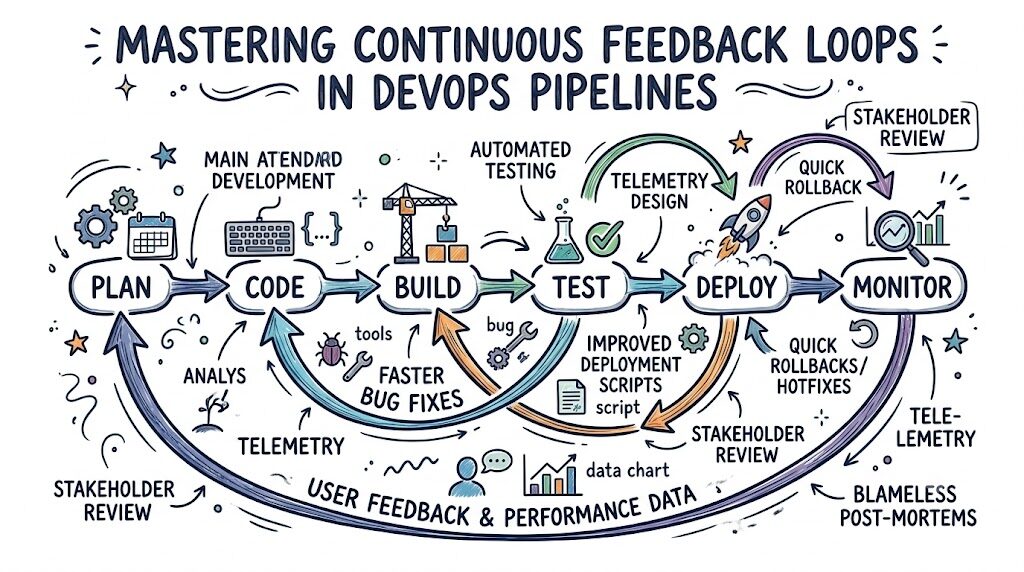
The workflow of a feedback loop is a continuous cycle of observation and response. It follows a predictable pattern:
- Code Changes: A developer commits code.
- Automated Testing: The CI pipeline runs. If tests fail, the developer receives instant feedback. This is the first loop.
- Deployment: If tests pass, the code is deployed to an environment.
- Monitoring: Once live, observability tools track the application’s behavior.
- Data Analysis: Metrics, logs, and traces are collected. If an anomaly is detected, an alert is triggered.
- Response: The team reviews the alert, performs a root cause analysis, and pushes a fix, starting the loop over.
For example, consider a payment processing service. If a developer deploys a change that increases transaction latency by 200 milliseconds, the monitoring tool detects the deviation from the baseline. It sends an alert. The developer sees the specific trace showing the slow database query, fixes the query, and pushes an update. The loop is closed.
Role of Feedback in CI/CD Pipelines
The CI/CD pipeline is the primary engine of DevOps, and feedback is its fuel. If you remove feedback, you are essentially “shipping and praying.”
Build Failures
A build process should fail fast. If your dependencies are broken or your code does not compile, you should know within seconds. This is the shortest feedback loop in the chain.
Test Failures
Unit and integration tests are your safety net. If a test fails during the CI process, the pipeline should stop immediately. This prevents bad code from ever reaching the deployment stage.
Deployment Monitoring
Deployment is not the end of the process. You must monitor the health of the application immediately after the code hits production. Did the deployment cause a spike in 500-level errors? If yes, the pipeline should ideally trigger an automated rollback.
Monitoring and Observability in Feedback Loops
Monitoring and observability are often used interchangeably, but they serve distinct roles in your feedback strategy. Monitoring tells you that something is wrong (the “what”). Observability tells you why it is wrong (the “why”).
Logs
Logs are the narrative of your application. They record events as they happen. Effective feedback requires structured logging so that you can search and filter for specific error types across thousands of microservices.
Metrics
Metrics are the numerical data points—CPU usage, request rates, error counts. They are excellent for setting thresholds. If your error rate crosses 1%, you need an alert.
Alerts and Dashboards
Alerts are the “active” part of feedback. Dashboards are the “passive” part. You need both. Dashboards allow you to see trends over time, while alerts cut through the noise to tell you what needs immediate attention.
Example: An e-commerce site experiences a spike in traffic during a sale. Your dashboard shows that while traffic is high, the checkout service latency remains low. This is a “good” feedback signal. However, if the payment gateway service metrics show an increase in connection timeouts, that is a feedback signal requiring intervention.
Real-World Example: Team Without Feedback Loops
Imagine “Team A,” an organization that treats feedback as an afterthought.
They push code to production on Friday afternoons. They do not have automated testing, and their monitoring is limited to a server status light that stays green unless the entire box crashes.
When a customer complains that they cannot log in, the support team creates a ticket. Three hours later, a developer picks it up. They spend an hour trying to reproduce the issue because they have no logs to look at. They spend another two hours guessing which recent code change caused the problem. Finally, they roll back the entire system, causing three hours of downtime and significant revenue loss.
This team is trapped in a cycle of reactive firefighting. They are not improving; they are merely surviving.
Real-World Example: Team Using Effective Feedback Loops
Now, consider “Team B.” They have invested in a comprehensive feedback loop system.
They push code multiple times a day. Their CI/CD pipeline runs a suite of automated tests. If a developer introduces a bug that breaks the login flow, the pipeline fails, and the developer is notified in the Slack channel within five minutes.
Even if a bug slips through to production, their observability stack catches it immediately. The system triggers an alert because the error rate for the login service spiked. The developer opens their dashboard, sees the exact line of code causing the exception, and applies a patch within 15 minutes. The customer never even notices the issue.
Team B is faster, more reliable, and—critically—less stressed.
Benefits of Feedback Loops in DevOps
| Benefit | Impact |
| Faster Issue Detection | Bugs are caught in development or staging, not by angry customers. |
| Better Software Quality | Continuous testing ensures that new features do not break existing functionality. |
| Reduced Downtime | Fast detection leads to fast recovery, maintaining high availability. |
| Improved Collaboration | Shared data creates a “single source of truth” between teams. |
| Faster Innovation | Developers spend less time fixing old bugs and more time building new features. |
Common Mistakes Teams Make
Even with good intentions, many organizations fail to implement feedback loops correctly.
- Ignoring Monitoring Data: You have the dashboards, but nobody checks them until something breaks. Monitoring should be part of the daily routine.
- Slow Response to Alerts: If an alert fires, someone needs to address it. If you ignore alerts, they eventually become background noise.
- Too Many Alerts (Alert Fatigue): If your team receives 100 alerts a day, they will stop paying attention. Feedback must be actionable and high-signal.
- Lack of Collaboration: One team manages the dashboard, but another team writes the code. Feedback must be transparent and shared across all stakeholders.
- Measuring the Wrong Things: Tracking “server up-time” is useless if your application is throwing errors for every user. Track business-critical metrics like transaction success rates.
Best Practices for Strong Feedback Loops
To build a culture of continuous improvement, follow this checklist:
- Automate Monitoring: Do not rely on manual checks. Configure your system to alert you the moment a threshold is crossed.
- Review Incidents Regularly: After every outage, conduct a “blameless post-mortem.” What feedback did we miss? How can we catch this earlier next time?
- Share Feedback Across Teams: Create transparency. Developers should see production logs, and SREs should see development deployment pipelines.
- Reduce Alert Noise: Fine-tune your alerts. Only alert on conditions that require immediate human intervention.
- Measure Improvements: Track your metrics over time. Are you seeing fewer errors this month than last month? Use data to prove the value of your efforts.
Role of DevOpsSchool in Learning DevOps Feedback Systems
Understanding these feedback loops requires a mix of theoretical knowledge and hands-on practice. It is not enough to read about them; you have to build them. Platforms like DevOpsSchool emphasize this practical approach.
By focusing on real-world DevOps workflow understanding, such platforms help learners connect the dots between CI/CD pipeline configuration and production monitoring. Whether you are a student or an IT professional, gaining exposure to these feedback mechanisms is essential for career growth. Understanding how to integrate various tools—from monitoring agents to automated testing frameworks—is a core competency that separates effective engineers from the rest.
Career Importance of Understanding Feedback Loops
The job market for DevOps and Site Reliability Engineering (SRE) is highly competitive. Employers are not looking for people who can just run commands. They are looking for engineers who understand systems thinking.
- DevOps Engineer: You are responsible for the CI/CD pipeline, which is the primary source of early feedback.
- Site Reliability Engineer (SRE): You own the production feedback loops. Your success depends on your ability to use logs, metrics, and traces to keep the system running.
- Cloud Engineer: You must understand how cloud-native tools provide feedback on resource utilization and costs.
- Platform Engineer: You build the internal developer platforms that provide feedback to other developers, making their lives easier.
- Automation Engineer: You write the scripts that automate the detection and remediation of issues, closing the feedback loop programmatically.
In all these roles, the ability to interpret feedback and turn it into actionable improvements is what drives career advancement.
Industries Using DevOps Feedback Systems
Feedback loops are not limited to tech startups. They are critical in any industry that relies on software.
- SaaS Companies: They rely on rapid feature releases and high uptime. Feedback loops are their lifeblood.
- Banking & Finance: Here, compliance and security are paramount. Feedback loops ensure that security vulnerabilities are detected and patched in real-time.
- Healthcare: Systems must be highly reliable. Feedback loops monitor critical patient data platforms to ensure 100% availability.
- E-Commerce: During peak events, systems must scale. Feedback loops allow teams to monitor performance and adjust capacity dynamically.
- Telecom: Managing massive networks requires real-time feedback to handle traffic spikes and hardware failures.
Future of Feedback Loops in DevOps
The future of feedback is moving toward automation and intelligence.
- AI-Powered Observability: AI models will soon be able to identify “normal” behavior patterns and automatically detect anomalies that humans might miss.
- Predictive Monitoring: Instead of telling you what happened, systems will predict what is going to happen. “This service will run out of memory in 2 hours based on current trends.”
- Automated Remediation: The ultimate feedback loop is one that fixes itself. If a service becomes unresponsive, the system will restart it, scale it, or rollback the last change without human intervention.
- Smarter Feedback Systems: Systems will begin to correlate data from disparate sources, telling you that “The spike in errors is related to the database migration that happened 30 minutes ago.”
FAQs
1. What are feedback loops in DevOps?
Feedback loops are processes that capture data from your software’s performance and behavior and return that information to the development and operations teams to guide improvement.
2. Why are feedback loops important?
They allow teams to detect issues early, reduce downtime, improve software quality, and ensure that the team is always learning and iterating.
3. What tools support feedback loops?
Tools include CI/CD platforms like Jenkins or GitLab CI, monitoring tools like Prometheus, and observability platforms like ELK Stack or Datadog.
4. How does CI/CD use feedback?
CI/CD uses feedback to determine if a code change is safe. If tests fail or builds crash, the pipeline provides immediate feedback to the developer.
5. What is observability?
Observability is the ability to understand the internal state of a system by examining its output (logs, metrics, and traces).
6. Can small teams use feedback loops?
Yes. Even a team of two can benefit from simple automated testing and basic server monitoring. It is about the culture of checking data, not the complexity of the tools.
7. Do feedback loops reduce downtime?
Absolutely. By detecting errors faster, you can resolve them before they impact users, or roll back quickly if a deployment goes wrong.
8. Are feedback loops hard to implement?
They require effort to set up initially, but they pay for themselves by saving time on troubleshooting and reducing manual toil.
9. How do I start creating a feedback loop?
Start with CI/CD. Automate your testing. If you do not have that, start with monitoring your production logs. Pick one area and improve it.
10. What is the difference between monitoring and feedback?
Monitoring is the collection of data; feedback is the action you take based on that data.
11. Does DevOps require specific tools?
No, DevOps is a methodology. You can build feedback loops with open-source tools or proprietary platforms depending on your needs.
12. How often should we review feedback?
Constantly. Your dashboards should be part of your daily workflow, not just checked when things go wrong.
13. What is alert fatigue?
Alert fatigue occurs when a team is bombarded with so many non-critical alerts that they start ignoring all of them, leading to missed critical issues.
14. How do I improve my feedback loops?
Regularly conduct post-mortems after incidents to identify where your feedback failed you.
15. Can AI help with feedback loops?
Yes, modern observability platforms use AI to filter out noise and identify meaningful patterns in your data.
Final Thoughts
DevOps is not a destination; it is a journey of continuous improvement. The most successful engineering teams are those that embrace the reality that things will break. They do not aim for perfection; they aim for faster learning.
Feedback loops are the tools that allow you to learn. When you treat every failure as a data point, you stop fearing bugs and start viewing them as opportunities to strengthen your systems. Whether you are setting up your first automated test or configuring complex observability for a microservices architecture, remember that the goal is always the same: make the system more resilient, make the process more efficient, and make the team more informed.
Small, incremental improvements—driven by the data you collect from your feedback loops—will compound over time, leading to significant, long-term stability and reliability.