Introduction
Software development has changed drastically over the last decade. In the past, companies released software once or twice a year. Today, users expect new features, security updates, and bug fixes on a weekly or even daily basis. This pressure to release code faster has forced development teams to rethink how they build, test, and deliver applications.
Teams that rely on manual processes often struggle with integration errors. When developers work in isolation and merge their code manually at the end of a project, the results are often disastrous. Systems break, bugs hide in the shadows, and release schedules crumble under the weight of “integration hell.”
This is where Continuous Integration (CI) changes the game. It is the practice of merging all developer working copies to a shared mainline several times a day, ensuring that every change is tested immediately. For beginners, understanding CI is the first step toward mastering the broader DevOps culture.
To gain hands-on experience and deep industry insights, many professionals turn to DevOpsSchool. Whether you are a student or a developer transitioning into a DevOps role, learning the fundamentals of automation is essential. This guide will walk you through the core concepts, tools, and workflows you need to understand Continuous Integration for beginners.
What Is Continuous Integration?
Continuous Integration is a development practice where developers integrate their code into a shared repository frequently. Each integration is verified by an automated build and automated tests.
Imagine a group of writers working on a single book. If every writer works on their own separate chapter for three months without talking to each other, bringing all those chapters together would be a nightmare. There would be conflicting character names, timeline inconsistencies, and plot holes.
Now, imagine if every time a writer finished a paragraph, they shared it with the team, and a smart editor immediately checked it for grammar, tone, and plot consistency. If there is a problem, the writer finds out within minutes and fixes it. That is exactly what Continuous Integration does for code. It turns a massive, risky “all-at-once” integration into small, frequent, and manageable steps.
Why Continuous Integration Matters
Continuous Integration is not just about tools; it is about building a culture of reliability. In modern software engineering, speed without quality is a recipe for failure. CI bridges that gap.
Faster Development Cycles
When you automate the testing of code, you remove the bottlenecks caused by manual code reviews and QA processes. Developers get immediate feedback on whether their code works, allowing them to iterate quickly.
Improved Software Quality
Because the software is tested every time a change is made, bugs are caught early. It is significantly easier and cheaper to fix a bug immediately after writing the code than it is to find it weeks later in a production environment.
Reduced “Integration Hell”
The term “integration hell” describes the painful process of merging code from multiple developers at the end of a project. By integrating code continuously, you ensure that components always work together.
Problems Developers Faced Before CI
Before the widespread adoption of CI, software teams faced significant hurdles that delayed releases and frustrated engineers.
| Problem | Impact |
| Code Conflicts | Developers spent days resolving overlapping changes in the codebase. |
| Delayed Testing | QA teams only tested code at the end of the project, leading to late-stage discovery of critical bugs. |
| Slow Releases | Manual build and deployment processes made releasing new features time-consuming. |
| Late Bug Detection | Bugs remained hidden for weeks, making them harder to trace and fix. |
| Team Silos | Communication gaps between developers led to fragmented and incompatible code. |
How Continuous Integration Works
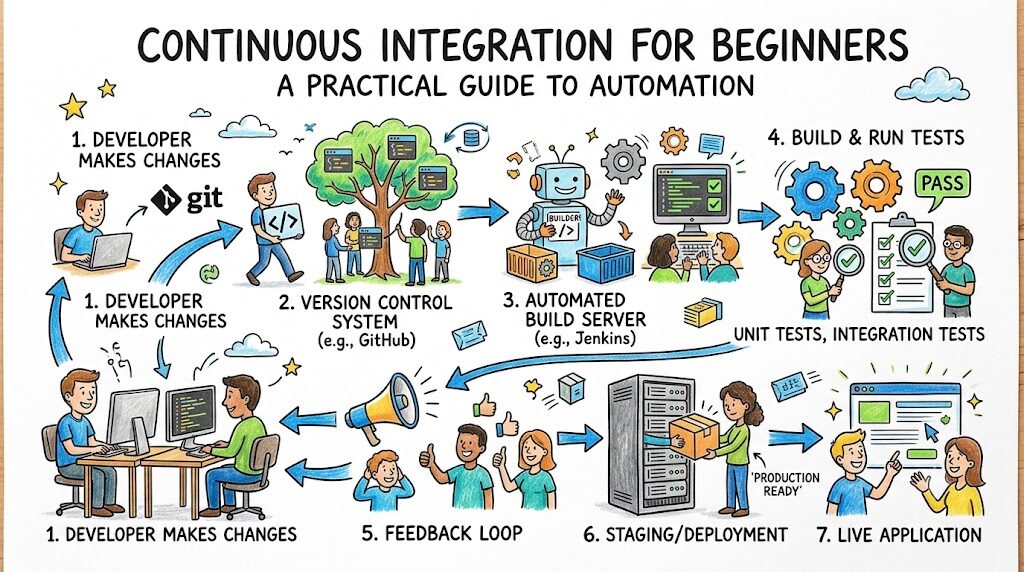
The CI workflow is a cycle designed to keep the codebase healthy. Here is how a standard process looks in a modern development environment.
- Code Commit: A developer writes code on their local machine and pushes it to a shared Version Control System (VCS), such as GitHub or GitLab.
- Automated Build: The CI server detects the change and triggers an automated build. It compiles the code and ensures there are no syntax errors or dependency issues.
- Automated Testing: The CI system runs a suite of automated tests (unit tests, integration tests). If the tests fail, the process stops, and the developer is notified immediately.
- Feedback Loop: The developer receives a notification (via email, Slack, or dashboard) about the build status. If it failed, they fix the code. If it passed, the code is ready for the next stage.
This loop ensures that the main branch of your code is always in a “deployable” state.
Core Components of Continuous Integration
To implement CI effectively, you need several foundational components working in harmony.
| Component | Purpose |
| Version Control System (VCS) | Stores the source code and tracks changes (e.g., Git). |
| Build Server | The automation engine that executes the CI tasks. |
| Automated Build Scripts | Instructions that tell the server how to compile and prepare the application. |
| Automated Test Suite | A collection of scripts that verify the functionality of the code. |
| Notification System | Alerts the team immediately when a build or test fails. |
| Artifact Repository | Stores the output of the build (e.g., binaries, Docker images) for later use. |
Popular CI Tools for Beginners
Choosing the right tool is the first step in your learning journey. Many industry-standard tools share similar core features.
| Tool | Best For |
| Jenkins | The industry standard, highly customizable, and great for learning the basics of self-hosted automation. |
| GitHub Actions | Native to GitHub, extremely easy to set up for beginners, and requires no external servers. |
| GitLab CI/CD | All-in-one solution that integrates code management and pipeline automation seamlessly. |
| CircleCI | Known for speed and ease of integration with third-party tools. |
| Azure DevOps | An enterprise-grade platform offering robust boards, repositories, and pipelines in one place. |
For a beginner, I recommend starting with GitHub Actions. It lives directly inside your code repository, meaning you do not need to set up complex infrastructure to start experimenting.
Real-World Example: Team Without Continuous Integration
Consider a team of five developers building an e-commerce website. Without CI, they share code by manually copying files or using shared drives.
Developer A updates the shopping cart logic. Developer B changes the database schema. They do not merge their code until Friday. When they finally combine the files, the website crashes. They spend the entire weekend manually debugging code, trying to figure out which change broke the site. The deadline is missed, and the client is unhappy. This is a classic example of the risks associated with manual integration.
Real-World Example: Team Using Continuous Integration
Now, consider the same team using a CI pipeline.
Developer A pushes their shopping cart update. The CI server immediately runs tests. It detects that Developer A’s change is incompatible with the current database schema. The CI tool sends a notification to the team’s dashboard.
Developer A sees the failure within five minutes. They coordinate with Developer B, update the schema, and push the fix. The tests pass. By the end of the day, all features are integrated, tested, and ready to go. The team leaves on Friday with no stress and a stable codebase.
Benefits of Continuous Integration
Continuous Integration offers tangible benefits that extend beyond just “writing code.”
- Faster Feedback: Developers know immediately if their changes are correct.
- Early Issue Detection: Bugs are isolated to the specific change, making them easy to identify.
- Better Collaboration: Teams communicate through code integration rather than just meetings.
- Reliable Releases: Since the code is always tested, the risk of breaking the production environment is significantly reduced.
- Historical Tracking: Every build is logged, providing a history of what changed and why.
Common Beginner Mistakes While Learning CI
When starting out, it is easy to get overwhelmed. Avoid these common traps to make your learning journey smoother.
- Skipping Git Basics: You cannot do CI if you do not understand version control. Master Git first.
- Overcomplicating Pipelines: Start with a simple “Hello World” build. Do not try to build a complex, multi-stage pipeline on your first day.
- Ignoring Testing: CI is useless without tests. You must write code that can be tested.
- Learning Too Many Tools: Pick one tool (like GitHub Actions or Jenkins) and master it before moving on to others.
- Manual Intervention: Avoid the temptation to “fix it manually” on the server. If the pipeline fails, the code should be fixed in the repository, not on the server.
Best Practices for Learning Continuous Integration
To build a strong foundation, follow these practical steps.
- Start Simple: Create a repository with a simple script. Set up a CI pipeline that runs that script every time you push code.
- Learn Git First: Understand how branches, commits, and pull requests work.
- Practice Small Commits: Don’t wait until the end of the week to merge code. Merge often, even if the feature is incomplete.
- Understand Automation: Think about every step you do manually (like compiling or running tests) and ask, “How can I automate this?”
- Review Logs: When your pipeline fails, do not panic. Read the logs. The error messages are your best teachers.
Role of DevOpsSchool in Learning CI
Learning Continuous Integration requires more than just reading documentation; it requires practical application. DevOpsSchool provides the structured environment and hands-on experience necessary to move from theory to implementation. By working on real-world projects and learning from experienced mentors, beginners can develop the engineering mindset required to handle complex CI/CD environments. The focus is on practical skills, industry-standard tools, and the logic behind automation, ensuring that students are ready for the demands of the modern job market.
Career Importance of Continuous Integration Skills
CI is no longer a “nice-to-have” skill; it is a fundamental requirement for many technical roles.
- DevOps Engineer: You are responsible for designing and maintaining the CI/CD pipelines that power the entire software delivery process.
- Software Engineer: You are expected to write testable code and understand how your changes interact with the broader system.
- QA Automation Engineer: You build the automated test suites that run within the CI pipelines.
- SRE Engineer: You focus on the reliability of the system, using CI to ensure that deployments are safe and automated.
- Platform Engineer: You build the internal tools and frameworks that make CI easier for other developers.
Proficiency in CI signals to employers that you understand how to deliver value safely and efficiently.
Industries Using Continuous Integration
The principles of CI are applied across almost every sector that relies on software.
- SaaS Platforms: They release updates multiple times a day to stay competitive.
- Banking & Finance: CI ensures that every financial transaction system change is thoroughly tested for security and accuracy.
- Healthcare: Automated testing ensures that patient data systems remain compliant and stable.
- E-Commerce: Platforms use CI to manage high-traffic websites that cannot afford downtime.
- Telecom: Large-scale infrastructure requires constant updates and rigorous testing.
Future of Continuous Integration
The landscape of CI is evolving. We are moving toward “smarter” pipelines.
- AI-Assisted Testing: AI tools are beginning to automatically detect which tests need to be run, speeding up pipelines even further.
- Cloud-Native Pipelines: Everything is moving to the cloud, with pipelines becoming ephemeral (created and destroyed on the fly).
- Security Integration (DevSecOps): Security scanning is now becoming a standard step within the CI pipeline, not an afterthought.
- Smarter Automation: Pipelines are becoming more intelligent, self-healing, and better at managing dependencies without human input.
FAQs
- What is the primary goal of Continuous Integration?The goal is to detect integration errors early by merging code changes into a central repository frequently and automatically testing those changes.
- Does Continuous Integration require specific coding languages?No, CI is a practice, not a language. It applies to any software project, whether you are using Java, Python, JavaScript, or C++.
- Is CI the same as Continuous Deployment?No. CI focuses on merging and testing code. Continuous Deployment (CD) takes that tested code and automatically releases it to the production environment.
- Can I practice Continuous Integration on my personal projects?Yes. In fact, it is the best way to learn. Create a free repository on GitHub and enable GitHub Actions to run tests on your personal code.
- How often should a developer commit code in a CI environment?Developers should aim to commit and push their code at least once a day, or whenever a small, logical piece of work is complete.
- Do I need a dedicated server to run CI?Not necessarily. Cloud-based CI providers like GitHub Actions or CircleCI offer free tiers that run pipelines on their infrastructure.
- What is the most common reason for a CI build to fail?Usually, it is due to a developer pushing code that fails unit tests or fails to compile because of missing dependencies.
- Is it difficult for a complete beginner to set up a CI pipeline?With modern tools like GitHub Actions, it is quite accessible. Most setups involve adding a simple configuration file to your repository.
- Should I use Jenkins or GitHub Actions as a beginner?GitHub Actions is generally easier to start with because it is built into the repository and requires less setup.
- Does CI make the development process slower?Initially, it requires time to set up. However, in the long run, it makes development significantly faster by preventing “integration hell” and reducing debugging time.
- Can CI help with security?Yes. You can configure your CI pipeline to run security scans on your code, checking for vulnerabilities before the code is ever merged.
- Is CI suitable for small teams?CI is beneficial for teams of any size, even for solo developers working on their own projects.
- What happens if a test fails in the CI pipeline?The build is marked as “failed,” and the team is notified. The developer must then fix the code and push it again to trigger a new build.
- Do I need to learn Docker to use CI?While not strictly mandatory, knowing Docker is highly recommended, as most modern CI pipelines use containers to build and test code in consistent environments.
- How does CI relate to the overall DevOps lifecycle?CI is the foundation. It feeds into the Continuous Delivery/Deployment (CD) phase, which completes the automation of the entire software delivery lifecycle.
Final Thoughts
Continuous Integration is not just a technical process; it is a change in mindset. It is about moving away from the fear of breaking things and toward a system where you are confident that your code works because it has been proven by automation. As you begin your journey in DevOps, remember that CI is your safety net. Start by learning the basics, practice consistently, and do not be discouraged by failing builds—they are simply part of the learning process. Mastering these concepts will position you well for a long and successful career in the software industry.