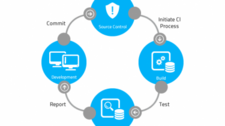
Continuous Integration (CI) is a software development discipline where every team member integrates their work into a shared mainline frequently — ideally at least once per day. Each integration is verified by an automated build and test suite, allowing teams to detect problems early. The practices below represent the foundational principles that make CI effective in real-world engineering environments.
1. Maintain a Single Source-of-Truth Repository
Every artifact required to build, test, and deploy your application should live in version control. This includes application source code, infrastructure-as-code scripts, database migration scripts, build configuration files, and deployment manifests. Using a system such as Git ensures that any developer or CI server can check out a known revision and produce a deterministic build from scratch, without relying on files that exist only on a local machine or a shared network drive.
Practical tip: Treat your repository as the single source of truth. If it is not in version control, it does not officially exist.
2. Automate the Build
The build process must be fully automated and triggerable by a single command or a CI server webhook. Manual build steps introduce human error and make reproducibility impossible. Whether your toolchain is Make, Gradle, Maven, MSBuild, npm scripts, or a custom shell script, the goal is the same: any engineer — or a headless CI agent — should be able to run the complete build without prior knowledge of local environment quirks.
Practical tip: Store build scripts alongside application code. Avoid build logic that only works inside a specific IDE or on a specific developer’s laptop.
3. Make the Build Self-Testing
A successful compilation is not the same as a working application. Incorporate automated tests — unit tests at a minimum, and integration tests where practical — directly into the build pipeline. The CI server should run these tests on every triggered build and report failures immediately. A build that compiles but ships broken behavior has failed, even if the compiler reported success.
Practical tip: Structure your test suite so that fast unit tests run first. Slower integration or end-to-end tests can run in a subsequent pipeline stage to keep early feedback rapid.
4. Everyone Commits to the Mainline Every Day
Long-lived feature branches are the enemy of CI. The longer a branch lives, the larger the eventual merge conflict and the longer integration problems stay hidden. Encourage every developer to integrate their in-progress work into the mainline branch at least once per working day, using techniques like feature flags or branch-by-abstraction to keep incomplete features invisible to end users while still allowing code to merge continuously.
Practical tip: If a change is too large to commit daily, the task is probably too large. Break it into smaller, independently mergeable increments.
5. Every Commit to the Mainline Triggers a Build
CI servers should be configured to watch the mainline branch and trigger a full build-and-test cycle automatically on every push. If a build fails, the team’s top priority becomes restoring the build to green — either by fixing the defect or reverting the offending commit. A broken mainline blocks every other developer from having confidence in their own integrations.
Practical tip: Define a clear team agreement: whoever breaks the build is responsible for fixing it immediately, not at the end of the sprint.
6. Keep the Build Fast
Feedback latency is the enemy of CI. A build that takes 45 minutes to complete will be ignored; developers will push and move on without waiting for results. Aim to keep the primary build-and-unit-test cycle short — many teams target under 10 minutes as a practical ceiling, though the right number depends on project size. Techniques that help include parallelising test execution, caching dependency downloads, and separating slow integration tests into a later pipeline stage.
Practical tip: Profile your build regularly. Identify the slowest steps and investigate whether they can be parallelised, cached, or moved to a later stage.
7. Make Build Results Visible to Everyone
Build status should not be hidden inside a tool that only the DevOps team monitors. Display the current state of every pipeline — passed, failed, or running — on a shared dashboard visible to the whole team. CI platforms such as Jenkins, GitLab CI/CD, GitHub Actions, CircleCI, and TeamCity all provide build dashboards and notification integrations (email, Slack, Teams) out of the box. Visibility creates shared accountability.
Practical tip: Consider a physical build radiator (a wall-mounted monitor showing CI status) in open-plan offices. The visual signal of a red build creates immediate social pressure to fix it.
Summary
| Best Practice | Core Goal |
|---|---|
| Maintain a version-controlled repository | Single source of truth for all artifacts |
| Automate the build | Reproducibility and consistency |
| Make the build self-testing | Catch defects automatically on every change |
| Commit to mainline daily | Reduce merge conflict and integration risk |
| Build every mainline commit | Immediate defect detection |
| Keep the build fast | Short feedback loops |
| Publish build results visibly | Shared accountability and transparency |
Implementing these practices consistently transforms CI from a tool you have installed into a genuine engineering discipline. The result is a codebase that is always in a releasable state and a team that can detect and fix integration problems in minutes rather than days.