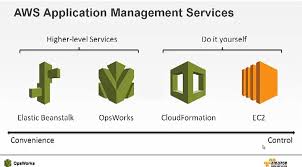
AWS gives engineering teams several overlapping services for deploying and configuring infrastructure. That flexibility is powerful, but it can make tool selection difficult. This article compares three core AWS configuration management services—CloudFormation, OpsWorks, and Elastic Beanstalk—explains what each one does best, and shows when it makes sense to combine them.
The Core Question: Declarative vs. Imperative Deployment
Before comparing the three services, it helps to understand the underlying deployment philosophy they share. You can provision AWS infrastructure using shell scripts full of AWS CLI commands—this is an imperative model where every step must be explicitly defined, error handling must be hand-coded, and scripts must be rewritten for each new application.
A more maintainable approach is declarative configuration: you describe the desired end state in a text file, and a deployment engine figures out how to reach that state, including error handling. All three services discussed here use this declarative model. The text files that describe your infrastructure can be stored in version control, enabling an infrastructure-as-code (IaC) workflow.
AWS CloudFormation: Deploying AWS Resources
CloudFormation is AWS’s foundational infrastructure-as-code service. You write a CloudFormation template—a JSON or YAML file—that declares which AWS resources your application needs. CloudFormation reads the template and provisions those resources in the correct order, handling dependencies automatically.
CloudFormation works well for:
- Deploying the AWS resource layer of an application (VPCs, subnets, security groups, RDS instances, S3 buckets, load balancers, etc.)
- Applications that are relatively static, where the entire infrastructure stack can be replaced on each update rather than patched in place
- Teams that need repeatable, version-controlled environment definitions
CloudFormation supports change sets, which let you preview proposed modifications to a running stack—such as adding or removing resources—before applying them. This gives operators an audit step before infrastructure changes take effect.
Key limitation: CloudFormation manages AWS resources at the provisioning level. It does not orchestrate configuration changes inside a running EC2 instance. For example, it cannot install new packages, update application configuration files, or restart services on an already-running server. Shell scripts can be embedded in CloudFormation user data, but their configuration capabilities are limited.
AWS OpsWorks: Configuration Management Inside EC2
AWS OpsWorks bridges the gap that CloudFormation leaves around in-instance configuration. OpsWorks provides managed versions of two popular configuration management tools—Chef and Puppet—as AWS services (OpsWorks for Chef Automate and OpsWorks for Puppet Enterprise). A third variant, OpsWorks Stacks, uses Chef cookbooks in a proprietary stack model.
OpsWorks handles:
- Initial deployment of applications onto EC2 instances, including OS-level configuration
- Ongoing configuration drift remediation—keeping instances in a defined state over time
- Application updates applied to running instances without replacing them
- Operating system package management, user accounts, file permissions, and service management
Use OpsWorks instead of CloudFormation alone when your application requires ongoing updates to the configuration of its EC2 instances—for example, rolling out new application versions, patching OS packages, or managing configuration files that change independently of the underlying infrastructure.
Combining CloudFormation and OpsWorks
For applications that use many AWS services and require detailed EC2 configuration management, CloudFormation and OpsWorks complement each other well. The recommended division of responsibility is:
| Layer | Tool |
|---|---|
| AWS resource provisioning (VPC, RDS, ELB, S3, security groups, etc.) | CloudFormation |
| EC2 instance OS and application configuration | OpsWorks (Chef or Puppet) |
In this model, CloudFormation bootstraps the OpsWorks stack as part of resource provisioning. Once EC2 instances are running, OpsWorks takes over to apply Chef recipes or Puppet manifests. When changes are needed, AWS resource changes go through CloudFormation change sets; application and OS changes go through OpsWorks. This separation of concerns keeps each tool focused on what it does best.
AWS Elastic Beanstalk: Managed Platform for Web Applications
Elastic Beanstalk takes a higher-level approach. Rather than requiring you to define individual AWS resources, Elastic Beanstalk is a platform-as-a-service (PaaS)-style provisioning service. You upload your application code, tell Elastic Beanstalk which platform to use (e.g., Python, Node.js, Java, Docker), and it provisions and configures the underlying infrastructure automatically.
Elastic Beanstalk automatically handles:
- Web server provisioning and configuration
- Auto Scaling group setup
- Load balancer configuration
- Health monitoring and alerting
- Log aggregation
- Rolling deployments and environment cloning
If your application is a self-contained web application or API and fits neatly within a supported Elastic Beanstalk platform, you may not need CloudFormation or OpsWorks at all. Elastic Beanstalk is the fastest path from code to a running, monitored web environment.
When to combine Elastic Beanstalk with CloudFormation: Most real-world applications need resources that Elastic Beanstalk does not manage on its own—a managed database (RDS), object storage (S3), a cache layer (ElastiCache), or a message queue (SQS). In these cases, use CloudFormation to define the full environment: let CloudFormation provision the Elastic Beanstalk environment alongside the supporting AWS resources. This gives you the convenience of Elastic Beanstalk for the application tier plus the full resource coverage of CloudFormation.
Decision Guide: Which Tool to Use
Use the following guidance to select the right tool or combination of tools for your use case:
- CloudFormation only — You need repeatable provisioning of AWS resources for a relatively static application, and you do not need to manage configuration inside EC2 instances beyond simple startup scripts.
- OpsWorks only (or OpsWorks + CloudFormation) — You have an application running on EC2 that requires ongoing configuration management, package updates, or application deployments to live instances. Add CloudFormation when you also have significant AWS resource dependencies.
- Elastic Beanstalk only — You are deploying a web application or API that fits a supported platform runtime and has minimal external AWS dependencies.
- Elastic Beanstalk + CloudFormation — Your web application needs Elastic Beanstalk’s managed platform conveniences but also depends on additional AWS resources such as RDS, S3, or ElastiCache that must be provisioned alongside it.
Summary Comparison
| Feature | CloudFormation | OpsWorks | Elastic Beanstalk |
|---|---|---|---|
| Primary role | AWS resource provisioning (IaC) | In-instance OS & app configuration management | Managed application platform |
| Abstraction level | Low (full control) | Medium (Chef/Puppet abstraction) | High (platform-managed) |
| Manages EC2 internals | No (limited user data scripts) | Yes | Partially (platform-managed only) |
| Ongoing config drift management | No | Yes | No |
| Best for | Any AWS resource topology | Long-lived EC2 fleets needing config management | Web apps and APIs on supported platforms |
| Combines well with | OpsWorks, Elastic Beanstalk | CloudFormation | CloudFormation |
All three services support a declarative approach to infrastructure management and can be stored as code in version control. Choosing between them—or combining them—depends primarily on how much control you need over the underlying EC2 configuration, how complex your AWS resource dependencies are, and how quickly you need to get a web application running.