LXC (Linux Containers) and Docker are both container technologies built on Linux kernel primitives, yet they serve meaningfully different purposes. Understanding where they overlap—and where they diverge—helps you make the right architectural choice for your workloads.
What Is LXC?
LXC, short for Linux Containers, is an OS-level virtualization mechanism that lets you run multiple isolated Linux environments on a single host kernel. Each container shares the host kernel but has its own filesystem, process tree, network stack, and user space. LXC achieves this isolation through two core Linux kernel features:
- cgroups (control groups) — introduced in Linux kernel 2.6.24, cgroups allow fine-grained allocation and accounting of CPU, memory, block I/O, and network resources across process groups.
- namespaces — namespaces partition global kernel resources so that each container sees its own isolated view of the system (PID namespace, network namespace, mount namespace, etc.).
An LXC container behaves much like a lightweight virtual machine: it runs a full Linux user space, including an init process, and can host multiple services simultaneously. This makes LXC well-suited for scenarios where you want strong process isolation and a full OS environment without the overhead of hardware emulation.
What Is Docker?
Docker began as an internal project at PaaS company dotCloud and was open-sourced in 2013. In its early versions, Docker’s runtime was built directly on top of LXC. Over time Docker replaced LXC with its own container runtime (libcontainer, now part of runc and the broader OCI ecosystem), but it continues to rely on the same underlying kernel features—cgroups and namespaces.
Docker’s core daemon and CLI tools are written in Go. The key design philosophy that differentiates Docker from raw LXC is the single-process-per-container model: each container is expected to run one primary process (a web server, a database, a worker), making containers highly composable and easy to reason about.
Containers vs. Virtual Machines: A Quick Baseline
Both LXC and Docker are container technologies, so it helps to first distinguish containers from full virtual machines (VMs):
| Attribute | Virtual Machine | Linux Container (LXC / Docker) |
|---|---|---|
| Kernel | Guest OS has its own kernel | Shares the host kernel |
| Boot time | Seconds to minutes | Milliseconds to seconds |
| Memory overhead | High (full OS image in RAM) | Low (only user-space differences) |
| Hardware emulation | Yes (virtual CPU, NIC, disk) | No |
| Isolation strength | Strong (hypervisor boundary) | Moderate (kernel namespace boundary) |
| Portability | Moderate (hypervisor-dependent) | High (OCI images run on any compliant runtime) |
Because containers skip hardware emulation entirely, they start faster and consume fewer resources than VMs. The trade-off is that all containers share the host kernel, so a kernel vulnerability or misconfiguration affects all tenants on that host.
Core Differences Between LXC and Docker
1. Design Philosophy
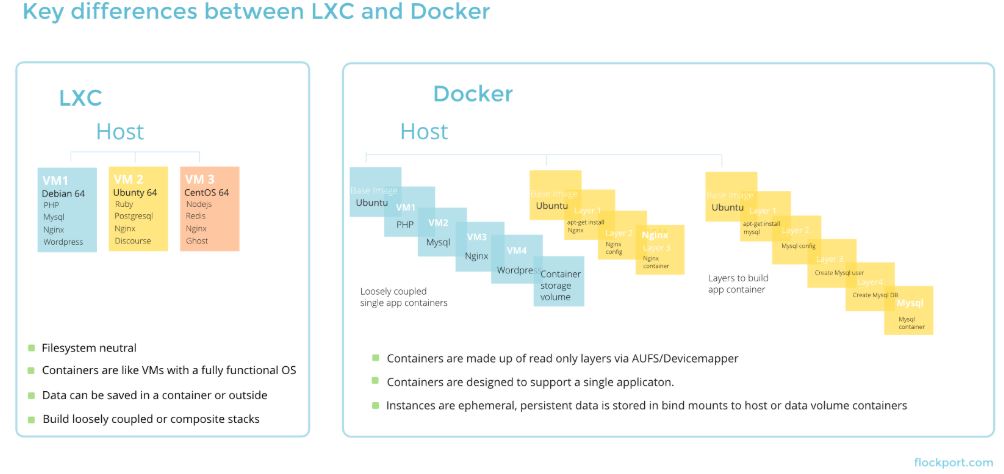
LXC targets system containers: a container is meant to mimic a complete Linux OS instance. You can SSH into it, run multiple daemons (cron, syslog, your application), and manage it much like a traditional server. This makes LXC a close analogue to a lightweight VM.
Docker targets application containers: a container packages exactly one application process and its dependencies. This constraint encourages microservice-style architectures where each container does one thing well and can be scaled, replaced, or updated independently.
2. Image Layering and Portability
Docker introduced a layered, copy-on-write image format. Each instruction in a Dockerfile produces an immutable layer; layers are cached and reused across builds and deployments. This means:
- Images are content-addressed and reproducible.
- Pushing or pulling an image only transfers changed layers, saving bandwidth.
- Any host with a compliant OCI runtime can run the same image without reconfiguration.
LXC does not have a standardized image format in the same sense. Container templates exist, but moving a running LXC environment between hosts requires more manual effort.
3. Versioning and Rollback
Because Docker images are immutable and layered, versioning is built in. You tag images, push them to a registry, and roll back to a previous tag if a release introduces a regression. LXC containers are more like live systems—they accumulate changes over time, which makes disciplined rollback harder without additional tooling.
4. Ecosystem and Tooling
Docker benefits from a large ecosystem: Docker Hub provides hundreds of thousands of pre-built images; Docker Compose orchestrates multi-container applications locally; Kubernetes (and other orchestrators) natively speak the OCI image and container runtime standards that Docker helped define.
LXC’s ecosystem is smaller and more Linux-distribution-centric. LXD (the daemon layer maintained by Canonical that sits on top of LXC) improves the management story considerably, adding REST APIs, clustering, and a richer image server, but LXC/LXD remains less widely adopted in CI/CD pipelines compared to Docker.
5. Networking and Resource Management
Both LXC and Docker use kernel namespaces for network isolation and cgroups for resource limits. Docker’s higher-level networking model (bridge networks, overlay networks, user-defined networks) abstracts away much of the low-level configuration. LXC gives you more direct control, but that control comes with more configuration responsibility.
6. Access via Libvirt
LXC can optionally be managed through libvirt using its LXC driver (connect string: lxc:///). This lets you manage LXC containers alongside QEMU/KVM VMs through a unified API. Libvirt-managed LXC and native LXC are not fully interchangeable, so choose your management path early and stay consistent.
Side-by-Side Comparison
| Dimension | LXC | Docker |
|---|---|---|
| Container model | System container (full OS) | Application container (single process) |
| Kernel dependency | Linux only | Linux (natively); Windows/macOS via VM shim |
| Image format | Templates / rootfs tarballs | OCI-compliant layered images |
| Registry / Hub | LXD image server (images.linuxcontainers.org) | Docker Hub, GHCR, ECR, and any OCI registry |
| Orchestration | LXD clustering | Kubernetes, Docker Swarm, Nomad, etc. |
| Learning curve | Moderate–steep for beginners | Gentle; large documentation base |
| Use case fit | Multi-service environments, dev VMs, legacy apps | Microservices, CI/CD pipelines, cloud-native apps |
When to Choose LXC
- You need a full Linux OS environment inside a container (systemd, multiple services, SSH daemon).
- You are migrating traditional server workloads to containers incrementally and want minimal application changes.
- You need fine-grained control over container resources without an additional abstraction layer.
- You are already using libvirt and want a unified management plane for VMs and containers.
When to Choose Docker
- You are building or deploying microservices or twelve-factor applications.
- You need reproducible, versioned, portable application packages that run identically in dev, staging, and production.
- You want to integrate with a Kubernetes-based or CI/CD pipeline ecosystem.
- You want access to the large library of pre-built images on public registries.
Summary
LXC and Docker are complementary rather than strictly competing technologies. LXC excels when you need a container that behaves like a lightweight, full-featured Linux system. Docker excels when you need fast, portable, versioned application packaging with broad ecosystem support. For most modern cloud-native and DevOps workflows, Docker (or the broader OCI runtime ecosystem it spawned) is the pragmatic default. For workloads that demand full OS-level isolation without the overhead of a hypervisor, LXC—especially when managed via LXD—remains a compelling option.
Understanding both tools makes you a more versatile infrastructure engineer, since production environments frequently use VMs, LXC-style system containers, and Docker application containers in combination.