Introduction
Software development moves faster today than at any other point in tech history. Not long ago, software companies released updates once or twice a year. Tech teams spent months writing code in isolation, only to face chaotic integration phases that delayed product launches.
In traditional setups, engineering teams struggled deeply with manual testing and code integration. Developers worked on separate features for weeks. When they finally tried to combine their work into a single codebase, everything broke.
Testing happened late in the cycle, bug fixing took weeks, and production deployments were stressful events that required whole teams to work through the weekend. This old approach created massive bottlenecks, frustrated businesses, and stalled innovation.
To solve these compounding delays, modern software engineering embraced automation. Continuous Integration became the bedrock of this transformation. As a foundational pillar of modern DevOps culture, it removes human error from the code consolidation process. It changes how teams write, test, and ship applications.
For students, freshers, developers, QA engineers, and IT professionals, understanding this concept early is critical. It bridges the gap between writing simple local scripts and contributing to enterprise-grade software products.
Learning these automation concepts from an established platform like DevOpsSchool provides beginners with the exact practical context needed to thrive in modern software teams. Understanding automation early reshapes how you think about code quality and team collaboration.
What Is Continuous Integration?
Continuous Integration is a software development practice where developers regularly merge their code changes into a central repository. Instead of waiting weeks to combine code, team members commit their work multiple times a day. Each contribution triggers an automated build and automated test suite to verify the stability of the application.
The primary goal of this practice is to find and fix bugs faster, improve software quality, and reduce the time it takes to validate and release new software updates.
To understand this clearly, consider a relatable real-world analogy:
Imagine a large commercial kitchen preparing a massive buffet for a major event.
In an old-school kitchen, ten different chefs cook ten different dishes completely in isolation. They do not taste each other’s food, and they do not check if the flavors match. Right before the guests arrive, they dump all the food onto a single large serving table. Suddenly, they realize three dishes are overly salty, two are cold, and the desserts are melting because they were placed next to the hot ovens. The kitchen descends into pure panic trying to fix the meal while guests wait.
Now, imagine a modern kitchen operating with a Continuous Integration mindset. Every time a chef finishes a small component of a dish, they pass a small sample to an automated tasting station. The station instantly checks the temperature, salt levels, and presentation against a master recipe. If a sauce is too salty, an alarm goes off immediately. The chef fixes it within two minutes while the sauce is still in the pan. By the time the buffet opens, every single dish is perfectly synchronized, high-quality, and ready for the guests without a single second of panic.
In software, Continuous Integration acts exactly like that automated tasting station. It ensures that every small line of code added by any developer fits perfectly into the main application instantly.
Why Continuous Integration Matters
In modern software development, speed without quality is useless, and quality without speed is irrelevant. Continuous Integration bridges this gap perfectly. It matters because it completely eliminates the guesswork from engineering workflows.
When code is integrated continuously, developers know the exact state of the software at any given hour. This transparency changes how businesses operate and how engineering teams collaborate.
Faster Development and Innovation
When developers do not have to worry about breaking the entire application with their changes, they write code with much higher confidence. They can build features in small, manageable pieces, push them to the central repository, and receive validation within minutes. This rapid loop allows companies to ship features to customers fast, outpace competitors, and respond to market demands efficiently.
Superior Software Quality
Automating the compilation and testing of code means human error is caught before it reaches production environments. If a developer accidentally deletes a bracket or introduces a logical flaw, the automated system catches it instantly.
The bug never makes it to an actual user. This constant, automated verification keeps the master codebase highly stable, minimizing production crashes and ensuring a smooth user experience.
Problems Developers Faced Before CI
To appreciate the value of modern automation, it is essential to understand the structural failures of traditional software development methodologies.
| Problem | Impact on Engineering Teams |
| Severe Code Conflicts | Developers worked in isolation for weeks. When merging code, thousands of conflicting lines appeared, leading to days of painful manual resolution. |
| Delayed Testing Cycles | Testing occurred only at the end of a development phase. QA teams received massive, buggy builds, making deep testing impossible. |
| Extremely Slow Releases | Because integration and testing were manual and error-prone, companies could only ship software updates a few times a year. |
| Late Bug Detection | Bugs introduced on day one of a project were often discovered on day ninety, making them incredibly expensive and difficult to fix. |
| Team Coordination Issues | Engineers lacked visibility into what their peers were doing, causing redundant work and broken communication channels. |
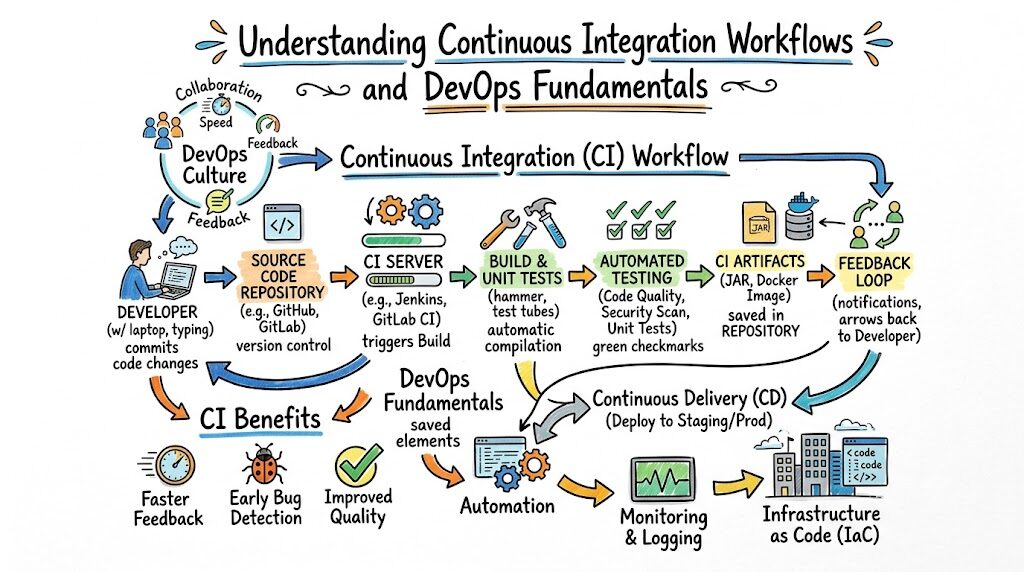
How Continuous Integration Works
The actual execution of Continuous Integration follows a highly structured, repeatable, and automated loop. It triggers the moment an engineer decides to add a new feature or fix a bug.
[Developer Writes Code]
          │
          ▼
[Push to Git Repository]
          │
          ▼
[Automated Build Starts]
          │
          ▼
[Automated Testing Runs]
          │
          ▼
[Feedback Provided to Team]
Code language: CSS (css)
1. Developer Writes Code
An engineer works on a small, specific task on their local computer. This could be adding a login button, fixing a font size, or updating a database connection. They test it briefly on their local machine to ensure basic functionality.
2. Code Pushed to Git Repository
Once the developer completes the task, they save their work and push their code changes to a central version control repository, such as GitHub or GitLab. This central repository serves as the single source of truth for the entire engineering team.
3. Automated Build Starts
The central repository communicates with a dedicated Continuous Integration server. The server instantly wakes up, provisions a clean, isolated environment, and downloads the updated codebase. It then compiles the source code into runnable software files. If there is a syntax error or a missing file, the build fails immediately.
4. Automated Testing Runs
Once the build compiles successfully, the server runs a pre-defined suite of automated tests. These tests check various aspects of the application, verifying that old features still work and that the new code behaves exactly as expected under different conditions.
5. Feedback Provided
The server compiles the results of the build and testing phases. If everything passes, the server marks the code change as safe, and it remains part of the main codebase. If anything fails, the system sends an instant notification to the developer via email or chat tools, detailing exactly which test broke and why.
Core Components of Continuous Integration
A reliable automated pipeline relies on several moving parts working together in perfect harmony. Beginners must understand these core components to see how automated workflows function.
| Component | Purpose in the Pipeline |
| Version Control System | Acts as the central storage engine for code. Tracks every historical change and allows multiple developers to work together. Examples include Git, GitHub, and GitLab. |
| Automated Build Scripts | Small execution files that tell the system exactly how to compile raw code into working software packages without human intervention. |
| Automated Test Suites | A collection of code-based checks that evaluate the software for functionality, security vulnerabilities, performance speed, and logic. |
| Notification Engine | The communication layer that alerts developers via chat tools, dashboards, or emails the exact moment a build succeeds or breaks. |
| Artifact Management Storage | A secure storage vault where successful software packages are kept, ready to be picked up for deployment to servers. |
Popular CI Tools for Beginners
The DevOps ecosystem contains many different platforms designed to automate code integration. As a beginner, you do not need to learn all of them. Focus on understanding how one or two major tools operate.
| Tool | Best For | Beginner Perspective |
| Jenkins | Open-source flexibility and self-hosted infrastructure. | Highly popular industry veteran. It has a slightly steeper learning curve but offers incredible customization via thousands of plugins. |
| GitHub Actions | Projects hosted directly inside GitHub. | Excellent for beginners. It requires zero server setup and integrates directly into your existing code repositories using simple configuration files. |
| GitLab CI/CD | All-in-one DevOps platform management. | Powerful and native to GitLab. It provides a cohesive experience covering code hosting, automated testing, and security scanning out of the box. |
| CircleCI | Speed and cloud-managed infrastructure. | Great for teams that want fast setups without managing infrastructure. It handles heavy scaling automatically in the cloud. |
| Azure DevOps | Enterprise organizations using Microsoft systems. | Ideal for companies heavily invested in the cloud ecosystem, providing deep integration with corporate project management boards. |
Real-World Example: Team Without Continuous Integration
To truly see the difference, let us look at two software engineering teams building the exact same mobile banking application.
The Team Manual Workflow
Team Alpha consists of five developers who do not use automation. They work on their individual laptops for two full months without sharing code.
Developer 1 changes how user authentication works. Developer 2 rewrites the database schema to make searches faster. Developer 3 adds a currency conversion feature.
On delivery week, they attempt to combine all their code manually into one file.
The Consequences
The application immediately crashes. The new database layout built by Developer 2 prevents Developer 1’s login feature from opening. Developer 3’s conversion tool relies on outdated code that no longer exists.
The team spends three weeks sitting in emergency meetings, manually scrolling through tens of thousands of lines of code to find out who broke what.
The launch is delayed, the business loses money, and the engineering team suffers immense burnout trying to fix a mountain of uncoordinated errors.
Real-World Example: Team Using Continuous Integration
The Team Automated Workflow
Team Beta uses a modern automated pipeline. Every single day, all five developers push their small code changes to a central repository three to four times.
When Developer 1 updates the authentication system at 10:00 AM, the automated server instantly runs the entire codebase and runs hundreds of tests.
At 11:30 AM, Developer 2 updates the database schema. The automated server runs the build, notices that Developer 2’s change accidentally breaks Developer 1’s login button, and sounds an alert within four minutes of the code push.
The Benefits
Developer 2 receives an instant notification: “Build Failed: Database update broke authentication logic on line 42.” Because the change was made just minutes ago, Developer 2 remembers exactly what they wrote. They fix line 42 in five minutes and push the code back to the repository. The build turns green.
The application remains perfectly stable every single day. The team launches their product exactly on time with zero stress, absolute confidence, and exceptional software quality.
Benefits of Continuous Integration
Implementing an automated integration cycle transforms software engineering from a high-risk guessing game into a predictable, measurable science.
- Immediate Feedback Loops: Developers know within minutes if their code is good or bad. They do not have to wait for weekly QA reviews to discover simple syntax mistakes.
- Early Issue Detection: Finding a bug when it is a single line of code is simple. Finding it when it is buried under a million lines of integrated code is a nightmare. Automation surfaces issues when they are small and highly isolated.
- Better Team Collaboration: Because the shared codebase is validated continuously, team members work with the peace of mind that they are building on top of a highly functional, stable foundation.
- Reliable Software Releases: When software is tested thousands of times during development, production deployments become completely routine events rather than stressful technical emergencies.
Common Beginner Mistakes While Learning CI
When starting your journey into automation and DevOps, it is incredibly easy to fall into common learning traps that lead to frustration. Avoid these regular pitfalls:
- Skipping Git Fundamentals: You cannot automate code integration if you do not know how to manage code versions manually. Many beginners try to build complex Jenkins pipelines before mastering basic Git commands like commit, push, branch, and merge.
- Overcomplicating the First Pipeline: Beginners often try to build enterprise-grade configurations on day one. They try to add security scans, performance trackers, and multi-cloud deployments all at once, which leads to broken, unfixable configurations.
- Ignoring the Testing Phase: A pipeline that only builds code but runs zero tests is not practicing true integration checking. A green build means nothing if the underlying code contains broken logical features.
- Learning Too Many Tools At Once: Do not jump from Jenkins to GitHub Actions to GitLab CI all in the same week. The core principles of automation are identical across all tools. Master one tool thoroughly before moving to the next.
Best Practices for Learning Continuous Integration
If you want to build a rock-solid understanding of automated software development workflows, follow this structured, practical path.
- Start with the Absolute Basics: Build a simple web page with basic HTML and CSS. Store it on your local computer using Git, and practice managing your own code history cleanly.
- Master Version Control Hosting: Move your local project up to GitHub or GitLab. Learn how to open a Pull Request and how to safely merge one branch of code into another without losing data.
- Build a Minimal Viable Pipeline: Create a single-step automated workflow using GitHub Actions. Write a configuration file that simply prints “Hello, World! Build Successful” every time you push code. Celebrate this small victory.
- Integrate Simple Tests: Add a very basic script to your code that verifies a specific file exists. Configure your automation tool to run that script on every push. Watch the pipeline fail intentionally if you delete the file.
- Focus on the Concepts over Syntax: Do not memorize specific tool commands. Focus on understanding why the code moves from version control to build environments, and how log messages help you debug errors.
Role of DevOpsSchool in Learning CI
Navigating the massive landscape of automation, cloud native architectures, and testing frameworks can feel completely overwhelming when you are studying completely alone. This is where structured learning programs change the trajectory of your education.
Platforms like DevOpsSchool focus heavily on breaking down complex architectural patterns into highly digestible, hands-on learning paths. Instead of just showing you theoretical slides or giving you pre-written configuration scripts to copy, they emphasize building a real-world engineering mindset.
Through structured guidance, beginners get direct exposure to real production environments. You learn how to configure version control repositories, write clean build scripts, set up automated testing matrices, and debug broken integration logs from scratch.
This practical, experience-driven approach ensures you understand the underlying philosophy of DevOps, preparing you to solve real technical challenges when you step into professional engineering environments.
Career Importance of Continuous Integration Skills
Automation is no longer an optional luxury skill for tech workers; it is a baseline global industry requirement. If you want to work in modern tech, you must understand how automated pipelines operate.
- DevOps Engineer: These professionals design, optimize, and maintain the entire automation infrastructure. They ensure code flows seamlessly from a engineer’s laptop straight to public cloud systems without friction.
- Software Engineer: Modern developers do not just write code; they own their code’s lifecycle. Knowing how to read pipeline logs and fix integration errors makes you an incredibly valuable team player.
- QA Automation Engineer: Quality Assurance has shifted away from manual button clicking. Modern QA professionals write automated test scripts that run directly inside the integration pipeline to catch defects instantly.
- Site Reliability Engineer (SRE): SREs focus on system uptime and resilience. They evaluate integration pipelines to ensure that new code updates do not compromise production system stability or speed.
- Platform Engineer: These specialists build internal developer portals and reusable automated templates, making it simple for hundreds of internal developers to integrate their work securely.
Industries Using Continuous Integration
Every sector that relies on digital applications to generate revenue or serve users relies heavily on automated delivery pipelines.
SaaS Platforms
Companies offering cloud software must ship updates multiple times a day to keep users engaged and secure. Automated validation ensures they can release new features constantly without breaking the core application for millions of concurrent users.
Banking and Finance
Financial systems demand extreme security and zero downtime. Automated integration pipelines run exhaustive compliance and security scans on every single line of code, ensuring that financial calculators and transaction engines remain completely flawless.
Healthcare Systems
Medical technology applications manage critical patient data and hospital operations. Pipelines in healthcare guarantee that software updates strictly adhere to global privacy regulations and data protection standards before deployment.
E-Commerce Ecosystems
Online retailers face massive traffic shifts, especially during holiday sales events. Automated pipelines allow engineering teams to quickly deploy bug fixes, update inventory interfaces, and scale checkout workflows safely during high-demand periods.
Future of Continuous Integration
The methodology of automated code integration continues to evolve alongside broader industry shifts in cloud computing and data analytics.
AI-Assisted Testing and Optimization
Artificial intelligence is steadily moving into automation pipelines. Future systems will automatically analyze your code changes, predict which tests are most likely to fail, and run those specific checks first to save computing time and provide even faster feedback.
Cloud-Native Pipelines
As applications move entirely to containerized infrastructure, integration pipelines are becoming fully cloud-native. Pipelines will spin up highly complex, isolated test environments in seconds inside cloud clusters, tearing them down the moment testing finishes to optimize infrastructure costs.
DevSecOps Integration
Security checking is moving further left in the development lifecycle. Instead of auditing software security right before release, future automated platforms will run deep vulnerability scans on every single daily code contribution, making security an implicit part of the regular development loop.
FAQs (15 Questions & Answers)
What is Continuous Integration?
Continuous Integration is a software development practice where team members merge their code changes into a single central repository frequently. Each code push triggers an automated system to compile and test the application, catching bugs instantly.
Why is CI important for software teams?
It removes manual errors from code collaboration, speeds up development timelines, catches bugs early when they are cheap to fix, and ensures the master codebase is always stable and ready for deployment.
Is CI difficult for beginners to learn?
Not if you take it step by step. It feels confusing if you try to learn massive enterprise setups immediately. If you start by understanding basic file saving with Git and small automated scripts, the concept becomes highly intuitive.
Do I need strong coding skills to understand CI?
You do not need to be an expert programmer to understand or manage integration pipelines. However, you do need a solid grasp of basic scripting, how software compiles, and how to write basic configuration files using formats like YAML.
What is the difference between Git and a CI tool?
Git is a local version control tool used to track changes in your source files. A CI tool, like Jenkins or GitHub Actions, is an automated server that watches your Git repository and automatically builds and tests your code whenever changes appear.
Is Jenkins still a useful tool to learn today?
Yes. While newer cloud-hosted tools have emerged, Jenkins remains incredibly prevalent in enterprise companies worldwide due to its open-source nature, deep plugin ecosystem, and massive historical adoption.
What comes after Continuous Integration in DevOps?
Continuous Integration is followed by Continuous Delivery or Continuous Deployment. While CI focuses on merging and testing code, CD focuses on automatically packaging and moving that validated code out to production servers for users.
Can beginners practice CI at home for free?
Absolutely. You can create a free account on GitHub, set up a public code repository, and use GitHub Actions completely free to build and test your personal practice projects.
What is a CI pipeline?
A pipeline is a sequence of automated steps that your code travels through from the moment you push it to a repository until it is declared stable. The steps typically include pulling code, compiling it, running tests, and generating status reports.
What happens when a build fails?
When a build fails, the pipeline stops immediately. The system flags the code change as unsafe and sends a detailed log report to the developer so they can fix the error right away. The main production code remains completely unaffected.
How often should developers integrate their code?
Ideally, multiple times a day. The more frequently you push small, manageable chunks of code, the easier it is to pinpoint errors and avoid painful code integration conflicts with your teammates.
What are automated unit tests?
Unit tests are small blocks of code written to test a single, specific function or piece of logic within an application. They run incredibly fast and form the foundation of a pipeline’s automated testing phase.
What is a YAML file in automation pipelines?
YAML is a human-readable data serialization language. Most modern automation tools use files written in YAML to let engineers specify the exact steps, environments, and commands the pipeline should execute.
Why do companies prefer CI skills when hiring freshers?
Companies want engineers who can contribute to team projects immediately without breaking existing applications. Knowing these automation systems proves you understand professional teamwork and modern engineering workflows.
Can I learn CI without knowing how to use Linux?
While you can build basic workflows on Windows or macOS, a fundamental understanding of Linux command-line operations is highly recommended, as most enterprise automation servers run on Linux operating systems.
Final Thoughts
Continuous Integration is fundamentally a practical, experience-driven skill rather than a collection of dry theories. It is a mindset that prioritizes teamwork, transparency, and high quality over isolated development speeds.
By removing manual compilation and testing tasks, automation empowers developers to focus on what they do best: writing great code and solving interesting real-world problems.
As you begin your journey into DevOps and cloud automation, remember to start with the absolute fundamentals. Do not worry about building massive, complex enterprise setups right away.
Focus on understanding version control, master the art of writing simple automated scripts, and practice consistently. Over time, these basic building blocks will form the foundation of a highly successful technical career.