Introduction
In the early days of software engineering, development and operations teams functioned in silos. Developers wrote code and threw it over the wall to the operations team, who then struggled to deploy it into stable environments. This disconnect led to long release cycles, frequent deployment failures, and significant friction. As businesses demanded faster innovation, the industry needed a shift in philosophy and methodology.
This shift brought us the DevOps movement. DevOps is not just a set of tools; it is a cultural and technical bridge between development and operations. By emphasizing automation, continuous integration, and shared responsibility, organizations have transformed how they build, ship, and maintain software. Whether you are a student or a seasoned IT professional, mastering the DevOps lifecycle is essential to navigating modern software delivery.
To gain practical, hands-on experience, many professionals turn to resources like DevOpsSchool. Understanding how to weave together development, testing, and operational tasks is the key to building reliable, high-performing systems.
What Is the DevOps Lifecycle?
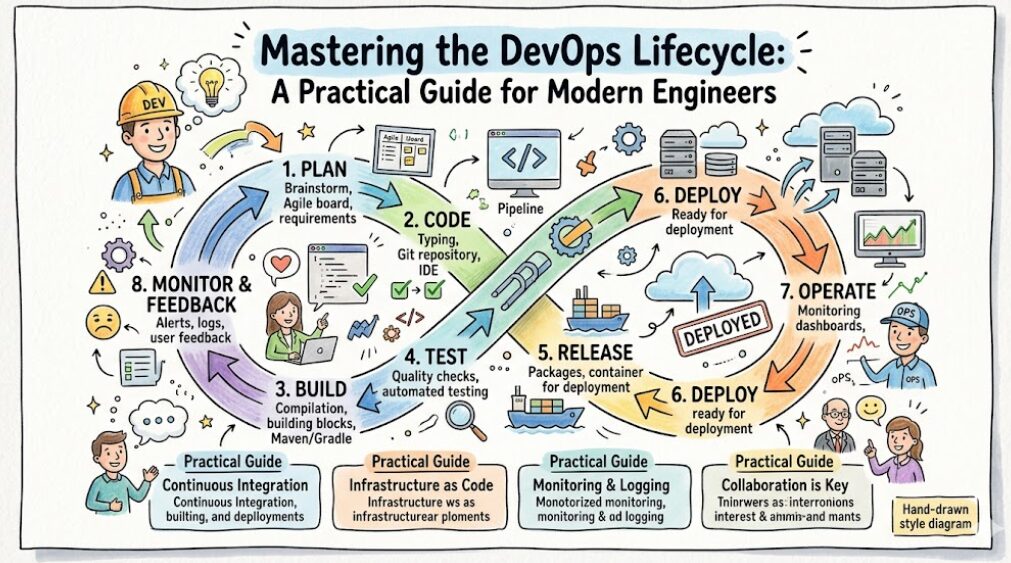
The DevOps lifecycle is an iterative, continuous process that integrates development and operations to improve software delivery. Unlike traditional models that follow a linear path, the DevOps lifecycle is circular. It focuses on breaking down organizational barriers and using automation to bridge the gap between writing code and managing it in production.
At its core, the lifecycle is defined by continuous improvement. It ensures that every change—no matter how small—is validated, tested, and deployed safely. By fostering collaboration and using automated feedback loops, teams can release high-quality software with speed and confidence.
Why the DevOps Lifecycle Matters
The importance of this methodology lies in its ability to balance two competing priorities: speed and stability.
- Faster Releases: By automating repetitive tasks, teams reduce the time taken from code commit to production.
- Better Reliability: Automated testing ensures that bugs are caught early, reducing the risk of outages.
- Improved Collaboration: When developers and operations staff use the same workflow, it eliminates finger-pointing and encourages shared ownership.
- Reduced Downtime: Continuous monitoring and automated rollback capabilities ensure that if something goes wrong, systems recover quickly.
- Continuous Improvement: Feedback loops provide insights into how software performs, allowing teams to iterate based on real user data.
Overview of the DevOps Lifecycle Stages
The lifecycle is typically visualized as an infinity loop, representing the constant flow of work.
| Stage | Purpose | Key Activities | Common Tools |
| Planning | Define goals | Requirements, Backlogs | Jira, Trello |
| Development | Write code | Coding, Version Control | Git, VS Code |
| Build | Create artifacts | Compilation, Packaging | Maven, Jenkins |
| Testing | Ensure quality | Automated unit/integration tests | Selenium, SonarQube |
| Release | Manage versions | Artifact storage, Approval | Nexus, Artifactory |
| Deployment | Ship to environment | Configuration, Infrastructure setup | Kubernetes, Terraform |
| Operations | Manage health | Scaling, Maintenance | Linux, Ansible |
| Monitoring | Track performance | Log analysis, Alerting | Prometheus, Grafana |
| Feedback | Optimize | Analyzing user reports/data | Slack, PagerDuty |
Stage 1: Planning
Planning is where the vision is defined. In an Agile DevOps environment, this stage involves breaking down high-level requirements into manageable tasks or user stories. Teams align on what needs to be built, the business value it delivers, and the resources required.
- Key Activities: Managing product backlogs, sprint planning, and identifying dependencies.
- Tools: Jira, Azure Boards, and Trello are staples for tracking progress.
Stage 2: Development
Once the plan is in place, developers start writing code. In a mature DevOps workflow, the emphasis is on version control. Every change must be tracked, and branching strategies (like Gitflow) are used to manage different versions of the code base.
- Collaboration: Developers push code to repositories, where it undergoes peer review to ensure quality before merging into the main branch.
- Tools: Git (the industry standard), GitHub, GitLab, and Bitbucket.
Stage 3: Build
The Build stage transforms raw source code into an executable artifact. This is often the first gate in the CI/CD pipeline. The system compiles the code, resolves dependencies, and creates a package—such as a JAR file or a Docker image.
- Automation: Using tools like Jenkins or GitHub Actions ensures that every time a developer pushes code, the build process triggers automatically.
Stage 4: Testing
Testing is the gatekeeper of quality. In DevOps, this is not a one-time event at the end of development. Instead, “Continuous Testing” runs automated scripts whenever a build is generated.
- Types of Testing: Functional, integration, security (DevSecOps), and performance tests.
- Tools: JUnit for Java testing, Selenium for browser automation, and SonarQube for code quality analysis.
Stage 5: Release
After the software passes testing, it enters the Release stage. Here, the focus is on versioning and artifact management. You need a reliable place to store your build artifacts so that the deployment stage can pull the exact version required for the target environment.
- Tools: Sonatype Nexus or JFrog Artifactory are commonly used as private repositories to manage these assets securely.
Stage 6: Deployment
Deployment is the process of moving code into an environment—whether it is Development, QA, Staging, or Production. Modern DevOps leans heavily on infrastructure-as-code (IaC) to ensure that environments are reproducible.
- Advanced Strategies: Techniques like Blue-Green deployment (running two identical environments) or Canary releases (deploying to a small subset of users) minimize risk.
- Tools: Kubernetes for orchestration, Helm for package management, and ArgoCD for GitOps-based deployment.
Stage 7: Operations
Operations involves the ongoing management of the infrastructure where your application lives. This includes patching servers, scaling resources based on load, and ensuring high availability.
- Focus: Stability and scalability. Experienced operations teams rely on automation tools like Ansible or Terraform to manage fleet-wide configurations without manual intervention.
Stage 8: Monitoring & Observability
Monitoring is the “eyes” of the DevOps lifecycle. You cannot improve what you cannot measure. Observability goes a step further by providing deep insights into the internal state of a system based on its logs, metrics, and traces.
- Tools: Prometheus for metrics, Grafana for visualization, and the ELK Stack (Elasticsearch, Logstash, Kibana) for log management.
Stage 9: Continuous Feedback
This final stage closes the loop. Feedback from monitoring systems and actual end-users flows back into the planning stage. This data-driven approach ensures that the next development cycle is focused on the most critical improvements.
CI/CD and the DevOps Lifecycle
CI/CD is the engine room of the DevOps lifecycle. It refers to the automation of the steps between code development and deployment.
| Concept | Definition | Goal |
| Continuous Integration (CI) | Merging code into a shared repository frequently. | Detect bugs early. |
| Continuous Delivery (CD) | Preparing code so it can be released to production at any time. | Ensure the code is always in a deployable state. |
| Continuous Deployment | Automatically pushing every change to production. | Eliminate manual intervention. |
Role of Automation in the DevOps Lifecycle
Automation is the defining characteristic of DevOps. It removes human error, increases consistency, and allows teams to scale. From automated testing and infrastructure provisioning to self-healing clusters, automation is what enables “Continuous” everything.
DevOps Lifecycle in Cloud-Native Environments
Cloud-native development leverages the full potential of the DevOps lifecycle. By using microservices, containers, and Kubernetes, organizations can deploy updates to specific parts of an application without needing to redeploy the entire system. Platform engineering teams build internal developer platforms that simplify these complex cloud workflows for the wider organization.
Popular DevOps Tools Across the Lifecycle
| Tool | Purpose | Lifecycle Stage | Difficulty |
| Git | Version Control | Development | Low |
| Jenkins | CI/CD Orchestration | Build/Test | Medium |
| Terraform | Infrastructure as Code | Deployment | High |
| Kubernetes | Container Orchestration | Deployment | High |
| Prometheus | Monitoring | Operations | Medium |
Real-World DevOps Lifecycle Example
- Commit: A developer pushes a new feature to the repository.
- Trigger: The CI pipeline (e.g., GitHub Actions) detects the commit and triggers a build.
- Test: Automated unit tests run. If they fail, the developer is notified immediately.
- Package: A Docker image is built and pushed to a registry.
- Deploy: The CI/CD pipeline triggers an update to the Kubernetes cluster using a rolling update strategy.
- Monitor: Prometheus monitors the new version. If error rates spike, the team receives an alert via Slack or PagerDuty to roll back the change.
Benefits of the DevOps Lifecycle
The primary benefit is business agility. Organizations that master these practices can deliver features in hours rather than months. Furthermore, the operational stability gained through automation allows teams to spend less time “fighting fires” and more time building value for the customer.
Common Challenges in the DevOps Lifecycle
- Cultural Resistance: Moving from a “silo” mindset to a collaborative one is difficult.
- Legacy Systems: Older, monolithic applications are notoriously hard to containerize or automate.
- Security Debt: “Moving fast” sometimes leads to “moving insecurely.” This is why DevSecOps is becoming a critical practice.
Best Practices for Managing the DevOps Lifecycle
- Start Small: Don’t try to automate everything at once.
- Infrastructure as Code (IaC): Treat your infrastructure like software; version it and test it.
- Embrace Failure: Use outages as learning opportunities, not blame games.
- Continuous Learning: The landscape changes fast; dedicate time to upskilling.
DevOps Lifecycle vs Traditional Software Delivery
| Feature | Traditional IT | DevOps Lifecycle |
| Deployment Speed | Slow (Weeks/Months) | Fast (Hours/Minutes) |
| Collaboration | Siloed | Cross-Functional |
| Automation | Manual/Partial | Full Automation |
| Feedback Loops | Delayed | Immediate |
| Release Frequency | Low | High |
DevOps Lifecycle Career Opportunities
The demand for DevOps professionals is surging. Key roles include:
- DevOps Engineer: Focuses on the pipeline and automation.
- Site Reliability Engineer (SRE): Focuses on system uptime and performance.
- Cloud Engineer: Focuses on cloud-native infrastructure and scalability.
- Platform Engineer: Builds internal tools to improve developer productivity.
Certifications & Learning Paths
Practical projects are more valuable than certifications alone, but a structured path helps.
| Certification | Best For | Focus Area |
| AWS/Azure/GCP Cloud Certs | Cloud Engineers | Infrastructure |
| CKA (Certified Kubernetes Admin) | DevOps/SRE | Containers |
| HashiCorp Terraform Assoc. | DevOps/IaC | Automation |
Learning within a structured environment, such as the ecosystem provided by DevOpsSchool, ensures you cover both the theoretical foundations and the practical applications required in real-world enterprises.
Common Beginner Mistakes
- Tool Obsession: Focusing on learning specific tools before understanding the underlying concepts of the lifecycle.
- Skipping Linux: Most DevOps tools run on Linux; a weak grasp here is a major bottleneck.
- Ignoring Networking: Understanding how services communicate is vital for troubleshooting.
- No Hands-on Work: Reading is not enough; build your own mini-pipelines on a cloud provider.
Future of the DevOps Lifecycle
The future is heading toward AI-assisted operations (AIOps), where machine learning helps predict failures before they happen. GitOps is also becoming the standard for managing infrastructure state, and the rise of Platform Engineering is further abstracting complexity for developers, allowing them to focus on code while the platform handles the lifecycle.
FAQs
- What is the DevOps lifecycle?It is a continuous, automated process that integrates development and operations to improve software quality and speed.
- Why is the DevOps lifecycle important?It bridges team silos, reduces manual errors, and allows for faster, more reliable software releases.
- What are the stages of DevOps?They generally include Planning, Development, Build, Testing, Release, Deployment, Operations, Monitoring, and Feedback.
- Is Kubernetes part of DevOps?Yes, Kubernetes is a tool used in the Deployment stage to manage containerized applications at scale.
- What is CI/CD in DevOps?Continuous Integration and Continuous Delivery/Deployment are the automated processes that ensure code is always ready for release.
- Which DevOps tools are most popular?Git, Jenkins, Docker, Kubernetes, Terraform, and Prometheus are industry leaders.
- Is coding necessary for DevOps?Yes. While you don’t need to be a software developer, you must be able to write scripts (Python/Bash) and understand code structures.
- How long does it take to learn DevOps?It depends on your background, but a focused, hands-on learning approach usually takes 6–12 months to reach a professional level.
- Can DevOps be applied to non-cloud projects?Yes, but the benefits are most apparent in cloud-native environments due to the ease of automation.
- What is DevSecOps?It is the practice of integrating security measures into every stage of the DevOps lifecycle.
- Do I need to be a Linux expert?You need a strong foundation in Linux administration, as most servers and containers run on Linux kernels.
- What is the difference between SRE and DevOps?DevOps is the culture/methodology; SRE is a specific way of implementing that methodology with a focus on reliability.
- Is the DevOps lifecycle fixed?No, it is highly customizable based on the size of the team and the specific needs of the product.
- How do I start with DevOps?Start by mastering Linux, Git, and a basic CI/CD pipeline using a tool like GitHub Actions.
- What is the role of monitoring?Monitoring provides the data needed to understand system health and triggers the feedback loop for improvement.
Final Thoughts
The DevOps lifecycle is more than a buzzword; it is a fundamental shift in how we deliver value to users. For anyone starting their journey, remember that the tools will change, but the principles of automation, collaboration, and continuous improvement remain constant. Do not be intimidated by the vast array of tools. Pick a path, build a project, and focus on solving real operational problems. Professional success comes to those who combine a solid technical foundation with a mindset of lifelong learning.