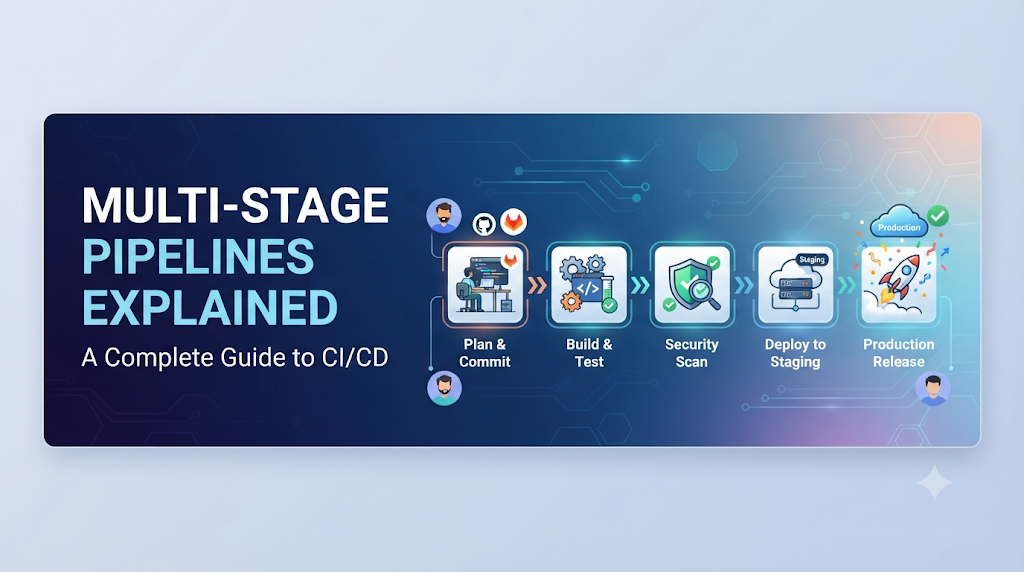
Imagine a developer commits code and the team needs to build, test, secure, package, and deploy the application all at once. Performing these tasks in a single unstructured script creates severe operational bottlenecks and makes troubleshooting nearly impossible. To solve this, engineering teams use multi-stage pipelines to divide software delivery into logical, connected phases with clear responsibilities. Educational platforms like DevOpsSchool often highlight this modular approach to help engineers master modern CI/CD implementation, giving teams total visibility, stronger security gates, and reliable software delivery.
1. Understand What A Multi-Stage Pipeline Means
To master continuous delivery, you must first understand the fundamental anatomy of a pipeline and how its execution components interact.
- What a pipeline is: A pipeline is an automated, repeatable sequence of actions that takes code from a version control system and delivers it to an environment, such as testing, staging, or production.
- What a pipeline stage represents: A stage is a major logical division within a pipeline (e.g., Build, Test, Deploy) that groups related activities together.
- Difference between a stage, job, and step:
- A step is an individual shell command, script, or task (e.g.,
npm install). - A job is a collection of steps that run sequentially on the same execution agent or runner.
- A stage is a collection of one or more parallel or sequential jobs that represent a distinct phase of the delivery lifecycle.
- A step is an individual shell command, script, or task (e.g.,
- How stages depend on one another: Pipelines execute stages in a defined order. A stage typically will not start until all preceding prerequisite stages complete successfully.
- Sequential versus parallel execution: Within a pipeline, stages usually execute sequentially (Stage A $\rightarrow$ Stage B $\rightarrow$ Stage C). However, jobs within a single stage can execute in parallel to speed up execution, such as running unit tests across multiple operating system environments simultaneously.
- How pipeline results move between stages: Successful stages produce outputs—known as artifacts or cached data—that subsequent stages download and consume, ensuring consistency across the entire workflow.
- How failed stages affect subsequent execution: If any mandatory step or job within a stage fails, the entire stage fails, halting the pipeline and preventing broken code from propagating downstream.
[ Source Code ]
       │
       ▼
  [ Build Stage ] ──(Pass)──► [ Test & Security Stages (Parallel) ] ──(Pass)──► [ Deploy Stage ]
       │                                    │                                      │
     (Fail)                               (Fail)                                 (Fail)
       ▼                                    ▼                                      ▼
[ Pipeline Stops ]                   [ Pipeline Stops ]                     [ Pipeline Stops ]
Code language: CSS (css)
2. Why Organizations Use Multi-Stage Pipelines
Adopting a multi-stage approach brings profound structural and cultural improvements to software engineering organizations.
- Better visibility into software delivery: Stakeholders can inspect the dashboard and instantly see whether an application is currently building, passing tests, waiting for approval, or running in production.
- Easier failure identification: Because tasks are neatly categorized, developers immediately know which stage broke, narrowing down troubleshooting from hours to minutes.
- Separation of responsibilities: Different teams can own different stages. For example, security engineers can manage compliance gates in the security stage, while operations teams govern the production deployment stage.
- Reusable pipeline components: Modular design allows teams to write pipeline templates that can be shared across multiple microservices and repositories.
- Consistent validation: Every code change goes through the exact same automated gauntlet, eliminating human error and manual configuration drift.
- Controlled environment promotion: Artifacts are promoted through environments sequentially, ensuring that what runs in production is identical to what passed validation in staging.
- Improved security enforcement: Automated vulnerability scans and policy checks run as non-bypassable gates before code reaches public environments.
- Easier maintenance and scaling: Updating a testing tool requires modifying only the test stage configuration rather than rewriting a monolithic script.
Despite these advantages, multi-stage pipelines introduce trade-offs. They require additional configuration complexity, can increase total pipeline execution time due to queuing and handoffs, and demand disciplined dependency management across distributed execution agents.
3. Explore the Architecture of A Multi-Stage Pipeline
A robust multi-stage CI/CD architecture relies on several coordinated components working together seamlessly:
- Source code repository: Stores application source code, configuration files, and pipeline definitions (e.g., Git).
- Pipeline configuration: Declarative text files (YAML or JSON) defining stages, jobs, triggers, and execution conditions.
- CI/CD orchestration platform: The server or cloud service managing pipeline scheduling, queueing, and state tracking.
- Build agents or runners: Virtual machines, containers, or bare-metal servers that execute the actual pipeline steps.
- Stage dependencies: Rules defining the execution flow and prerequisite conditions between stages.
- Jobs and execution steps: The granular commands executed on the build agents.
- Artifacts and caches: Compiled binaries, container images, and dependency libraries saved for reuse or downstream deployment.
- Environment variables: Configuration parameters injected dynamically during execution.
- Secrets and credentials: Encrypted tokens, API keys, and passwords stored securely in vault services.
- Deployment environments: Target infrastructure targets such as Kubernetes clusters, cloud VMs, or serverless functions.
- Pipeline logs and reports: Execution output streams providing auditing and debugging data.
4. Understand the Responsibilities of Each Pipeline Stage
A comprehensive enterprise pipeline typically incorporates several logical stages. However, remember that pipeline design should always reflect application requirements rather than arbitrary complexity.
- Source Stage: Retrieves source code from the repository, verifies commit hashes, and validates branch triggers.
- Build Stage: Provisions the runtime environment, downloads dependencies, compiles source code, and creates intermediate build outputs.
- Test Stage: Executes automated unit, integration, and functional tests to verify expected software behavior.
- Security Stage: Performs static code analysis (SAST), software composition analysis (SCA) for dependencies, and container vulnerability scanning.
- Package Stage: Bundles the verified application into immutable versioned artifacts, such as Docker container images, JAR files, or zip archives.
- Staging Stage: Deploys the packaged artifact to a pre-production environment that closely mimics production infrastructure.
- Approval Stage: Pauses execution to require manual authorization, compliance sign-off, or peer review before production release.
- Production Stage: Deploys the approved artifact to live production servers serving real users.
- Post-Deployment Stage: Executes smoke tests, synthetic user transactions, and health checks to confirm successful deployment.
5. Build A Multi-Stage Pipeline Through A Practical Example
To make these concepts concrete, let us trace a sample Node.js web application through a complete multi-stage pipeline.
Step-by-Step Workflow
- A developer commits application code to the
mainbranch in Git. - The webhook triggers the CI/CD platform automatically.
- The Source Stage checks out the repository code.
- The Build Stage installs Node.js dependencies (
npm ci). - The Build Stage compiles or bundles application assets.
- The Test Stage executes automated unit tests (
npm test). - The Security Stage scans dependencies for known vulnerabilities (
npm audit). - The Package Stage builds a versioned Docker image and pushes it to a container registry.
- The Staging Stage deploys the container to the staging Kubernetes namespace.
- Automated smoke tests validate the staging deployment.
- A manual approval gate pauses the pipeline for release manager sign-off.
- The Production Stage deploys the exact same Docker image tag to production.
- Health check monitoring verifies zero-downtime availability.
Sample Declarative Pipeline Configuration (YAML)
YAML
stages:
  - build
  - test
  - security
  - package
  - staging
  - production

variables:
  IMAGE_NAME: "registry.example.com/webapp"

build_job:
  stage: build
  script:
    - echo "Installing dependencies..."
    - npm ci
    - echo "Building application assets..."
    - npm run build
  artifacts:
    paths:
      - dist/
      - node_modules/

test_job:
  stage: test
  dependencies:
    - build_job
  script:
    - echo "Running unit tests..."
    - npm test

security_job:
  stage: security
  script:
    - echo "Running dependency vulnerability scan..."
    - npm audit --audit-level=high

package_job:
  stage: package
  dependencies:
    - build_job
  script:
    - echo "Building Docker container image..."
    - docker build -t $IMAGE_NAME:$CI_COMMIT_SHA .
    - docker push $IMAGE_NAME:$CI_COMMIT_SHA

staging_deploy:
  stage: staging
  script:
    - echo "Deploying image to Staging environment..."
    - kubectl set image deployment/webapp-staging webapp=$IMAGE_NAME:$CI_COMMIT_SHA --namespace=staging

production_approval:
  stage: production
  when: manual
  script:
    - echo "Approval granted. Deploying to Production..."
    - kubectl set image deployment/webapp-prod webapp=$IMAGE_NAME:$CI_COMMIT_SHA --namespace=production
Code language: JavaScript (javascript)
6. Manage Dependencies and Execution Order Between Stages
Execution control determines how and when pipeline components talk to each other. By default, stages execute sequentially, but modern pipelines allow sophisticated branching and concurrency.
- Sequential stage execution: Ensuring that testing never occurs before a successful build.
- Parallel jobs within a stage: Running unit tests, linting, and style checks concurrently to minimize feedback delay.
- Stage dependencies (
needs/dependencies): Explicitly declaring which upstream data a job requires, enabling non-linear pipelines where a deployment stage can skip unrelated intermediary jobs if needed. - Conditional execution (
if/when): Running specific stages only on designated branches (e.g., running production deployment exclusively on tagged release commits). - Failure handling and retry policies: Configuring automatic retries for flaky network operations or failing fast on syntax errors.
- Timeouts: Setting execution limits so hanging processes do not block runner agents indefinitely.
- Manual intervention: Inserting human approval checkpoints for high-risk environments.
7. Share Artifacts and Data Between Pipeline Stages
A common anti-pattern in early CI/CD implementations was rebuilding the application from source code at every single stage. Multi-stage pipelines solve this by generating an immutable artifact once and passing it downstream.
- Build artifacts: Compiled binaries, static assets, or test reports stored temporarily by the orchestration engine.
- Container images: Immutable Docker images tagged with unique commit SHAs or semantic version numbers.
- Artifact repositories: Centralized storage systems (e.g., Nexus, Artifactory, Container Registries) holding approved deliverables.
- Pipeline variables and job outputs: Exported environment variables passing dynamic metadata (like build numbers or commit hashes) between stages.
- Why promote the same artifact? Rebuilding code in staging or production introduces risks of compiler drift, changed environment dependencies, or missing patches. Promoting a single tested artifact guarantees release integrity.
8. Configure Environment-Specific Deployment Stages
Environments isolate changes as they mature from development to production. Multi-stage pipelines manage environment configuration cleanly by decoupling code from configuration data.
| Environment | Purpose | Configuration Source | Access Control |
| Development | Rapid developer testing | Local config / ephemeral overrides | Open to engineering team |
| Testing / QA | Automated integration and regression tests | Staging config templates | Automated CI/CD runner access |
| Staging | Production mirror for final user acceptance | Production-like environment variables | Restricted internal access |
| Production | Live environment serving real users | Encrypted production secrets store | Strict change-management approvals |
To prevent configuration drift, teams store environment configurations in version-controlled repositories and inject them into pipelines using secure secret management tools rather than hardcoding values into application source code.
9. Add Security and Quality Gates Between Stages
Quality and security gates act as automated checkpoints that protect downstream environments from defective or vulnerable code.
- Unit and integration test results: Block merging or deployment if test pass rates fall below 100% or defined thresholds.
- Code quality analysis: Enforce code coverage metrics, complexity limits, and style guidelines.
- Dependency vulnerability scanning: Detect outdated libraries with known CVEs (Common Vulnerabilities and Exposures).
- Secret detection: Prevent accidental commits of API keys, private SSH keys, or database credentials.
- Container image scanning: Inspect base operating system packages inside Docker images for critical flaws.
- Approval policies: Require explicit sign-off from designated team leads or security officers before production deployment.
By shifting these checks left into automated pipeline gates, organizations catch vulnerabilities during development rather than after production incidents occur.
10. Implement Multi-Stage Pipelines in Popular CI/CD Platforms
While the conceptual model remains universal, syntax varies across popular CI/CD orchestration tools.
- Jenkins Declarative Pipelines: Uses Groovy-based syntax structured around an outer
pipelineblock containing distinctstages,stage, andstepsdirectives, withpostblocks for cleanup or notifications. - GitLab CI/CD: Utilizes intuitive YAML configuration files where stages are declared globally and jobs are assigned to stages using the
stage:keyword, supportingneedsfor directed acyclic graph (DAG) execution. - GitHub Actions: Organizes workflows around
.github/workflows/YAML files where workflows consist ofjobsthat can specifyneedsdependencies, simulating stages through job grouping and concurrency controls. - Azure DevOps Pipelines: Employs multi-stage YAML pipelines (
stages,jobs,deployment) with robust environment governance, approvals, and resource checks built directly into enterprise templates.
11. Monitor Pipeline Execution and Troubleshoot Failures
Even well-designed pipelines encounter failures. Effective troubleshooting requires understanding common failure modes and knowing how to inspect stage logs.
- Source checkout failures: Usually caused by invalid SSH keys, expired tokens, or incorrect branch references. Inspect Git credentials and repository permissions.
- Dependency installation errors: Often stem from upstream registry outages or conflicting package versions. Review runner network connectivity and lockfile integrity.
- Build failures: Caused by syntax errors, missing environment variables, or compiler mismatches. Examine compiler output logs within the specific build job.
- Flaky tests: Result from race conditions, timing issues, or external service dependencies. Isolate flaky tests and implement retry or mocking mechanisms.
- Security scan failures: Triggered by high-severity vulnerabilities. Review security reports to patch dependency trees or apply policy exceptions.
- Deployment permission errors: Caused by expired cloud credentials or insufficient IAM roles. Verify secret injection and role-based access control (RBAC) settings.
12. Improve Pipeline Performance and Maintainability
As teams scale, pipelines can become sluggish. Optimizing pipeline performance ensures rapid feedback loops for developers.
- Parallel execution: Run independent tests and security scans concurrently across multiple runner nodes.
- Dependency caching: Cache heavy directories like
node_modules,.m2, orvendor/between runs to eliminate redundant downloads. - Reusable templates: Extract common pipeline patterns into shareable templates or include files to reduce code duplication.
- Efficient test selection: Run only tests impacted by recent code changes rather than full test suites on every minor commit.
- Appropriate agent allocation: Match runner hardware sizing (CPU/RAM) to the computational demands of heavy build jobs.
- Artifact cleanup: Purge old build artifacts and temporary container images regularly to conserve storage quotas.
13. Measure Multi-Stage Pipeline Effectiveness
You cannot improve what you do not measure. Tracking key performance indicators helps teams identify bottlenecks and optimize their delivery workflows.
- Total pipeline duration: Time elapsed from initial code commit to successful production deployment.
- Individual stage duration: Identifying which specific stage (e.g., heavy integration testing or security scans) causes bottlenecks.
- Build and deployment success rate: Percentage of pipelines passing successfully without human intervention.
- Mean time to recovery (MTTR): How quickly teams recover when a pipeline or deployment fails.
- Time spent waiting for approvals: Measuring queue delays caused by manual sign-off bottlenecks.
14. A Practical Roadmap for Introducing Multi-Stage Pipelines
Migrating from chaotic scripts to a mature multi-stage pipeline requires a phased, intentional adoption strategy.
- Phase 1 – Review: Audit existing build, test, and deployment scripts to map out manual handoffs and bottlenecks.
- Phase 2 – Structure: Define logical stages (Source, Build, Test, Deploy) and establish clean separation of concerns.
- Phase 3 – Automate: Implement automated builds, unit testing, and artifact generation to remove manual intervention.
- Phase 4 – Control: Introduce security scanning, environment promotion rules, and approval gates.
- Phase 5 – Optimize: Enhance execution speed through caching, parallelization, and continuous pipeline refinement.
Organizations should always begin with a simple pipeline and introduce additional complexity only when it provides clear, measurable operational value.
Conclusion: Build A More Predictable Software Delivery Process
Multi-stage pipelines transform software delivery from an unpredictable, manual chore into a structured, automated, and measurable engineering discipline. By dividing complex workflows into logical stages with clear responsibilities, strict dependency management, immutable artifact promotion, and robust security gates, teams achieve higher deployment frequency and lower change failure rates. As you continue developing your DevOps and CI/CD competencies, exploring educational resources and structured training programs from DevOpsSchool can provide valuable guidance. Ultimately, a well-designed multi-stage pipeline does more than automate individual tasks—it establishes a secure, repeatable, and transparent path from source code to production.