This article is based on foundational Kubernetes architecture documentation. Original source attribution: redhat.com.
What Is Kubernetes?
Kubernetes is an open source container orchestration platform designed to run distributed applications and services at scale. Understanding how it works—beyond the basics—requires a look at its design principles and the components that make up a cluster.
Kubernetes Design Principles
According to the Kubernetes implementation details, every Kubernetes cluster is built around three core principles:
- Secure: The platform should follow current security best practices by default.
- Easy to use: Common operations should be achievable with a small number of straightforward commands.
- Extensible: The platform should not favor any single provider and should be customizable through configuration files.
The Two Parts of a Kubernetes Cluster
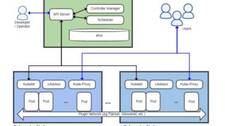
A running Kubernetes deployment is called a cluster. Every cluster has two logical sections:
- Control plane — the set of master node components that manage the overall cluster state and configuration.
- Worker nodes — the compute machines that run your application workloads inside pods.
Each node is its own Linux environment and can be a physical or virtual machine. Worker nodes run pods, which are made up of one or more containers.
The Control Plane
The control plane is the nerve center of a Kubernetes cluster. It stores cluster state and configuration, and it stays in constant contact with worker nodes to ensure the cluster is always running in the desired state.
kube-apiserver
The kube-apiserver is the front end of the Kubernetes control plane. All internal and external requests—whether they come from REST calls, the kubectl CLI, or tools like kubeadm—pass through it. The API server validates each request and, if valid, processes it. Think of it as the single point of entry for all cluster operations.
kube-scheduler
The kube-scheduler decides which worker node should run a newly created pod. It evaluates the resource requirements of the pod (CPU, memory, etc.) alongside the current health and available capacity of each node, then assigns the pod accordingly.
kube-controller-manager
The kube-controller-manager bundles multiple controller loops into a single binary. These controllers continuously watch the state of the cluster and reconcile it toward the desired state:
- The replication controller works with the scheduler to ensure the correct number of pod replicas are running.
- The node controller detects and responds to node failures.
- The endpoints controller connects Services to Pods so that traffic reaches the right destination.
- The service account and token controllers manage API access credentials.
etcd
etcd is a distributed, fault-tolerant key-value store that serves as the single source of truth for all cluster configuration data and state. If you need to know the current state of any object in your cluster, the answer lives in etcd.
Worker Nodes
A cluster needs at least one worker node—but production clusters typically run many. Worker nodes host the pods that run your applications. Scaling the cluster horizontally is as straightforward as adding more worker nodes.
Pods
A pod is the smallest deployable unit in Kubernetes. It represents a single instance of a running application and consists of one or more tightly coupled containers that share the same network namespace and storage. Pods can be connected to persistent storage volumes to support stateful applications.
Container Runtime Engine
Every worker node runs a container runtime responsible for pulling images and starting containers. Kubernetes supports any runtime that complies with the Open Container Initiative (OCI) specification, such as containerd and CRI-O. Docker was historically the most common choice, but Kubernetes removed its built-in Docker shim in version 1.24.
kubelet
The kubelet is an agent that runs on every worker node. It communicates directly with the control plane and is responsible for ensuring that the containers described in a pod specification are running and healthy. When the control plane issues instructions to a worker node, the kubelet carries them out.
kube-proxy
The kube-proxy is a network proxy that runs on each worker node. It maintains network rules that allow pods and external clients to communicate with your services. Depending on the host OS and configuration, kube-proxy either leverages the OS packet-filtering layer (e.g., iptables or IPVS) or proxies traffic itself.
Supporting Infrastructure
Persistent Storage
Kubernetes lets users request storage through PersistentVolumeClaims (PVCs) without needing to know the details of the underlying storage system. PersistentVolumes (PVs) are cluster-scoped resources that outlive any individual pod, making them essential for stateful workloads like databases.
Container Registry
Container images must be stored somewhere before Kubernetes can pull and run them. That storage location is a container registry. You can run your own private registry or use a hosted service such as Docker Hub, Google Artifact Registry, or Amazon ECR.
Underlying Infrastructure
One of Kubernetes’s strengths is infrastructure agnosticism. You can run a cluster on bare-metal servers, virtual machines, public cloud providers, private clouds, or hybrid environments. The platform abstracts away the underlying hardware so your workloads remain portable.
How the Components Work Together
Here is a simplified end-to-end flow to illustrate how the components interact when you deploy an application:
- You submit a deployment manifest using
kubectl apply. The request hits the kube-apiserver, which validates and stores the desired state in etcd. - The kube-controller-manager detects that no pods exist yet for this deployment and creates pod objects.
- The kube-scheduler watches for unscheduled pods and assigns each one to a suitable worker node based on resource availability.
- The kubelet on the selected node reads the pod specification, instructs the container runtime to pull the image and start the containers, then reports status back to the control plane.
- The kube-proxy updates networking rules so that the new pods are reachable via their associated Service.
Flexibility and Complexity
Kubernetes deliberately leaves many choices to the operator: the operating system, container runtime, CI/CD tooling, storage provider, networking plugin, and more. You also take on responsibility for access control, multi-tenancy, and secure defaults. This flexibility is powerful, but it means there is significant operational overhead involved in running Kubernetes correctly in production.
Organizations can choose to run Kubernetes entirely themselves or use a managed service (such as GKE, EKS, or AKS) where the control plane is operated by the cloud vendor, reducing the burden of day-to-day cluster management.
Summary
| Component | Location | Role |
|---|---|---|
| kube-apiserver | Control plane | Single entry point for all API requests |
| kube-scheduler | Control plane | Assigns pods to worker nodes |
| kube-controller-manager | Control plane | Runs reconciliation loops to maintain desired state |
| etcd | Control plane | Distributed key-value store for cluster state |
| kubelet | Worker node | Ensures containers in pods are running |
| kube-proxy | Worker node | Manages network rules for service communication |
| Container runtime | Worker node | Pulls images and runs containers |
This overview covers the essential building blocks of a Kubernetes cluster. From here, you can explore deeper topics such as network policies, RBAC, custom resource definitions (CRDs), and the Kubernetes Operator pattern to understand how the platform can be extended for more complex use cases.