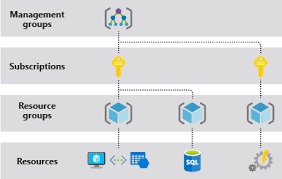
The key to success in the cloud is mastering the administrative tools and deployment options your chosen platform provides. For Microsoft Azure, that means understanding Azure Resource Manager (ARM) templates, the Azure portal, Reserved VM Instances, availability zones, and subscription structures. Getting these right helps teams minimize costs, improve resiliency, and operate at scale.
The following four best practices give DevOps and cloud engineering teams a practical foundation for optimizing Azure resource management.
1. Use ARM Templates to Replicate Azure Resources
Infrastructure-as-code is one of the most powerful levers available to cloud operations teams. Azure Resource Manager (ARM) templates let you define your infrastructure in declarative JSON, enabling repeatable, consistent deployments across environments—whether for development, testing, staging, or disaster recovery.
ARM templates operate at the resource group level. You can trigger a deployment via an API call, the Azure CLI, Azure PowerShell, or directly through the Azure portal. Because templates are idempotent, re-running the same template against an existing resource group will bring resources into the desired state without duplicating what already exists.
Key Considerations
- Policy enforcement: Azure Policy can block deployments that violate organizational rules (for example, restricting VM SKUs or enforcing tagging). Test templates in a non-production subscription first to surface policy conflicts before they affect live workloads.
- VM image capture: Azure does not provide a direct VM clone operation. To replicate a VM, you must capture its image—a process that generalizes the machine (using
sysprepon Windows or the Azure Linux Agent’s deprovision command on Linux) and renders the original VM unusable. Never perform this on a running production server without first creating a backup or snapshot. - Modular template design: Break large templates into linked or nested templates to improve reuse and reduce deployment complexity as your environment grows.
// Minimal ARM template skeleton
{
  "$schema": "https://schema.management.azure.com/schemas/2019-04-01/deploymentTemplate.json#",
  "contentVersion": "1.0.0.0",
  "parameters": {},
  "resources": []
}Code language: JSON / JSON with Comments (json)
2. Maximize Savings with Azure Reserved Instance Size Flexibility
On-demand pricing is convenient but expensive at scale. Azure Reserved VM Instances (RIs) let you commit to one- or three-year terms in exchange for significant discounts compared to pay-as-you-go rates. The size flexibility feature extends the value of an RI by allowing the discount to apply to differently sized VM instances within the same VM series (instance family), not just the exact SKU you originally purchased.
How to Get the Most from RI Flexibility
- Plan your workload profile before purchasing. The flexibility ratio—how many normalized units a given VM size represents—varies across instance sizes within a family. Larger instances consume more units, so a single large RI can partially cover several smaller VMs, or vice versa.
- Choose the right scope. A reservation scope can be set to a single subscription or shared across all subscriptions in a billing account. Shared scope is typically more efficient because Azure can automatically apply the discount wherever utilization is highest.
- Manage reservations actively. As workloads change, you may need to split a reservation, merge reservations, or adjust the scope. These operations are available in the Azure portal under Reservations.
- Monitor utilization. Unused RI capacity is wasted spend. Use Azure Cost Management to track reservation utilization and identify opportunities to exchange or return underused reservations within Microsoft’s allowed windows.
3. Build Resiliency with Azure Availability Zones
Availability zones (AZs) are physically separate data centers within a single Azure region. Each zone has independent power, cooling, and networking. Distributing workloads across AZs protects applications from single data center failures and is a foundational pattern for high-availability architectures on Azure.
Zonal vs. Zone-Redundant Services
Azure services that support availability zones fall into two categories:
- Zonal services: A resource—such as a virtual machine or a managed disk—is pinned to a specific zone at deployment time. You control zone placement and are responsible for distributing resources across zones manually.
- Zone-redundant services: Azure automatically replicates data and compute across zones. Examples include Azure Virtual Machine Scale Sets, Azure SQL Database, and Azure Storage with zone-redundant storage (ZRS) replication. These services handle zone distribution transparently.
Load Balancing Across Zones
To distribute traffic across VMs deployed in multiple zones, use the Azure Standard Load Balancer, which supports zone-redundant front-end IP addresses. The Basic Load Balancer SKU does not support availability zones, so teams running zone-aware workloads should ensure they are using the Standard SKU.
Not all Azure regions support availability zones. Before designing a zone-redundant architecture, verify that your target region includes at least three AZs in the official Azure documentation.
4. Optimize Azure Subscription Management
Azure subscriptions are the fundamental unit of resource access and billing. Every resource deployed in Azure belongs to a subscription, which defines who has access, what policies apply, and how costs are attributed. As organizations scale, ad hoc subscription growth leads to governance gaps, cost visibility problems, and security risks.
Subscription Design Principles
- Use Management Groups: Azure Management Groups let you apply policies and role-based access control (RBAC) across multiple subscriptions from a single point. Organize subscriptions into a hierarchy that reflects your organizational structure—for example, separating production, non-production, and sandbox environments.
- Apply RBAC at the right scope: Assign permissions at the management group or resource group level rather than directly on individual resources. This reduces administrative overhead and makes access reviews more manageable.
- Enforce governance with Azure Policy: Use Azure Policy to enforce compliance requirements—such as mandatory resource tagging, allowed locations, or permitted VM SKUs—consistently across all subscriptions in a management group.
- Separate workloads by subscription when needed: Subscriptions have service limits (quotas). High-scale workloads may require dedicated subscriptions to avoid hitting these limits. Also consider separating workloads with different compliance requirements into distinct subscriptions to simplify audit scope.
- Use Cost Management and budgets: Set budget alerts per subscription or resource group so teams are notified before they exceed spend thresholds.
Summary
| Practice | Primary Benefit |
|---|---|
| ARM templates | Repeatable, consistent infrastructure deployments |
| Reserved Instance size flexibility | Reduced compute costs with scheduling flexibility |
| Availability zones | High availability and data center fault tolerance |
| Subscription management | Governance, cost visibility, and security at scale |
Adopting these practices systematically—rather than addressing them reactively—gives DevOps teams the control they need to run Azure workloads reliably and cost-effectively. Start by auditing your current ARM template coverage and subscription structure, then layer in Reserved Instances and availability zone placement as workloads mature.
Original topic sourced from TechTarget (techtarget.com).