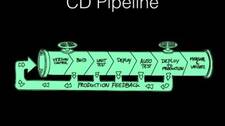
Continuous Integration (CI) is a software engineering practice that evolved alongside agile and extreme programming methodologies. At its core, CI means automating the build, test, and code-quality analysis steps so that the mainline branch is always in a releasable state. Continuous Delivery (CD) extends CI by automating the promotion and deployment of software through QA, pre-production, and production environments, making releases predictable and low-risk. For geographically distributed agile teams, a mature CD pipeline is no longer optional—it is a prerequisite for sustainable delivery velocity.
Why a Mature CD Pipeline Matters
Organizations that invest in mature CI/CD pipelines typically realise benefits across the entire software delivery lifecycle:
- Reduced manual effort: Automating repetitive tasks frees engineers to focus on higher-value work and accelerates release cycles.
- Improved release quality: Automated testing and promotion gates catch defects earlier, reducing rollbacks in production.
- Greater visibility and accountability: A shared pipeline dashboard gives every team—development, QA, support, and operations—a single source of truth for release state.
- Lower deployment and support costs: Consistent, scripted deployments reduce the cost of incidents and the time spent on post-release fire-fighting.
- Cross-team collaboration: Shared tooling and processes break down silos between development and operations.
The Core Practices of a Mature CD Pipeline
1. Maintain a Single, Authoritative Code Repository
Every artifact required to build and deploy the product—source code, configuration, dependency manifests, and infrastructure definitions—should live in a version-controlled repository. Revision control is non-negotiable. Prefer trunk-based development or short-lived feature branches over long-running per-developer branches. Long-running branches increase integration risk and delay feedback. Git is the de facto standard for distributed version control and pairs well with code-review tooling.
2. Automate the Build Process
Use a build tool—such as Maven, Gradle, Make, or Bazel—to standardise how the project is compiled and packaged. A single command should be sufficient to produce all distributable artifacts: binaries, packages (RPM, DEB, MSI), container images, or tarballs. Key rules for build automation:
- Builds must be repeatable: the same source commit should always produce the same artifact.
- Builds must be fast: break large monolithic build jobs into smaller, parallelisable jobs to keep feedback loops short.
- Builds must be environment-independent: no dependency on a developer’s local machine state.
3. Run Automated Tests on Every Commit
A CI server (Jenkins, GitLab CI, GitHub Actions, TeamCity, etc.) should monitor the repository and trigger a build-and-test pipeline automatically for every commit or pull request. This ensures a stable, verified baseline at all times. For code-review workflows, integrate your CI server with a review tool such as Gerrit or a pull-request system so that test results are visible to reviewers before a merge decision is made.
Test suites should be organised into fast feedback layers:
- Unit tests – run on every commit; must complete in seconds.
- Integration tests – run against assembled components; may take minutes.
- End-to-end / acceptance tests – run against a fully deployed environment; may take longer but should be parallelised where possible.
4. Enforce Static Code Analysis
Code quality problems accumulate into technical debt that slows future development. Integrate static analysis tools (SonarQube, Checkstyle, ESLint, SpotBugs, etc.) directly into the CI pipeline. Define quality gates—minimum code coverage thresholds, maximum critical violation counts—and fail the build when those thresholds are not met. Treating code quality as a first-class pipeline concern prevents debt from silently accumulating.
5. Commit Frequently to the Mainline
Developers should integrate their changes into the shared baseline frequently—ideally multiple times per day. Small, frequent commits reduce merge conflicts, make automated test failures easier to diagnose, and keep every developer aware of the real-time state of the codebase. Large, infrequent merges are one of the most common sources of integration pain in software projects.
6. Test in Production-Equivalent Environments
A defect that is only reproducible in production is a defect that was not caught in testing. Test environments should match production as closely as possible: same operating system versions and patches, same library versions, same network topology, and same configuration values (with secrets handled separately). Use configuration management tools—Ansible, Chef, Puppet, or Terraform/cloud-init for infrastructure—to provision and maintain environments in a consistent, documented, repeatable way. Infrastructure-as-code stored in version control ensures environment drift is detectable and correctable.
7. Define a Clear Build Promotion Process
Promotion is the act of deciding that a build artifact is ready to advance to the next stage of the pipeline (e.g., from CI → QA → pre-production → production). Document explicit promotion criteria: which automated test gates must pass, which manual approvals are required, and who has authority to approve each stage. Most CI/CD platforms support first-class promotion workflows. A well-defined promotion process is especially important for distributed teams where informal communication cannot substitute for a shared, visible process.
8. Manage Release Artifacts with a Dedicated Repository Manager
Large organisations quickly accumulate hundreds or thousands of versioned artifacts: release candidates, GA builds, client-specific builds, patches. A binary repository manager such as JFrog Artifactory or Sonatype Nexus provides a governed, searchable store for all artifact types (Maven, npm, Docker images, Helm charts, raw files). Using a dedicated artifact repository ensures that the exact binary promoted through QA is the binary deployed to production—no rebuilding from source at deployment time.
9. Automate Deployments
Manual deployments are error-prone, slow, and difficult to audit. All deployments—to every environment—should be executed by scripts or pipeline jobs, never by a human typing commands manually. Deployment automation should include:
- Pre-deployment checks (health of target environment, dependency availability).
- Deployment execution (artifact retrieval, configuration injection, service restart).
- Post-deployment smoke tests to verify the new version is serving traffic correctly.
- Automated rollback on smoke test failure.
With sufficient test coverage and deployment automation in place, teams can consider enabling Continuous Deployment—automatically deploying every commit that passes all pipeline gates directly to production without manual approval.
10. Use Configuration Management Across All Environments
Modern software stacks span virtualised infrastructure, public cloud, private cloud, and multi-datacenter deployments. Configuration management tools (Ansible, Chef, Puppet) or infrastructure-as-code platforms (Terraform, Pulumi, AWS CDK) enable teams to define environment state declaratively, apply it repeatably, and detect and remediate drift automatically. This is especially important for hybrid or multi-datacenter deployments where manual configuration of each host is not feasible.
11. Publish Build Status and Test Results to the Whole Team
A broken build that nobody knows about defeats the purpose of CI. Configure your CI/CD platform to notify developers immediately—via email, Slack, Microsoft Teams, or a build radiator dashboard—when a build or test fails. Notifications should identify the commit and author that introduced the failure so the right person can act quickly. Visibility into pipeline health drives accountability and gives teams the data they need to improve their processes over time.
Summary
A mature Continuous Delivery pipeline is not a single tool or a one-time project—it is an evolving set of practices that collectively reduce risk, increase deployment frequency, and improve software quality. The eleven practices described above represent a proven baseline: single repository, automated builds, per-commit testing, static analysis, frequent commits, production-equivalent test environments, defined promotion processes, artifact management, deployment automation, configuration management, and team-wide build visibility. Organisations that consistently apply these practices report faster release cycles, lower defect rates, and better collaboration between development and operations teams.