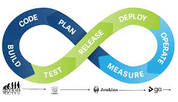
Modern software delivery has moved well beyond the traditional waterfall-style Software Development Life Cycle (SDLC). The rise of containerized applications, cloud-native architectures, and rapidly iterating product teams has pushed the industry toward a faster, more automated model: CI/CD — Continuous Integration and Continuous Delivery.
This article explains what CI/CD means, how a pipeline works end-to-end, and the real trade-offs you should consider before adopting it.
The Traditional SDLC and Its Limitations
The conventional Software Development Life Cycle follows a linear sequence of phases:
- Planning
- Implementation
- Testing
- Documentation
- Deployment
- Maintenance
This model served the industry well for decades. However, it struggles to keep pace with two defining characteristics of modern development: speed and automation. When teams are deploying containerized microservices multiple times a day, waiting for a slow, manual release process creates a serious bottleneck. That is the gap CI/CD is designed to close.
What Is a Pipeline?
Before diving into CI and CD individually, it helps to understand the concept of a pipeline. A pipeline is a sequence of automated stages, where each stage depends on the successful output of the one before it:
Stage 1 → Output → Stage 2 → Output → Stage 3 → OutputIf any stage fails — for example, a test suite reports errors — the pipeline halts and subsequent stages do not run. This fail-fast behavior is intentional: it surfaces problems as early as possible, before broken code reaches production.
A CI/CD pipeline typically automates code builds, test execution, and deployment to staging or production environments. Each of these actions happens without manual intervention, making the whole cycle significantly faster than a human-driven process.
What Is Continuous Integration (CI)?
Continuous Integration is the practice of having developers frequently merge their code changes into a shared version-control repository — often multiple times per day. Every merge triggers an automated workflow that:
- Pulls the latest code from the repository
- Compiles or builds the application
- Runs the automated test suite against the new build
- Reports results back to the developer immediately
The key benefit of this tight feedback loop is early bug detection. When a developer commits a small, incremental change rather than a large batch of code, any integration errors are much easier to identify and fix. Waiting days or weeks between integrations means defects pile up and become exponentially harder to debug.
Popular CI tools include Jenkins, GitHub Actions, GitLab CI, CircleCI, and Travis CI.
What Is Continuous Delivery (CD)?
Continuous Delivery picks up where CI leaves off. Once code has been integrated and validated by the CI stage, CD is responsible for automatically preparing and delivering that code to a staging or production environment.
CD does more than move code from one place to another. It also performs additional quality checks — such as integration tests, performance tests, or security scans — to confirm that a build is genuinely ready for production. The goal is that at any given moment, the main branch contains code that could be released safely.
It is worth noting a distinction that often causes confusion:
- Continuous Delivery — the pipeline automatically prepares a release-ready artifact, but a human approval step may gate the final push to production.
- Continuous Deployment — every change that passes automated tests is deployed to production automatically, with no manual gate.
Many teams use “CD” to mean either or both, depending on their maturity and risk tolerance.
The Stages of a CI/CD Pipeline
Compared to the traditional SDLC, the CI/CD lifecycle is leaner and designed to run continuously throughout the working day:
- Commit — A developer pushes a code change to the shared repository.
- Build — The CI system automatically compiles the application and produces a build artifact.
- Test — Automated tests (unit, integration, end-to-end) run against the build artifact.
- Deploy — If all tests pass, the artifact is deployed to a staging or production environment.
Because each developer commit can trigger this cycle independently, the pipeline runs many times per day. Automation tools such as Jenkins, GitHub Actions, and GitLab CI orchestrate the handoff between each stage without human intervention.
Pros and Cons of CI/CD
CI/CD delivers real, measurable improvements for teams that adopt it successfully — but it is not without cost or complexity.
Advantages
- Faster deployment cycles
- Automated testing catches bugs earlier and more consistently
- Smaller, incremental code changes are easier to review and debug
- Better fault isolation — when something breaks, the scope of change is narrow
- Increased test coverage, because writing tests becomes a required part of the workflow
- Automated deployment reduces human error in release processes
- Repeatable, auditable process for every release
- Faster mean time to resolution (MTTR) when incidents occur
- Smaller backlog of unshipped features
- A large and mature ecosystem of open-source tooling
Disadvantages
- New skills required — pipeline configuration, infrastructure-as-code, and test automation are non-trivial disciplines
- Significant upfront investment in tooling, infrastructure, and process change
- Legacy systems and monolithic codebases are often difficult to integrate into a CI/CD pipeline without significant refactoring
- Maintaining a high-quality automated test suite demands ongoing discipline from the entire team
- Poorly designed pipelines can become a bottleneck or a source of flaky tests that erode trust in the system
Is CI/CD Right for Your Team?
CI/CD is not a silver bullet, and adopting it requires deliberate planning. Before committing to the investment, consider the following questions:
- How frequently does your team ship code? The higher the release cadence, the more value CI/CD delivers.
- What is the state of your test coverage? A CI/CD pipeline is only as reliable as the tests that underpin it. Low coverage means low confidence in automated deployments.
- Are your systems containerized or cloud-native? CI/CD integrates naturally with container-based deployments. Legacy or tightly coupled systems may need significant work before they can benefit.
- Does your organisation have the skills in-house? Pipeline engineering, DevOps tooling, and test automation are specialised skills. Factor in training or hiring costs.
If your team is looking to accelerate delivery, reduce manual errors, and ship a more consistent product, CI/CD is worth the investment. Start small — automate the build and test stages first — and expand the pipeline incrementally as your team’s confidence and skill grows.
Summary
CI/CD replaces slow, manual release processes with an automated pipeline that builds, tests, and deploys code on every commit. Continuous Integration keeps the shared codebase healthy by detecting integration errors immediately. Continuous Delivery ensures that every validated build is ready — and potentially deployed — to production with minimal delay. Together, they form the foundation of a modern, high-velocity engineering culture.