A testing environment is a configured combination of software and hardware in which a QA or development team validates a new software build. These environments typically mirror pre-production or staging setups and are deliberately scoped to expose defects before code reaches production. Organisations commonly maintain dedicated environments at multiple pipeline stages: developer test, integration test, dedicated functional test, and pre-production or business-readiness test.
As delivery cycles compress and IT infrastructure grows more complex, managing these environments manually becomes a significant bottleneck. When non-production environments are treated as a secondary concern, the result is ad-hoc configuration drift, rising maintenance costs, and environment-related defects that are difficult to isolate. Structured automation addresses these problems directly.
1. Key Challenges in Test Environment Management
Organisations face several recurring pain points when managing test environments at scale:
- Complex infrastructure dependencies. Modern applications rely on interconnected services, databases, and third-party integrations. Reproducing these dependencies accurately across multiple environment tiers is labour-intensive.
- Manual provisioning delays. When infrastructure engineers must manually build or refresh environments in response to every sprint or release request, cycle time suffers and human error is introduced.
- Configuration drift. Environments that are patched, updated, or modified inconsistently diverge from each other and from production, making defect reproduction unreliable.
- Environment contention. Multiple teams competing for a limited number of shared environments leads to scheduling conflicts and idle test cycles.
- Data governance risk. Test environments often need production-like data while still complying with privacy regulations. Managing data masking and desensitisation manually is error-prone.
2. Test Environment Automation Approach for DevOps
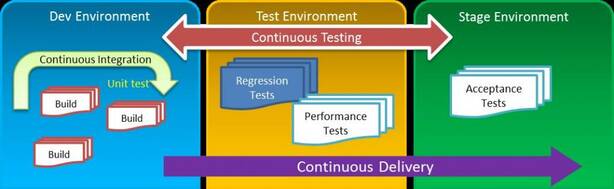
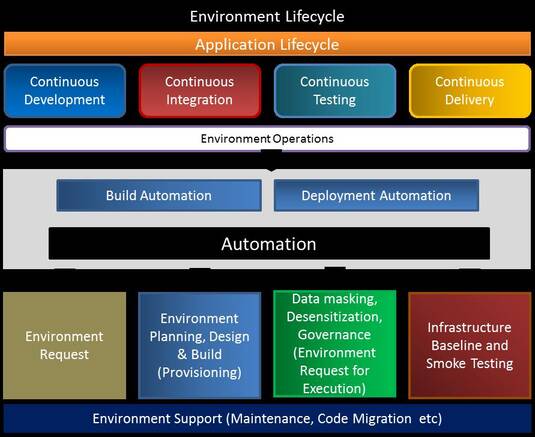
In a DevOps continuous delivery pipeline, manual environment provisioning is not sustainable. Each stage of the pipeline—Continuous Development, Continuous Integration, Continuous Testing, and Continuous Delivery—requires environments that can be created, configured, and torn down rapidly and repeatably.
An effective automation framework for environment management covers four core areas:
- Environment request process — Standardising how teams request environments through a self-service portal or API, eliminating email-based, ad-hoc requests.
- Environment planning, design, and build provisioning — Using infrastructure-as-code (IaC) templates to define and spin up environments consistently.
- Data masking, desensitisation, and governance — Automating the preparation of compliant test data sets as part of the provisioning workflow.
- Infrastructure baseline and smoke testing — Running automated health checks immediately after provisioning to confirm that the environment is ready for use before handing it to the test team.
Ongoing support activities—such as configuration maintenance and code migrations between environments—can also be automated once the initial workflows are in place.
Localised vs. Centralised Automation
Automation of test environments typically falls into two complementary patterns:
- Localised automation targets specific, bounded tasks such as database refresh, operating system patch application, or service restart after a deployment. Scripts are scoped to a single component and can be developed incrementally.
- Centralised automation orchestrates and integrates multiple systems across the environment lifecycle—for example, routing an environment request received through a service management tool to a deployment automation engine that provisions cloud infrastructure and then runs smoke tests, all without human intervention.
Reusable, well-documented automation scripts and workflows are a key long-term asset. Once built and validated, they can be applied to future provisioning requests with minimal modification, compounding the time savings over successive releases.
3. Benefits of Test Environment Automation
Structured test environment automation delivers both quantitative and qualitative benefits. The figures below are indicative ranges cited in industry analysis and should be validated against your own environment before use in business cases.
Quantitative Benefits
- 30–40% reduction in time to market through faster provisioning cycles
- Up to 50% reduction in manual health-check effort
- 20–30% improvement in overall environment efficiency
- 30–40% reduction in cost of operations
Qualitative Benefits
- Elimination of configuration errors introduced by manual steps
- Consistent, reproducible environments across every pipeline stage
- Proactive monitoring and self-healing capabilities that reduce mean time to recovery for environment incidents
- Optimised infrastructure utilisation and licence management through automated asset tracking
- Environment-as-a-service model, enabling teams to provision what they need on demand
4. Test Environment Metrics for Release Management
Measuring the health and efficiency of test environments is essential for informed release management decisions. Three categories of metrics provide the most actionable insight:
Environment Efficiency
Track how frequently each environment is used and how often demand conflicts arise between teams or releases. Environments that regularly cause scheduling conflicts should be analysed for their impact on the release plan—for example, measuring how many test execution hours are lost due to environment unavailability.
Environment Stability
Monitor environment outages and categorise them by cause: internal project factors versus external dependencies. Track how frequently teams resort to manual workarounds when an environment fails. Use this data to build a remediation plan that protects the critical path to release.
Environment Agility
Measure the time required to create, configure, and validate a new environment from a request. Track tasks such as retooling an environment to match a different code branch and performing pre-release build validation. Lower provisioning times directly translate to shorter feedback loops for developers and testers.
5. Test Environment Automation Tools
A wide range of commercial and open-source tools support test environment automation. The following are commonly used across the industry:
Configuration Management Tools
- Chef — A configuration management tool that uses recipes and cookbooks (written in Ruby) to define the desired state of servers. Chef integrates with major cloud providers including Amazon EC2, Microsoft Azure, Google Cloud Platform, and OpenStack to automate provisioning and configuration at scale.
- Puppet — An open-source configuration management utility that runs on Unix-like systems and Windows. Puppet uses its own declarative language to describe system configuration, making it well-suited to enforcing consistency across large server fleets.
Environment and Release Management Platforms
- Plutora TEMS (Test Environment Management Software) — A commercial platform providing centralised pre-production environment management, covering request management, scheduling, and environment health monitoring.
- ServiceNow — A platform-as-a-service (PaaS) provider of IT Service Management (ITSM) software built on ITIL standards. ServiceNow is commonly used as the service management layer through which environment requests are submitted and tracked.
Infrastructure and Connectivity Tools
- SSH (Secure Shell) — A cryptographic network protocol for secure remote access to machines. SSH is foundational to test environment automation: provisioning scripts, deployment tools, and health-check workflows commonly use SSH to connect to and configure remote hosts. When environments run inside virtual machines, SSH key management becomes a key operational concern. Terminal multiplexers such as tmux or screen can maintain persistent sessions across multiple SSH connections, reducing context-switching overhead for engineers.
- SmartFrog — An open-source Java framework for managing the configuration, deployment, and coordination of distributed software systems broken into independently deployable components. Useful for orchestrating multi-host test environments.
6. Putting It Together: A Practical Automation Strategy
Organisations approaching test environment automation for the first time should consider the following sequencing:
- Audit current environments. Document all existing environments, their configurations, owners, and usage patterns. Identify the environments with the most contention and the highest incident rates—these are the highest-value automation targets.
- Standardise before automating. Automation reinforces whatever patterns exist. Establish standard environment templates and naming conventions before writing provisioning scripts.
- Start with localised automation. Automate high-frequency, bounded tasks first (database refresh, patch application) to build confidence and establish reusable script libraries.
- Integrate into the CI/CD pipeline. Once localised automation is stable, connect it to your CI/CD toolchain so that environment provisioning is triggered automatically by pipeline events rather than manual requests.
- Add monitoring and self-healing. Instrument environments with health checks and alerting. Automate remediation for known failure patterns to reduce manual intervention.
- Measure and improve. Track the three metric categories—efficiency, stability, and agility—before and after each automation initiative to demonstrate value and guide the next improvement cycle.
Conclusion
Test environment automation is not a single tool or a one-time project—it is an ongoing engineering discipline that applies DevOps principles to the infrastructure that supports testing itself. By automating provisioning, configuration, data management, and health monitoring, teams reduce cycle time, eliminate a class of environment-related defects, and free engineers to focus on work that cannot be automated. The investment compounds over time: reusable scripts and workflows become a shared asset that accelerates every subsequent release.
Original source referenced: capgemini.com (2017). Tool descriptions and benefit ranges are drawn from the original source material.