Introduction
Entering the world of software development and IT infrastructure can feel overwhelming. Many new students face an avalanche of technical terms like containers, orchestrators, and automated workflows right at the start of their learning journey. It is entirely common to feel confused about how all these pieces fit together.
The primary reason for this struggle is that traditional computer science education often focuses heavily on writing code, while ignoring how that code actually reaches real users. In modern enterprise environments, code writing is only the first step of a long and complex journey.
Modern software delivery demands absolute speed, safety, and reliability. This is exactly where the concept of software deployment automation becomes essential. To bridge the massive gap between writing applications on a local laptop and running them safely on live enterprise servers, companies rely heavily on systematic workflows.
For any new student or career switcher, learning Continuous Delivery for beginners is the single most important milestone in building a sustainable IT foundation. This concept serves as the core operational bridge that connects development teams with operations teams.
When you understand this foundational pillar, you no longer look at software as isolated text files. Instead, you begin to see it as a flowing, continuous stream of value. Aspiring IT professionals can access comprehensive, industry-aligned foundational resources and structured guidance directly at DevOpsSchool, which offers deep insights into real-world pipeline implementation methodologies.
What Is Continuous Delivery in Simple Words?
At its absolute core, Continuous Delivery is a software engineering practice where code changes are automatically prepared, tested, and built for a production release. The foundational rule of Continuous Delivery is simple: your software must always be in a release-ready state.
Continuous Delivery means ensuring your application is completely ready to be deployed to live users at any given second, with the simple click of a single button.
Think of it as an automated manufacturing assembly line. When a software developer finishes writing a new feature or fixing a minor bug, they do not manually copy files onto a web server. Instead, they commit their work into a version control tracking system.
Once that code is submitted, an automated release pipeline takes over immediately. The system compiles the code, executes comprehensive quality checks, runs security scans, and configures the application for deployment.
If every single validation test passes successfully, the code sits safely in a staging environment, fully prepared for immediate production deployment. The software is ready to go live whenever the business stakeholders decide the market timing is perfect.
Why Continuous Delivery Is Important for DevOps Students
Understanding Continuous Delivery early in your education completely changes how you view software development. It serves as the logical extension and foundation of modern CI/CD patterns, which form the bedrock of all cloud engineering activities.
If you attempt to learn advanced tools like Jenkins, GitHub Actions, or Kubernetes without mastering the core philosophy of automated delivery, you will end up memorizing commands without understanding their actual purpose.
Furthermore, mastering this domain provides unmatched real-world job relevance. If you look at entry-level job descriptions for cloud engineers, release analysts, or system automation practitioners, pipeline design skills are universally required.
Learning these concepts early allows you to build a genuine DevOps mindset. You stop thinking purely like a programmer who only cares if the code runs on their local machine. Instead, you start thinking like an operational architect who cares about system stability, automated testing metrics, and repeatable infrastructure patterns.
How Software Deployment Worked Before Continuous Delivery
To appreciate why modern teams value automated systems so highly, it helps to understand the historical challenges that plagued the IT industry for decades. Before software deployment automation became standard practice, releasing an application update was an incredibly stressful, slow, and error-prone ritual.
The Manual Nightmare
In the traditional software era, developers would write code for several months in complete isolation. Once a major release window approached, they would bundle all their code files together and email them or upload them to a shared network drive. From there, system administrators had to manually read long, text-heavy instruction manuals to figure out how to install the software.
The Problem of Environment Mismatches
Because humans were executing these installation steps manually, mistakes were inevitable. A technician might forget to copy a single database configuration file or neglect to install a specific version of a software library on the server. This led to the classic operational conflict: “It worked perfectly fine on my machine, so it must be an operations issue.”
Delayed Testing and Fragile Systems
Testing occurred at the very end of the long development lifecycle. Quality assurance teams would discover critical architectural bugs weeks after the code was originally written. Fixing these deep issues right before a major launch caused massive delays, long nights of stressful troubleshooting, and frequent system outages for paying customers.
How Continuous Delivery Changed Software Engineering
The advent of automated release pipelines completely transformed the software engineering landscape. By replacing unreliable manual labor with deterministic, predictable software scripts, organizations achieved unprecedented operational efficiency.
- Automation Over Manual Labor: Software tasks that previously required teams of engineers working over an extended weekend are now executed completely by automated systems in minutes.
- Radical Risk Reduction: Because software updates are broken down into small, incremental additions, the overall surface area for potential errors drops dramatically.
- Repeatable Deployments: An automated pipeline ensures that deploying software to a testing environment uses the exact same mechanics as deploying to a live production environment.
- Blazing Fast Feedback Loops: Developers receive definitive confirmation within minutes if their code updates have broken existing system functionality, allowing them to fix errors immediately.
Continuous Integration vs Continuous Delivery (Beginner Comparison)
Many new students frequently confuse Continuous Integration (CI) with Continuous Delivery (CD). While they are tightly linked and work together as a unified process, they focus on entirely different segments of the software lifecycle.
| Metric | Continuous Integration (CI) | Continuous Delivery (CD) |
| Primary Focus | Code consolidation, compilation, and early validation testing. | Release readiness, environmental staging, and deployment preparation. |
| Automation Boundary | Automatically triggered when a developer pushes code to a central repository. | Extends through staging validation and stops right before final manual production approval. |
| Core Goal | To detect integration bugs as early as possible in the development loop. | To ensure that code is always stable and fully certified for live deployment. |
| Typical Outputs | Validated software binaries, compiled code packages, or clean container images. | A fully verified environment that is completely prepared to serve live production users. |
To put this in simple terms, Continuous Integration is about making sure all the individual ingredients blend together perfectly without ruining the recipe. Continuous Delivery is about cooking that meal completely, placing it under a warming lamp, and making sure it is ready to be served to the customer the moment the waiter arrives.
Basic Structure of a Continuous Delivery Pipeline
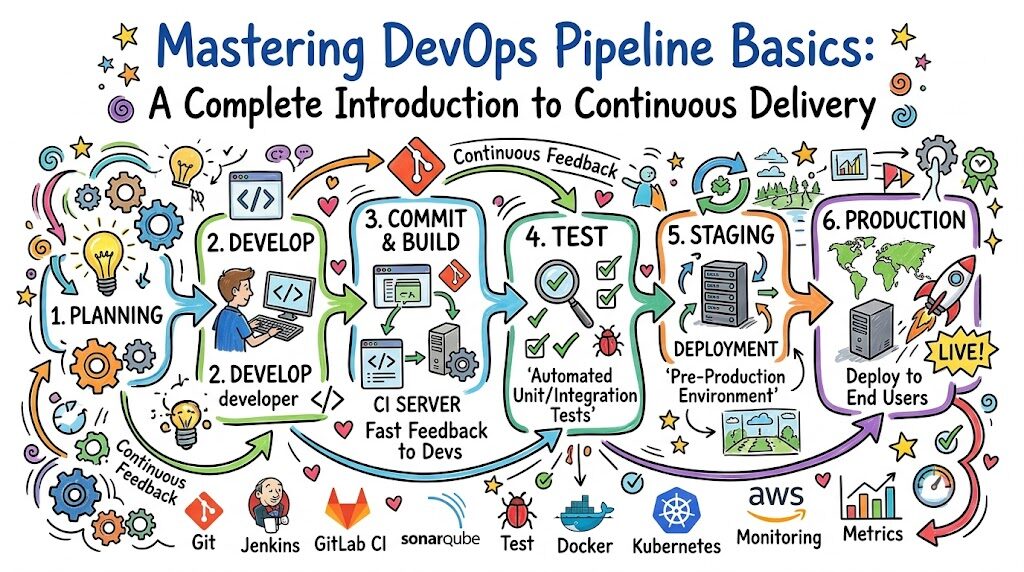
A DevOps pipeline basics journey can be broken down into a series of highly structured, sequential stages. Each stage acts as a quality gateway that the code must successfully pass through before moving forward.
[ Code Commit ] ──> [ Build Process ] ──> [ Automated Testing ]
                                                   │
[ Production Release ] <── [ Approval Stage ] <── [ Staging Deployment ]
Code language: CSS (css)
1. Code Commit
The pipeline begins the exact millisecond a developer pushes their updated source code to a central platform like GitHub or GitLab. This action alerts the automation engine that new material is ready for processing.
2. Build Process
The automation tool fetches the newly updated source code, compiles it into functional machine language, and gathers all necessary external software libraries. If there are syntax errors or missing structural dependencies, the pipeline halts immediately.
3. Automated Testing
Once the software build is verified, the pipeline subjects the application to rigorous automated testing suites. This includes unit tests checking individual code functions, security vulnerability scans checking for known structural exploits, and style checks ensuring compliance with industry standards.
4. Staging Deployment
If the testing suite passes perfectly, the pipeline automatically deploys the application into a staging environment. This environment is an exact architectural clone of the live production system where real customers operate.
5. Approval Stage
This is the definitive marker of a Continuous Delivery pipeline. The software sits securely in the verified staging environment, fully operational. It waits for human business logic or management sign-off to authorize the final transition to the public production space.
6. Production Release
Once authorized, the pipeline executes the final transition scripts, deploying the thoroughly tested code to live production servers with absolute precision and zero down-time for active users.
Real-World Analogy to Understand Continuous Delivery
To firmly grasp the mechanics of a release pipeline explained without getting bogged down in complex syntax, let us look at a real-world analogy: an advanced automobile manufacturing plant.
Imagine a modern car factory utilizing a highly sophisticated assembly line system. The car begins as raw, unformed sheets of metal at the very start of the track. As the vehicle moves smoothly along the conveyor belt, automated robotic arms weld specific components, apply protective paint coats, install the engine, and attach safety wheels.
At various intervals along this assembly line, automated tracking sensors inspect the work. One machine checks the alignment of the doors, another verifies the engine compression, and a computer scans the electrical wiring for short circuits. If a single defect is detected at any point, the entire assembly line halts instantly so technicians can correct the flaw before the vehicle moves another inch forward.
Once the car reaches the absolute end of the factory floor, it is fully fueled, thoroughly inspected, polished, and parked safely in the shipping yard. The car is 100% functional and completely ready to be driven out on public roads immediately.
The factory does not need to build a new car from scratch when a buyer places an order; the vehicle is already sitting there in a state of absolute readiness. This is precisely what Continuous Delivery does for digital software.
Common Beginner Confusions About Continuous Delivery
When first studying this field, certain conceptual misunderstandings tend to pop up repeatedly. Clearing these up early will accelerate your progress.
Confusion 1: Thinking CD means every single change goes to live production automatically.
This is incorrect. That specific process is called Continuous Deployment. Continuous Delivery simply ensures the software is fully capable of going to production at any moment, but the final step still relies on a conscious human business decision.
Confusion 2: Believing that tools are more important than the underlying process.
Beginners often rush to memorize complex Jenkins configurations or GitHub Actions syntax. Tools change constantly, but the foundational principles of testing, isolation, environment parity, and automated validation remain identical across all technology stacks.
Confusion 3: Overestimating the complexity of starting a pipeline.
You do not need a massive corporate data center to practice these concepts. A basic pipeline can be built using a simple two-line automation script that copies a basic text file from a local code repository into a testing folder on your own personal computer.
Why Continuous Delivery Is Critical in DevOps Careers
If you want to build a highly resilient, long-term career in the cloud computing ecosystem, mastering deployment automation is non-negotiable. Modern enterprise teams no longer hire individuals who only know how to perform manual server administration.
DevOps Engineer
In this role, your core responsibility is designing, maintaining, and troubleshooting the very automation pipelines that development teams use daily. You will be expected to optimize pipeline speeds and ensure seamless integration across various cloud systems.
Cloud Architect / Cloud Engineer
Cloud platforms like AWS, Azure, and Google Cloud are built entirely around programmatic interfaces. As a cloud engineer, you will write automated delivery tracks that provision computing infrastructure dynamically alongside the core application code.
Site Reliability Engineer (SRE)
SRE professionals focus heavily on system availability, uptime, and performance metrics. Understanding Continuous Delivery helps SREs design automated rollback pipelines that can instantly withdraw a malfunctioning software update before it compromises user experience.
Platform Engineer
Platform teams design internal developer portals that abstract away underlying infrastructure complexities. A deep knowledge of delivery automation allows these engineers to build standardized pipeline templates that hundreds of developers can safely leverage with zero friction.
Tools Used in Continuous Delivery (Beginner Overview)
While concepts must always come first, you will eventually utilize specialized software tools to construct and manage automated release operations. Below is a foundational roadmap of the core tools dominating the modern enterprise space.
| Tool | Core Technology Class | Purpose in the Delivery Pipeline |
| Git / GitHub | Version Control System | Serves as the absolute source of truth for code changes and triggers the initial pipeline run. |
| Jenkins | Automation / Orchestration Server | An open-source classic used to script custom workflows, execute build scripts, and coordinate tests. |
| GitHub Actions | Cloud-Native CI/CD Platform | Built directly into GitHub, allowing students to write automation configurations easily using simple YAML files. |
| Docker | Software Containerization Engine | Packages applications alongside their exact operating dependencies to completely eliminate environment mismatches. |
| Argo CD | Declarative GitOps Tool | Conceptually monitors cloud environments to ensure live production systems always match the code stored in Git. |
Real-World Scenario: Without Continuous Delivery
To see these concepts in action, let us observe a hypothetical software team operating without an automated continuous delivery framework.
Imagine a retail banking company trying to launch an urgent mobile application update on a Friday night. The development team finishes editing the code at 5:00 PM. They manually package the application into a compressed file and upload it to a shared server directory.
At 8:00 PM, the night-shift operations team logs in to deploy the update. They open a lengthy, outdated word document containing manual step-by-step setup instructions. Halfway through the manual process, an engineer accidentally types an incorrect database command, subtly corrupting the storage connections.
The system crashes immediately. Because there are no automated testing layers built into this workflow, the team has no way of knowing whether the crash was caused by a coding bug or a manual typing error.
The entire team spends the rest of the night frantically digging through thousands of lines of server logs under extreme corporate stress. By Saturday morning, exhausted and defeated, they perform a messy manual rollback, having completely failed to deliver the new features to their waiting customers.
Real-World Scenario: With Continuous Delivery
Now, let us examine the exact same retail banking company operating with a fully realized Continuous Delivery paradigm in place.
The developer finishes writing the urgent mobile application update and pushes the code changes directly to the main GitHub repository. The moment the code lands, the automated delivery pipeline springs to life.
The automation system compiles the application code, runs 500 individual unit tests within two minutes, and executes a thorough security compliance scan. Every single check returns a clean green status indicator.
The pipeline then seamlessly deploys the application update into an isolated staging environment that precisely mirrors the live banking servers. Automated integration scripts simulate 1,000 digital customer transactions to verify system stability under heavy load conditions.
The entire process finishes flawlessly in less than ten minutes. The system automatically sends a notification to the operations manager stating that the update is fully validated and ready for production.
The manager logs into the dashboard, reviews the automated test reports, and confidently clicks a button labeled “Approve Release.” The pipeline pushes the update to live production servers instantly with zero downtime, zero stress, and complete operational transparency.
How Beginners Should Start Learning Continuous Delivery
If you are wondering how to practically approach this vast field without getting lost in the details, follow this structured, step-by-step learning progression designed specifically for newcomers.
Step 1: Master the Basics of Git
Before touching an automation engine, you must understand how version control operates. Learn how to create a code repository, perform basic commits, manage branching pathways, and push code up to platforms like GitHub. Git is the primary engine that drives all modern deployment pipelines.
Step 2: Grasp Continuous Integration First
Focus on the initial phase of the pipeline. Write a incredibly basic code script—such as a simple Python file—and configure a basic tool like GitHub Actions to automatically run that script whenever you make a change. Your only goal here is to get used to automated execution loops.
Step 3: Understand Core Pipeline Environments
Learn the conceptual differences between a local computer, a development testing server, a staging mirror environment, and a live production space. Understand how data configurations shift as an application progresses through these different zones.
Step 4: Practice Basic File Automation
Write a simple pipeline script that automatically moves a text file from one folder to another on your computer after verifying its contents. This simple practice strips away the intimidation factor and helps you see that pipelines are just ordered scripts performing logical actions.
Step 5: Build Tiny, End-to-End Projects
Create a basic web page, containerize it using a simple Dockerfile, and write a straightforward pipeline that builds that container and places it onto a free cloud hosting tier. Focus on the workflow end-to-end rather than building a complex application.
Common Mistakes Beginners Make
Avoid these frequent learning traps to save time and build cleaner habits as you advance through your DevOps training.
- Jumping Directly Into Complex Tools: Do not try to master advanced Kubernetes cluster orchestrations or complex enterprise Jenkins configurations during your first week. Focus heavily on fundamental architectural concepts before scaling up.
- Ignoring the Core Fundamentals: Skipping basic command-line navigation, networking rules, and fundamental file permissions will make troubleshooting an automated pipeline nearly impossible.
- Failing to Practice Hands-On Pipelines: Simply watching video lectures or reading textbook theory will not build operational muscle memory. You must write the configuration code yourself and intentionally break it to see how error logs operate.
- Confusing the Boundaries of CI and CD: Ensure you can clearly explain where integration validation ends and where continuous delivery readiness begins during any architectural discussion.
Role of DevOpsSchool in Learning Continuous Delivery
Navigating the transition from writing basic code to orchestrating complex enterprise delivery pipelines requires structured guidance. This is where specialized educational frameworks become incredibly valuable for students seeking to accelerate their technical growth.
A structured training approach focuses heavily on breaking down deep architectural concepts into clear, digestible operational milestones. This methodology ensures that students do not just learn how to run individual software tools, but thoroughly comprehend the foundational “why” behind enterprise automation strategies.
By interacting with realistic pipeline scenarios and sandbox testing systems, learners gain hands-on experience dealing with simulated production failures, environment mismatches, and automated testing errors in a completely safe training space.
This experience-driven mentorship bridges the wide gap between theoretical knowledge and practical career ready implementation. It helps aspiring cloud professionals develop the genuine technical confidence needed to manage modern software deployment automation systems across global enterprise environments.
Industries Where Continuous Delivery Is Used
Automated delivery methodologies are no longer restricted to specialized silicon valley technology firms. Today, every modern industry relies heavily on these systems to survive in a highly competitive digital marketplace.
SaaS (Software as a Service) Companies
SaaS platforms like streaming services, digital design tools, and productivity applications use automation pipelines to continuously deploy micro updates, perform real-time A/B feature testing, and patch security issues multiple times a day without interrupting active user sessions.
E-Commerce Platforms
Online retail platforms experience massive, unpredictable traffic spikes during major holiday shopping events. Automated pipelines allow these companies to dynamically scale up their checkout systems and quickly update inventory algorithms with absolute safety.
Banking and Financial Institutions
Modern fintech platforms and legacy banking enterprises utilize strict automated release pipelines to ensure every single code change passes exhaustive security compliance scans, encryption audits, and financial regulation validations before getting anywhere near customer account ledgers.
Healthcare Systems
Medical technology portals and hospital tracking databases require absolute system stability. Continuous Delivery allows health IT systems to roll out critical software fixes and data management updates smoothly, ensuring zero operational disruption to patient care workflows.
Telecom Industry
Telecommunication providers manage massive global communication networks. Automated release pipelines help these companies deploy software configurations to thousands of remote cellular stations and digital routing nodes reliably without causing service dropouts.
Future of Continuous Delivery
The landscape of software delivery continues to evolve at an incredible pace. As systems grow larger and more complex, automation paradigms adapt to handle the immense operational scale.
[ Traditional Automation ] ──> [ GitOps Frameworks ] ──> [ AI-Driven Deployments ]
Code language: CSS (css)
The industry is moving rapidly toward fully automated, self-healing release architectures. A major manifestation of this evolution is the widespread adoption of GitOps frameworks, where your entire infrastructure configuration is managed using version-controlled text files that constantly self-correct to prevent system drift.
Furthermore, artificial intelligence and machine learning models are being integrated directly into advanced delivery systems. Future pipelines will not just run static pre-programmed tests.
Instead, intelligent deployment systems will automatically analyze live system performance, monitor real-time user behavior, and autonomously decide whether to roll back an update or continue scaling a deployment based on live system metrics.
FAQs
What is Continuous Delivery?
Continuous Delivery is a DevOps engineering methodology where software code updates are automatically built, tested, and systematically prepared for a live production release. It guarantees that your software application remains in a release-ready state at all times.
Is CD difficult for beginners to learn?
Not if you focus on the underlying concepts first. Beginners typically struggle only when they try to memorize complex software tools before understanding the basic principles of automated testing, environment isolation, and step-by-step pipeline structures.
Do I need to be an expert coder for CD?
No, you do not need to be an advanced software developer. However, you should understand basic programming logic, script configuration files using straightforward languages like YAML or JSON, and comfortably navigate a standard command-line interface.
What is the core difference between CI and CD?
Continuous Integration focuses on automatically compiling, merging, and testing developer code variations within a central repository. Continuous Delivery picks up right where integration ends, focusing on preparing and staging that verified code so it is fully optimized for a live launch.
What tools should a beginner learn first for CD?
Beginners should start by learning basic Git version control commands. Once comfortable with Git, move on to configuring simple, lightweight automated workflows using user-friendly cloud-native platforms like GitHub Actions or GitLab CI/CD.
Is Continuous Delivery used by real real-world companies?
Yes, it is the standard operating baseline across the global tech sector. Companies ranging from small innovative tech startups to massive multinational banking institutions utilize these automated systems to deliver software securely and efficiently.
How does a deployment pipeline work?
A deployment pipeline functions as a highly ordered, automated sequence of quality stages. When code changes are submitted, the automation engine compiles the code, executes verification tests, deploys the app to a mock staging environment, and awaits a final release confirmation.
Can beginners learn CD easily without a computer science degree?
Absolutely. Modern cloud automation focuses heavily on systemic operational logic, clear configuration management, and consistency. Anyone with strong logical problem-solving skills and a dedication to hands-on practice can master these concepts.
What is a release pipeline?
A release pipeline is the digital structural pathway that code travels through on its journey to production users. It encompasses the entire automated infrastructure responsible for building, testing, securing, and deploying software updates systematically.
Why is automated testing necessary for CD?
Without automated testing, a pipeline cannot safely verify the health of code updates. Manual testing is far too slow and prone to human oversight. Automated tests serve as the digital security guards that confidently certify whether an update is safe for public use.
What is the difference between Continuous Delivery and Continuous Deployment?
In Continuous Delivery, the final step to push an update live onto production servers requires a manual human confirmation click. In Continuous Deployment, that final step is completely automated; if the code passes all testing stages, it goes live to users immediately without any human intervention.
Do I need to learn Linux before studying Continuous Delivery?
Yes, a foundational understanding of basic Linux command-line operations is highly recommended. The vast majority of modern enterprise deployment pipelines and cloud infrastructure servers run on Linux operating systems.
How does CD help improve overall software quality?
By breaking down massive software releases into small, frequent, automated updates, teams can easily identify bugs early, maintain consistent testing standards, and ensure that flawed code is caught before it ever reaches a real-world customer.
Can a fresh graduate secure a DevOps job by knowing Continuous Delivery?
Yes, displaying a deep conceptual clarity of pipeline automation, along with a few hands-on personal portfolio projects demonstrating functional CI/CD paths, makes a entry-level candidate stand out significantly to modern engineering recruiters.
What exactly is a staging environment in a CD pipeline?
A staging environment is an isolated, highly secure testing sandbox that is built to be an exact architectural clone of the live production website or app. It allows teams to safely run final validation checks without impacting real users.
Final Thoughts
As you continue forward on your DevOps path, always remember that Continuous Delivery is far more than a simple collection of automation tools. It is a fundamental mindset focused on absolute reliability, consistent quality, and operational efficiency.
Do not get discouraged if your first automated pipeline fails, or if a configuration script returns confusing error codes. Encountering and troubleshooting broken pipeline stages is the exact process that transforms a curious beginner into a seasoned DevOps professional.
Focus heavily on mastering the core architectural fundamentals first, build simple automation routines consistently, and prioritize systematic learning over tool hype. Over time, these foundational concepts will become second nature, giving you the clarity and confidence to architect world-class software delivery systems.