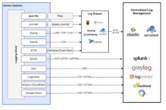
Containers have become central to modern DevOps workflows — supporting continuous delivery, automation, and immutable infrastructure patterns. But their defining characteristic, ephemerality, is also their biggest logging challenge. Containers can spin up and tear down in seconds, taking their log data with them. Without a deliberate logging strategy, that data disappears before anyone can act on it.
This article covers why container logging is uniquely difficult, the four most common logging architectures, and the operational best practices that keep log pipelines reliable in production.
Why Container Logging Is Different from Traditional Logging
In a traditional VM or bare-metal environment, a running process writes logs to a file, and that file stays on disk indefinitely. Containers break this assumption in several important ways.
Short Lifespans Make Log Persistence Difficult
Containers are designed to be stateless. When a container stops — whether due to a crash, a scale-in event, or a deliberate shutdown — any data written inside the container’s writable layer is gone unless it was explicitly exported. This includes log files written to local paths inside the container. A log tied to the container’s own filesystem is effectively lost the moment the container exits.
Logging Must Span Three Distinct Layers
A containerized application runs within at least three overlapping environments, and meaningful troubleshooting requires visibility into all three:
- The application layer — logs emitted by the application code running inside the container.
- The container engine layer — events generated by the runtime itself (e.g., the Docker daemon), such as container start, stop, OOM kills, and image pulls.
- The host OS layer — kernel messages, system calls, and OS-level security events that affect every container sharing that kernel.
Correlating events across all three layers is essential for root-cause analysis. A crash that appears at the application layer may actually be triggered by a host-level memory constraint or a container engine restart.
VM-Wrapped Containers Add a Fourth Layer
Some organizations run containers inside VMs as an additional security boundary — for example, to isolate workloads that share a kernel. This is a legitimate hardening pattern, but it means the logging pipeline must also account for the VM guest OS and the hypervisor. Each additional layer increases both coverage requirements and operational complexity.
Four Container Logging Approaches
There is no universally correct approach. The right choice depends on your infrastructure, team maturity, and operational requirements. The four models below are not mutually exclusive — many production environments combine elements of all of them.
1. Application-Based Logging
In this model, the application handles its own logging using a library or framework built into the code — for example, a Java service using Apache Log4j to write structured log events and ship them directly to a remote log aggregator.
Advantages:
- Familiar to teams migrating from monolithic architectures.
- The application controls log structure, levels, and destinations.
- Can send logs directly to a remote endpoint, bypassing local storage entirely.
Disadvantages:
- The logging library runs inside the container, consuming CPU and memory and potentially degrading application performance.
- No visibility into the container engine or host OS layers.
- If the remote endpoint is unreachable and there is no local buffer configured, log events are dropped.
- Log data stored locally inside the container is lost when the container stops unless forwarding is working correctly.
2. Volume-Based Logging
Container engines such as Docker support named volumes — storage areas managed by the engine that exist independently of the container’s lifecycle. Mounting a volume at the path where the application writes logs means those log files persist after the container is destroyed.
Advantages:
- Log data survives container restarts and termination.
- A single volume can be shared across multiple containers, enabling centralized log collection at the host level.
- Log files can be backed up, rotated, or consumed by a separate log-shipping agent running on the host.
Disadvantages:
- Volumes are tied to a specific host. If a container is rescheduled to a different node (common in Kubernetes or Docker Swarm environments), the volume does not follow it, and logs from the new host are written to a different location.
- Requires a separate process to ship logs from the volume to a central aggregator.
3. Container Engine Native Logging Drivers
Most container engines provide built-in logging drivers that capture a container’s standard output (stdout) and standard error (stderr) streams and forward them to a configured destination. Docker, for example, ships with drivers for syslog, journald, Fluentd, AWS CloudWatch Logs, Google Cloud Logging, and others.
Advantages:
- No changes required to application code — any process writing to stdout/stderr is automatically captured.
- Decouples log delivery from the application, reducing in-container resource overhead.
- Direct integration with many common log aggregation platforms.
Disadvantages:
- Only captures stdout and stderr. Applications that write logs to internal files require an additional mechanism.
- Some drivers (e.g., the Docker
journalddriver) have blocking behavior that can slow container startup or affect performance under high log volume. - Driver availability and configuration options vary between engine versions.
4. Dedicated Logging Containers (Sidecar or DaemonSet Pattern)
Rather than relying on application code or the host engine alone, this pattern uses a purpose-built container to collect, aggregate, and forward logs. Two variants are common:
- Sidecar pattern: A logging container runs alongside each application container in the same pod (Kubernetes) or task. It reads the application’s log stream and forwards it to a central aggregator.
- DaemonSet / host-level agent pattern: A single logging container (or agent) runs once per host node and collects logs from all containers running on that node. Tools like Logspout can capture stdout/stderr from every container on a host and forward the combined stream to a remote syslog endpoint.
Advantages:
- Well-suited to microservices architectures — each service concern (running the app, shipping logs) is handled by a separate container.
- The logging container moves with the application containers, solving the portability problem that affects volume-based logging.
- Centralizes log aggregation logic, making it easier to update or replace the logging stack without touching application code.
Disadvantages:
- Adds operational overhead — the logging container must be monitored, maintained, and updated.
- In the sidecar pattern, resource usage scales with the number of application containers.
Container Log Management Best Practices
Measure the Performance Impact of Your Logging Approach
Every logging mechanism adds some overhead. Application-based logging consumes CPU inside the container. High-volume native logging drivers can introduce latency. Before committing to an approach in production, test it under realistic load. Verify that log collection does not degrade application response times or throughput to an unacceptable degree.
Use Container-Aware Monitoring Tools
Generic monitoring platforms were not designed for ephemeral, dynamically scheduled workloads. Use tools that understand container lifecycles and can associate log events with the correct container, pod, or service — even after the source container has been removed. Tools such as Google’s cAdvisor collect container resource metrics, and many commercial observability platforms offer purpose-built container integrations.
Prioritize Integrations Over Point Solutions
Modern container environments often span multiple orchestrators, cloud providers, and runtimes. A logging or observability platform that integrates broadly — for example, supporting Docker, Kubernetes, and managed Kubernetes services from multiple cloud providers — reduces the number of tools required and enables cross-environment log correlation. Evaluate platforms by their integration breadth before committing to one.
Use Logs and Metrics Together
Logs and metrics answer different questions. Log entries capture discrete events — errors, warnings, specific user actions. Metrics capture continuous measurements — CPU utilization, memory usage, request rates. Effective troubleshooting requires both. Configure your logging pipeline to correlate log errors with concurrent metric anomalies, so that engineers can move quickly from symptom to root cause.
Define Log Retention and Deletion Policies
Container environments generate logs at very high volume. Storing everything indefinitely is expensive and often unnecessary. Define retention periods based on two factors: the business value of the data over time (most operational logs lose diagnostic utility after a few weeks) and any applicable regulatory or compliance requirements that mandate minimum retention periods. Automate deletion of logs that have exceeded their retention window to avoid uncontrolled storage growth.
Protect Log Files
Container logs frequently contain sensitive infrastructure details: host names, IP addresses, environment variable values, directory paths, and in some cases application secrets that were incorrectly logged. Restrict read access to log storage using appropriate access controls, and encrypt log data in transit and at rest. Audit who has access to log aggregation platforms, especially in multi-tenant environments.
Keep Logging Infrastructure Separate from Application Infrastructure
If your logging platform runs in the same cluster as the applications it monitors, a cluster-wide incident — a network partition, a resource exhaustion event, a botched deployment — can take down both the application and the logging system simultaneously. This is precisely when you need logs most. Deploy your log aggregation and storage infrastructure in a separate environment or cluster, and ensure it is configured for high availability. A logging pipeline that goes dark during an incident provides no value.
Choosing the Right Approach for Your Environment
The four logging models — application-based, volume-based, engine-native, and dedicated logging containers — each suit different operational contexts. Teams running simple single-host Docker environments may find the native logging driver sufficient. Large-scale Kubernetes environments typically benefit from a DaemonSet-based log agent combined with a centralized aggregation platform. Teams with strict compliance requirements may need multiple layers running in parallel.
Regardless of which model you choose, enforce logging at all three layers — application, container engine, and host OS — and make sure your logging pipeline is tested, monitored, and treated as production-critical infrastructure in its own right. Log data you cannot access when you need it is the same as no log data at all.