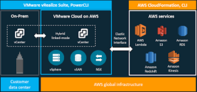
VMware Cloud on AWS is a powerful enterprise platform, but it is not a beginner-friendly one. Administrators who are unfamiliar with core VMware technologies such as ESXi, vCenter, vSAN, and NSX will struggle to deploy and manage it effectively from day one. This article outlines the structured training path that helps admins build the knowledge they need, starting from vSphere fundamentals and working up to the dedicated VMware Cloud on AWS course.
Why VMware Cloud on AWS Requires Serious Training Investment
VMware Cloud on AWS is not simply a new software package — it is an enterprise-grade extension of the VMware stack running on AWS infrastructure. Adopting it means connecting an on-premises data center to a software-defined data center (SDDC), configuring VPN connectivity to secure network traffic, and setting up networking and security components including firewall rules, DNS, and DHCP.
There is no entry-level version of this platform. Admins who are not already confident with ESXi and vCenter will find the environment overwhelming. That said, the platform offers compelling reasons to invest the time: it consolidates and extends data center capabilities, simplifies disaster recovery, and provides a consistent operational model across on-premises and cloud environments.
Pricing is also worth understanding before deployment begins. VMware Cloud on AWS is billed on a per-host, per-hour basis, and costs vary depending on host specifications. Admins need to plan capacity carefully to avoid unexpected spend.
Step 1 — Build the vSphere Foundation First
The recommended starting point is the “VMware vSphere: Install, Configure and Manage” (ICM) course. This course covers the core vSphere skills that underpin everything in VMware Cloud on AWS — because at its heart, the cloud platform is VMware’s core technology running in an AWS-hosted environment.
The ICM course serves two audiences: experienced admins who need to refresh and solidify their knowledge, and those who lack confidence in foundational vSphere concepts. Even though the course focuses primarily on on-premises data center scenarios, the skills it develops translate directly to the cloud context.
VMware offers the ICM course online year-round through its official training portal. The course is a prerequisite — not optional — before moving on to VMware Cloud on AWS-specific material.
Step 2 — Understand vSAN and NSX
Beyond vSphere, two additional technologies are central to VMware Cloud on AWS: vSAN and NSX.
vSAN
vSAN is VMware’s software-defined storage layer. It eliminates the requirement for external shared storage arrays by pooling local disks across ESXi hosts into a distributed datastore. Understanding vSAN is essential because storage is foundational to every workload running in the SDDC, and vSAN does not offer a simplified beginner mode — admins need to understand deployment, policy management, and failure tolerance from the outset.
NSX
NSX is VMware’s network virtualization platform. It allows admins to make network topology and security changes programmatically, without requiring physical intervention on switching or routing hardware. NSX does offer a simplified mode that lets newer admins get started with core networking tasks without being exposed to its full feature set immediately. A more advanced control panel gives experienced admins access to the complete range of configurations.
For admins who are new to both technologies, it is recommended to prioritize vSAN training before NSX, given that vSAN offers less operational flexibility for those who do not fully understand it, while NSX’s simpler mode provides a safer on-ramp for networking tasks.
Step 3 — Complete the ‘VMware Cloud on AWS: Deploy and Manage’ Course
Once admins have solid grounding in vSphere, vSAN, and NSX, they are ready for the “VMware Cloud on AWS: Deploy and Manage” course. This course picks up where the foundational training leaves off and addresses topics specific to the cloud platform, including:
- Key differences between on-premises VMware environments and VMware Cloud on AWS
- How on-premises services integrate with the SDDC
- SDDC deployment and day-two management tasks
- Security best practices for VMware Cloud on AWS, some of which also apply to on-premises environments
This course is available year-round through VMware’s official training portal.
Training Delivery Options and Cost Considerations
The cumulative cost of completing the full training path is significant. However, VMware offers multiple delivery formats — including in-person instructor-led sessions, live online classes, and self-paced options — which gives organizations flexibility in how they structure training for their teams.
Discounts are available through the VMware User Group (VMUG) Advantage program, which can meaningfully reduce per-seat costs for organizations that are already VMUG members. Organizations planning a serious VMware Cloud on AWS adoption should factor training costs into their total investment alongside licensing and infrastructure spend.
The Recommended Training Path at a Glance
- VMware vSphere: Install, Configure and Manage (ICM) — Foundational vSphere skills covering ESXi, vCenter, and core data center operations.
- vSAN training — Software-defined storage concepts, deployment, and management.
- NSX training — Network virtualization fundamentals, with progression from simplified to advanced mode.
- VMware Cloud on AWS: Deploy and Manage — Platform-specific deployment, integration, and security topics.
Skipping steps in this path is likely to result in operational problems after deployment. VMware Cloud on AWS environments succeed or fail based on how they are managed, and gaps in foundational knowledge have a direct impact on reliability, security, and cost control. The training investment, while substantial, reflects the complexity and capability of the platform itself.
This article is based on reporting originally published on SearchServerVirtualization (TechTarget).