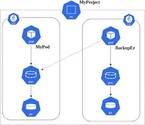
Your container infrastructure needs a backup strategy. Kubernetes and Docker will not rebuild themselves after a catastrophic failure, and assuming otherwise is a dangerous misconception. While you do not need to snapshot the live running state of every container, you absolutely must back up the configuration and data that define your environment.
What Needs to Be Backed Up
Before diving into methods, establish a clear inventory of what is at risk:
- Dockerfiles — the source of truth for every image you build
- Docker images — the built artifacts stored in a registry
- Kubernetes YAML manifests — Deployment, Service, ConfigMap, and other resource definitions
- Kubernetes etcd database — the cluster state store
- Persistent volumes — any storage mounted into containers
- Application databases — data written by containerized database engines
Dockerfiles and Kubernetes YAML Manifests
Docker images are built from Dockerfiles, and Kubernetes workloads are described by YAML manifests. Both are plain-text files that are ideal candidates for version control. Store them in a Git repository (GitHub, GitLab, Bitbucket, or a self-hosted alternative) so that every change is tracked and every historical version is recoverable.
Do not create ad hoc containers from ad hoc images built from Dockerfiles that exist only on someone’s laptop. If a Dockerfile is not committed to a repository, it is effectively unprotected. The same rule applies to Kubernetes YAML files describing each deployment.
The repositories themselves must also be backed up. Most hosted Git services provide APIs that allow you to script a periodic download of your repositories. Third-party commercial tools also exist for this purpose.
If you are already running containers built from images for which you no longer have the original Dockerfile, the docker image history command can help you reconstruct the layers. Tools such as dfimage can assist in generating an approximate Dockerfile from an existing image. Treat these as a starting point, not a perfect reproduction, and commit the result to version control immediately.
Docker Images
Built images should be stored in a container registry — either a private Docker registry, a cloud-provider registry, or Docker Hub. The registry is your authoritative source for every image version your containers run. Back up the contents of that registry so that images can be restored even if the registry itself is lost.
If you need to capture the current state of a running container as an image (for example, because the original image is no longer available), use docker commit <container_id> <image_name>. You can then push this image to your registry and reconstruct an approximate Dockerfile using docker image history or dfimage. This is a recovery technique, not a recommended workflow.
Kubernetes etcd
etcd is the key-value store that holds the entire state of a Kubernetes cluster. Losing etcd without a backup means losing the cluster’s desired state — all deployments, services, config maps, secrets, and role bindings.
The canonical way to back up etcd is with the etcdctl snapshot save command:
ETCDCTL_API=3 etcdctl snapshot save snapshot.db \
  --endpoints=https://127.0.0.1:2379 \
  --cacert=/etc/kubernetes/pki/etcd/ca.crt \
  --cert=/etc/kubernetes/pki/etcd/server.crt \
  --key=/etc/kubernetes/pki/etcd/server.keyCode language: JavaScript (javascript)
This produces a snapshot.db file in the current directory. That file must then be moved to external, durable storage. If you are integrating this into a commercial backup solution, trigger the snapshot command as a pre-backup script, then include the output directory in the backup job’s scope. Refer to the official Kubernetes etcd backup documentation for restoration procedures.
Persistent Volumes
Containers can access persistent storage in several ways, each requiring a different backup approach:
- Docker named volumes — stored in a subdirectory managed by the Docker daemon (typically under
/var/lib/docker/volumes/) - Bind mounts — a host directory mounted into the container at runtime
- NFS mounts — a network filesystem mounted as a volume
- Object storage — an object-storage bucket exposed as a volume
The fundamental challenge with all of these is consistency: if data is being written while the backup runs, the backup may capture a partially written state. The simplest way to guarantee consistency is to stop all containers using the volume before backing it up — but this causes downtime, which may be unacceptable in production.
For named Docker volumes, a common technique is to spin up a temporary container that mounts the volume read-only, archives it with tar, and writes the archive to a bind-mounted host directory that your backup agent can then pick up:
docker run --rm \
  -v myvolume:/data:ro \
  -v /tmp/backups:/backup \
  busybox tar czf /backup/myvolume-$(date +%F).tar.gz -C /data .Code language: JavaScript (javascript)
For NFS-mounted filesystems, bind-mounted host directories, or object storage, prefer the native backup mechanism for that storage layer — for example, a filesystem snapshot followed by replication, or the storage provider’s own backup tooling. These approaches typically produce more consistent results than a file-level copy of an active volume.
Backing up persistent volumes in Kubernetes is harder than in standalone Docker because pods are distributed across nodes and volumes are managed by the cluster. This is one reason stateful data is better managed in a dedicated database than a raw filesystem when running on Kubernetes.
Application Databases Running in Containers
When a container runs a database engine (MySQL, PostgreSQL, MongoDB, and so on), the data files that back up that engine require special handling. A raw file-level copy of a live database is rarely consistent and often unrestorable.
Preferred approaches include:
- Native database dump utilities — Run the database’s own backup command (e.g.,
mysqldump,pg_dump) inside or against the container, write the output to a bind-mounted directory, and then back up that directory. Example for MySQL running in a container:docker exec <container> mysqldump -u root -p<password> --all-databases > /backup/dump.sql - Stop-and-copy — Stop the container, back up the data directory, then restart. Suitable only where downtime is tolerable.
- Database-native replication or snapshots — Many databases support replication to a secondary node that can be quiesced for backup without affecting the primary.
To discover which volumes are mounted by which containers, use:
# List running containers
docker ps

# Inspect a specific container's mount configuration
docker inspect <container_id> | jq '.[].Mounts'Code language: PHP (php)
In Kubernetes, bind mounts and volume claims are also declared in the pod or deployment YAML, so your version-controlled manifests serve double duty as a mount inventory.
Commercial Backup Solutions
Several commercial and open-source tools address Kubernetes and Docker backup at a higher level of abstraction than manual scripting:
- Velero (originally Heptio Ark, now a VMware-sponsored open-source project) — Provides backup and restore of Kubernetes cluster resources and persistent volumes. It integrates with cloud object storage and supports scheduled backups and disaster recovery workflows.
- Commvault — Offers a virtual server agent capable of acting as a proxy for container and image backup.
- Cohesity — Provides data protection targeting Kubernetes namespaces.
- Portworx — Storage platform designed for Kubernetes with integrated backup and restore capabilities.
- Kasten K10 — Kubernetes-native data management platform focused on backup, disaster recovery, and application mobility.
Evaluate commercial tools against your specific storage backends, cluster size, recovery time objectives (RTO), and recovery point objectives (RPO). No single tool covers every configuration.
Summary: Backup Checklist
| Component | Recommended Approach |
|---|---|
| Dockerfiles | Version control (Git) + repository backup |
| Kubernetes YAML manifests | Version control (Git) + repository backup |
| Docker images | Container registry + registry backup |
| Kubernetes etcd | etcdctl snapshot save + offsite storage |
| Persistent volumes | Quiesce + tar/snapshot, or storage-native backup |
| Application databases | Native dump utility or replication-based backup |
Container infrastructure introduces new backup challenges, but the underlying principles are unchanged: know what data you have, understand how it changes, and verify that you can restore it before you need to.