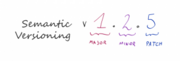
Software projects accumulate dependencies fast. Without a consistent versioning strategy, upgrading one library can silently break another, and teams lose confidence in deployments. Semantic Versioning (commonly abbreviated SemVer) is a widely adopted convention that encodes meaningful information directly into a version number so that developers, operators, and automated tooling can make informed decisions about updates.
What Is Semantic Versioning?
A semantic version number takes the form:
MAJOR.MINOR.PATCHCode language: CSS (css)- MAJOR – Incremented when you make incompatible (breaking) API changes. Consumers must update their code before upgrading.
- MINOR – Incremented when you add functionality in a backward-compatible manner. Existing consumers can upgrade safely.
- PATCH – Incremented for backward-compatible bug fixes only. Upgrading carries minimal risk.
For example, moving from 2.3.1 to 2.4.0 signals new features that don’t break existing integrations. Moving from 2.4.0 to 3.0.0 signals that breaking changes were introduced and migration work may be required.
Why SemVer Matters in DevOps
In a DevOps pipeline, software artifacts flow through multiple environments — development, testing, staging, and production — often automatically. Predictable versioning is what makes that automation trustworthy:
- Dependency management: Package managers such as npm, Maven, Gradle, and Cargo all understand SemVer range syntax (e.g.,
^1.2.0). They can pull the latest safe upgrade automatically without human intervention. - Avoiding dependency hell: When every library in your graph follows SemVer, version conflicts become predictable and resolvable rather than mysterious runtime failures.
- Release communication: A version bump tells every stakeholder — developers, QA, ops, and consumers — exactly what kind of change landed without reading the entire changelog.
- Rollback confidence: Clear PATCH boundaries mean teams can roll back a single fix without inadvertently losing a feature introduced in the same version range.
- CI/CD automation: Build pipelines can automatically promote a PATCH release to production while holding a MAJOR release for additional testing and approval gates.
Pre-release and Build Metadata
SemVer also supports optional suffixes for pre-release identifiers and build metadata:
1.0.0-alpha.1
1.0.0-beta.3
1.0.0-rc.1
1.0.0+build.20231201Code language: CSS (css)- Pre-release labels (hyphen-separated) indicate that a version is not yet stable. They sort before the release version they are appended to, so
1.0.0-alpha.1 < 1.0.0. - Build metadata (plus-separated) is ignored when determining version precedence and is typically used to attach CI build numbers or commit SHAs for traceability.
SemVer in Practice: A Typical Workflow
A straightforward SemVer workflow in a CI/CD pipeline looks like this:
- Start at
1.0.0once your public API is stable. Use0.y.zfor initial development where anything can change. - Commit a bug fix → bump PATCH (
1.0.0→1.0.1). Automated tests pass; pipeline promotes directly to production. - Add a new endpoint → bump MINOR (
1.0.1→1.1.0). Pipeline runs integration tests; stakeholders are notified of new capabilities. - Redesign the authentication flow (breaking change) → bump MAJOR (
1.1.0→2.0.0). Pipeline triggers additional approval gates; a migration guide is published alongside the release. - Tag the release in Git (e.g.,
git tag v2.0.0) and publish the artifact to your registry. The tag becomes the single source of truth for that release.
Common Pitfalls to Avoid
- Bumping MAJOR for internal refactors: If no public API surface changed, it is not a breaking change. Reserve MAJOR increments for actual consumer-facing incompatibilities.
- Skipping versions: SemVer does not require sequential numbers, but skipping versions (e.g., jumping
1.0.0→1.0.5) confuses consumers and tooling. Release every increment. - Forgetting pre-release labels: Publishing unstable code as a release version forces consumers to treat it as stable. Use
-alpha,-beta, or-rcsuffixes while the release is still in progress. - Inconsistent team practices: SemVer only works if the entire team applies it consistently. Codify bump rules in your CONTRIBUTING guide and enforce them with tooling such as
semantic-releaseor Conventional Commits.
Further Reading
For a deeper dive into applying SemVer in DevOps pipelines, see the original article on DZone: DevOps: Semantic Versioning Simplified – DZone DevOps.