
Most enterprises have adopted DevOps practices, yet a surprisingly small proportion of mobile apps undergo any form of automated security testing. That gap represents real risk. The good news is that teams already running CI/CD pipelines for mobile development are well-positioned to layer in automated security testing with relatively little additional overhead. This article explains what mobile app security testing automation is, why it matters, and exactly where and how to integrate it into a DevOps toolchain.
This article is based on a piece originally published on nowsecure.com. Statistics cited (RightScale 2016 State of the Cloud Report; Ponemon Institute 2017 Study on Mobile IoT Application Security) originate from that source and have not been independently verified.
What Is Mobile App Security Testing Automation?
Mobile app security testing automation means running static and dynamic security analysis against a mobile app automatically — typically triggered by a build event — before the app is deployed. Security testing surfaces vulnerabilities that arise from an app’s permissions model, network connections, data storage, third-party libraries, and other components of the mobile attack surface.
Integrated into a DevOps pipeline, automated security tests run alongside functional, integration, compatibility, and performance tests. This is the practical definition of DevSecOps: security becomes a continuous, automated step in the software delivery lifecycle (SDLC) rather than a one-off gate at the end. The earlier in the SDLC a defect is found, the cheaper it is to fix — a well-established principle that applies equally to security bugs.
Why Automate Mobile App Security Testing?
Traditional mobile app security testing is manual. A typical manual process involves:
- Navigating an app’s UI by hand to trigger different code paths
- Observing behavior across attack scenarios — for example, proxying traffic through a man-in-the-middle (MITM) setup, or running the app on a jailbroken or rooted device
- Collecting output from various testing tools and comparing it between builds
A skilled penetration tester performing a thorough assessment remains the gold standard for security coverage. However, penetration testing is time-consuming, and mobile release cycles have accelerated dramatically. As build frequency increases, manual security testing simply cannot keep pace. Security analysts are forced to focus only on recently changed code, leaving unreviewed functionality exposed.
Many manual security checks are inherently repetitive — verifying that a debug flag is disabled in a production build, confirming that certificate pinning is in place, checking that sensitive data is not written to device logs. Repetitive, deterministic checks are exactly the tasks that automation handles well. Automating these checks frees security analysts to focus on exploratory, context-driven penetration testing where human judgment genuinely adds value.
Benefits of Mobile App Security Testing Automation
- Parallelization: Security tests run concurrently with functional, compatibility, and performance tests — adding no wall-clock time to the pipeline when cloud-based device farms are used.
- Shift-left security: Defects are reported during the build phase, when developers still have full context and fixes are inexpensive.
- Regression protection: Every build is scanned, so a security regression introduced in a code change is caught immediately rather than at a quarterly pen-test.
- Script reuse: Existing UI automation scripts (written in XCTest, Appium, or similar frameworks) can drive automated dynamic security analysis with minimal additional effort.
- More time for deep testing: Analysts are freed from repetitive checks and can invest time in nuanced, exploratory testing that automation cannot replicate.
Overcoming Common Challenges
Integrating automated security testing into a mobile DevOps pipeline is achievable, but there are real challenges to address up front.
Coverage Challenges
Static analysis — examining source code or a compiled binary without running the app — is straightforward to automate and fast to run. However, it provides limited coverage on its own. Many security vulnerabilities only manifest at runtime: how the app handles network responses, what it writes to disk under certain conditions, or how it behaves on a compromised device.
Dynamic analysis closes that gap by running the app on a real or virtual device and observing its runtime behavior. Automating dynamic analysis is more complex because it requires scripting realistic user interactions through the UI. Using a physical device rather than an emulator is preferable for accuracy, because emulators do not reproduce all hardware behaviors. The good news is that UI automation scripts already written for functional QA can be reused or extended to drive security-focused dynamic analysis.
False Positives and Alert Fatigue
Static-only analysis tools frequently generate a high rate of false positives — flagging code patterns that look suspicious but are not actually exploitable in context. When developers are routinely asked to investigate false alarms, they lose trust in the tooling and begin to ignore findings altogether. This is the classic alert-fatigue problem. Combining static and dynamic analysis reduces false positive rates, because dynamic analysis can confirm whether a potential vulnerability is actually reachable and exploitable at runtime.
Reporting Quality
A binary pass/fail report is insufficient. Developers need to understand why a finding is a security risk, how to reproduce it, and what the recommended remediation is. Quality automated security test reports should include:
- A clear description of the vulnerability and the risk it represents
- Evidence or proof-of-concept that confirms the issue exists (not just a static code pattern match)
- Specific remediation guidance, not generic advice
- Severity classification so teams can prioritize
When reports meet these criteria, security findings can flow directly into an issue tracker such as Jira, where they are treated like any other development task — triaged, prioritized, assigned, and tracked to resolution.
Who Owns Mobile App Security Testing Automation?
Ownership typically splits across two dimensions:
- Tool selection and findings review: The security team should own these. Security engineers have the expertise to evaluate tooling, interpret findings, validate results, and escalate genuine vulnerabilities.
- Automation scripting: Development and QA teams are often better placed to write and maintain the UI automation scripts that drive dynamic analysis, because they already own functional test automation. Adding security-specific interactions to existing scripts — or configuring a security testing framework to consume those scripts — is usually low-overhead work for teams already fluent in Appium, XCTest, or XCode UI Automation.
The goal is for security testing to run at the same frequency as other automated UI tests, triggered automatically on every build, with no manual intervention required for standard checks.
Where Does Security Testing Sit in the DevOps Toolchain?
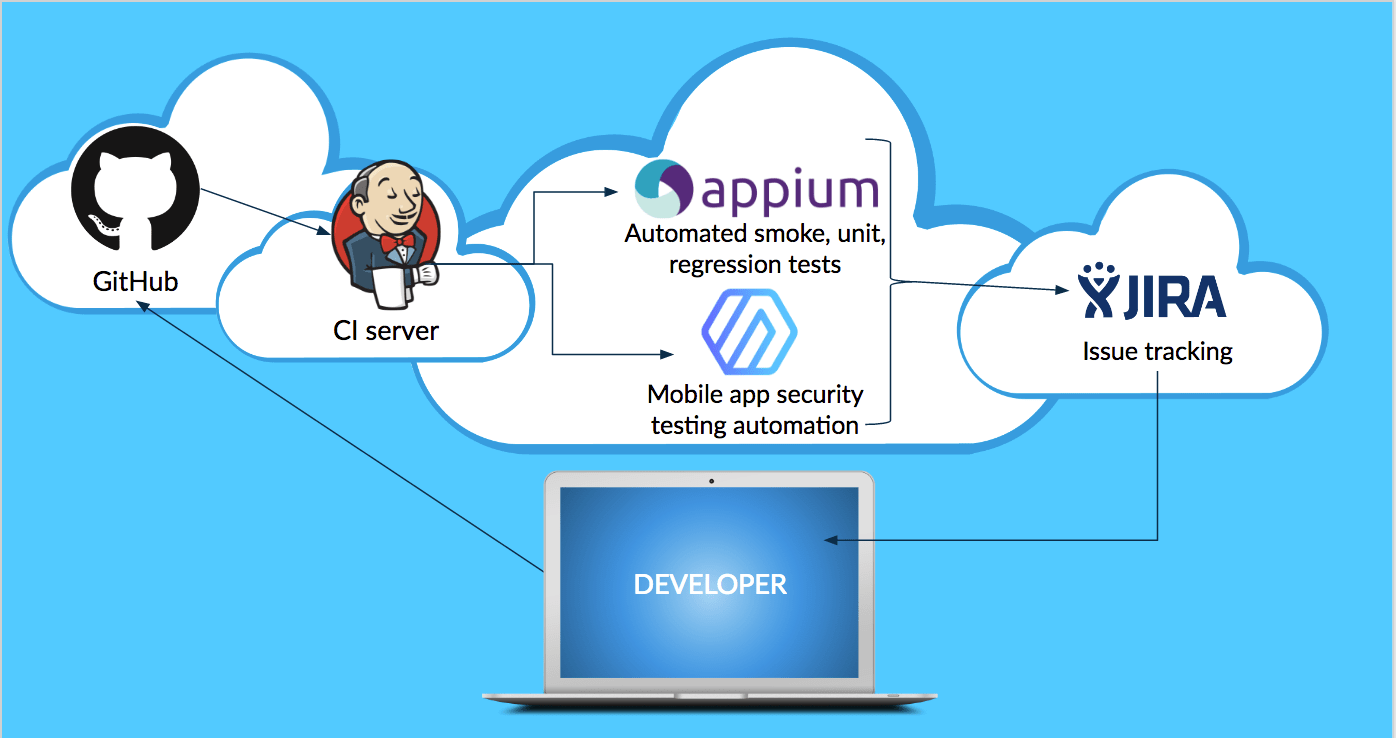
The recommended insertion point is at the build stage — immediately after the CI server produces a compiled build artifact. The general flow looks like this:
- Developer pushes code to source control (e.g., GitHub, GitLab, Bitbucket).
- CI server (e.g., Jenkins, Bitrise, Buddybuild, CircleCI) compiles the build.
- Automated test suite runs — unit, integration, UI functional tests, and security tests execute in parallel against the build artifact.
- Security testing framework receives the compiled app, runs static and dynamic analysis, and returns findings.
- Issue tracker (e.g., Jira) ingests findings and creates or updates tickets, which enter the development team’s normal sprint workflow.
- Build is promoted or blocked based on configurable severity thresholds — for example, blocking deployment if any critical vulnerabilities are found.
Inserting security testing at the build stage keeps it out of the critical path for developers during active coding, while still surfacing findings early enough to fix them before release.
Getting Started: Practical Steps
Teams that already have CI/CD pipelines for mobile development can begin integrating automated security testing with the following steps:
- Inventory existing test automation. Identify UI automation scripts (Appium, XCTest, Espresso, etc.) already in use for functional testing. These can often drive dynamic security analysis with minimal modification.
- Select a mobile security testing tool that supports your platform (iOS, Android, or both), integrates with your CI server via an API or plugin, and provides actionable reporting. Evaluate whether the tool supports both static and dynamic analysis.
- Integrate at the build stage. Configure your CI pipeline to pass the compiled build artifact to the security testing framework automatically on each build.
- Connect findings to your issue tracker. Set up the integration between the security testing tool and your issue tracker so that findings automatically generate tickets with severity, description, and remediation guidance.
- Define quality gates. Decide which severity levels should block a build from progressing to the next pipeline stage. Start conservatively — block only on critical findings — and tighten thresholds as the team builds familiarity with the tooling.
- Review and tune regularly. Work with the security team to review reported findings, identify persistent false positives, and adjust tool configuration to improve signal-to-noise ratio over time.
Summary
Mobile app security testing automation is not a separate, heavyweight initiative — it is another layer in a testing stack that most mobile DevOps teams are already building. Static and dynamic security analysis can be triggered automatically on every build, driven by existing UI automation scripts, and reported through existing issue-tracking workflows. The result is a DevSecOps model where security defects are caught early, fixed cheaply, and tracked with the same discipline as functional bugs.
If your team has already invested in CI/CD for mobile, the incremental effort to add automated security testing is small relative to the risk reduction it delivers. The remaining gap between DevOps adoption and mobile security testing coverage is a solvable problem — and solving it starts with treating security as just another automated test.