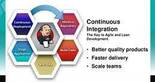
Continuous Integration (CI) is not just for application code. ETL and data integration pipelines benefit from the same discipline: automated execution, version control, and rapid feedback on changes. This guide walks through setting up Jenkins to run and trigger Pentaho Data Integration (PDI) jobs and transformations, starting with a simple scheduled build and progressing to a git-hook-driven on-commit build.
Download and Install Jenkins
The simplest way to get Jenkins running locally is to deploy the Jenkins WAR file into an existing servlet container such as Apache Tomcat. The following shell commands show an example installation on Linux:
cd ~/apps

# Download and unpack Tomcat (update the version URL as needed)
wget http://mirrors.ukfast.co.uk/sites/ftp.apache.org/tomcat/tomcat-9/v9.0.0.M17/bin/apache-tomcat-9.0.0.M17.zip
unzip apache-tomcat-9.0.0.M17.zip
rm apache-tomcat-9.0.0.M17.zip
chmod 700 apache-tomcat-9.0.0.M17/bin/*.sh

# Drop the Jenkins WAR into the Tomcat webapps directory
cd apache-tomcat-9.0.0.M17/webapps
wget http://mirrors.jenkins.io/war-stable/latest/jenkins.war

# Start Tomcat
cd ../bin
sh ./startup.shCode language: PHP (php)
Once Tomcat starts, open http://localhost:8080/jenkins in your browser. Jenkins will prompt you for an initial admin password, which is stored at:
~/.jenkins/secrets/initialAdminPasswordCode language: JavaScript (javascript)After authenticating, Jenkins offers to install a set of suggested plugins. At a minimum, install the Git plugin — it is required for the SCM polling and git-hook notification features described later in this guide.
Schedule a PDI Job in Jenkins
The most straightforward integration between Jenkins and PDI is a periodically scheduled build that executes a PDI job or transformation via the pan.sh (for transformations) or kitchen.sh (for jobs) command-line launcher.
Step-by-Step
- In the Jenkins UI, click New Item.
- Give the item a name and select Freestyle project, then click OK.
- Under Build Triggers, tick Build periodically. Enter a cron-style schedule in the Schedule field. For example,
* * * * *triggers a build every minute (useful for quick testing — use a less frequent interval in production). - Scroll to the Build section, click Add build step, and choose Execute shell. Enter the PDI launch command. Example for running a transformation with
pan.sh:
/home/dsteiner/apps/pentaho-ee/design-tools/data-integration/pan.sh \
-file=/home/dsteiner/git/diethardsteiner.github.io/sample-files/pdi/test.ktrCode language: JavaScript (javascript)- Click Save.
- Wait for the schedule to trigger. The running build appears in the Build History panel on the left. Click the build number, then Console Output to inspect the PDI log.
Once you have verified the setup, delete the test item and move on to the more powerful on-commit approach below.
On-Commit Build: Trigger Jenkins from a Git Hook
Polling on a fixed schedule wastes resources and introduces latency. A better approach is to have Git notify Jenkins immediately after every commit. This is the foundation of true CI for data pipelines: every committed change to a .ktr or .kjb file automatically kicks off the corresponding PDI job or transformation.
There are two broad strategies:
- Jenkins polls the repository on a schedule (simple but inefficient).
- Git notifies Jenkins via a hook the instant a commit happens (more efficient and responsive).
We use a git post-commit hook to call the Jenkins Git plugin’s notification endpoint:
http://localhost:8080/jenkins/git/notifyCommit?url=<repository-url>Code language: HTML, XML (xml)Git Hooks — Key Facts
- Git hooks are scripts that Git executes automatically on specific events (e.g.,
post-commit,pre-push). - They live in
<repo-root>/.git/hooks/. Files have no extension. They can be written in any scripting language available on the machine. - Client-side hooks are not pushed to the remote server and are not version-controlled. Every developer’s local clone needs its own copy.
- You can work around this by storing hook scripts inside the tracked repository and symlinking from
.git/hooks/, or by using the Git Template Directory to auto-copy hooks into every new clone. - Hook scripts must be executable (
chmod +x).
Create the post-commit Hook
Inside your local git repository, create a file named post-commit (no extension) in the .git/hooks/ directory:
#!/bin/sh
curl http://localhost:8080/jenkins/git/notifyCommit?url=file:///home/dsteiner/git/diethardsteiner.github.ioCode language: JavaScript (javascript)
Make the hook executable:
chmod 700 .git/hooks/post-commitThe file:// URL scheme works for local repositories and is useful during development. In a production setup, replace it with the URL of your remote Git server.
Configure the Jenkins Item
- Click New Item, name it, and select Freestyle project.
- In the Source Code Management section, select Git and set the Repository URL to the same URL used in the hook (e.g.,
file:///home/dsteiner/git/diethardsteiner.github.io). - In Build Triggers, enable Poll SCM. Leave the Schedule field empty. This is a required but counter-intuitive step: the Git plugin only responds to
notifyCommitrequests for jobs that have Poll SCM enabled, even though no polling schedule is defined. - In the Build section, click Add build step → Execute shell and enter your PDI command:
/home/dsteiner/apps/pentaho-ee/design-tools/data-integration/pan.sh \
-file=/home/dsteiner/git/diethardsteiner.github.io/sample-files/pdi/test.ktrCode language: JavaScript (javascript)- Click Save.
Test the End-to-End Flow
Navigate to your git repository on the command line, make any change to a tracked file, and commit:
echo "# test" >> README.md
git add README.md
git commit -m "Test CI trigger"Code language: PHP (php)
The post-commit hook fires automatically, calls the Jenkins notifyCommit endpoint, and Jenkins starts the build within seconds. Check the Build History in the Jenkins UI and review the Console Output to confirm the PDI transformation ran successfully.
Summary
| Approach | Trigger mechanism | Best for |
|---|---|---|
| Scheduled build | Jenkins cron via Build periodically | Batch ETL that must run on a fixed cadence regardless of code changes |
| On-commit build | Git post-commit hook + notifyCommit endpoint | Agile development workflows where pipeline code changes frequently |
By wiring Jenkins to your PDI repository, you gain immediate feedback whenever a transformation or job is modified — the same CI discipline that application development teams rely on, applied directly to your data integration layer.
Original source credit: 126kr.com (via bestdevops.com). Additional reference: Pentaho Data Integration scheduling with Jenkins; Automatically triggering a Jenkins build on Git commit.