Introduction
Network inventory management is the foundational discipline of identifying, cataloging, and maintaining a real-time record of every physical and logical asset within an IT ecosystem. In modern hybrid environments, this extends beyond simple hardware tracking to include virtual machines, cloud instances, containers, and complex software licensing. A robust network inventory tool serves as the “Source of Truth” for an organization, enabling technical teams to move from reactive troubleshooting to proactive infrastructure lifecycle management. By automating the discovery of routers, switches, servers, and endpoints, these tools eliminate the human error inherent in manual spreadsheets and provide the granular visibility required for effective capacity planning and cost optimization.
The strategic importance of network inventory has intensified as security and compliance frameworks become more stringent. You cannot secure what you cannot see; therefore, an accurate inventory is the first step in any vulnerability management or Zero Trust initiative. Advanced platforms now utilize both active scanning and passive listening to surface “shadow IT” and unmanaged devices that might otherwise bypass traditional security controls. For leadership, these tools translate technical data into business intelligence, highlighting aging hardware that poses an operational risk and identifying underutilized software licenses that can be reclaimed to reduce annual expenditures.
Best for: Systems administrators, Network Engineers, IT Asset Managers (ITAM), and Security Operations Center (SOC) teams who require precise, automated visibility into distributed or high-density infrastructure.
Not ideal for: Ultra-small businesses with fewer than 10-15 static devices where the overhead of deploying and maintaining a dedicated management suite outweighs the manual effort of periodic audits.
Key Trends in Network Inventory Tools
The most significant trend currently shaping the market is the shift toward “Observability-Driven Inventory.” Tools are no longer static databases; they are dynamic systems that correlate inventory data with real-time performance metrics and traffic patterns. This allows teams to see not just that a device exists, but exactly how it is behaving and which business services depend on it. Artificial Intelligence and Machine Learning are also being deployed to automate the “normalization” of data, instantly reconciling disparate device names and manufacturer details into a standardized format for cleaner reporting.
Furthermore, there is a massive move toward API-first architectures and “Infrastructure as Code” (IaC) integrations. Modern inventory tools act as data providers for automation workflows, feeding accurate asset details into configuration management databases (CMDBs) or security orchestration platforms (SOAR). Sustainability tracking has also emerged as a key feature, with many platforms now calculating the carbon footprint and energy consumption of inventoried hardware. This enables organizations to meet ESG (Environmental, Social, and Governance) reporting requirements directly from their IT management consoles.
How We Selected These Tools
The selection of these ten tools was driven by a requirement for multi-vendor support and high-fidelity discovery capabilities. We prioritized solutions that offer “agentless” discovery, as the ability to scan a network without installing software on every endpoint is critical for managing IoT devices and legacy hardware. The maturity of the integration ecosystem was another primary factor; we looked for tools that can seamlessly exchange data with popular ITSM platforms like ServiceNow, Jira Service Management, and various RMM suites used by Managed Service Providers.
Security and audit readiness were non-negotiable criteria. Each selected tool provides detailed change logs, historical tracking, and the ability to generate compliance-ready reports for frameworks such as SOC2, HIPAA, and PCI-DSS. We also evaluated the “Ease of Setup” against the “Depth of Data,” ensuring our list includes both “plug-and-play” scanners for rapid audits and sophisticated enterprise platforms designed for deep interrogation of complex, multi-site global networks.
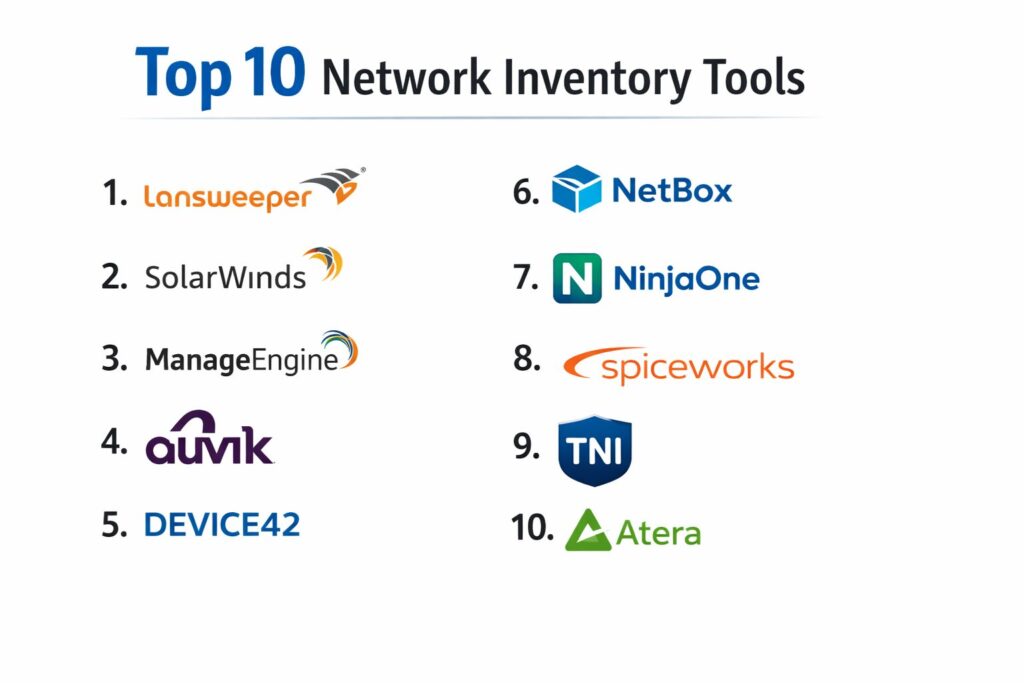
1. Lansweeper
Lansweeper is a powerhouse in the discovery space, known for its incredible ability to find “everything with an IP address” without requiring agents. It excels in diverse environments containing a mix of IT, OT (Operational Technology), and IoT devices.
Key Features
The platform utilizes a multi-scan technology that combines active scanning, passive listening, and cloud connectors to build a comprehensive asset database. It provides a unique “Asset Radar” that detects devices the moment they connect to the network, preventing rogue hardware from remaining hidden. The software inventory module automatically catalogs installed applications and identifies end-of-life versions that may pose security risks. It also includes an integrated help desk and a robust automated reporting engine. Its “Deep Scan” capability can extract serial numbers, hardware specifications, and even warranty information directly from manufacturers.
Pros
Exceptional at finding unmanaged and “shadow” assets that other tools miss. The agentless model makes initial deployment extremely fast across large subnets.
Cons
The user interface can feel cluttered and overwhelming for beginners. Reporting, while powerful, requires a learning curve to build complex custom SQL queries.
Platforms and Deployment
Available as an on-premises installation or a cloud-hosted “Sites” platform.
Security and Compliance
Supports credential-free scanning and encrypted data transmission; provides detailed audit trails for hardware changes.
Integrations and Ecosystem
Strong native integrations with ServiceNow, Jira, and Zendesk, plus a comprehensive API for custom data exports.
Support and Community
Offers a deep knowledge base and an active community forum where users share custom report templates.
2. SolarWinds Network Inventory
SolarWinds is a staple in the enterprise market, offering a deeply technical approach to inventory through its Network Performance Monitor (NPM) and Network Configuration Manager (NCM) modules.
Key Features
The tool provides automated discovery and multi-vendor support for thousands of device types. Its “NetPath” feature visualizes the hop-by-hop path of a service, linking inventory data to actual network performance. It excels at configuration auditing, allowing teams to compare current device settings against “Gold Master” configurations for compliance. The platform includes a sophisticated alerting system that triggers when hardware changes or unauthorized devices are detected. It also tracks hardware health, such as fan speeds and power supply status, alongside traditional inventory metrics.
Pros
Offers the deepest technical integration between inventory and performance monitoring in the industry. The “THWACK” community provides a massive library of user-generated content.
Cons
Can be expensive as it often requires multiple modules to unlock full functionality. The infrastructure requirements for the on-premises version are significant.
Platforms and Deployment
Primarily Windows-based on-premises deployment with increasing SaaS observability options.
Security and Compliance
Highly focused on “Secure by Design” principles; includes robust reporting for NIST and DISA STIG compliance.
Integrations and Ecosystem
Integrates perfectly with the broader SolarWinds Orion platform and major ITSM suites.
Support and Community
Industry-leading support and the THWACK community, which is one of the largest IT forums in the world.
3. ManageEngine AssetExplorer
AssetExplorer is a dedicated IT Asset Management (ITAM) solution that focuses on the entire lifecycle of a network asset, from procurement to disposal.
Key Features
The platform provides a unified view of hardware and software assets across the network using multiple discovery modes, including WMI, SNMP, and SSH. It features a robust “Software License Management” module that helps organizations stay compliant and avoid “under-licensing” penalties during audits. The tool includes a built-in “Purchase and Contract Management” system to track warranties and maintenance agreements. It also offers a CMDB that visualizes the relationships and dependencies between different configuration items. Its “Scan-on-the-go” mobile app allows technicians to update inventory records from the data center floor.
Pros
Excellent value for the price, especially for organizations that need to combine technical inventory with financial asset tracking. The interface is modern and intuitive.
Cons
Some advanced automation features require integration with other ManageEngine products like ServiceDesk Plus. The discovery of cloud-native assets is not as mature as some competitors.
Platforms and Deployment
Available for on-premises Windows installation or as a cloud-based SaaS offering.
Security and Compliance
Provides role-based access control and detailed logs for all asset modifications, assisting in ISO 27001 compliance.
Integrations and Ecosystem
Seamlessly integrates with the vast ManageEngine suite and offers REST APIs for third-party connectivity.
Support and Community
Reliable technical support with regular webinars and an extensive library of “how-to” documentation.
4. Auvik
Auvik is a cloud-native platform specifically designed for Managed Service Providers (MSPs) and internal IT teams who need real-time network visibility and automated documentation.
Key Features
Auvik’s standout feature is its real-time, interactive Layer 2 and Layer 3 topology mapping. As devices are discovered, they are automatically placed on a map showing exactly how they are interconnected. It performs automated configuration backups for network gear, allowing for instant “diff” comparisons if a change causes an outage. The platform tracks IP address utilization (IPAM) and provides deep insights into network traffic flows (NetFlow). It also monitors the “up/down” status of every inventoried device, sending instant alerts if a critical switch or router fails.
Pros
The automated topology mapping is world-class and saves hundreds of hours of manual diagramming. The cloud-native architecture means there is virtually no server maintenance.
Cons
Pricing is based on “managed” network devices (like switches and firewalls), which can become expensive as the network grows. It is less focused on “endpoint” inventory (like laptops).
Platforms and Deployment
100% cloud-based; requires a small “collector” installed on-site or as a virtual appliance.
Security and Compliance
Uses 256-bit AES encryption for all data at rest and in transit; supports multi-factor authentication (MFA) for all users.
Integrations and Ecosystem
Excellent integrations with RMM and documentation tools like IT Glue, Datto, and ConnectWise.
Support and Community
High-quality 24/7 support and a very proactive customer success team.
5. Device42
Device42 is an enterprise-grade solution that bridges the gap between traditional network inventory and Data Center Infrastructure Management (DCIM).
Key Features
The platform provides deep application dependency mapping (ADM), showing how software applications relate to specific servers and network components. This is invaluable for planning cloud migrations or disaster recovery. It includes comprehensive rack elevation diagrams, allowing managers to visualize the physical placement of hardware in data centers. Its IP Address Management (IPAM) is highly sophisticated, supporting both IPv4 and IPv6. The tool also includes a “Certificate Management” module that alerts teams before SSL/TLS certificates expire, preventing unexpected downtime.
Pros
Unrivaled for managing complex data centers and hybrid-cloud environments. The dependency mapping provides “Business Value” context that basic scanners lack.
Cons
The feature set is vast, leading to a steeper learning curve than simpler tools. It may be over-engineered for organizations with purely office-based networks.
Platforms and Deployment
Deployed as a virtual appliance on VMWare, Hyper-V, or Nutanix.
Security and Compliance
Enterprise-grade security controls and comprehensive reporting for regulatory audits.
Integrations and Ecosystem
Massive library of integrations including Ansible, Puppet, Chef, and major cloud providers (AWS/Azure).
Support and Community
Professional support team and extensive technical documentation tailored for enterprise architects.
6. NetBox
NetBox is the industry-standard “Source of Truth” for network automation. Originally developed by the DigitalOcean team, it is designed specifically to represent the intended state of a network.
Key Features
Unlike tools that “discover” what is there, NetBox is designed to store what should be there. It combines IPAM, DCIM, and circuit provider tracking into a single, highly structured database. It uses a rigorous data model that forces consistency across the network organization. The platform is built around a powerful REST API and GraphQL, making it the preferred choice for teams practicing “Infrastructure as Code.” It allows for the documentation of cabling, power connections, and virtual chassis configurations with extreme precision.
Pros
Completely open-source and free to self-host. It provides the most accurate and structured data model for driving network automation scripts.
Cons
It does not perform automated network discovery natively; data must be entered manually or imported via API from other discovery tools.
Platforms and Deployment
Self-hosted on Linux/Docker or available as a managed “Cloud” service.
Security and Compliance
Open-source nature allows for full security auditing; supports LDAP and OIDC for enterprise authentication.
Integrations and Ecosystem
The center of the modern network automation ecosystem; integrates with everything from Ansible to custom Python scripts.
Support and Community
Extremely active community on GitHub and Slack; managed versions offer professional SLAs.
7. NinjaOne
NinjaOne is an all-in-one IT management platform that integrates network inventory directly into its remote monitoring and management (RMM) suite.
Key Features
The platform provides a single-pane-of-glass view for all endpoints and network devices. It uses a lightweight agent for servers and workstations while employing SNMP for “agentless” discovery of network gear. It automatically builds a hardware and software inventory that is updated in real-time. A key feature is the “Automation Engine,” which can trigger scripts based on inventory changes—for example, automatically deploying software when a new laptop is detected. It also includes integrated patch management and backup services.
Pros
Extremely easy to use with a fast, modern interface. Combining inventory, RMM, and ticketing in one tool reduces “tool sprawl” and training time.
Cons
The depth of specialized network features (like BGP or deep flow analysis) is not as extensive as dedicated network tools like Auvik or SolarWinds.
Platforms and Deployment
Fully cloud-based SaaS platform.
Security and Compliance
SOC2 Type II certified; includes powerful security features like integrated antivirus and disk encryption management.
Integrations and Ecosystem
Native integrations with major PSA (Professional Services Automation) tools and security vendors.
Support and Community
Consistently rated #1 for customer support on peer review sites; offers free training and onboarding.
8. Spiceworks Inventory
Spiceworks is a legendary free tool that has helped thousands of IT pros manage their infrastructure. It is ideal for small to mid-sized businesses with limited budgets.
Key Features
The tool performs agentless scans of the network to identify hardware, software, and configuration details. It provides a simple, web-based dashboard that categorizes assets by type and location. A unique feature is the “Community Integration,” where you can see reviews and troubleshooting tips from other IT pros directly within the asset view. It includes basic reporting on disk space usage, memory levels, and installed software. It also alerts you when software is installed or removed and when hardware components (like hard drives) show signs of failure.
Pros
Completely free to use. It is very easy to set up and provides immediate value for smaller IT departments without a budget for enterprise tools.
Cons
The free version is ad-supported within the dashboard. The development pace has slowed compared to modern SaaS-first competitors.
Platforms and Deployment
On-premises installation (Windows) or a simplified cloud version.
Security and Compliance
Basic security features; suitable for internal tracking but may lack the rigorous audit trails required for high-security environments.
Integrations and Ecosystem
Integrates with the Spiceworks Help Desk and has a large library of community-built “apps” and scripts.
Support and Community
Supported primarily by one of the largest and most helpful IT communities in the world.
9. Total Network Inventory (TNI)
TNI is a specialized, lightweight application focused exclusively on providing a high-quality audit of Windows, Mac, and Linux computers as well as network equipment.
Key Features
The software is designed for speed and precision in scanning. It allows for “scheduled audits” where the software automatically scans the network at quiet times to update its database. The “Reporting” engine is its crown jewel, offering highly customizable, multi-level reports that can be exported to Excel or PDF with a single click. It includes a “Software Accounting” module that tracks installations against purchased licenses. The platform also visualizes network topology through a map view and provides a “Change Log” that highlights exactly what has changed on a machine since the last scan.
Pros
Very “snappy” and fast performance compared to heavier web-based suites. The one-time licensing model (perpetual) is very attractive for budget-conscious teams.
Cons
It is primarily a “point-in-time” auditor rather than a 24/7 real-time monitoring platform. Lacks the deep ITSM integrations of larger suites.
Platforms and Deployment
Standalone Windows application used for scanning the entire network.
Security and Compliance
Safe, agentless scanning that uses standard protocols; perfect for “air-gapped” networks that cannot use cloud tools.
Integrations and Ecosystem
Focused on data exportability; lacks a broad native integration ecosystem.
Support and Community
Responsive email support and regular software updates.
10. Atera
Atera is a modern, AI-powered platform for IT professionals that combines network discovery with remote management and a per-technician pricing model.
Key Features
Atera’s “Network Discovery” module is an add-on that provides a comprehensive view of all components within a client’s network. It automatically identifies opportunities for upgrades, such as out-of-warranty hardware or machines with low disk space. The platform uses AI to help technicians troubleshoot issues and even generate scripts for automated remediation. It provides a “Security Assessment” report that scores the network based on discovered vulnerabilities and open ports. Because it is built for MSPs, it handles multiple isolated customer networks from a single dashboard with ease.
Pros
The “Per-Technician” pricing is incredibly disruptive, allowing you to manage unlimited devices for a flat monthly fee. The AI features significantly speed up routine tasks.
Cons
The network discovery is a paid add-on, not part of the base license. Some users find the network mapping less detailed than specialized tools like Auvik.
Platforms and Deployment
100% Cloud-based SaaS.
Security and Compliance
Includes 2FA, detailed activity logs, and integrations with security leaders like Bitdefender and Malwarebytes.
Integrations and Ecosystem
Robust ecosystem of integrations for backup, security, and payment processing.
Support and Community
Active community and a very “transparent” development roadmap based on user feedback.
Comparison Table
| Tool Name | Best For | Deployment | Standout Feature | Pricing Model | Public Rating |
| 1. Lansweeper | “Shadow IT” Discovery | Hybrid | Agentless Asset Radar | Per Asset | 4.6/5 |
| 2. SolarWinds | Enterprise NetOps | On-Prem | NetPath Visualization | Per Node | 4.5/5 |
| 3. ManageEngine | Lifecycle ITAM | Hybrid | Software License Mgmt | Per Asset | 4.4/5 |
| 4. Auvik | MSPs / NetOps | Cloud | Auto-Topology Maps | Per Network Device | 4.7/5 |
| 5. Device42 | Data Center / Cloud | Virtual App. | Dependency Mapping | Per Asset | 4.5/5 |
| 6. NetBox | Network Automation | Hybrid | Structured Data Model | Open Source/SaaS | 4.8/5 |
| 7. NinjaOne | All-in-One IT | Cloud | Policy Automation | Per Endpoint | 4.8/5 |
| 8. Spiceworks | SMB / Zero Budget | On-Prem/Cloud | Community Integration | Free (Ads) | 4.1/5 |
| 9. TNI | Fast Audits | Windows App | Powerful Reporting | Perpetual License | 4.3/5 |
| 10. Atera | AI-Driven MSPs | Cloud | Per-Technician Pricing | Per Tech | 4.6/5 |
Evaluation & Scoring of Network Inventory Tools
The scoring below is a comparative model intended to help shortlisting. Each criterion is scored from 1–10, then a weighted total from 0–10 is calculated using the weights listed. These are analyst estimates based on typical fit and common workflow requirements, not public ratings.
Weights:
- Core features – 25%
- Ease of use – 15%
- Integrations & ecosystem – 15%
- Security & compliance – 10%
- Performance & reliability – 10%
- Support & community – 10%
- Price / value – 15%
| Tool Name | Core (25%) | Ease (15%) | Integrations (15%) | Security (10%) | Performance (10%) | Support (10%) | Value (15%) | Weighted Total |
| 1. Lansweeper | 10 | 7 | 9 | 9 | 9 | 8 | 8 | 8.85 |
| 2. SolarWinds | 10 | 6 | 9 | 10 | 9 | 9 | 6 | 8.55 |
| 3. ManageEngine | 9 | 8 | 9 | 9 | 8 | 8 | 9 | 8.65 |
| 4. Auvik | 9 | 10 | 9 | 9 | 10 | 9 | 7 | 9.00 |
| 5. Device42 | 10 | 6 | 10 | 9 | 9 | 8 | 7 | 8.60 |
| 6. NetBox | 8 | 5 | 10 | 9 | 10 | 8 | 10 | 8.20 |
| 7. NinjaOne | 8 | 10 | 9 | 9 | 9 | 10 | 8 | 8.95 |
| 8. Spiceworks | 7 | 8 | 6 | 6 | 7 | 9 | 10 | 7.65 |
| 9. TNI | 8 | 9 | 4 | 8 | 10 | 8 | 9 | 8.05 |
| 10. Atera | 8 | 9 | 8 | 9 | 9 | 9 | 10 | 8.85 |
How to interpret the scores:
- Use the weighted total to shortlist candidates, then validate with a pilot.
- A lower score can mean specialization, not weakness.
- Security and compliance scores reflect controllability and governance fit, because certifications are often not publicly stated.
- Actual outcomes vary with assembly size, team skills, templates, and process maturity.
Which Network Inventory Tool Is Right for You?
Solo / Freelancer
For an independent IT consultant, Atera is almost impossible to beat. Its per-technician pricing allows you to manage an unlimited number of clients and devices without a predictable increase in cost. Alternatively, if you just need to perform a one-time audit for a customer, Total Network Inventory (TNI) is a perfect “toolkit” item.
SMB
Small to medium businesses should look at Lansweeper or NinjaOne. Lansweeper provides incredible depth for its price and doesn’t require complex server setups. NinjaOne is the better choice if you want to consolidate your inventory, remote access, and ticketing into a single tool.
Mid-Market
Organizations with a healthy mix of local and remote infrastructure will find Auvik or ManageEngine AssetExplorer highly effective. Auvik’s topology maps are a game-changer for mid-sized teams that need to understand complex switch and VLAN configurations quickly.
Enterprise
For global enterprises with massive data centers, Device42 or SolarWinds are the industry standards. Device42 is specifically superior if you are in the middle of a massive cloud migration, while SolarWinds provides the deep performance telemetry that large scale NetOps teams require.
Budget vs Premium
If the budget is zero, Spiceworks is the clear choice. For those seeking the best value for high-end features, ManageEngine offers a great balance. Printful and SolarWinds represent the “Premium” end of the market, where you pay more for direct control and deep integration.
Feature Depth vs Ease of Use
Auvik and NinjaOne represent the modern approach: they are incredibly easy to use but mask some of the deepest technical settings. Tools like NetBox and SolarWinds prioritize depth and technical control, requiring more expert knowledge to operate effectively.
Integrations & Scalability
NetBox is the gold standard for integration into automation pipelines. If your goal is to build a “Self-Healing Network,” NetBox should be your central data store. For general IT management, Lansweeper’s ability to feed data into almost any major ITSM tool makes it the most scalable discovery engine.
Security & Compliance Needs
SolarWinds and Device42 offer the most robust reporting modules for strict regulatory environments. However, Lansweeper’s ability to detect unmanaged “Shadow IT” makes it a critical component of any comprehensive security strategy.
Frequently Asked Questions (FAQs)
1. What is the difference between active and passive discovery?
Active discovery “queries” the network by sending packets and asking devices for information. Passive discovery “listens” to network traffic and identifies devices based on the data they naturally broadcast. Using both provides the most complete inventory.
2. Can these tools discover devices behind firewalls?
Yes, most enterprise tools use “collectors” or “proxies”—small pieces of software installed inside a remote network segment that collect data locally and then securely send it back to the central server.
3. Do I need to install an agent on every computer?
No. Many modern tools like Lansweeper and Auvik use “agentless” methods like SNMP, WMI, or SSH. Agents are only needed if you want deep, 24/7 monitoring of laptops that frequently leave the office network.
4. How does inventory help with cloud migration?
Dependency mapping (found in tools like Device42) shows you exactly which servers and services talk to each other. This ensures you move the entire application stack at once, preventing “broken links” after the migration.
5. Is NetBox a discovery tool?
No. NetBox is a “Source of Truth.” It stores the intended state of the network. You typically use a discovery tool like Lansweeper to find what is actually there and then use a script to compare it to NetBox.
6. What is CMDB vs Network Inventory?
A Network Inventory is a list of assets. A CMDB (Configuration Management Database) is more complex; it tracks the relationships between assets and how they support specific business services (like “The Payroll System”).
7. Can these tools track software licenses?
Yes, tools like ManageEngine and Lansweeper can scan the registry of every computer to see what software is installed and compare it to the number of licenses you have purchased.
8. How often should I scan my network?
For most office environments, a daily scan is sufficient. However, security-focused teams often use “real-time” discovery (like Lansweeper’s Asset Radar) to detect new devices the moment they appear.
9. Can I monitor IoT and OT devices?
Yes, as long as the device has an IP address and supports standard protocols like SNMP or MQTT. Many modern tools have specialized libraries for medical, industrial, and smart-office hardware.
10. Do I need an SQL database for these tools?
On-premises tools like SolarWinds and Lansweeper usually require a Microsoft SQL or PostgreSQL database. Cloud-based tools (SaaS) handle all the database management for you in the background.
Conclusion
A comprehensive network inventory is no longer an optional IT luxury; it is the fundamental prerequisite for modern infrastructure operations, security, and financial accountability. As an expert who has watched the transition from manual ledger-books to AI-augmented observability, I can state with certainty that the choice of an inventory tool directly impacts your team’s ability to innovate. When your engineers are no longer wasting hours searching for “ghost” assets or manually updating Visio diagrams, they are free to focus on high-impact projects like automation and architectural modernization. Whether you prioritize the automated topology maps of Auvik, the open-source purity of NetBox, or the lifecycle depth of AssetExplorer, the goal remains the same: complete, unquestionable visibility into the technology that powers your business.