Setting up distributed network monitoring in mission-critical production environments is a complex undertaking. Configuration mistakes are costly, and maintaining consistency across hundreds or thousands of nodes is a real operational challenge. The following ten steps address the most common pain points—from initial discovery through SLA reporting—drawing on practices supported by monitoring platforms such as Opsview.
1. Fast, Easy Setup and Configuration
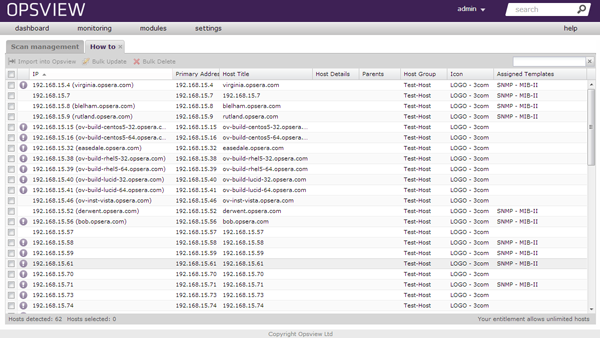
The biggest barrier to distributed monitoring is the sheer volume of initial configuration work. Autodiscovery tooling addresses this directly: you specify an IP address or CIDR range, and the monitoring system scans the network, identifies devices, and imports them with sensible defaults. This eliminates the need to hand-enter host definitions one by one.
Beyond discovery, a well-designed configuration UI should let you make all changes in a single interface—no context-switching between screens or separate tools. For teams that prefer automation, a public REST API enables programmatic control: scripting bulk host imports, updating server profiles, or triggering configuration reloads as part of a CI/CD pipeline.
2. Maintain Consistency with Host Templates
In large distributed environments, configuration drift is a persistent problem. Host templates solve this by defining a standard set of service checks, thresholds, and notification rules for a given device class—say, all Cisco routers, all MySQL servers, or all Linux hosts running Apache.
When you need to change a monitoring parameter across an entire device class, you update the template once and the change propagates to every host inheriting it. This controlled, centralized approach reduces the risk of inconsistent monitoring coverage and makes auditing your configuration straightforward.
3. Reduce Errors with Cloning
Even with templates, there are situations where you need many near-identical host objects—for example, a rack of identical network switches that differ only in IP address and hostname. Manually entering each one is tedious and introduces transcription errors.
A clone function lets you duplicate an existing, correctly configured host object as many times as needed, then adjust only the fields that differ (typically the IP and display name). This saves time and keeps configuration consistent across identical infrastructure.
4. Speed Up Configuration with SNMP
SNMP (Simple Network Management Protocol) is the lingua franca of network device monitoring. A monitoring platform with embedded SNMP polling and trap handling can automatically detect SNMP interfaces on imported devices, eliminating the need to manually map OIDs or configure trap receivers.
This matters for distributed monitoring because SNMP configuration mistakes—wrong community strings, incorrect OID mappings, missed trap destinations—are a leading cause of monitoring gaps. Automating SNMP interface detection removes a significant source of human error during setup.
5. Manage Complexity with Attributes
As environments scale, the number of individual service checks grows rapidly. Attributes (sometimes called custom variables or macros in other monitoring systems) allow you to define a single parameterized service check and apply it across many targets.
A practical example: a VMware host running 20–30 guest VMs. Instead of creating a separate service check for each guest, you define one check that accepts a VM name as an attribute, then list all guests as attribute values on the host object. The monitoring system generates individual checks automatically. This pattern dramatically reduces configuration volume and makes adding or removing VMs a matter of updating a list rather than creating or deleting check objects.
6. Go Agentless Where Appropriate
Agent-based monitoring offers deep visibility but requires installing and maintaining agent software on every monitored system. In distributed environments—especially where you monitor third-party network equipment, embedded devices, or systems where you cannot install software—agentless monitoring is essential.
Agentless protocols to consider:
- SNMP — Industry-standard protocol for network devices, servers, and appliances. Suitable for availability checks, interface counters, and hardware health.
- WMI (Windows Management Instrumentation) — Native Windows management interface. Allows monitoring of CPU, memory, disk, services, and process state without installing an agent on Windows hosts.
- SSH-based checks — For Linux/Unix hosts where firewall policy or security requirements prohibit agent installation, remote checks over SSH are a common alternative.
- ICMP / synthetic transactions — Useful for basic availability and end-to-end transaction monitoring.
Agentless monitoring reduces deployment time significantly when onboarding new infrastructure, and removes the operational burden of keeping agents updated. The trade-off is that agentless checks may be less granular and more network-intensive than agent-based collection.
7. Get the Right Notifications to the Right People
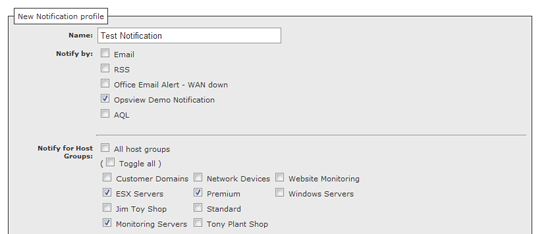
Alert fatigue is one of the most common reasons monitoring deployments fail in practice. Effective notification design means routing the right alert to the right person through the right channel at the right time—and nothing more.
Best practices for distributed monitoring notifications:
- Severity-based routing — Warning states might trigger email during business hours; critical states (service outages, host down) trigger SMS or phone escalation at any hour.
- Role-based targeting — Network engineers receive network alerts; application teams receive application alerts. Avoid broadcasting all alerts to all staff.
- Time-of-day scheduling — Align notifications with on-call rotations. Suppressing non-critical alerts outside business hours reduces noise without losing visibility into genuine outages.
- Escalation paths — If the primary contact does not acknowledge within a defined window, automatically escalate to a secondary or manager.
8. Visualize the Performance of Your Infrastructure
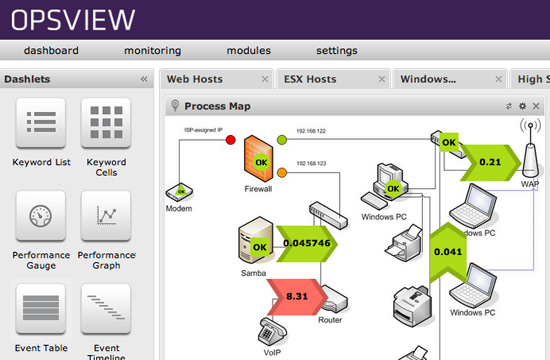
Raw status tables are hard to act on quickly during an incident. Topology maps, network diagrams, and business process maps give operators an at-a-glance view of which systems are healthy and which are degraded—and critically, how failures in one system propagate to dependent systems.
Effective visualization capabilities for distributed monitoring include:
- Network maps — Show device-to-device relationships and link status. Immediately reveals where a connectivity failure is occurring.
- Process/application maps — Model multi-tier applications so operators can see whether a degraded front-end is caused by an application server, database, or network issue.
- Custom infrastructure maps — Upload a data center floor plan or logical architecture diagram and overlay live status indicators. Useful for communicating infrastructure health to non-technical stakeholders.
- Host group tree views — Hierarchical summary views that roll up status from individual hosts to groups (e.g., by data center, by business unit, by environment).
9. Integrate with Your Service Desk
One of the biggest time sinks in operations is the manual process of spotting an alert, deciding it warrants a ticket, opening the service desk tool, filling in the details, and assigning it to the right team. At scale, this overhead is significant and error-prone.
Monitoring platforms that integrate directly with service desk tools—such as Jira Service Management, ServiceNow, or Request Tracker—can automatically create, categorize, and assign tickets when defined thresholds are breached. When the underlying issue resolves, the ticket can be automatically updated or closed.
This bi-directional integration delivers several benefits:
- Engineers spend time resolving problems, not filing tickets.
- Every incident has an associated ticket with a full timeline, reducing post-incident investigation time.
- SLA clocks in the service desk start automatically when the monitoring system detects a problem, not when someone manually notices and files a ticket.
10. Report Against SLAs
Distributed monitoring data is only valuable if it can be turned into actionable reports for internal teams and external stakeholders. SLA, availability, and performance reports allow you to answer the questions that matter to the business: Was the agreed uptime delivered? Which services degraded last quarter? Where should capacity be added?
Useful reporting capabilities for distributed monitoring environments include:
- Availability reports — Historical uptime percentages for specific hosts, services, or application tiers over configurable time windows.
- SLA reports — Compare actual availability against contractual commitments. Particularly important for managed service providers billing against service levels.
- Performance trend reports — Long-term trending of metrics such as CPU utilization, response times, and interface throughput. Essential for capacity planning.
- Scheduled delivery — Reports generated and emailed automatically on a defined schedule (daily, weekly, monthly), reducing manual effort and ensuring stakeholders receive consistent, timely data.
Well-designed reporting closes the loop between operational monitoring and business accountability, and provides the evidence base for infrastructure investment decisions.
Summary
Successful distributed network monitoring depends on reducing manual configuration work, maintaining consistency at scale, routing the right information to the right people, and turning raw monitoring data into business-relevant reports. The ten steps above—autodiscovery, templating, cloning, SNMP automation, attribute-based checks, agentless monitoring, smart notifications, visualization, service desk integration, and SLA reporting—collectively address the most common failure modes in distributed monitoring deployments. Applied together, they give operations teams the coverage and context they need to keep complex infrastructure reliable.
Original source: opsview.com