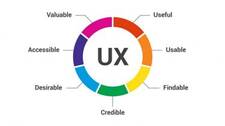
End-user experience is rarely one-size-fits-all. Age, device type, accessibility needs, network conditions, and personal preferences all influence how someone perceives your software. Teams that consistently deliver high-quality experiences typically rely on a layered set of development resources rather than a single silver-bullet tool. Below are five categories of resources that directly contribute to a better end-user experience across the full software development lifecycle.
1. Universal Repository Manager
A universal repository manager gives development teams a single, organized location to store and manage the artifacts that make up a modern software project: container images, language packages (npm, Maven, PyPI, NuGet, etc.), and Helm Charts for Kubernetes deployments. Without a centralized manager, artifacts can become scattered across different registries and storage locations, creating inconsistencies that slow delivery and introduce security gaps.
Key benefits of a universal repository manager include:
- Consistency across environments: Developers, CI pipelines, and production systems all pull from the same source of truth, reducing “works on my machine” failures.
- Access control and audit trails: Fine-grained permissions ensure only authorized pipelines can publish or consume specific artifact types.
- Faster builds: Proxying and caching upstream registries locally reduces external network round-trips, cutting build and pull times.
- Scalability: Enterprise-grade managers are designed to handle high-concurrency artifact requests as teams and user bases grow.
Because releases become more predictable and controlled, the downstream effect on end-users is fewer regressions, faster update cycles, and more stable software in production.
2. DevOps Toolchains
DevOps is as much a cultural shift as it is a technology choice, but the right toolchain is what turns DevOps principles into measurable outcomes for end-users. A well-integrated DevOps toolchain automates the repetitive work between a code commit and a production deployment, covering continuous integration (CI), continuous delivery (CD), security scanning, and infrastructure-as-code.
How DevOps tooling improves end-user experience:
- Faster release cycles: Automation removes manual handoffs, compressing the time between a feature being ready and users benefiting from it.
- Shift-left security: Scanning dependencies and container images early in the pipeline prevents vulnerable builds from reaching end-users.
- Reliable rollbacks: Versioned artifacts combined with automated deployment pipelines make rolling back a bad release a predictable, low-risk operation.
- End-to-end visibility: Dashboards that trace a change from commit through build, test, and deploy help teams identify bottlenecks before they affect users.
Popular open-source and commercial options exist across every stage of the pipeline. The best choice depends on your team size, existing infrastructure, and the languages and platforms you target.
3. Personalization and Behavioral Analytics Tools
Modern users expect software that adapts to their context and preferences. Personalization resources allow applications to tailor content, workflows, and recommendations based on user behavior, demographics, or explicit settings. Even straightforward personalization—greeting a returning user by name, remembering their last screen, or surfacing relevant content first—measurably improves engagement and retention.
At a more sophisticated level, behavioral analytics platforms capture interaction data—click paths, session duration, feature adoption rates—and surface patterns that product and engineering teams can act on. Practical applications include:
- Identifying which features drive retention versus which ones users abandon.
- Running A/B tests to validate UX decisions with real usage data rather than assumptions.
- Segmenting users by behavior to prioritize development work toward the highest-impact improvements.
When implementing behavioral analytics, teams must balance insight collection with user privacy obligations. Always review applicable data protection regulations (such as GDPR or CCPA) before capturing or storing user behavior data.
4. Prototyping and Interactive Design Tools
Catching usability problems before a single line of production code is written is far cheaper than fixing them after release. Prototyping tools let designers and developers convert static wireframes into clickable, interactive mockups that stakeholders and test users can evaluate as though they were using the finished product.
The value prototyping brings to end-user experience:
- Early validation: Usability issues—confusing navigation, unclear calls-to-action, inaccessible form layouts—surface during low-cost design reviews rather than expensive post-launch patches.
- Rapid iteration: Changes to a prototype are made in minutes, enabling multiple rounds of user feedback in a short timeframe.
- Stakeholder alignment: An interactive prototype communicates intended behavior far more precisely than a written specification, reducing misunderstandings between design, engineering, and product teams.
- Accessibility testing: Prototypes can be evaluated against accessibility guidelines (such as WCAG) before development begins, ensuring inclusive design from the start.
Some advanced prototyping platforms also integrate automated heuristic analysis, flagging common UX anti-patterns and suggesting improvements based on established design principles.
5. Performance Monitoring Systems
Deploying software is not the end of the engineering team’s responsibility—it is the beginning of a continuous improvement cycle. Performance monitoring systems instrument your application and infrastructure to collect real-time metrics on the factors that matter most to end-users: page load times, error rates, API response latency, uptime, and resource utilization.
What effective monitoring enables:
- Real User Monitoring (RUM): Captures performance data from actual user sessions across different devices, browsers, and network conditions—revealing issues that synthetic tests miss.
- Alerting and on-call workflows: Automated alerts notify engineering teams the moment a key metric degrades, reducing mean time to detection (MTTD).
- Root-cause analysis: Distributed tracing connects a slow end-user request back to the specific service, database query, or infrastructure component responsible.
- Trend analysis: Long-term performance dashboards reveal gradual degradation—such as a steadily growing database query time—before it becomes a critical outage.
Monitoring should cover the full stack: frontend (Core Web Vitals, JavaScript errors), backend (API latency, error rates), and infrastructure (CPU, memory, disk I/O, network). Teams that monitor proactively resolve issues before the majority of users notice them, protecting satisfaction and trust.
Putting It All Together
No single tool delivers a great end-user experience on its own. The five resource categories above work best when used together as part of a coherent engineering strategy:
- Use a universal repository manager to keep artifacts organized, secure, and consistently available throughout the pipeline.
- Build a DevOps toolchain that automates integration, delivery, and security scanning so releases are fast and reliable.
- Apply personalization and behavioral analytics to understand your users and continuously adapt the product to their real needs.
- Invest in prototyping early to validate UX decisions before they are coded into production.
- Instrument everything with performance monitoring to catch and resolve issues before they reach users.
Teams that treat these resources as ongoing investments—rather than one-time setup tasks—consistently ship software that earns and retains user trust.