I was moving a Laravel project to a ubuntu virtual machine.
Steps that I followed:
1. Installed Xampp
2. Another thing which is required is Composer
3. Now the thing is when we try to install Laravel project inside our htdocs folder it through an error
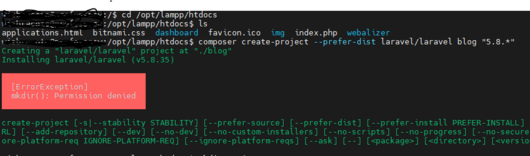
4. To resolve this error first create a folder inside your htdocs.
mkdir Projects5 grant read and write permissions to this folder by running this commands
sude chmod +rw Projects6. You may get another error while installing is (“mbstring” extension is missing.)
Run the below commands to resolve these errors
sudo apt-get install php-mbstring
Code language: JavaScript (javascript)
sudo su - root
7. That’s it now try installing your project again
composer create-project --prefer-dist laravel/laravel testProject "5.8.*"Code language: JavaScript (javascript)That’s it, Hope it help someone out there.