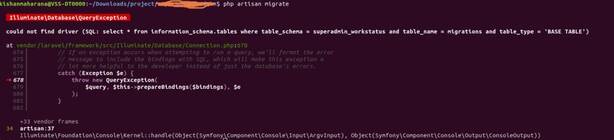
The “Artisan migrate could not find driver” error message typically occurs when running migrations using Laravel’s Artisan command-line interface, and it indicates that Laravel is unable to find the database driver specified in the application’s configuration.
To resolve this issue, you need to ensure that the database driver specified in your Laravel application’s configuration file matches the database driver installed on your system.
For example, if you are using MySQL as your database and have not yet installed the MySQL database driver for PHP, you may encounter this error. In such a case, you can install the MySQL driver using the following command:
sudo apt-get install php-mysql
Code language: JavaScript (javascript)
If you have already installed the correct database driver, you may need to ensure that it is enabled in your PHP configuration file.
You can also try clearing the configuration cache by running the following Artisan command:
php artisan config:clear
Code language: CSS (css)
If the above steps do not resolve the issue, you may need to check your database configuration in your Laravel application’s .env file or config/database.php file to ensure that the correct database driver is specified.