Introduction
For many years, software development and IT operations lived in separate, isolated silos, creating manual friction and delayed releases until DevOps emerged to bridge this gap through a culture of collaboration, automation, and continuous improvement. Today, the sheer volume of software, platforms, and methodologies on modern cloud-native landscape maps often leaves beginners feeling overwhelmed and attempting to master everything at once. However, learning tools in a logical sequence is far more effective than trying to digest the entire ecosystem simultaneously; true proficiency is built by mastering a core set of foundational utilities that move code smoothly from a laptop to a live environment. By emphasizing practical experience over pure theory, you can turn abstract pipeline concepts into tangible engineering skills, and structured resources like the DevOpsSchool learning ecosystem can provide the organized mentorship needed to navigate this technical transition systematically.
What Is a DevOps Toolchain?
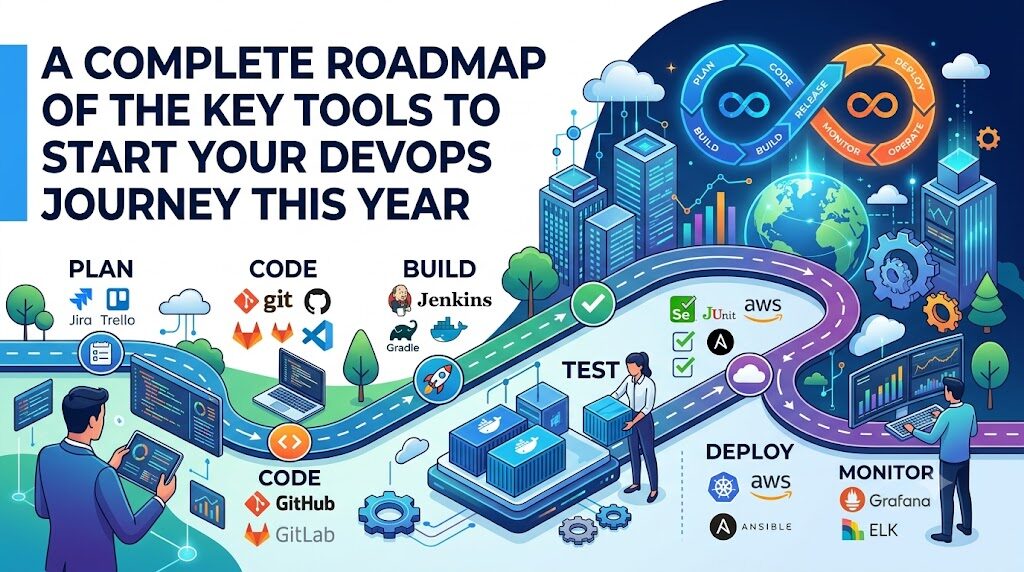
A DevOps toolchain is a collection of tools that work together to automate, manage, and streamline the entire software delivery lifecycle. Rather than relying on a single monolithic application, DevOps practitioners combine specialized software components into an integrated pipeline. This toolchain supports the continuous loop of planning, coding, building, testing, deploying, operating, and monitoring software.
The primary objective of a toolchain is to foster collaboration and remove manual handoffs between teams. In a traditional setup, moving code from development to QA and then to production required multiple manual steps, tickets, and approvals. A well-designed toolchain automates these transitions, allowing software to flow through checks and balances with minimal human intervention.
Automation sits at the heart of this concept. When a developer updates code, the toolchain automatically triggers a build, runs automated tests, validates security compliance, provisions the necessary infrastructure, and deploys the application. This process is commonly referred to as Continuous Integration and Continuous Delivery (CI/CD).
Beyond deployment, a modern toolchain manages infrastructure management and active monitoring. It ensures that the environments housing the applications are stable, secure, reproducible, and observable. By viewing these tools not as isolated utilities but as parts of an interconnected ecosystem, you begin to see how modern engineering teams deliver value reliably at high velocity.
Why Learning DevOps Tools Matters
Understanding the mechanics of DevOps tools is crucial because these applications turn abstract methodologies into repeatable realities. Automation cannot exist without tools that script, package, and deploy software. By learning these technologies, you gain the ability to eliminate repetitive manual tasks, reducing human error and freeing up time for high-value engineering work.
Tools also serve as a common language that improves collaboration between developers and operations engineers. When infrastructure is defined using the same version-controlled files that developers use for application logic, the traditional barriers between departments disappear. Both teams work out of the same repositories, review each other’s configurations, and share responsibility for the system’s overall health.
From a business perspective, proficiency with these utilities leads directly to faster deployments and better reliability. Organizations can ship new features to customers in minutes or hours rather than weeks or months. If an issue occurs in production, automated monitoring and deployment tools allow teams to roll back changes or patch vulnerabilities almost instantly.
However, it is vital to clarify that tools support DevOps practices rather than defining DevOps itself. Simply installing a piece of software does not mean you are practicing DevOps. The tools are instruments; the core philosophy relies on shared responsibility, transparency, and a culture of continuous learning. Mastering the technical tools gives you the capability to implement these philosophical principles effectively in real-world project environments.
DevOps Learning Roadmap
Navigating the landscape requires a step-by-step progression. Attempting to learn advanced container orchestration before understanding basic operating system commands is a recipe for frustration. Below is a structured progression designed to build your skills logically.
Computer Basics
      ↓
Linux Fundamentals
      ↓
Networking Basics
      ↓
Git & Version Control
      ↓
Shell Scripting
      ↓
Python Basics
      ↓
Docker
      ↓
Jenkins / CI/CD
      ↓
Cloud Fundamentals
      ↓
Terraform
      ↓
Kubernetes
      ↓
Monitoring & Logging
      ↓
DevSecOps Basics
      ↓
Real-World Projects
1. Computer Basics & Linux Fundamentals
Everything in the cloud runs on servers, and the vast majority of those servers run Linux. You must start by learning how to navigate the command line, manage file systems, edit text files directly from the terminal, and understand users, groups, and permissions.
2. Networking Basics
You cannot secure or troubleshoot systems if you do not know how data travels between them. Focus on understanding IP addressing, subnets, ports, protocols like HTTP, HTTPS, and SSH, DNS configuration, and the basics of load balancing.
3. Git & Version Control
Git is the absolute foundation of modern collaborative engineering. It tracks changes to code and configurations, allows multiple engineers to work on the same system simultaneously, and serves as the single source of truth for automation workflows.
4. Scripting (Shell Scripting & Python Basics)
Automating systems requires writing code to handle repetitive tasks. Start with basic Shell scripting (Bash) to automate operating system tasks, then pick up Python to handle more complex logic, API interactions, and data parsing.
5. Docker & Containerization
Containers isolate applications from their underlying infrastructure, ensuring that code runs the same way on a developer’s laptop as it does on a production server. Docker is the standard entry point for understanding container runtimes and packaging.
6. Jenkins / CI/CD Pipelines
Once you can package an application, you need a mechanism to build and test it automatically every time code changes. Jenkins introduces you to pipeline architecture, build triggers, and automated workflows.
7. Cloud Fundamentals (AWS, Azure, or GCP)
Modern engineering rarely involves buying physical hardware. You must learn how to navigate at least one major cloud platform, understanding how to provision virtual servers, manage cloud storage, and configure cloud networks safely.
8. Terraform (Infrastructure as Code)
Instead of clicking buttons in a cloud console to create infrastructure, you write configuration files that define your resources. Terraform allows you to spin up, modify, and tear down entire cloud environments programmatically.
9. Kubernetes (Container Orchestration)
When you have dozens or hundreds of containers running across multiple servers, you need a system to manage their lifecycle, scaling, network routing, and health. Kubernetes is the industry standard for container orchestration.
10. Monitoring, Logging, & DevSecOps Basics
Once applications are running, you must keep them healthy and secure. Learning to collect metrics, aggregate logs, and scan code for vulnerabilities ensures your systems remain stable, visible, and resilient against security threats.
Essential DevOps Tools
To help you evaluate the key tools to start your DevOps journey, the following comparison table breaks down the primary utilities, their purposes, why you should focus on them, and a realistic project you can build to gain hands-on proficiency.
| Tool | Primary Purpose | Why Beginners Should Learn It | Practical Project |
| Linux | Operating System Foundation | Over 90% of cloud servers run on Linux; command-line fluency is mandatory. | Set up a secure local server, manage permissions, and configure local cron jobs. |
| Git & GitHub | Version Control & Collaboration | Tracks changes, manages collaboration, and triggers automated pipelines. | Create a repository, manage branches, resolve a merge conflict, and submit a pull request. |
| VS Code | Code and Configuration Editing | A highly customizable editor that supports syntax highlighting, Git integration, and extensions. | Configure an IDE workspace with extensions for markdown, yaml, shell scripting, and git. |
| Shell Scripting | Operating System Automation | Allows quick automation of repetitive system administration tasks and text processing. | Write a script that checks disk space usage and sends an alert email if it exceeds 80%. |
| Python | Advanced Automation & Scripting | Highly readable language used for cloud automation, API integration, and writing custom tools. | Write a script that talks to a cloud provider API to list and stop unutilized virtual machines. |
| Docker | Application Containerization | Standardizes application environments, solving the “it works on my machine” problem. | Create a Dockerfile for a basic web application, build the image, and run it locally. |
| Jenkins | CI/CD Automation | Widely adopted, open-source automation server used to build, test, and deploy applications. | Build a pipeline that automatically pulls code from GitHub, runs tests, and builds a container. |
| AWS / Azure / GCP | Cloud Infrastructure Provisioning | Provides the underlying virtualized computing power, networking, and storage for modern apps. | Deploy a virtual instance, attach a block storage volume, and host a static website securely. |
| Terraform | Infrastructure as Code (IaC) | Allows you to define and provision cloud infrastructure using a declarative configuration language. | Write a script to automatically provision a cloud network, security groups, and a virtual machine. |
| Kubernetes | Container Orchestration | Automates deployment, scaling, management, and networking of containerized applications. | Deploy a multi-container web application with automated self-healing and load balancing. |
| Prometheus | Time-Series Metric Collection | Captures real-time performance data and health metrics from applications and infrastructure. | Configure a target instance to export system metrics and collect them using Prometheus. |
| Grafana | Metric Visualization | Transforms raw data from Prometheus into readable, interactive dashboards for monitoring. | Design a visual dashboard that displays real-time CPU, memory, and network utilization. |
| ELK Stack / Loki | Log Aggregation and Analysis | Collects and centralizes logs from various applications to facilitate troubleshooting. | Aggregate logs from multiple Docker containers into a central location for searchable analysis. |
| Trivy / SonarQube | Security and Code Quality Scanning | Scans code vulnerabilities and container image security flaws early in the deployment cycle. | Integrate an image scanner into your build process to block images with critical security flaws. |
How These Tools Work Together
To truly understand the value of these utilities, you must look at them through the lens of an interconnected software delivery lifecycle. A single tool does nothing in isolation; their power comes from how they pass data and control from one stage to the next.
Let us trace the path of an application update through a modern automated pipeline:
[Developer Workspace] -> Writes code & configuration files in VS Code
         ↓
[Git / GitHub Repository] -> Code commits push to remote main branch
         ↓
[Jenkins CI Pipeline] -> Detects change, pulls code, initiates build sequence
         ↓
[Docker Engine Build] -> Compiles code, runs unit tests, packages into a container image
         ↓
[Trivy Security Scan] -> Validates container image for known security vulnerabilities
         ↓
[Terraform Automation] -> Verifies cloud infrastructure and provisions missing components
         ↓
[Kubernetes Cluster] -> Deploys container image via rolling update to prevent downtime
         ↓
[Prometheus & Grafana] -> Monitors live container performance and application health
         ↓
[Continuous Feedback] -> System issues generate logs for engineers to review in VS Code
Code language: CSS (css)- The Developer Workspace: A software engineer writes code and infrastructure configurations inside an editor like Visual Studio Code on a Linux-based workstation.
- Version Control Submission: The engineer uses Git commands to commit these changes and pushes them to a remote repository hosted on GitHub.
- Pipeline Orchestration: A Jenkins server detects the new commit via a webhook and immediately initiates an automated continuous integration pipeline.
- Containerized Packaging: Within the pipeline, Jenkins executes Docker commands to build a fresh container image containing the updated application code and runs automated test suites.
- Security Verification: The pipeline passes the newly built Docker image to a security scanner like Trivy, checking for unpatched vulnerabilities in the base operating system or application libraries.
- Infrastructure Synthesis: If the tests and scans pass, the pipeline applies Terraform configurations to verify that the target cloud environment matches the exact infrastructure specifications required by the updated application.
- Orchestrated Deployment: Jenkins instructs the Kubernetes cluster to update its deployment. Kubernetes pulls the verified Docker container image from a container registry and executes a rolling update, replacing old instances with new ones without causing user downtime.
- Observability and Monitoring: Once live, Prometheus continually scrapes performance metrics from the new containers, while Grafana displays the performance metrics on a dashboard viewed by the operations team.
- Continuous Feedback: If application logs reveal an error or if Prometheus detects an unexpected spike in memory usage, notifications are generated, allowing engineers to pull logs, diagnose the problem, and write a patch, restarting the cycle.
Building a Beginner Home Lab
You do not need an expensive corporate cloud account or high-end enterprise server hardware to practice DevOps. You can construct a functional, fully featured learning environment entirely on your existing computer or by utilizing free resources available online.
Begin by transforming your local machine into a micro-datacenter using virtualization. If your computer runs Windows or macOS, install a virtualization platform like VirtualBox or utilize features like the Windows Subsystem for Linux (WSL). This allows you to run a full Linux environment (such as Ubuntu Server) directly on your laptop without altering your primary operating system.
Next, install Docker inside your local Linux environment. This instantly gives you the capacity to run multiple isolated applications, local databases, and web servers without cluttering your system. You can spin up local databases, configure web proxy servers, and practice network routing entirely within a single command-line interface.
For version control and CI/CD pipelines, set up a free personal account on GitHub. You can install a local instance of Jenkins inside a Docker container on your machine and connect it to your GitHub repository using webhooks or local polling tools. This lets you practice building real automation pipelines right on your local machine.
When you are ready to venture into the cloud, make use of the free tiers offered by major cloud platforms such as AWS, Google Cloud, or Microsoft Azure. These providers offer limited-resource virtual instances, storage buckets, and basic database services completely free for up to twelve months. Always set up billing alerts immediately upon account creation to guarantee you stay within the free tier boundaries while practicing your infrastructure configurations.
Hands-On Projects
Theoretical knowledge vanishes quickly without practical implementation. To cement your understanding of these core technologies, work through structured, hands-on tasks that gradually increase in complexity.
- Linux and Shell Scripting Practice: Write a custom script that automates basic server upkeep. Program the script to run every midnight, check disk space, clear out temporary log files older than seven days, and write a summary report to a local text file.
- Git Workflow Exercises: Mimic a real-world software team environment. Create a repository, create a separate branch to add a feature, intentionally edit the same file line in both branches to create a merge conflict, and practice walking through the technical steps required to safely resolve the conflict and merge the code.
- Dockerizing a Web Application: Take a simple, single-page application written in Python, Node.js, or HTML/CSS. Write a minimal Dockerfile that copies the application files, exposes the correct network port, sets up the required environment variables, and packages it into a portable container image that runs smoothly on any system.
- Creating a Jenkins Automation Pipeline: Build a structured workflow file that automates validation tasks. Configure the pipeline to monitor your GitHub repository, pull down code changes automatically whenever you commit work, run a syntax checker to catch errors, and print a success message upon completion.
- Provisioning Infrastructure with Terraform: Write configuration files that declare basic cloud components, such as a virtual private network, a firewall security rule allowing HTTP traffic, and a single micro-sized virtual server instance. Practice running plans to preview infrastructure changes before executing them.
- Deploying Applications to Kubernetes: Set up a lightweight local cluster using tools like Minikube or Kind. Write configuration files to deploy your custom containerized web application, configure a service layer to distribute incoming network traffic, and simulate a server failure by manually deleting a running instance to watch Kubernetes automatically spin up a healthy replacement.
- Monitoring an Application Stack: Install Prometheus and Grafana to watch over your local lab infrastructure. Build a visual dashboard showing real-time graphs of CPU workloads, memory usage patterns, and network traffic, and configure custom alert conditions that change color when your local systems face heavy simulation workloads.
Measuring Your Progress
When learning a broad spectrum of technical tools, it is easy to mistake watching video tutorials for true operational competence. To ensure you are genuinely absorbing the material, establish clear indicators to track your engineering growth.
The following KPI dashboard outlines key operational metrics you can track to evaluate your practical learning progress over time.
| Metric | Why It Matters | Learning Benefit |
| Commands Practiced | Measures direct familiarity with command-line interactions. | Builds muscle memory, reducing reliance on cheat sheets for basic operating system navigation. |
| Git Commits | Quantifies your daily and weekly engagement with configuration tracking. | Develops proper version control habits and builds a visible, clean development history. |
| Projects Completed | Tracks your capability to integrate separate utilities into working solutions. | Demonstrates your ability to solve multi-step technical problems independently. |
| CI/CD Pipelines Built | Reflects your understanding of automated quality gates and integration logic. | Helps you understand build errors, step configurations, and delivery paths. |
| Docker Images Created | Measures your ability to package software and minimize dependencies. | Builds a deep understanding of application layers, file sizes, and container optimization. |
| Documentation Written | Validates your capacity to explain complex setups to fellow engineers. | Solidifies your knowledge and creates a personal technical reference library for future work. |
Common Challenges
The path to mastering a modern delivery toolchain contains common obstacles that derail many aspiring engineers. Recognizing these friction points early allows you to alter your learning strategy and maintain steady progress.
The following table details common learning roadblocks along with direct, practical recommendations to overcome them.
| Challenge | Impact | Recommended Solution |
| Learning Too Many Tools at Once | Leads to cognitive fatigue, confusion, and a superficial understanding of concepts. | Pick one core tool stack component at a time and do not advance until you understand its underlying purpose. |
| Ignoring Linux Fundamentals | Creates significant roadblocks when troubleshooting container runtimes or cloud systems. | Spend your initial weeks exclusively inside the terminal learning file manipulation and permission models. |
| Memorizing Commands | Leaves you helpless when faced with minor syntax changes or unique error messages. | Focus on the underlying architectural concepts; let documentation handle the specific syntax flags. |
| Skipping Projects | Creates a false sense of security that breaks down during real-world technical troubleshooting. | Build a functional, broken, and repaired lab environment for every single tool you study. |
| Weak Troubleshooting Skills | Causes long delays when simple configuration typos stop an entire build pipeline. | Learn to read error stack traces line-by-line from the bottom up to locate the root cause. |
| Lack of Consistency | Forgetting syntax and core commands due to long gaps between study sessions. | Commit to spending thirty uninterrupted minutes inside a terminal every single day. |
Best Practices
Establishing solid habits early in your training ensures you build a reliable foundation that scales naturally into professional deployment environments.
Step-by-Step Implementation Checklist
- Master One Tool Component at a Time: Resist the temptation to jump into Kubernetes while still struggling to build basic Docker container images. Ensure you understand the immediate problem a tool solves before adding more layers to your technical stack.
- Engage in Daily Practical Execution: Coding and system administration are mechanical skills that depend heavily on consistency. Spending a brief period interacting with a terminal daily is far more valuable than a single long session once a week.
- Construct End-to-End Projects: Move beyond isolated sandbox exercises. Connect your version control repositories directly to build platforms, run security scanners, and deliver your code onto actual virtual host systems.
- Rely on Official Documentation: Avoid relying solely on third-party blog tutorials that may become outdated quickly. Learn to read official product documentation guides, configuration specs, and release logs to find accurate information.
- Maintain Clear Internal Documentation: Write detailed installation and setup readmes for every lab configuration you build. Documenting your steps ensures you can recreate complex environments weeks later without starting over from scratch.
- Review and Revisit Key Concepts: Periodically audit your understanding of foundational elements. Revisit basic networking principles, Linux access rights, and Git branch structures to ensure your core technical knowledge remains sharp.
Real-World Example: A Learner’s Journey
Let us look at a realistic case study of an individual transitioning into DevOps. This example demonstrates how following a structured framework helps build operational capability step-by-step.
The Starting Point
An entry-level technical professional with basic desktop computer knowledge but no server administration, command-line fluency, or software development background decided to transition into cloud operations engineering.
Month 1: Setting the Baseline
The learner avoided cloud accounts entirely during the first four weeks. Instead, they installed an Ubuntu Linux virtual machine locally. They spent an hour each day creating directories, modifying file access permissions, editing configurations with text editors, and writing simple Bash scripts to automate file archival.
Month 2: Managing Code and Configurations
The learner introduced version control by creating a personal account on GitHub. They moved their collection of Bash scripts into a Git repository, practicing branching models, committing code, and resolving artificial merge conflicts until tracking file histories became second nature.
Month 3: Embracing Containerization
With a solid terminal foundation established, the learner installed Docker. They learned how to build container images for small applications, manage internal container networks, map persistent data volumes, and combine multiple local components using configuration files.
Month 4: Connecting the Pipeline
The learner set up an automation server locally and linked it to their version control system. They built an automated continuous integration pipeline that pulled their containerized application code directly from GitHub, initiated build scripts, ran automated tests, and generated verified container build artifacts.
Month 5: Moving to the Cloud
The learner opened a free-tier cloud service provider account and configured billing protections immediately. Instead of manually clicking through the web console dashboard, they utilized infrastructure configuration files to declare their networks, access lists, and virtual servers cleanly as version-controlled code.
The Outcome
By maintaining a methodical, step-by-step approach over several months, the learner transformed abstract technical concepts into highly integrated, functional automation systems. This structured learning strategy helped them develop strong problem-solving skills and the practical capability to manage modern application pipelines.
Common Beginner Mistakes
- Installing Every Tool Immediately: Many beginners start by downloading complex enterprise utilities simultaneously, which often leads to configuration conflicts and confusion. Focus on mastering the underlying operating system and code workflows before adding advanced orchestration layers.
- Ignoring Networking Principles: You cannot debug a broken continuous delivery pipeline if you do not understand subnets, firewall rules, routing behaviors, and protocol headers. Make sure you spend time learning how data actually flows across networks.
- Skipping Git Mastery: Treating version control as an afterthought is a major mistake. Real-world automation depends entirely on a clean, structured version control history; an unorganized repository will quickly lead to broken build pipelines.
- Avoiding Troubleshooting Opportunities: Copying and pasting configuration files without analyzing error logs deprives you of vital learning moments. When a build fails, read the log file line by line to understand exactly what broke and why.
- Focusing Exclusively on Certifications: While certifications can help structure your studies, they do not replace the value of hands-on experience. Prioritize building practical home labs and maintaining public code portfolios alongside your test preparation.
Future of DevOps Tools
The automation landscape continues to evolve rapidly. Staying aware of industry directions ensures you choose tools that remain highly relevant as delivery platforms mature.
Artificial intelligence continues to integrate into deployment pipelines. Modern AI-assisted development tools help engineers write infrastructure configurations, analyze build logs to find anomalies, and suggest optimal scaling parameters. However, these assistive utilities still require engineers who understand the core underlying systems to validate and correct their outputs.
Platform Engineering has grown into a highly prominent architectural practice. Instead of requiring every developer to master complex infrastructure configurations, specialized engineering teams build internal developer platforms. These platforms provide self-service access to resources, abstracting away underlying infrastructure complexities while maintaining governance standards.
GitOps has emerged as a standard pattern for cloud-native delivery infrastructure. In a GitOps workflow, the desired state of a production system is maintained entirely within a version-controlled repository. Specialized agent software continuously watches the repository and updates live infrastructure automatically to match the declared configuration files.
Observability platforms have progressed beyond traditional simple status monitoring. Modern systems utilize advanced telemetry aggregation to trace transactions across distributed applications, helping teams pinpoint performance bottlenecks automatically. This evolution makes understanding telemetry collection, log aggregation, and system visibility a vital skill for anyone entering the field.
Certifications & Learning Paths
While hands-on project creation should remain your primary learning focus, pursuing structured certification paths can help validate your expertise and fill hidden gaps in your knowledge.
To help plan your training milestones, the following table organizes industry-standard certifications by structural area, target audience, technical level, and primary material focus.
| Certification Area | Best For | Skill Level | Learning Focus |
| Linux Administration | Foundations and core systems management. | Beginner / Intermediate | File management, system permissions, user administration, and command-line text processing. |
| Version Control | Foundational software tracking. | Beginner | Branch management styles, remote workflows, commit signatures, and history resolution. |
| Containerization | Core packaging engineering. | Intermediate | Core runtime configuration, custom file generation, network isolated spaces, and storage mapping. |
| Cloud Infrastructure | Cloud platform architecture. | Beginner / Intermediate | Cloud network layouts, identity management, compute instances, and virtual data storage. |
| Infrastructure as Code | Programmatic environment creation. | Intermediate | Declarative syntax patterns, state file tracking, workspace separation, and module construction. |
| Orchestration | Multi-system cloud deployments. | Advanced | High-availability design, secure configurations, continuous service discovery, and container scheduling. |
Practical DevOps Tool Checklist
- Establish Linux Competency: Practice navigating directory systems, altering file configurations, managing access rights, and searching system streams using the command line daily.
- Maintain Active Version Control Habituation: Move all your script files and configurations into a personal version control platform, utilizing branching strategies for all modifications.
- Package Custom Applications: Construct custom container build configurations to package simple web applications along with their exact runtime dependencies.
- Orchestrate Automation Workflows: Set up a dedicated build server to watch your code repositories and automatically run validation tasks every time you save changes.
- Program Cloud Deployments: Replace manual infrastructure setup by writing configuration files that safely declare and provision cloud systems automatically.
- Manage Scaled Environments: Set up a lightweight local orchestration environment to practice scaling containers up and down, managing software versions, and handling self-healing workflows.
- Implement Comprehensive Observability: Configure system exporters and tracking dashboards to monitor real-time resource utilization and centralize application logs for troubleshooting.
- Publish a Project Portfolio: Maintain a well-documented, public repository showcasing your integrated automation systems to demonstrate your practical technical capabilities.
FAQs (15 Questions)
1. Which DevOps tool should I learn first?
You should always start with Linux fundamentals. The vast majority of cloud infrastructure, container platforms, and automation tools run on Linux operating systems. Learning to navigate the command-line interface, manage system files, configure user permissions, and use text editors layout the base for all future tools.
2. Do I need programming experience before learning Docker?
No, deep software engineering skills are not required to learn Docker. However, you should have a basic understanding of how applications run, including how they use network ports, environment variables, and file systems. Basic scripting knowledge will make writing container configurations much easier.
3. Should I learn Linux before Kubernetes?
Yes, a firm understanding of Linux is highly recommended before diving into Kubernetes. Kubernetes orchestrates containers that run on Linux nodes. Without knowing how Linux handles processes, networking, storage volumes, and user permissions, troubleshooting a Kubernetes cluster will be very difficult.
4. Is Jenkins still worth learning?
Yes, Jenkins remains highly relevant. While newer cloud-native pipeline utilities exist, Jenkins is still widely used in corporate environments globally. Learning Jenkins helps you master fundamental CI/CD concepts like build stages, environment variables, webhooks, and artifact management, which easily translate to other pipeline tools.
5. Which cloud platform should a beginner choose?
Start with one of the major providers: Amazon Web Services (AWS), Microsoft Azure, or Google Cloud Platform (GCP). AWS currently holds the largest market share, making it an excellent starting point with abundant learning resources. Focus on mastering core cloud concepts rather than trying to learn multiple platforms at once.
6. How can I practice using these tools at home for free?
You can build a fully featured DevOps lab using a standard laptop. Use tools like VirtualBox or WSL to run Linux locally for free. Docker, Jenkins, Terraform, and Prometheus can all be run locally inside containers. For cloud practice, take advantage of the free-tier accounts provided by AWS, Azure, or GCP.
7. Do I need to learn every single tool to get a job?
No, trying to learn every tool is a common mistake. Companies value a deep understanding of core principles over a superficial knowledge of dozens of applications. Focus on mastering one tool in each major category: one version control tool (Git), one container system (Docker), one CI/CD tool (Jenkins), one IaC tool (Terraform), and one cloud platform.
8. How can I effectively measure my progress?
The best way to measure progress is through working, automated projects. If you can write an infrastructure file that spins up a cloud server, configures a pipeline to build a custom container image, and deploys it with monitoring without manual intervention, you are making excellent progress.
9. What is the difference between Docker and Kubernetes?
Docker is used to package, isolate, and run individual containers on a single machine. Kubernetes is a container orchestration platform used to manage, scale, and coordinate thousands of containers running across a whole cluster of multiple servers. Docker builds and runs the container, while Kubernetes manages them at scale.
10. Why is Git considered so important for DevOps?
Git serves as the single source of truth for both application code and infrastructure configurations. It records every change made to a system, allows teams to collaborate safely on branches, provides rollback capabilities when updates fail, and serves as the primary trigger for automated delivery pipelines.
11. What is Infrastructure as Code (IaC)?
Infrastructure as Code is the practice of managing and provisioning computing environments using configuration files rather than manual processes or graphical user interfaces. Tools like Terraform allow you to write human-readable code that automatically builds, updates, and tears down entire cloud architectures.
12. Do I need to be a Linux system administrator before starting?
No, you do not need to be an expert sysadmin to start. You should focus on practical everyday operational commands: managing files, editing configurations, inspecting running processes, checking network status, and reading system log outputs. Your administration skills will naturally deepen as you build projects.
13. What is the difference between continuous integration and continuous delivery?
Continuous Integration (CI) focuses on automatically merging, building, and testing code changes every time a developer commits updates to a repository. Continuous Delivery (CD) takes those tested changes and automatically prepares them for deployment to staging or production environments, ensuring code is always in a deployable state.
14. What are the dangers of ignoring security while learning tools?
Ignoring security early on can lead to risky habits, like embedding passwords or private cloud access keys directly inside public GitHub repositories. Learning to handle secret tokens securely from the beginning prevents cloud account compromises and aligns with real-world DevSecOps standards.
15. How much scripting is actually required on a daily basis?
Scripting is a daily necessity for automation tasks. You do not need to write complex application code, but you must be comfortable writing short Bash scripts to handle operating system tasks and basic Python scripts to parse data formats like JSON or YAML and interact with cloud APIs.
Final Thoughts
Embarking on this engineering path requires patience, consistency, and a structured strategy. The landscape can seem overwhelming at first, but remember that every complex cloud environment is built upon simple, foundational components. Focus on mastering core architectural concepts before worrying about advanced, specialized utilities.Take your time running code locally, understanding operating system principles, and learning to read error logs carefully. True competence comes from building, breaking, and fixing real automation labs. Stay curious, practice regularly, and build your technical toolkit step-by-step.