Cloud-native and DevOps practices continue to reshape how software is built and delivered. Containerization and microservices architecture have become foundational for many organizations undergoing digital transformation. Platforms like Docker and Kubernetes have made it easier to build and run containerized workloads — but managing, storing, and distributing the container images those workloads depend on introduces its own set of challenges. That’s where container registries come in.
What Is a Container Registry?
A container registry is a centralized repository for storing, organizing, and distributing container images. Think of it as a version-controlled artifact store specifically designed for container images. A registry lets teams:
- Publish images produced during the build process
- Store multiple versions of an image alongside its metadata
- Locate and download specific image versions at deployment time
- Manage access to images across teams, environments, and pipelines
Unlike a simple file store, a registry understands the layered structure of container images, supports tagging and versioning, and integrates natively with container runtimes and orchestration platforms. Consumers — whether human developers or automated CI/CD pipelines — can pull a specific version of an image exactly as it was published, ensuring reproducibility across environments.
Public Registries: Docker Hub and Its Trade-offs
Docker Hub is the most widely known public container registry and a convenient starting point for pulling community-maintained base images. However, using Docker Hub — or any fully public registry — as the primary store for your organization’s images comes with meaningful risks:
- No moderation by default: Public registries allow any user to publish images. Without a curation or approval layer, it is difficult to verify that a third-party image does not contain malicious or vulnerable software.
- Exposure of sensitive content: Application images often embed configuration, credentials, or proprietary code. Pushing those to a public registry exposes them to the internet.
- Rate limiting and availability: Public registries can impose pull-rate limits that disrupt CI/CD pipelines, especially at scale.
- Supply chain risk: Depending on community-maintained images without scanning them introduces software supply chain risk into your deployments.
Security Considerations with Kubernetes
Kubernetes adds another dimension to container image security. Clusters routinely pull images from registries to run workloads, which means a compromised or malicious image can spread quickly across an environment. Security is consistently cited as one of the top challenges for Kubernetes operators, spanning image provenance, network policy, secrets management, and runtime threat detection. A controlled, private registry is one of the most effective first steps toward reducing the container security attack surface in Kubernetes environments.
Why Organizations Need a Private Container Registry
A private container registry — whether self-hosted or provided by a third-party vendor — addresses the shortcomings of purely public options. Key reasons organizations adopt private registries include:
1. Image Security and Access Control
Private registries support role-based access control (RBAC), letting you define exactly which teams or automated systems can push or pull specific images. This prevents unauthorized access to proprietary images and limits blast radius if credentials are compromised.
2. Vulnerability Scanning
Many private registries integrate vulnerability scanning directly into the push workflow. Images are scanned for known CVEs before they are made available to downstream consumers, creating a security checkpoint inside the delivery pipeline rather than relying on ad-hoc scanning.
3. Developer Productivity
Container registries integrate with the tools developers already use: CLI clients, IDE plugins, CI/CD platforms, and Kubernetes admission controllers. Developers can push images directly from a local build environment and have those images immediately available to staging or production pipelines. This tight integration reduces friction in the image lifecycle and keeps teams focused on shipping software rather than managing infrastructure.
4. Centralized Image Lifecycle Management
A private registry gives operations teams a single pane of glass for all container images across the organization. Retention policies, garbage collection, audit logs, and promotion workflows (e.g., from a dev registry to a production registry) can all be managed centrally, reducing drift and improving auditability.
5. Protection of Proprietary Assets
Enterprise application images frequently contain compiled proprietary code, licensed dependencies, or embedded configuration. Keeping those images in a private registry ensures they are never inadvertently exposed publicly and remain subject to your organization’s data governance policies.
Choosing Between Self-Hosted and Managed Registries
Organizations typically evaluate two approaches:
- Managed registries (cloud provider or SaaS): Options include Amazon ECR, Google Artifact Registry, Azure Container Registry, and JFrog Artifactory Cloud. These reduce operational overhead and integrate natively with the surrounding cloud ecosystem.
- Self-hosted registries: Projects like Harbor (CNCF graduated) and the Docker Distribution registry can be run on-premises or in a private cloud, giving teams full control over data residency and configuration at the cost of additional operational responsibility.
The right choice depends on your compliance requirements, existing cloud footprint, team capacity, and cost model.
Container Registries and the CI/CD Pipeline
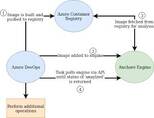
A container registry is most valuable when it is a first-class citizen of your CI/CD pipeline. A typical integration pattern looks like this:
- Build: The CI system builds a container image from source code and a Dockerfile.
- Scan: The image is scanned for vulnerabilities before being pushed.
- Push: The CI system authenticates to the private registry and pushes the image, tagged with a build number, Git commit SHA, or semantic version.
- Promote: Upon passing automated tests, the image is promoted (re-tagged or copied) to a production-ready repository within the registry.
- Deploy: Kubernetes or another runtime pulls the specific image version from the registry during deployment.
This workflow ensures that every artifact deployed to production has a traceable, immutable history and has passed defined quality gates.
Summary
Container registries are not optional infrastructure in a mature DevOps practice — they are a prerequisite for secure, reproducible, and efficient container-based software delivery. Public registries like Docker Hub are useful for consuming community base images, but organizations that build and ship their own containerized software need a private registry with access controls, vulnerability scanning, and deep CI/CD integration. Investing in the right registry solution early pays dividends in security posture, developer experience, and operational reliability as container workloads scale.