This article is based on a post originally sourced from sdtimes.com, expanded and rewritten for a DevOps engineering audience.
Why CI/CD Is Non-Negotiable for Kubernetes Projects
Having a continuous integration and deployment (CI/CD) pipeline is effectively mandatory for any serious software project today. For cloud-native applications running on Kubernetes, the stakes are even higher. Developers and operators face a distinct set of challenges:
- How do you run reliable end-to-end (e2e) tests inside a Kubernetes environment?
- How do you automate testing and releasing across multiple platforms and Kubernetes versions?
- How do you accept community contributions without compromising code quality or infrastructure security?
This guide walks through the key stages of a CI/CD pipeline tailored for open-source Kubernetes projects, using freely available tooling to cover the full journey from code commit to published release.
Characteristics of Cloud-Native Kubernetes Applications
Cloud-native applications are typically composed of multiple microservices. When you update one microservice, you want to ship it quickly — but you also need confidence that the change does not break interactions with other services. Unit tests cover individual components well, but they cannot catch cross-service regressions. That is where end-to-end tests become essential.
For open-source projects, there is an additional dimension: community contributions. You want pull requests from external contributors, but you also need their code to pass the same quality bar as internal changes — ideally before anyone reviews it manually. This means running e2e tests on untrusted code, which introduces security considerations for your CI infrastructure.
Finally, once changes land on the main branch, you may want to cut a new release — potentially several times a week. Automating the release process, including updating Helm charts, keeps the pipeline sustainable as the project grows.
The Tooling Stack
The following open-source and free tools can cover the entire pipeline:
- GitHub — source code hosting, pull request workflow, and release tagging.
- A CI system — any CI platform that supports running Docker containers (CircleCI, GitHub Actions, GitLab CI, etc.). The examples below reference CircleCI, but the concepts apply broadly.
- kind (Kubernetes IN Docker) — runs a full Kubernetes cluster using only a Docker daemon. Ideal for e2e tests on pull requests and untrusted code, because the cluster is ephemeral and isolated. Running kind inside a CI environment such as CircleCI means a compromised job cannot affect your production infrastructure.
- GKE (Google Kubernetes Engine) or another managed Kubernetes provider — used for e2e tests that need to closely resemble a production deployment. Because these tests run against real cloud infrastructure, they should only be triggered for trusted code (the main branch or a release tag), not for unreviewed pull requests.
- Helm — packages and distributes the Kubernetes application. Automating chart updates as part of the release pipeline prevents chart drift and manual errors.
- A container registry — stores Docker images between pipeline stages and for end users. Docker Hub, GitHub Container Registry, and Google Artifact Registry are common choices.
Example Application: Kubeapps
The techniques described here were applied to Kubeapps, a real-world open-source project that runs on Kubernetes, is hosted on GitHub, and is distributed to users as a Helm chart. It is a representative example because it combines multiple microservices, community contributions, and versioned Helm releases — all of the challenges described above.
The Three-Stage CI/CD Pipeline
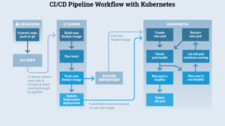
The pipeline is structured into three sequential stages. Each stage gates the next: a failure in Stage 1 prevents Stage 2 from running, and so on.
Stage 1: Unit Testing and Image Building
The first stage runs unit tests and builds Docker images for each microservice. Jobs for different microservices can be parallelised, which keeps total pipeline time low even as the number of services grows.
A common pattern is to keep all microservices in a single Git repository (monorepo). This is particularly useful when a new feature requires coordinated changes across multiple services — all related changes can live in one development branch and be reviewed and tested together.
Handling image sharing for pull requests: External contributors do not have credentials to push images to the project’s container registry. To make built images available for Stage 2 without a registry push, save each image as a tar archive and cache or persist it as a CI artifact. The next stage then loads the tar file directly.
Pushing images when credentials are available: For commits to the main branch or release tags — where credentials are available via CI environment secrets — log in to the registry and push images with a meaningful tag (for example, a dev tag for main-branch builds, or a version tag for releases).
# Example: saving an image as a tar file for use in a later CI stage
docker save myorg/myservice:latest -o /tmp/myservice.tar

# Example: loading it in the next stage
docker load -i /tmp/myservice.tarCode language: PHP (php)
Stage 2: End-to-End Tests
With Docker images available from Stage 1, Stage 2 deploys the application into a real Kubernetes environment and runs e2e tests. The Kubernetes target differs based on the trust level of the code being tested.
Step 2a: Spin Up a Kubernetes Cluster
For pull requests (untrusted code): use kind. Kind creates a Kubernetes cluster as a set of Docker containers, requiring nothing beyond a Docker daemon. Because kind runs entirely inside the CI job’s container environment, a malicious or buggy contribution cannot reach your cloud accounts or production clusters. Setup is straightforward:
# Install kind and create a cluster
curl -Lo ./kind https://kind.sigs.k8s.io/dl/latest/kind-linux-amd64
chmod +x ./kind
./kind create cluster --name ci-clusterCode language: PHP (php)
For trusted code (main branch or release tags): use a managed cluster such as GKE. A managed cluster more closely mirrors a production deployment and can test cloud-specific behaviour. Because this uses real cloud infrastructure and credentials, it must only run on code that has been reviewed and approved. When provisioning the cluster programmatically, your script should:
- Verify that the required credentials are present in the environment.
- Check whether a cluster with the target name already exists to avoid duplicate provisioning.
- Wait for the cluster to reach a healthy state before proceeding.
Step 2b: Load Images into the Cluster
When using kind, images are not automatically available inside the cluster even if they exist on the CI host. You must explicitly load each image tar into the kind cluster:
./kind load image-archive /tmp/myservice.tar --name ci-clusterWhen using GKE, this step is unnecessary. Because images were pushed to the container registry in Stage 1 (credentials are available for trusted code), the cluster can pull them directly using standard Kubernetes image pull mechanisms.
Step 2c: Deploy and Run E2E Tests
With a running cluster and available images, deploy the application — typically via Helm — and execute your e2e test suite. Tests at this stage should cover cross-service interactions that unit tests cannot reach: API contracts between microservices, authentication flows, and user-facing behaviours that span the full stack.
Stage 3: Release and Helm Chart Publishing
Once all tests pass on the main branch and a release is triggered (typically by pushing a version tag), the pipeline should automate the full release process:
- Tag and push production Docker images with the release version to the container registry.
- Update the Helm chart — bump the
appVersionandversionfields inChart.yaml, package the chart, and publish it to your Helm repository. - Create a GitHub release with release notes and attach build artefacts if appropriate.
Automating these steps means the team can create releases as frequently as needed — several times a week if the project demands it — without manual toil or the risk of human error in the release process.
Security Considerations for Open-Source Pipelines
Running CI for an open-source project means running code from strangers. Keep the following principles in mind:
- Never expose cloud credentials to untrusted pull requests. Use kind for PR-triggered e2e tests precisely because it requires no cloud credentials.
- Gate credential-using jobs behind branch or approval checks. Only run jobs that use registry credentials or managed cloud clusters on the main branch or explicitly approved commits.
- Use ephemeral environments. kind clusters are destroyed at the end of each CI job, leaving no persistent attack surface.
- Treat CI secrets as sensitive. Store registry credentials and cloud service account keys in your CI platform’s encrypted secret store, not in repository files.
Summary
A well-structured CI/CD pipeline for an open-source Kubernetes project has three core stages: unit testing and image building (parallelised per microservice), end-to-end testing in a real Kubernetes environment (kind for PRs, a managed cluster for trusted code), and automated release with Helm chart publishing. By using freely available tools and following the trust boundary between untrusted contributions and verified code, you can accept community pull requests confidently while keeping release quality high and release frequency sustainable.