Originally sourced from DZone.com. Expanded and edited for clarity.
The Problem: Source Code is Easy, Databases are Hard
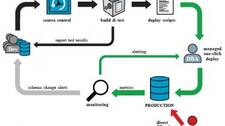
Most teams have solid pipelines for deploying application code. A typical Java shop might use Git for version control, Maven for builds, and Jenkins for CI/CD — delivering code to production in a repeatable, auditable way. But what happens to the database? Schema changes, reference data updates, and structural alterations are often applied manually, tracked in a spreadsheet, or left to individual developers. This makes deployments brittle and hard to reproduce.
Database migration tools solve this problem by versioning SQL scripts alongside your application code, then applying them automatically and in the correct order during each deployment. Flyway is one of the most widely adopted open-source tools for this purpose.
What is Flyway?
Flyway is an open-source database migration tool that helps you evolve your database schema in a controlled, versioned way. Its core workflow is straightforward:
- It scans a configured directory for SQL migration scripts.
- On startup (or on demand), it executes any scripts that have not yet been applied to the target database.
- It calculates a checksum for each executed file and stores both the checksum and execution metadata in a special schema history table (by default named
flyway_schema_history). - On subsequent runs, it compares checksums to detect tampering or unexpected changes.
This eliminates the need to manually track or apply database changes. Every change becomes an auditable, version-controlled artifact.
SQL Script Naming Convention
Flyway relies on a strict file naming convention to determine the order in which migrations are applied. The standard format is:
V{version}__{description}.sqlFor example:
V1__create_users_table.sql
V2__add_email_column.sql
V3_2343__update_user_roles.sqlCode language: CSS (css)
These scripts are typically stored in src/main/resources/db/migration in a Maven project, making them part of the application’s classpath and version-controlled alongside the source code.
Integrating Flyway with a Spring Application
Flyway integrates cleanly with Spring. You can configure it as a Spring bean that runs automatically on application startup using the migrate init method:
<beans:bean id="flyway" class="org.flywaydb.core.Flyway" init-method="migrate">
    <beans:property name="dataSource" ref="dataSource"/>
    <beans:property name="locations" value="classpath:db/migration"/>
    <beans:property name="initOnMigrate" value="true"/>
    <beans:property name="outOfOrder" value="true"/>
</beans:bean>Code language: HTML, XML (xml)
If you are using Spring Boot, Flyway auto-configuration is even simpler — add the flyway-core dependency to your pom.xml or build.gradle and Spring Boot will pick it up automatically, using your configured DataSource.
Each time the application starts, Flyway checks the schema history table, identifies unapplied migrations, and runs them in version order. No manual intervention required.
Common Issues and Solutions in Team Environments
Theory is clean; practice is messier. The following are real issues teams encounter when using Flyway in collaborative CI environments, along with proven solutions.
Issue 1: Version Number Conflicts During Parallel Development
Problem: Two developers both pull from the repository, independently create a new migration script, and assign it the same version number (e.g., V5__add_index.sql). When both commits are merged, Flyway throws an exception because two scripts share the same version.
Solution: Use a sub-version or suffix that is guaranteed to be unique across the team. A common and effective approach is to use the task or ticket number from your issue tracker as part of the version string:
V5_2343__add_users_index.sql
V5_2344__update_roles_table.sqlCode language: CSS (css)
Because each developer works on a unique task, the ticket number makes version collisions practically impossible without coordination.
Issue 2: Out-of-Order Migration Failures
Problem: Script V5_2343__add_users_index.sql is committed and applied to the production database before V5_2344__update_roles_table.sql. Later, when V5_2344 is applied, Flyway detects that an older version was applied after a newer one and throws a validation error.
Solution: Enable the outOfOrder flag in your Flyway configuration:
<beans:property name="outOfOrder" value="true"/>Code language: HTML, XML (xml)Or in application.properties for Spring Boot:
spring.flyway.out-of-order=trueCode language: JavaScript (javascript)This tells Flyway to apply migrations that arrive out of sequence rather than aborting the run. Use this setting with caution: it is appropriate for teams where migrations are logically independent, but can cause issues if scripts have dependencies on each other.
Issue 3: Checksum Mismatch Across Operating Systems
Problem: A developer on macOS or Linux creates a SQL migration file and commits it. It runs fine on the Linux production server. A Windows developer then pulls the same file, but Git’s default Windows configuration converts Unix line endings (LF) to Windows line endings (CRLF). Flyway recalculates the checksum and detects a mismatch, causing validation to fail.
Solution: Address this at two levels:
- Configure Git to preserve line endings on checkout by setting
core.autocrlf=inputin your global or repository-level Git config. This tells Git to convert CRLF to LF on commit but leave files unchanged on checkout — ensuring all developers and CI servers work with LF line endings:git config --global core.autocrlf input - Use Flyway’s
repaircommand to recalculate and update stored checksums when a mismatch has already occurred. This can be configured as the init method temporarily:<beans:bean id="flyway" class="org.flywaydb.core.Flyway" init-method="repair">
After running repair, switch back tomigratefor normal operation.
Using a .gitattributes file in your repository to enforce LF line endings for *.sql files is an even more robust long-term solution:
*.sql text eol=lfFitting Flyway into a CI/CD Pipeline
In a CI/CD pipeline (e.g., Jenkins, GitLab CI, GitHub Actions), Flyway migrations can be triggered in several ways:
- On application startup: The most common approach for web applications. The Spring integration shown above handles this automatically.
- As a dedicated pipeline step: Use the Flyway command-line tool or Maven plugin (
flyway:migrate) as a build step before deploying the application artifact. This separates migration from application startup and makes failures easier to diagnose. - As part of integration tests: Run migrations against a test database before running integration tests, ensuring the test environment always reflects the current schema.
In all cases, the principle is the same: SQL migration scripts live in version control, are reviewed in pull requests, and are applied automatically by the pipeline — just like application code.
Summary
Flyway brings the discipline of version control to database schema management. By storing versioned SQL scripts alongside your application code and applying them automatically during CI/CD runs, you eliminate the manual steps, missed changes, and environment drift that plague manual database management. The main operational challenges — version conflicts, out-of-order migrations, and cross-platform checksum mismatches — all have straightforward solutions once you understand the root cause.
For teams using Maven and Spring, the integration is minimal and the payoff is significant: every environment, from a developer’s laptop to production, runs the same database schema, applied in the same way, every time.