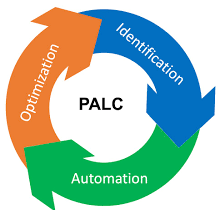
Imagine backing out of your driveway, pressing the gas, and arriving at work instantly — no traffic, no obstacles, no decisions required. That fantasy captures exactly how too many teams treat automation: configure it once, trust it forever, and move on. In practice, automation demands ongoing attention, measurement, and refinement.
The “Fire and Forget” Trap
The fire-and-forget mindset is understandable. Automation exists to reduce manual toil, and once a workflow is running cleanly, it is tempting to stop watching it. The problem is that infrastructure, data volumes, tooling, and workloads all change over time. An automated process that was perfectly tuned twelve months ago may be silently degrading today.
This applies across the DevOps toolchain — CI/CD pipelines, deployment scripts, monitoring rules, infrastructure-as-code, and backup systems alike. Complexity compounds the risk: containerized environments, multi-language codebases, access-restricted databases, and multi-platform targets all introduce variables that can shift without notice.
A Real-World Example: Backup Automation Gone Stale
The team at Ingrained Tech shared a candid example of how they fell into this exact trap with their own backup infrastructure. Their backup architecture followed a layered approach:
- Desktops backed up to a central server
- That server (and others) backed up to a NAS device
- The NAS replicated out to cloud storage (Backblaze)
The tooling — Duplicity for encrypted, incremental backups and Backblaze as the cloud backend — was working. Backups were completing and verification was passing. Everything looked fine from the outside.
Then the team noticed something alarming: weekly backups were taking nearly the entire week to complete. At that pace, a new weekly backup cycle would begin before the previous one finished — a situation that would break the entire backup chain.
Diagnosing the Problem
The team investigated disk I/O and network throughput — the two most common culprits for backup slowdowns. The bottleneck was disk I/O. The root cause was architectural: Duplicity was reading source data from a disk and simultaneously writing encrypted, compressed archives (tarballs) back to the same disk. That read-write contention on a single spindle (or set of spindles) was saturating I/O capacity and dragging out backup times.
As a side effect, an unrelated nightly build running on the same server had been experiencing intermittent failures for months. The team had noticed the occasional issue but had not traced it to backup I/O contention. Once they understood the backup problem, the build failures made sense.
The Fix: Redistribute the Work
The solution was straightforward once the bottleneck was identified:
- Rsync the source data to the NAS first. The NAS was configured as RAID 50, giving it significantly higher I/O capacity than the source server.
- Run Duplicity on the NAS. By moving the compression and encryption workload to the NAS — a far less busy system — the I/O contention on the source server was eliminated entirely.
- Send encrypted archives to the cloud. The NAS then handled the upload to Backblaze cloud buckets as before.
The result was immediate: backup completion times dropped from days to hours, and the unrelated build failures on the source server disappeared at the same time.
One remaining task was to verify that the new validation step was actually confirming data integrity end-to-end, not just confirming that files were transferred — a subtle but important distinction when rearchitecting a backup pipeline.
What This Means for DevOps Automation
This backup story is a useful proxy for automation challenges across any DevOps environment. Several principles emerge from it:
1. “Automate and Watch” — Not “Automate and Forget”
Successful automation requires continuous observation. Metrics such as job duration, queue depth, failure rates, and resource utilization should be tracked over time. A backup that completes in two hours one month and twelve hours the next month is signaling a change — even if it still shows a green status.
2. Yesterday’s Solution May Not Fit Today’s Scale
Data volumes grow. Team sizes grow. Build pipelines get more complex. An automation design that was perfectly adequate for a smaller dataset or simpler workload will eventually hit its limits. Periodic reviews of automated workflows — not just when something breaks — help surface these problems before they become urgent.
3. Latent Problems Hide Behind Working Systems
The intermittent build failures in this example had been on the team’s backlog for months. They appeared minor in isolation. Only after understanding the backup I/O contention did the true cause become clear. When automation systems share infrastructure, the interactions between workloads can produce symptoms that look unrelated. Profiling resource usage across jobs — not just per job — helps surface these hidden dependencies.
4. Improvement Is Iterative, Not One-Time
DevOps culture treats improvement as a continuous process. The same discipline applied to software delivery — measure, learn, refactor, redeploy — should be applied to the automation infrastructure that supports it. Reworking a backup pipeline, a deployment script, or a monitoring ruleset is not a sign of failure; it is a sign of a healthy engineering culture.
5. The Tooling Landscape Keeps Moving
Tools that were best-in-class two years ago may have been surpassed. New versions of existing tools may have resolved the very constraints that originally drove your architecture decisions. Staying current with the tooling ecosystem — without chasing every new release — is part of responsible automation ownership.
Practical Steps for Healthier Automation
- Set duration baselines. Record how long automated jobs take when they are working well. Alert on significant deviations, not just on failures.
- Review automation periodically. Schedule quarterly or semi-annual reviews of critical automated workflows, even when they appear healthy.
- Profile shared infrastructure. When multiple automated jobs share the same host, disk, or network segment, measure their combined resource usage — not just each job in isolation.
- Validate outputs, not just completion. A job that exits with code 0 is not necessarily doing what you think it is. Validate the actual output — restored data, deployed artifact, generated report — as part of the automated check.
- Document the original design intent. When you revisit an automated system months later, knowing why it was designed the way it was helps you make better decisions about changing it.
Summary
Automation is not a destination — it is a practice. Treating automated systems as permanently solved problems is how silent failures accumulate until they become urgent crises. Applying the same iterative improvement mindset to your automation infrastructure that you apply to your software is what separates mature DevOps organizations from those still running on last year’s assumptions. Automate thoughtfully, monitor continuously, and revisit regularly.