Introduction
Live chat software has transitioned from a basic customer service tool into a sophisticated conversational intelligence hub. These platforms are the primary interface for real-time customer engagement, blending human empathy with autonomous AI agents. Modern live chat systems no longer just “wait” for a visitor to type; they use predictive intent, behavioral triggers, and multimodal capabilities (voice and video) to resolve issues and drive revenue instantly.
The necessity of live chat in the current market is driven by the “zero-latency” expectation of the modern consumer. Businesses that fail to respond within seconds often lose the customer to a competitor. Consequently, platforms are deeply integrated into the entire business stack—connecting directly to CRMs, inventory systems, and marketing automation to provide personalized, context-aware support without requiring the customer to repeat their information.
Real-world use cases include:
- E-commerce Conversion: Using AI to provide instant product recommendations and inventory checks within the chat window.
- SaaS Technical Support: Resolving complex API or installation queries through screen-sharing and real-time debugging.
- B2B Lead Qualification: Automatically identifying high-value website visitors and routing them to a live sales representative.
- FinTech & Banking: Providing secure, encrypted communication for account inquiries and fraud alerts.
- Government & Healthcare: Offering 24/7 automated triage and appointment scheduling across multiple languages.
What buyers should evaluate (Criteria):
- AI Autonomy: The ability of the bot to resolve complex queries without human intervention.
- Omnichannel Inbox: Consolidation of WhatsApp, Instagram, SMS, and Webchat into one interface.
- Proactive Engagement: Triggers based on user behavior (e.g., time on page, cart abandonment).
- Security & Compliance: Alignment with global standards like GDPR, SOC 2, and HIPAA.
- Visual Support: Features like co-browsing, screen sharing, and video chat within the widget.
- Developer Extensibility: Availability of robust APIs and SDKs for custom mobile and web integrations.
- Analytics & Sentiment: Real-time reporting on agent performance and customer mood.
- Ease of Implementation: How quickly the widget can be deployed and trained on company data.
Best for: Businesses of all sizes looking to increase conversion rates, reduce support costs, and provide an immediate, personalized customer experience.
Not ideal for: Organizations with zero website traffic or those that deal exclusively with “long-cycle” offline contracts where real-time digital communication is unnecessary.
Key Trends in Live Chat Software
The live chat landscape is defined by “The End of the Script” and “The Rise of Multimodal AI.”
- Generative AI Agents: Bots now use Large Language Models (LLMs) to hold natural, fluid conversations instead of following rigid, frustrating decision trees.
- Predictive Intent: Systems can now predict why a user is chatting before they even finish their first sentence, based on their browsing path.
- Multimodal Communication: A seamless transition from text to voice or video calls within the same chat interface.
- Webscraping Training: AI agents can now “read” a company’s website and documentation in real-time to answer new questions without manual training.
- Sentiment-Based Routing: Conversations are automatically escalated to senior human agents if the AI detects frustration or high emotional stakes.
- Zero-Knowledge Privacy: Advanced encryption methods that allow for secure data exchange within the chat without the provider “seeing” the sensitive data.
- Hyper-Personalization: Utilizing browser cookies and CRM data to greet returning users by name and reference their past purchase history.
- Autonomous Scheduling: Bots that don’t just “ask” for a meeting but directly book it into a salesperson’s calendar by checking real-time availability.
How We Selected These Tools (Methodology)
Our selection of the top 10 live chat platforms follows a strict SaaS evaluation framework:
- Conversational AI Depth: We prioritized tools that offer native, LLM-powered agents over those with basic “if/then” logic.
- Unified Inbox Quality: We assessed how effectively the tool aggregates messages from disparate social and messaging channels.
- Integration Maturity: Preference was given to platforms that offer deep, bi-directional sync with major CRMs (Salesforce, HubSpot).
- Security Posture: Evaluation of enterprise-grade security features, including visitor verification and data masking.
- Scalability: The platform’s ability to handle high-volume spikes during sales events or product launches.
- Mobile Experience: The quality of the mobile app for agents who need to respond on the go.
- End-User UX: We measured the loading speed, customization, and accessibility of the visitor-facing widget.
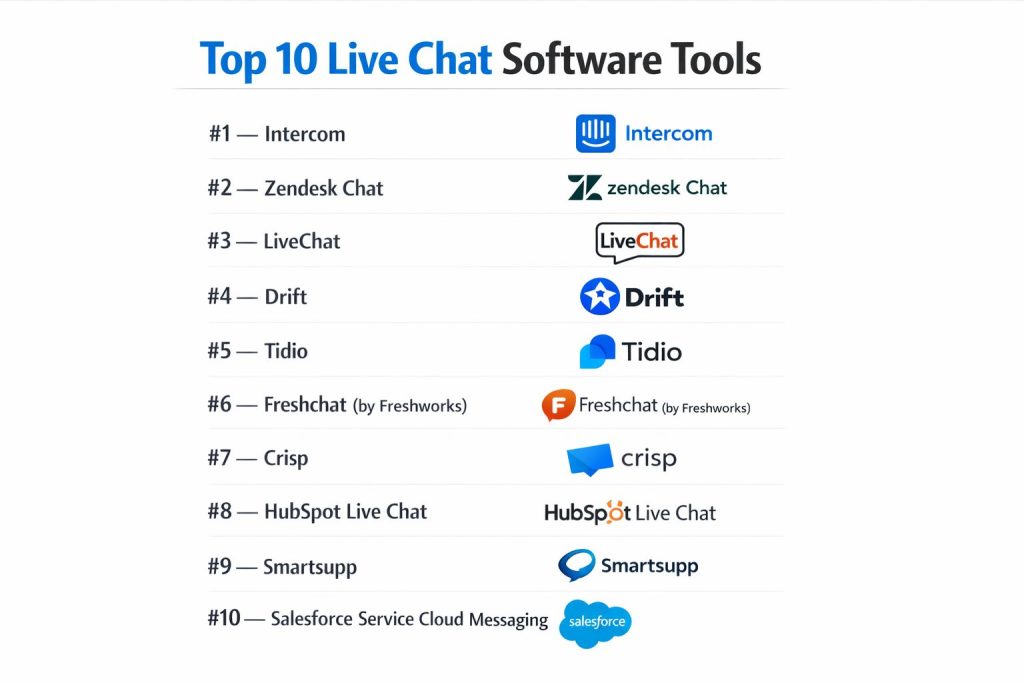
Top 10 Live Chat Software Tools
#1 — Intercom
The pioneer of the messenger-based customer experience, Intercom provides an integrated platform for support, marketing, and sales powered by its advanced AI agent, Fin.
Key Features
- Fin AI Agent: An LLM-powered bot that resolves inquiries using your knowledge base and support articles.
- Omnichannel Inbox: A centralized hub for web, mobile app, email, and social messaging.
- Product Tours: Interactive, in-app walkthroughs triggered by the chat widget.
- Visual File Sharing: Seamless sharing of screenshots, videos, and PDFs within the conversation.
- Messenger Apps: A marketplace of apps that live inside the chat (e.g., Stripe, Shopify, Calendly).
- Advanced Routing: Logic-based assignment of conversations based on team capacity or customer spend.
Pros
- User Experience: Widely considered the most modern and intuitive interface for both agents and customers.
- Continuous Innovation: Consistently at the forefront of AI and automation technology.
Cons
- Cost: Pricing can escalate quickly with add-ons and “resolution-based” fees for the AI agent.
- Complex Setup: The vast number of features requires significant time to optimize fully.
Platforms / Deployment
- Web / Windows / macOS / iOS / Android
- Cloud
Security & Compliance
- SOC 2 Type II, ISO 27001, GDPR, HIPAA (Enterprise).
- SSO/SAML, 2FA, Data Masking.
Integrations & Ecosystem
Intercom has one of the largest app ecosystems in the industry.
- Salesforce & HubSpot
- Slack & Microsoft Teams
- GitHub & Jira
- WhatsApp & Instagram
Support & Community
Extensive help center, 24/7 chat support, and the “Intercom Academy” for professional certification.
#2 — Zendesk Chat
Part of the broader Zendesk Service suite, this is an enterprise-grade solution designed for high-volume support teams that require deep reporting and scalability.
Key Features
- Agent Workspace: A unified interface where agents can switch between chat, email, and voice.
- AI Agents: Automated bots that suggest answers and handle routine ticket categorization.
- Real-Time Monitoring: Live dashboards showing wait times, satisfaction ratings, and agent load.
- Chat SDKs: Robust tools for embedding native chat experiences into iOS and Android apps.
- Triggers & Shortcuts: Pre-defined responses and automation based on visitor behavior.
- Advanced Analytics: Detailed historical reporting and predictive forecasting for staffing.
Pros
- Enterprise Scalability: Built to handle thousands of agents and millions of monthly conversations.
- Ecosystem Integration: Works perfectly with Zendesk’s world-class ticketing and voice systems.
Cons
- Learning Curve: The interface can be overwhelming for small teams or non-technical users.
- Legacy UI: Some parts of the dashboard feel dated compared to “chat-first” startups.
Platforms / Deployment
- Web / Windows / macOS / iOS / Android
- Cloud
Security & Compliance
- SOC 2, ISO 27001, GDPR, HIPAA, FedRAMP.
- Enterprise Key Management (EKM).
Integrations & Ecosystem
Native connections to almost every major enterprise software.
- Microsoft 365 & Google Workspace
- Salesforce
- Shopify
- Slack
Support & Community
Global 24/7 support, dedicated account managers, and a massive global user community.
#3 — LiveChat
A dedicated, high-performance chat tool focused purely on speed, efficiency, and increasing online sales through a highly customizable widget.
Key Features
- Sneak Peek: Allows agents to see what the visitor is typing before they hit “send.”
- Ecommerce Cards: Send product cards with images and “buy” buttons directly in the chat.
- AI Insights: Automatically tags and summarizes conversations to identify trends.
- Work Scheduler: Manages agent shifts and ensures 24/7 coverage.
- Ticketing System: Built-in tool to handle offline messages and follow-ups.
- Visitor Tracking: Real-time list of who is on your site and which pages they are viewing.
Pros
- Speed: One of the fastest and most responsive widgets on the market.
- Simplicity: Very easy for agents to learn and use without extensive training.
Cons
- Multi-Channel Limitations: While it has integrations, the “unified inbox” feel is not as deep as Intercom.
- Feature Gaps: Lacks some of the native marketing automation found in competitors like Drift.
Platforms / Deployment
- Web / Windows / macOS / iOS / Android
- Cloud
Security & Compliance
- PCI Compliance, SOC 2, GDPR.
- Credit Card Masking, IP Blocking.
Integrations & Ecosystem
Over 200+ integrations available via their marketplace.
- HubSpot
- Mailchimp
- WhatsApp & Facebook Messenger
- Google Analytics
Support & Community
24/7/365 live chat support and a comprehensive knowledge base.
#4 — Drift
A conversational marketing platform designed to accelerate revenue by connecting website visitors with sales teams in real-time.
Key Features
- Conversational Landing Pages: Replaces static forms with a chat-first engagement experience.
- Bionic Chatbots: AI agents that qualify leads and book meetings directly into calendars.
- Account-Based Marketing (ABM): Personalized greetings for specific target accounts.
- Video Messaging: Allows agents to send personalized video clips within the chat.
- Revenue Reporting: Shows exactly how much pipeline and closed revenue was generated by chat.
- Intel Alerts: Notifies sales reps when their high-value leads return to the website.
Pros
- Sales Optimized: The best tool for teams focused on lead generation and “speed to lead.”
- Advanced Automation: Playbooks that can handle complex sales qualification logic.
Cons
- High Entry Price: One of the most expensive options on the list.
- Not Support-First: While it has support features, its core DNA is marketing and sales.
Platforms / Deployment
- Web / iOS / Android
- Cloud
Security & Compliance
- SOC 2 Type II, GDPR, Privacy Shield.
- SSO/SAML.
Integrations & Ecosystem
Deep focus on the sales and marketing stack.
- Salesforce & Marketo
- Pardot & Eloqua
- 6sense & Demandbase
- Slack
Support & Community
Drift Insider community, professional services for setup, and 24/7 support.
#5 — Tidio
An all-in-one customer service platform that combines live chat, AI chatbots, and email marketing, specifically tailored for small and medium businesses (SMBs).
Key Features
- Lyro AI: A conversational AI agent that can handle up to 70% of customer inquiries.
- Visual Chatbot Builder: No-code drag-and-drop tool to create complex automation flows.
- Live Typing Preview: Real-time visibility into what the visitor is currently typing.
- Multichannel Support: Manage messages from Messenger, Instagram, and WhatsApp in one place.
- Visitor List: Real-time view of current website visitors and their geographic location.
- Email Marketing: Integrated tools to send newsletters and abandoned cart emails.
Pros
- Value for Money: Offers advanced AI features at a much lower price point than enterprise rivals.
- Ease of Use: Extremely user-friendly interface that requires zero technical knowledge.
Cons
- Scalability: Can struggle with extremely high-volume enterprise requirements.
- Basic Reporting: Analytics are functional but less granular than Zendesk or Intercom.
Platforms / Deployment
- Web / Windows / macOS / iOS / Android
- Cloud
Security & Compliance
- GDPR Compliant, SSL Encryption.
- 2FA, Secure Data Hosting.
Integrations & Ecosystem
Strong focus on e-commerce and small business tools.
- Shopify & WooCommerce
- Wix & WordPress
- HubSpot & Pipedrive
- Mailchimp
Support & Community
Responsive 24/5 support, extensive documentation, and video tutorials.
#6 — Freshchat (by Freshworks)
A modern messaging software for sales and customer engagement that offers a great balance of AI automation and human-centric features.
Key Features
- Freddy AI: Generative AI for both customer-facing bots and agent assistance.
- Campaigns: Proactive messaging based on user behavior (e.g., specific page views).
- IntelliAssign: Automatically routes chats based on agent skill level and current load.
- Multilingual Support: Auto-translation for agents to chat in over 30+ languages.
- Co-browsing: Allows agents to see the user’s screen and guide them through the site.
- Advanced Dashboards: Real-time and historical views of all conversation metrics.
Pros
- Integrated Ecosystem: Works seamlessly with Freshdesk (Support) and Freshsales (CRM).
- Affordable Growth: Scaling plans that accommodate startups to large enterprises.
Cons
- Integration Depth: While good, it isn’t as deeply “hooked into” non-Freshworks products as Intercom.
- App Stability: Occasional reports of mobile app lag during high traffic.
Platforms / Deployment
- Web / iOS / Android
- Cloud
Security & Compliance
- SOC 2, ISO 27001, GDPR, HIPAA.
- Audit Logs, Data Residency options.
Integrations & Ecosystem
Part of the Freshworks Marketplace with hundreds of apps.
- WhatsApp & Apple Messages for Business
- Salesforce
- Slack
- Stripe
Support & Community
24/7 email and chat support, along with “Freshworks Academy” for training.
#7 — Crisp
A simple yet powerful shared inbox and live chat tool favored by startups and small teams for its affordability and “all-in-one” approach.
Key Features
- MagicBrowse: A co-browsing feature that lets you see the user’s screen in real-time.
- Shared Inbox: Consolidates email, chat, SMS, and social media into one view.
- Crisp CRM: A built-in, lightweight CRM to manage lead and customer data.
- Knowledge Base: Integrated help center that is searchable from the chat widget.
- Game Integration: Includes a “Crisp Game” to keep visitors engaged while they wait.
- Live Translate: Instant translation of messages to communicate globally.
Pros
- Pricing Model: Flat-rate pricing for the “Unlimited” plan, which is rare in the industry.
- Lightweight: Very fast loading times and minimal impact on website performance.
Cons
- Feature Depth: Not as robust as Intercom for complex enterprise workflows.
- AI Sophistication: AI capabilities are functional but behind the LLM-native leaders.
Platforms / Deployment
- Web / Windows / macOS / iOS / Android
- Cloud
Security & Compliance
- GDPR Compliant, 2FA.
- Secure Data Storage in the EU.
Integrations & Ecosystem
Good selection of essential tools for tech startups.
- Slack & Discord
- Zapier & Make
- Shopify
- GitHub
Support & Community
Fast chat support, active community forum, and detailed developer API docs.
#8 — HubSpot Live Chat
A free-to-start live chat tool that is natively built into the HubSpot CRM, making it ideal for teams focused on lead tracking and sales.
Key Features
- Full CRM Integration: Every chat transcript is automatically saved to the contact’s record.
- Chatbot Builder: Create bots for lead qualification, meeting booking, and ticket creation.
- Targeted Messages: Display different welcome messages based on visitor segments.
- Office Hours: Automatically toggles the chat widget based on team availability.
- Slack Integration: Respond to chats directly from within a Slack channel.
- Mobile Inbox: Manage all conversations via the primary HubSpot mobile app.
Pros
- Unified Data: No “syncing” required; the data lives where your sales and marketing data lives.
- Cost: The basic version is free forever, making it accessible for any business.
Cons
- Limited Customization: The widget design is less flexible than dedicated tools like LiveChat.
- Support Features: Lacks advanced “service desk” features like co-browsing or screen sharing.
Platforms / Deployment
- Web / iOS / Android
- Cloud
Security & Compliance
- SOC 2, GDPR, HIPAA (Enterprise).
- 2FA, SSO.
Integrations & Ecosystem
Deeply integrated with the entire HubSpot platform.
- Salesforce
- Shopify
- WordPress
- Facebook Messenger
Support & Community
Massive knowledge base, HubSpot Community, and tiered support for paid plans.
#9 — Smartsupp
A unique live chat solution that combines messaging with visitor video recordings to give businesses a complete view of the customer journey.
Key Features
- Visitor Video Recordings: Watch how users navigate your site to identify bottlenecks.
- Mira AI: An automated assistant trained on your website and product feed.
- Real-time Visitor List: Shows which products a customer is looking at in the current moment.
- Automated Messages: Trigger chats based on time spent on page or cart value.
- Mobile App: Simple, notification-heavy app to ensure no message is missed.
- Custom Branding: Ability to match the widget entirely to your site’s aesthetic.
Pros
- Behavioral Insights: The video recording feature is a game-changer for conversion optimization.
- Simple Setup: Can be live on a website in under 5 minutes.
Cons
- Enterprise Features: Lacks some of the complex routing and SLA management of Zendesk.
- Bot Complexity: The chatbot builder is less advanced than Tidio or Drift.
Platforms / Deployment
- Web / iOS / Android
- Cloud
Security & Compliance
- GDPR Compliant, Secure Encryption.
- IP Masking for video recordings.
Integrations & Ecosystem
Focused primarily on the e-commerce stack.
- Shopify & Magento
- WooCommerce & OpenCart
- Google Analytics
- PrestaShop
Support & Community
Email and chat support with a helpful resource center.
#10 — Salesforce Service Cloud Messaging
An enterprise-only messaging solution built for organizations that use Salesforce as their primary operating system.
Key Features
- Agentforce AI: Advanced, generative AI that acts as an autonomous support agent.
- Omni-Channel Routing: Complex logic to route chats based on CRM data (e.g., VIP status).
- Messaging for Web & In-App: Native, secure chat for both desktop and mobile applications.
- Pre-Chat Forms: Collect data before the conversation starts to assist in routing.
- Service Cloud Voice Integration: Seamless transition from text chat to phone calls.
- Einstein Analytics: Predictive insights into customer churn and agent efficiency.
Pros
- Unmatched Power: The most powerful logic and data engine available in the market.
- Identity Management: Best-in-class security and user verification for regulated industries.
Cons
- Cost & Complexity: Extremely expensive and requires a certified Salesforce admin to manage.
- UI Friction: The agent interface can be dense and requires significant training.
Platforms / Deployment
- Web / iOS / Android
- Cloud
Security & Compliance
- FedRAMP, HIPAA, SOC 2, ISO 27001.
- Shield Encryption, Event Monitoring.
Integrations & Ecosystem
Native to the Salesforce ecosystem; connects to everything via AppExchange.
- MuleSoft
- Slack
- Marketing Cloud
- Tableau
Support & Community
Global Premier support, Trailhead training, and a massive network of implementation partners.
Comparison Table (Top 10)
| Tool Name | Best For | Platform(s) Supported | Deployment | Standout Feature | Public Rating |
| Intercom | Modern UX / SaaS | Web, Win, Mac, iOS, Android | Cloud | Fin AI Agent | 4.6 / 5 |
| Zendesk Chat | Enterprise Support | Web, Win, Mac, iOS, Android | Cloud | Omnichannel Workspace | 4.5 / 5 |
| LiveChat | Speed & Ecommerce | Web, Win, Mac, iOS, Android | Cloud | Typing Sneak Peek | 4.7 / 5 |
| Drift | Sales / Lead Gen | Web, iOS, Android | Cloud | Bionic Chatbots | 4.4 / 5 |
| Tidio | SMB / AI Value | Web, Win, Mac, iOS, Android | Cloud | Lyro AI Agent | 4.7 / 5 |
| Freshchat | Support + Sales | Web, iOS, Android | Cloud | Co-browsing | 4.4 / 5 |
| Crisp | Startups | Web, Win, Mac, iOS, Android | Cloud | Flat-rate Pricing | 4.5 / 5 |
| HubSpot Chat | CRM Alignment | Web, iOS, Android | Cloud | Native CRM Sync | 4.3 / 5 |
| Smartsupp | Video Insights | Web, iOS, Android | Cloud | Visitor Recordings | 4.6 / 5 |
| Salesforce | Global Enterprise | Web, iOS, Android | Cloud | Agentforce AI | 4.1 / 5 |
Evaluation & Scoring of Live Chat Software
| Tool Name | AI (25%) | UX (15%) | Int. (15%) | Sec. (10%) | Perf. (10%) | Supp. (10%) | Value (15%) | Weighted Total |
| Intercom | 10 | 10 | 9 | 9 | 9 | 9 | 6 | 8.90 |
| Zendesk Chat | 9 | 7 | 10 | 10 | 9 | 10 | 7 | 8.65 |
| LiveChat | 8 | 9 | 8 | 8 | 10 | 9 | 8 | 8.45 |
| Drift | 9 | 8 | 9 | 8 | 9 | 8 | 5 | 8.10 |
| Tidio | 9 | 9 | 8 | 7 | 9 | 8 | 10 | 8.65 |
| Freshchat | 8 | 8 | 9 | 9 | 8 | 8 | 8 | 8.25 |
| Crisp | 7 | 9 | 8 | 7 | 10 | 8 | 10 | 8.30 |
| HubSpot Chat | 7 | 8 | 10 | 9 | 8 | 8 | 9 | 8.20 |
| Smartsupp | 8 | 8 | 7 | 8 | 9 | 8 | 9 | 8.05 |
| Salesforce | 10 | 5 | 10 | 10 | 8 | 10 | 5 | 8.30 |
Which Live Chat Software Tool Is Right for You?
Solo / Small Business
Tidio is the standout for small businesses. Its free tier is generous, and its AI (Lyro) is easy to set up, allowing you to have a “24/7 support team” without actually hiring one.
Growing Startups
Intercom or Crisp are ideal. Intercom offers the most polished experience for tech-savvy customers, while Crisp provides a flat-rate plan that won’t punish you as your traffic grows.
Sales-Driven Teams
If your primary goal is booking meetings and closing deals, Drift is the gold standard. Its ABM (Account-Based Marketing) features allow your sales team to roll out the “red carpet” for VIP prospects.
Enterprise & High Volume
Zendesk and Salesforce are the only choices for organizations that need rigorous compliance, complex routing, and integration with thousands of other business processes.
E-commerce Focus
LiveChat and Smartsupp excel here. LiveChat’s “Product Cards” drive direct sales, while Smartsupp’s video recordings help you understand exactly why customers are abandoning their carts.
Frequently Asked Questions (FAQs)
What is the difference between Live Chat and Chatbots?
Live chat connects a human visitor to a human agent. Chatbots are automated programs that interact with the visitor. Most platforms use a “Hybrid” model where a bot handles the initial greeting and the human takes over if the issue is complex.
Will AI replace human chat agents?
AI is replacing “Level 1” support (answering FAQs, password resets). However, humans are more necessary than ever for “Level 2 and 3” support, where empathy, creative problem-solving, and complex negotiation are required.
How does live chat affect website loading speed?
Most modern widgets are “Asynchronous,” meaning they load after your website’s primary content. Tools like Crisp and LiveChat are particularly optimized for minimal impact on page speed.
Can I use live chat on my mobile app?
Yes, most top-tier tools (Intercom, Zendesk, Freshchat) offer “Mobile SDKs” that allow you to embed a native chat experience directly into your iOS or Android application.
Is live chat secure enough for medical or financial data?
Yes, but you must ensure you are using an “Enterprise” tier plan that offers HIPAA or SOC 2 compliance. These plans include features like data masking, where sensitive info (like credit card numbers) is automatically hidden from the agent.
What is “Co-browsing”?
Co-browsing (offered by Freshchat and Crisp) allows an agent to see exactly what is on the customer’s screen and even highlight parts of the page to guide them. Unlike “Screen Sharing,” it usually only shows the specific browser tab for privacy.
Can I chat with customers on WhatsApp through these tools?
Yes. Most tools on this list act as a “Unified Inbox,” allowing you to respond to WhatsApp Business, Instagram DMs, and Facebook messages from a single dashboard.
What happens if a customer chats after business hours?
Most tools will either trigger an AI agent to handle the query or display an “Offline Form” that converts the chat into an email ticket for the team to answer the next day.
Do I need a developer to install live chat?
Generally, no. For web-based chat, you simply copy and paste a small snippet of JavaScript code into your website’s header. Platforms like WordPress and Shopify have plugins that make this a one-click process.
What is “Sentiment Analysis” in live chat?
It is an AI feature that analyzes the customer’s words to determine their mood (Positive, Neutral, or Angry). This allows the system to prioritize angry customers and route them to senior agents immediately.
Conclusion
Live chat is the heartbeat of digital customer experience. Whether you prioritize the AI-first sophistication of Intercom, the sales-driven power of Drift, or the value-packed efficiency of Tidio, the right tool will transform your website from a static brochure into a dynamic, revenue-generating conversation.
The most successful companies are those that use AI to handle the mundane and humans to handle the meaningful. By selecting a tool that fits your specific scale and goals, you can provide the instant gratification that modern customers demand.