Introduction
Construction management software has evolved from basic digital spreadsheets into comprehensive project ecosystems that synchronize the field and the office in real-time. In the high-stakes environment of modern AEC (Architecture, Engineering, and Construction), these platforms serve as the single source of truth for complex data, including Building Information Modeling (BIM), Request for Information (RFI) workflows, and integrated project financials. By centralizing documentation and communication, these tools mitigate the risks of costly rework and schedule slippage, which are common in multi-stakeholder infrastructure and commercial projects. The adoption of these systems is no longer a luxury but a fundamental requirement for maintaining operational transparency and regulatory compliance.
The strategic implementation of construction technology allows firms to transition from reactive problem-solving to proactive risk management. Advanced platforms now leverage cloud-native architectures to provide offline access for remote jobsites, ensuring that site supers and subcontractors always have the latest drawings at their fingertips. When evaluating these solutions, it is essential to consider the “digital maturity” of your workforce, as the most powerful feature set is useless without high user adoption. A robust construction management suite should not only track progress but also protect the organization through rigorous audit trails, automated safety logs, and seamless integration with existing ERP and accounting systems.
Best for: General contractors, specialty subcontractors, real estate developers, and civil engineering firms who need to manage budgets, schedules, and site safety within a unified digital environment.
Not ideal for: Small, independent handymen or residential micro-contractors who only require basic task lists and simple invoicing, as the complexity of enterprise-grade suites may outweigh the benefits for low-volume projects.
Key Trends in Construction Management Software
A defining trend in the current landscape is the deep integration of Artificial Intelligence for predictive scheduling and risk analysis. Modern platforms are now capable of analyzing historical project data to flag potential delays before they occur, allowing project managers to pivot resources dynamically. We are also seeing a massive surge in “BIM-to-Field” workflows, where 3D models are no longer confined to the design office but are accessible on tablets for clash detection and quality inspections directly on the jobsite.
Furthermore, the industry is shifting toward “all-in-one” AECO platforms that break down the silos between owners, architects, and contractors. This collaborative transparency is supported by enhanced mobile-first designs that cater to a multilingual workforce, featuring AI-powered translation and visual task management. Sustainability tracking has also become a core module, with new tools emerging to monitor carbon footprints and material waste, helping firms meet increasingly stringent environmental regulations and green building certifications.
How We Selected These Tools
Our selection process focused on a rigorous evaluation of technical stability, specialized feature sets, and market reliability. We prioritized platforms that demonstrate high uptime and offer robust offline capabilities, which are critical for jobsites with limited connectivity. Market share was considered an indicator of ecosystem health; widely adopted tools typically offer more third-party integrations and a larger pool of trained professionals. We also looked for a balance between “breadth” (all-in-one suites) and “depth” (specialized field or scheduling tools).
Technical criteria included the sophistication of document version control, the ease of RFI and submittal processing, and the security of the data environment. We specifically sought out tools that comply with international standards such as ISO 19650 for BIM and maintain high-level encryption for financial data. Finally, we assessed the quality of the vendor’s professional services and support infrastructure, as successful deployment in the construction industry often requires hands-on implementation and ongoing training.
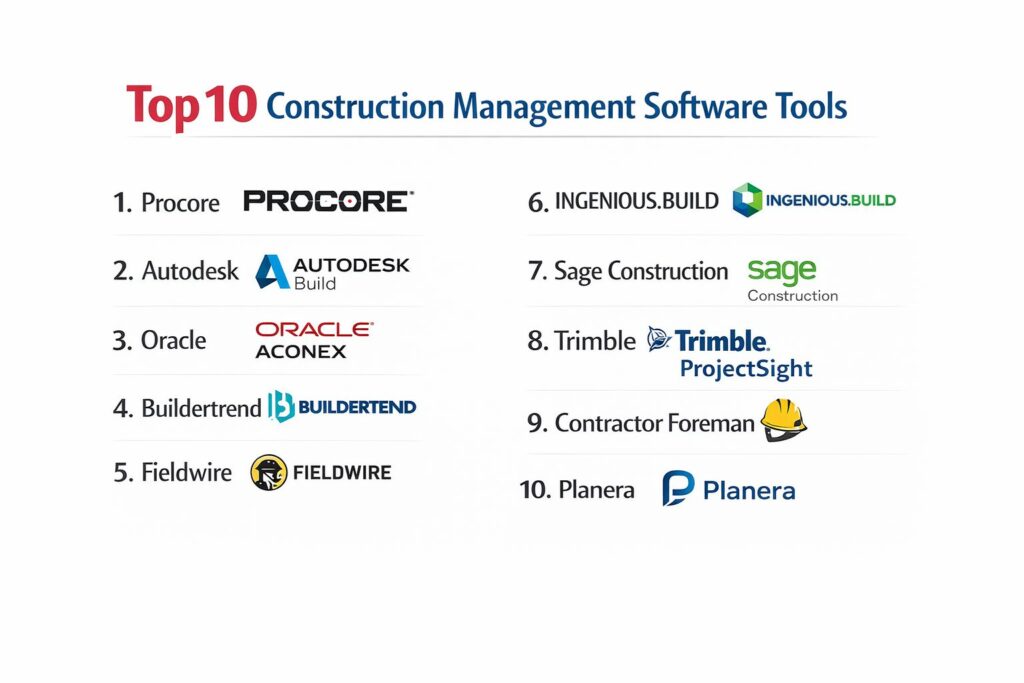
1. Procore
Procore is the industry standard for enterprise-level construction management, offering a comprehensive suite that covers the entire project lifecycle from preconstruction to closeout. It is renowned for its vast marketplace of integrations and its ability to connect thousands of stakeholders on a single, scalable platform.
Key Features
The platform includes a robust Project Management module for RFIs, submittals, and daily logs. Its Financial Management tool provides real-time visibility into project budgets and cost changes. The Quality & Safety module automates inspections and incident reporting to ensure site compliance. Procore also features a specialized BIM viewer that allows field teams to interact with 3D models on mobile devices. Its “App Marketplace” connects with over 400 third-party tools, including specialized accounting and ERP software.
Pros
Unrivaled scalability and a massive ecosystem of integrations make it suitable for the world’s largest projects. The mobile application is highly optimized for field use, even in low-connectivity areas.
Cons
The pricing model is based on project volume, which can become very expensive for high-revenue firms. The platform’s depth requires a dedicated administrator for optimal setup.
Platforms and Deployment
Cloud-based web application with native mobile apps for iOS and Android.
Security and Compliance
SOC 2 Type II certified and compliant with GDPR; provides rigorous audit trails for every project action.
Integrations and Ecosystem
Direct integrations with Sage, QuickBooks, DocuSign, and hundreds of other AEC-specific applications.
Support and Community
Offers 24/7 live support and an extensive “Procore Certification” program for professional development.
2. Autodesk Build
Autodesk Build combines the best of PlanGrid’s field collaboration with powerful project management and document control. It is the preferred choice for firms already embedded in the Autodesk ecosystem, providing a seamless flow of data from Revit and AutoCAD to the jobsite.
Key Features
Central to the platform is its world-class Document Management system, which ensures everyone is working from the latest drawing set. It features advanced RFI and submittal workflows that link directly to the project schedule. The Cost Management module enables teams to track expenses and manage change orders within the same environment. It also includes “Asset Tracking” for equipment and materials throughout the project lifecycle. Deep integration with BIM 360 allows for high-fidelity model viewing and clash resolution in the field.
Pros
Seamless data continuity for teams using Autodesk design tools reduces the risk of manual data entry errors. The drawing markup and versioning tools are among the most intuitive in the market.
Cons
Can be complex and overwhelming for smaller firms that do not utilize BIM or heavy design coordination. Licensing costs can add up quickly for large, multi-disciplinary teams.
Platforms and Deployment
Part of the Autodesk Construction Cloud; accessible via web and mobile.
Security and Compliance
Enterprise-grade security with ISO 27001, 27017, and 27018 certifications.
Integrations and Ecosystem
Natively integrated with the entire Autodesk suite and over 200 partner integrations.
Support and Community
Comprehensive technical support and access to the global Autodesk University learning network.
3. Oracle Aconex
Oracle Aconex is a high-security, high-governance platform designed for the world’s most complex infrastructure and energy projects. It focuses on neutral data ownership and strict document control to prevent disputes and ensure total project transparency.
Key Features
The platform is built around a unique “neutrality” model where each organization manages its own data while sharing a common project record. It features an automated workflow engine for managing thousands of drawings and documents with zero file size limits. Its “Connected BIM” feature allows multi-party collaboration on large-scale models without the need for specialized software. The platform provides a full audit trail of every communication, making it the gold standard for public sector and compliance-heavy builds. It also includes robust reporting dashboards for executive-level oversight.
Pros
Ideal for mega-projects where document control and legal traceability are paramount. The “owner-controlled” data environment minimizes the risk of data loss during project handovers.
Cons
The user interface feels more traditional and less “modern” than newer competitors. It has a steeper learning curve for field-level subcontractors.
Platforms and Deployment
Cloud-native web platform with global data residency options.
Security and Compliance
FedRAMP authorized and compliant with the highest international security standards for government and defense projects.
Integrations and Ecosystem
Connects with Oracle’s wider Primavera and ERP ecosystems for end-to-end project controls.
Support and Community
Dedicated global support teams and professional implementation services for enterprise clients.
4. Buildertrend
Buildertrend is the leading solution for residential builders, remodelers, and specialty contractors. It combines heavy-duty project management with a customer-facing portal that manages the “human” side of home building.
Key Features
The platform features a comprehensive scheduling tool with Gantt charts that can be shared with subcontractors and clients. It includes a financial suite for estimates, bids, and online payments. The “Client Portal” is a standout feature, allowing homeowners to see progress photos, approve selections, and pay invoices. It also manages daily logs, photos, and videos to document site progress. Built-in CRM tools help contractors manage leads and pre-construction activities within the same system.
Pros
The focus on client communication significantly improves customer satisfaction and reduces disputes. It is highly user-friendly and can be implemented quickly by small to mid-sized teams.
Cons
Not suitable for complex commercial or infrastructure projects that require advanced document control. The cost can increase significantly as the number of users or projects grows.
Platforms and Deployment
Web-based dashboard with a highly-rated mobile app for both builders and clients.
Security and Compliance
Standard encryption for data and secure payment processing through integrated gateways.
Integrations and Ecosystem
Strong integrations with QuickBooks, Xero, and specialized design tools like Houzz.
Support and Community
Provides dedicated “Customer Success Managers” and a wealth of online learning resources through Buildertrend University.
5. Fieldwire
Fieldwire focuses on the “field-first” philosophy, prioritizing the needs of the people actually building on-site. It is widely used by subcontractors and site supers for task management, plan viewing, and punch lists.
Key Features
The platform’s core strength is its fast, high-performance plan viewer that works flawlessly offline. It uses a “task-based” approach to site management, allowing users to pin issues, photos, and notes directly onto drawings. It includes automated “Schedules of Values” and progress reporting tools. The punch list feature is highly efficient, enabling quick closeouts by assigning tasks to specific trades. It also supports “Forms” for digital safety inspections, daily reports, and timesheets, replacing paper-based site documentation.
Pros
Extremely easy to adopt for field crews with little to no technical training. The pricing model is flexible and affordable for smaller teams and individual subcontractors.
Cons
Lacks the deep financial and pre-construction features found in larger suites like Procore. It is often used as a “point solution” rather than an enterprise ERP.
Platforms and Deployment
Mobile-optimized platform available on iOS, Android, and Web.
Security and Compliance
Secure data storage with standard encryption; focus on clear accountability and task ownership.
Integrations and Ecosystem
Integrates with Box, Dropbox, and Google Drive for document syncing; also connects with Procore and Autodesk Build.
Support and Community
Offers responsive email and chat support, with a focus on quick resolution for field-level issues.
6. INGENIOUS.BUILD
INGENIOUS.BUILD is a modern, all-in-one platform designed to unify the interests of owners, developers, and contractors. It focuses on eliminating data silos and providing a collaborative environment for real estate development.
Key Features
The platform provides integrated workflows for capital planning, design, and construction execution. It features a unique “Financials” module that handles everything from budget development to automated invoice routing and approvals. The system includes real-time collaboration tools for RFIs, submittals, and drawing markups. It offers a “fixed-pricing” model that is not tied to project value, making it a predictable expense for growing firms. The interface is designed for high-speed navigation, allowing users to jump between multiple projects with ease.
Pros
The fixed-pricing model offers excellent value compared to volume-based competitors. It is specifically tailored for the needs of real estate developers and owners who need high-level visibility.
Cons
As a newer entrant, its marketplace of third-party integrations is not as mature as Procore’s. It is strictly focused on the AECO industry.
Platforms and Deployment
Modern cloud-based web application with full mobile support.
Security and Compliance
SOC 2 compliant with a focus on data sovereignty and secure multi-party collaboration.
Integrations and Ecosystem
Offers a growing list of integrations with major accounting and document storage providers.
Support and Community
Known for fast onboarding and personalized customer support for both office and field teams.
7. Sage Construction Management
Sage Construction Management (formerly Corecon) is built for small to mid-sized general contractors and subcontractors who need a professional-grade suite with deep ties to the Sage accounting ecosystem.
Key Features
The platform covers the entire project lifecycle, including lead tracking, estimating, and project controls. It features a robust “Bidding” module that allows contractors to manage invitations and compare vendor quotes. The project management tools handle RFIs, submittals, and change orders with ease. It includes a “TeamLink” portal for external collaborators to access project data without full licenses. Its biggest strength is the native synchronization with Sage 50, Sage 100, and Sage 300, ensuring financial data is always accurate across the company.
Pros
The best choice for firms already using Sage for their back-office accounting. It offers a very high feature-to-cost ratio for mid-market contractors.
Cons
The user interface can feel a bit dated compared to modern SaaS platforms. Mobile functionality is solid but not as “slick” as specialized field apps.
Platforms and Deployment
Web-based cloud platform with supporting mobile apps.
Security and Compliance
Inherits the strong security and financial compliance standards of the Sage brand.
Integrations and Ecosystem
Unmatched integration with Sage accounting products and major productivity suites like Microsoft 365.
Support and Community
Backed by Sage’s global support network and a large community of certified consultants.
8. Trimble ProjectSight
ProjectSight is the next-generation construction management solution from Trimble, designed specifically for mid-to-large general contractors. It provides a balanced mix of cost management and field coordination tools.
Key Features
The platform excels in “Cost Management,” offering detailed tracking for contracts, change orders, and payments. It features a drawing-centric interface where tasks and RFIs are linked directly to locations on plans. It includes a “Field Management” module for daily reports, safety notices, and inspections. ProjectSight is built on the Trimble Connect platform, allowing for high-quality BIM viewing and collaboration. The system is designed for high data integrity, ensuring that all field updates are automatically synced with the master project record.
Pros
Offers a very competitive alternative to Procore for firms that need enterprise features at a lower price point. The integration with Trimble’s hardware (like robotic total stations) is a unique advantage.
Cons
The ecosystem of third-party “non-Trimble” integrations is smaller than some competitors. It requires some configuration to align with specific company workflows.
Platforms and Deployment
Cloud-based web application with native mobile support.
Security and Compliance
Enterprise-grade security with a focus on data protection for high-value construction projects.
Integrations and Ecosystem
Deeply integrated with Trimble Connect, Viewpoint, and Tekla; also supports Microsoft 365.
Support and Community
Provides professional implementation services and a global network of Trimble partners.
9. Contractor Foreman
Contractor Foreman is widely recognized as one of the most affordable and easy-to-use “all-in-one” platforms for small to mid-sized contractors. It provides over 35 modules that cover everything from estimating to safety.
Key Features
The platform includes a powerful “Estimating” tool with a built-in database of parts and labor. It features a scheduling module that integrates with Google, Outlook, and iCal. The system manages daily logs, RFIs, and submittals through a simple, icon-driven interface. It offers a unique “Customer Portal” for client communication and approvals. It also includes features for equipment tracking, vehicle logs, and safety meetings. The pricing is “flat-rate,” meaning you pay one price regardless of project volume or number of users (depending on the plan).
Pros
Excellent value for money for smaller firms that need a wide variety of tools without a high price tag. The “flat-rate” pricing makes it very predictable for budgeting.
Cons
The sheer number of modules can make the interface feel cluttered for users who only need a few features. Not designed for complex enterprise-level governance.
Platforms and Deployment
Web-based platform with a highly-rated mobile app for field teams.
Security and Compliance
Standard data encryption and secure user permissions; high ratings for customer data privacy.
Integrations and Ecosystem
Strong integrations with QuickBooks, Xero, Gusto, and WePay.
Support and Community
Offers extensive video tutorials and highly-rated live chat support for quick problem resolution.
10. Planera
Planera is a specialized scheduling and planning tool that aims to replace complex legacy software like Primavera P6. It focuses on collaborative, “whiteboard-style” scheduling that the entire team can understand and use.
Key Features
The platform features a “Digital Whiteboard” where teams can visually map out project timelines in real-time. It includes a “DCMA Quality Check” that automatically scores schedules for logic and reliability. Its “Manny AI” assistant helps identify schedule risks and suggests “what-if” scenarios. It supports Monte Carlo risk simulations to predict project completion dates with high accuracy. Planera also allows teams to link “Master Schedules” with “Working Schedules” without using external spreadsheets, ensuring everyone stays aligned on the critical path.
Pros
Much easier to learn and use than traditional CPM scheduling software. It fosters true collaboration between project managers, supers, and owners during the planning phase.
Cons
It is a specialized tool and does not provide a full project management suite (no RFIs or financials). It must be used alongside another PM platform.
Platforms and Deployment
Cloud-based web platform designed for collaborative office use.
Security and Compliance
Secure cloud infrastructure with a focus on protecting proprietary schedule data.
Integrations and Ecosystem
Natively integrates with Procore and Autodesk Construction Cloud to push/pull schedule data.
Support and Community
Provides dedicated training sessions to help teams transition from legacy scheduling tools.
Comparison Table
| Tool Name | Best For | Platform(s) Supported | Deployment | Standout Feature | Public Rating |
| 1. Procore | Enterprise GCs | Web, iOS, Android | Cloud | 400+ App Marketplace | 4.6/5 |
| 2. Autodesk Build | BIM/Design-Build | Web, iOS, Android | Cloud | Drawing-to-Field Flow | 4.5/5 |
| 3. Oracle Aconex | Mega-Infrastructure | Web, Mobile | Cloud | Neutral Data Ownership | 4.3/5 |
| 4. Buildertrend | Residential Builders | Web, iOS, Android | Cloud | Customer Portal | 4.4/5 |
| 5. Fieldwire | Field/Subcontractors | Web, iOS, Android | Cloud | High-Speed Plan Viewer | 4.6/5 |
| 6. INGENIOUS.BUILD | Developers/Owners | Web, Mobile | Cloud | Fixed-Price Enterprise | 4.7/5 |
| 7. Sage Construction | Financial Focus | Web, Mobile | Cloud | Sage Accounting Sync | 4.2/5 |
| 8. Trimble ProjectSight | Mid-Large GCs | Web, iOS, Android | Cloud | Trimble Hardware Links | 4.4/5 |
| 9. Contractor Foreman | Small-Mid SMBs | Web, iOS, Android | Cloud | Flat-Rate Pricing | 4.8/5 |
| 10. Planera | Advanced Scheduling | Web | Cloud | AI Schedule Risk Check | 4.6/5 |
Evaluation & Scoring of Construction Management Software
The scoring below is a comparative model intended to help shortlisting. Each criterion is scored from 1–10, then a weighted total from 0–10 is calculated using the weights listed. These are analyst estimates based on typical fit and common workflow requirements, not public ratings.
Weights:
- Core features – 25%
- Ease of use – 15%
- Integrations & ecosystem – 15%
- Security & compliance – 10%
- Performance & reliability – 10%
- Support & community – 10%
- Price / value – 15%
| Tool Name | Core (25%) | Ease (15%) | Integrations (15%) | Security (10%) | Performance (10%) | Support (10%) | Value (15%) | Weighted Total |
| 1. Procore | 10 | 7 | 10 | 10 | 9 | 10 | 6 | 8.85 |
| 2. Autodesk Build | 9 | 7 | 9 | 10 | 10 | 9 | 7 | 8.65 |
| 3. Oracle Aconex | 10 | 5 | 7 | 10 | 8 | 8 | 6 | 7.95 |
| 4. Buildertrend | 7 | 10 | 8 | 8 | 9 | 9 | 8 | 8.25 |
| 5. Fieldwire | 6 | 10 | 7 | 8 | 10 | 9 | 9 | 8.25 |
| 6. INGENIOUS.BUILD | 8 | 9 | 7 | 9 | 9 | 9 | 10 | 8.70 |
| 7. Sage Construction | 8 | 7 | 9 | 9 | 8 | 8 | 8 | 8.05 |
| 8. Trimble ProjectSight | 8 | 8 | 8 | 9 | 9 | 8 | 8 | 8.25 |
| 9. Contractor Foreman | 7 | 9 | 8 | 8 | 8 | 9 | 10 | 8.40 |
| 10. Planera | 6 | 9 | 6 | 9 | 9 | 9 | 8 | 7.65 |
How to interpret the scores:
- Use the weighted total to shortlist candidates, then validate with a pilot.
- A lower score can mean specialization, not weakness.
- Security and compliance scores reflect controllability and governance fit, because certifications are often not publicly stated.
- Actual outcomes vary with assembly size, team skills, templates, and process maturity.
Which Construction Management Software Is Right for You?
Solo / Freelancer
For independent project consultants or small owner-representatives, a platform like Contractor Foreman offers the best balance of features and cost. Its flat-rate pricing ensures you aren’t penalized for growing your project list, and the ease of use means you won’t spend all your time on administration.
SMB
Small to mid-sized residential builders should look toward Buildertrend. The heavy focus on client communication and selection management is perfectly tailored to the residential market, where keeping the homeowner happy is as important as the construction itself.
Mid-Market
General contractors in the $10M–$100M revenue range will find the best value in INGENIOUS.BUILD or Trimble ProjectSight. These tools provide the “big company” features like advanced cost controls and BIM viewing without the enterprise price tag or the complexity of a massive ERP system.
Enterprise
Large-scale global firms should prioritize Procore or Autodesk Build. These platforms have the robust API ecosystems and the depth of feature sets (like advanced safety analytics and portfolio-level reporting) that are necessary for managing high-risk, multi-billion dollar project pipelines.
Budget vs Premium
If budget is the primary driver, Contractor Foreman’s “fixed” price points are unbeatable. However, the “premium” paid for Procore is often justified by the massive gains in efficiency and the reduction in legal risk that comes with using the industry’s most vetted platform.
Feature Depth vs Ease of Use
Fieldwire is the winner for firms that need immediate “buy-in” from site crews. It does one thing—field execution—exceptionally well. If you need “depth” in financial forecasting or contract governance, you must look toward Aconex or Sage Construction Management.
Integrations & Scalability
Procore remains the king of scalability. Its marketplace ensures that as your company adds new accounting, HR, or site-tech tools, the construction platform will always be able to act as the central hub, preventing the creation of data silos.
Security & Compliance Needs
For government contracts or major infrastructure, Oracle Aconex is often a non-negotiable requirement. Its strict neutrality and immutable audit trails provide a level of legal defensibility that is required in high-stakes public sector environments.
Frequently Asked Questions (FAQs)
1. What is the main difference between Procore and Autodesk Build?
Procore is a broad, platform-first solution that aims to connect everything through its massive marketplace. Autodesk Build is a design-first solution that focuses on the continuity of data from the architect’s model to the construction site.
2. Can these tools work without an internet connection?
Yes, most top-tier platforms like Fieldwire, Procore, and Autodesk Build have robust “offline modes.” You can view drawings and log issues while on-site, and the data will automatically sync once you return to a Wi-Fi or cellular zone.
3. Is it possible to integrate my existing accounting software?
Most professional-grade construction tools integrate with common accounting software like QuickBooks, Sage, or Xero. This prevents double-entry and ensures that the project team is seeing the same budget numbers as the accounting office.
4. How long does it typically take to implement this software?
For small firms using tools like Contractor Foreman, setup can take a few days. For enterprise suites like Procore or Aconex, implementation—including team training and data migration—can take 3 to 6 months.
5. Do my subcontractors need to pay for their own licenses?
It depends on the platform. Procore and Buildertrend often allow for unlimited collaborators, meaning your subs can use the system for free under your license. Others may charge per “user,” which can increase costs for the general contractor.
6. What is a “Single Source of Truth” in construction?
This refers to a centralized digital environment where the latest versions of all plans, RFIs, and contracts are stored. It ensures that every stakeholder is working from the most current data, reducing errors and rework.
7. Can these tools help with safety compliance?
Yes, most include safety modules for digital site inspections, “toolbox talk” logs, and incident reporting. These features help ensure that OSHA or other local safety standards are met and documented.
8. Do I need to be a BIM expert to use these platforms?
No. While many tools support BIM, they are designed so that field teams can view 3D models and clash reports as easily as they would view a 2D PDF, requiring minimal technical training for the end-user.
9. How do these tools handle project “handover” to the owner?
At the end of a project, these platforms allow you to export a complete “digital twin” of the project—including all drawings, warranties, and manuals—providing the owner with everything they need for facility management.
10. What are the most common reasons construction software implementations fail?
The most common reasons are a lack of “executive buy-in,” choosing a tool that is too complex for the field team, and failing to provide adequate training and support during the first 90 days of use.
Conclusion
Selecting the right construction management software is a high-impact decision that dictates the operational efficiency and financial health of your firm. In today’s digital-first AEC market, the ability to centralize project data and automate field workflows is the primary differentiator between firms that scale profitably and those that struggle with project overruns. Whether you are a small residential builder requiring the client-centric focus of Buildertrend or a large general contractor needing the enterprise-grade robustness of Procore, the goal is to create a seamless flow of information from the design desk to the jobsite. By choosing a platform that matches your team’s technical maturity and your project’s complexity, you ensure that your organization is protected by a rigorous digital audit trail and empowered by real-time insights. Ultimately, the best software is not the one with the most features, but the one that your field crews will actually use every single day to build better and safer structures.