Introduction
Airline crew scheduling tools help airlines plan, assign, and manage duties for pilots and cabin crew while respecting complex rules such as duty limits, rest requirements, qualifications, seniority rules, and operational constraints. These platforms matter because crew is one of the most constrained and cost-sensitive resources in airline operations, and even small disruptions can cascade into delays, cancellations, and expensive recovery actions.
Common use cases include building pairings and rosters, tracking legality and qualifications, managing reserves, handling day-of-operations disruptions, enabling crew self-service for bids and swaps, and supporting cost control through smarter utilization. When evaluating options, compare: optimization strength (pairings/rostering), rule engine flexibility, fatigue and legality checks, disruption recovery, real-time tracking and alerts, training/qualification management, crew communication and self-service, integrations with ops systems, reporting and auditability, and scalability for multi-base operations.
Best for: airlines, ACMI operators, large charter operators, and aviation operations teams that need robust compliance, real-time recovery, and scalable planning.
Not ideal for: small non-aviation businesses or teams that only need basic shift planning without aviation legality, qualification, and disruption workflows.
Key Trends in Airline Crew Scheduling Tools
- More automation for disruption recovery, with stronger alerting and fast re-optimization when crew legality changes.
- Centralized rule engines that encode authority, company, and union rules to reduce manual checking.
- Increased focus on crew communication workflows, including acknowledgements, notifications, and self-service actions.
- Greater emphasis on end-to-end coverage: planning, rostering, tracking, and qualifications in one operational view.
- Cloud adoption where feasible, while many airlines still keep core planning systems tightly controlled due to operational risk.
- More scenario modeling to estimate cost and operational impact of changes before committing to recovery actions.
- Stronger expectations for role-based access and auditability in operational systems, especially when multiple departments collaborate.
- More integration-driven buying, where value depends on how well scheduling connects with ops control, payroll, training, and disruption systems.
- UI and workflow improvements focused on dispatchers and crew controllers under time pressure.
- More attention to resilience: stable performance during irregular operations when utilization peaks.
How We Selected These Tools
- Included widely recognized airline-grade crew management and scheduling products used across commercial aviation and large operators.
- Prioritized tools that cover core functions such as pairing, rostering, legality checks, tracking, and operational recovery.
- Considered rule engine depth and configurability, since compliance varies by operator, base, fleet, and agreements.
- Looked for platforms that support real-time operations workflows, not only long-range planning.
- Considered ecosystem fit: integration patterns with operations, training, payroll, and communication tooling.
- Included a mix of long-established enterprise systems and modern platforms used by growing operators.
- Avoided guessing on certifications, ratings, or features not clearly published.
- Selected tools that can plausibly support multi-base, multi-fleet complexity and scaling needs.
Top 10 Airline Crew Scheduling Tools
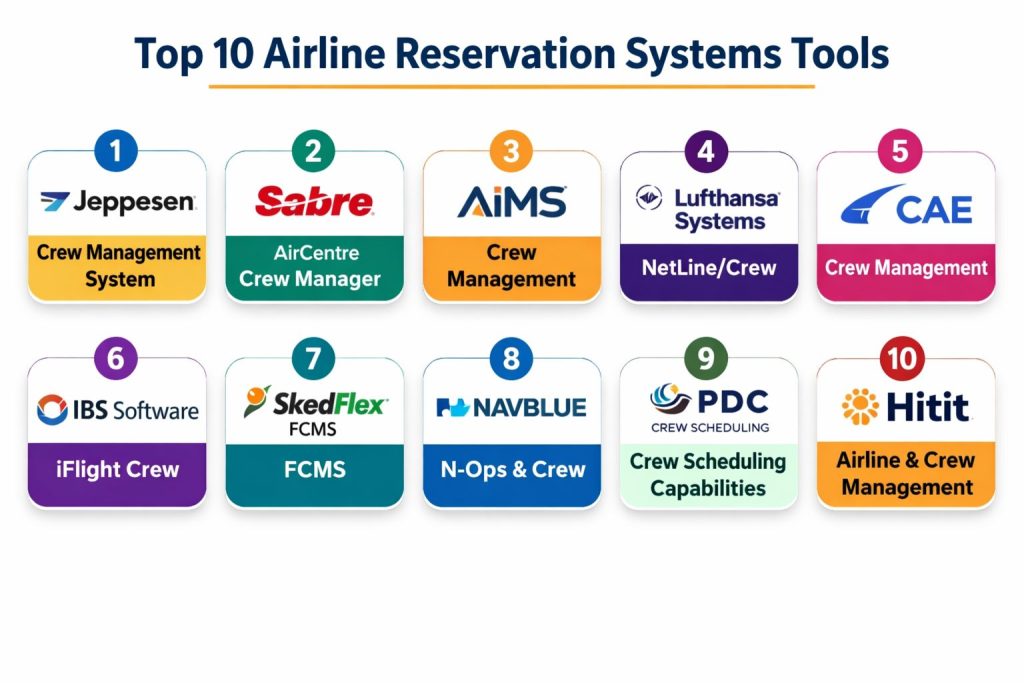
1 — Jeppesen Crew Management System
Jeppesen’s crew management suite is built to maximize crew efficiency with tightly integrated solutions across planning and operational workflows. It is commonly positioned for airlines needing optimization, coordination across functions, and improved operational stability.
Key Features
- Integrated crew management approach designed to reduce silos across functions
- Crew scheduling and optimization focus for productivity and stability
- Workflow support that amplifies cross-functional collaboration
- Operational efficiency improvements through integrated ecosystem approach
- Designed for airline-scale crew operations with complex constraints
- Suite-style approach that can fit broader flight operations processes
Pros
- Strong fit for large-scale airline operations with complex planning needs
- Integrated approach helps reduce handoff friction between teams
Cons
- Enterprise implementations can be complex and require change management
- Details on specific controls and certifications are not always clearly published publicly
Platforms / Deployment
Varies / N/A
Security & Compliance
Not publicly stated
Integrations & Ecosystem
Often used as part of an airline operations technology stack and commonly integrated with adjacent operational systems.
- Interoperates with airline operations workflows (varies)
- Integration approach depends on modules and airline environment (varies)
- Data exchange with operational stakeholders (varies)
- Extensibility details vary by deployment (varies)
Support & Community
Enterprise vendor support model; community details vary by customer base and region.
2 — Sabre AirCentre Crew Manager
Sabre’s crew management offering is often evaluated by airlines that need real-time operational control, recovery workflows, and day-of-operations handling. It fits carriers that want strong ops alignment between scheduling and disruption management.
Key Features
- Crew assignment workflows aligned to operations control needs
- Support for legality awareness during operational changes (varies)
- Disruption handling and recovery workflows (varies)
- Workflow tooling for dispatch/crew control coordination (varies)
- Rule and constraint handling depending on configuration (varies)
- Operational visibility patterns used by airline ops teams (varies)
Pros
- Strong fit for operational control and recovery scenarios
- Common choice for airlines running complex daily ops
Cons
- Feature details depend heavily on configuration and modules
- Public information on compliance certifications is not always clearly stated
Platforms / Deployment
Varies / N/A
Security & Compliance
Not publicly stated
Integrations & Ecosystem
Typically sits in an airline operations environment and integrates with operational systems based on airline architecture.
- Ops stack integrations (varies)
- Data handoffs for scheduling and tracking workflows (varies)
- APIs and connectivity depend on contract and deployment (varies)
- Ecosystem maturity depends on airline stack (varies)
Support & Community
Enterprise support model; community is primarily professional users rather than open communities.
3 — AIMS Crew Management
AIMS provides crew management capabilities focused on pairing generation, cost calculation, and schedule costing approaches. It is often considered by airlines and operators that want configurable planning and cost-aware crew scheduling.
Key Features
- Automatic generation of pairings from each base with workload distribution
- Solutions that can be produced for crew bases and positions
- Crew cost calculations including items such as hotel expenses and allowances
- Costing by region, destination, aircraft type, and defined periods
- Planned versus operated schedule costing comparisons
- Cost-focused analysis to support planning decisions
Pros
- Costing and cost comparison features support financial discipline
- Pairing generation and base-level planning support structured scheduling
Cons
- Depth of real-time disruption features may vary by deployment
- Security and compliance certifications are not publicly stated
Platforms / Deployment
Varies / N/A
Security & Compliance
Not publicly stated
Integrations & Ecosystem
Often used alongside airline operations systems and requires integration planning for a smooth workflow.
- Data exchange with ops and planning tools (varies)
- Integration with travel, training, and payroll depends on modules (varies)
- Reporting integration depends on airline BI stack (varies)
- Extensibility details vary (varies)
Support & Community
Vendor support model; documentation and onboarding experience varies by contract.
4 — Lufthansa Systems NetLine/Crew
NetLine/Crew is commonly associated with airline-grade crew planning and operational reliability for complex networks. It is often considered by carriers seeking proven enterprise-scale workflows and operational stability.
Key Features
- Airline-scale crew planning workflows (varies)
- Support for complex multi-base operations (varies)
- Planning and operations alignment (varies)
- Configurable rules and constraints depending on airline needs (varies)
- Designed for high-volume operational environments (varies)
- Fits larger integrated airline IT landscapes (varies)
Pros
- Strong fit for complex network carriers and high-scale operations
- Typically aligned with enterprise airline processes
Cons
- Implementation can be heavy and require deep process alignment
- Publicly stated security/compliance details may be limited
Platforms / Deployment
Varies / N/A
Security & Compliance
Not publicly stated
Integrations & Ecosystem
Typically deployed as part of a broader airline systems environment and integrated with connected operational platforms.
- Integration with operations systems (varies)
- Data handoffs with crew and flight operations (varies)
- Interfaces depend on airline architecture (varies)
- Ecosystem depends on deployed modules (varies)
Support & Community
Enterprise support; community visibility is limited compared to open platforms.
5 — CAE Crew Management
CAE’s crew management capabilities are often associated with airline operations needs and, in many contexts, align well with training and qualifications workflows. It can fit operators that want scheduling plus strong linkage to crew readiness.
Key Features
- Crew scheduling workflows for airline operations (varies)
- Qualification and readiness alignment patterns (varies)
- Operational communication features depending on setup (varies)
- Rule-based legality handling depending on configuration (varies)
- Supports planning and operations collaboration (varies)
- Suitable for operators seeking integrated operational tooling (varies)
Pros
- Useful when training and readiness are central operational concerns
- Supports structured airline operational workflows
Cons
- Public details on specific security controls are not always clear
- Exact feature set can vary by modules and deployment
Platforms / Deployment
Varies / N/A
Security & Compliance
Not publicly stated
Integrations & Ecosystem
Often integrated into airline operations and training ecosystems depending on the operator’s environment.
- Integration with training/qualification systems (varies)
- Ops stack interfaces (varies)
- Data exchange patterns depend on airline setup (varies)
- Extensibility varies by deployment (varies)
Support & Community
Enterprise vendor support model; onboarding and support tiers vary.
6 — IBS Software iFlight Crew
iFlight is positioned as an integrated airline operations and crew management platform with modules covering planning through crew optimization and tracking. It emphasizes real-time situational awareness, automation, and centralized rule handling for regulations and agreements.
Key Features
- End-to-end coverage from planning through crew optimization and tracking
- Real-time dynamic situational awareness and process automation
- Scenario modeling and recovery support for operational challenges (varies)
- Centralized rule engine for authority and union regulation adherence
- Training and qualification management support (varies)
- Crew self-service functions such as bid/swap automation (varies)
Pros
- Strong breadth across operations and crew workflows
- Real-time awareness and automation can reduce disruption impact
Cons
- Implementation complexity depends on airline scale and modules
- Security and compliance certifications are not publicly stated
Platforms / Deployment
Varies / N/A
Security & Compliance
Not publicly stated
Integrations & Ecosystem
Designed to sit within an airline operations environment and connect across operational stakeholders.
- Integrations across ops modules (varies)
- Crew communication and collaboration features (varies)
- Interfaces depend on airline stack and rollout (varies)
- Data exchange patterns vary (varies)
Support & Community
Enterprise support model; community is primarily airline operators and partners.
7 — SkedFlex FCMS
SkedFlex FCMS is positioned as an all-in-one flight and crew management system aimed at replacing spreadsheets and disconnected tools. It emphasizes real-time visibility, automation, legality awareness, and integrated modules such as training and payroll.
Key Features
- All-in-one approach for flight and crew management workflows
- Real-time visibility into crew status, rest, and duty limits with alerts
- Centralized trip data and change tracking for schedule changes
- Qualification monitoring and rules engine approach
- Automation to reduce compliance risk and streamline communication
- Modular extensions such as training and payroll support (varies)
Pros
- Strong for operators modernizing from manual workflows
- Real-time alerts help reduce legality surprises
Cons
- Depth for large network carriers may vary by deployment
- Publicly stated compliance certifications are not clearly available
Platforms / Deployment
Cloud
Security & Compliance
Not publicly stated
Integrations & Ecosystem
Often used as an integrated platform with operational workflows centralized in one system, with integrations depending on operator needs.
- Operational data connections (varies)
- Payroll and training modules (varies)
- Reporting exports and interfaces (varies)
- Integration options depend on rollout (varies)
Support & Community
Vendor-led support; community footprint varies by operator segment.
8 — NAVBLUE N-Ops & Crew (crew scheduling capabilities)
NAVBLUE is commonly considered in airline operations technology stacks, and its operations suite is often evaluated for crew-related workflows depending on configuration. It can fit operators seeking an integrated ops approach with crew scheduling alignment.
Key Features
- Operations-suite approach with crew workflow alignment (varies)
- Rule-based scheduling patterns depending on setup (varies)
- Operational planning and execution coordination (varies)
- Supports airline operations teams with integrated workflows (varies)
- Reporting and operational visibility patterns (varies)
- Suitable for growing operators standardizing processes (varies)
Pros
- Fits integrated airline operations approaches
- Can be attractive for operators consolidating multiple tools
Cons
- Feature depth depends on purchased modules
- Security and compliance certifications are not publicly stated
Platforms / Deployment
Varies / N/A
Security & Compliance
Not publicly stated
Integrations & Ecosystem
Often deployed within an airline operations architecture with required interfaces based on the airline environment.
- Ops system interfaces (varies)
- Data exchange with planning and execution (varies)
- Integration approach depends on airline stack (varies)
- Extensibility varies (varies)
Support & Community
Enterprise vendor support; onboarding experience depends on implementation scope.
9 — PDC ACDM / Crew Scheduling (crew operations capabilities)
PDC is known for aviation operations software, and its crew-related capabilities are often evaluated by operators that need operational control and compliance awareness. It can be considered for operators that want practical ops workflows that support crew scheduling needs.
Key Features
- Operational workflow tooling for aviation environments (varies)
- Crew-related planning and execution support (varies)
- Legality and compliance awareness patterns (varies)
- Tools that support day-of-ops coordination (varies)
- Operational reporting and tracking patterns (varies)
- Configurable workflows depending on operator needs (varies)
Pros
- Practical focus on operations workflows
- Useful for operators emphasizing day-of-ops discipline
Cons
- Feature scope depends on modules
- Publicly stated compliance certifications are not clearly available
Platforms / Deployment
Varies / N/A
Security & Compliance
Not publicly stated
Integrations & Ecosystem
Typically integrated with operational systems depending on how the operator runs dispatch, tracking, and reporting.
- Operations interfaces (varies)
- Reporting exports (varies)
- Integration with airline systems (varies)
- Extensibility depends on deployment (varies)
Support & Community
Vendor-led support; community varies by region and operator type.
10 — Hitit Airline & Crew Management (crew scheduling capabilities)
Hitit provides airline operational software, and its crew management capabilities are typically evaluated by airlines seeking an integrated operational platform. It can fit carriers that want a unified system approach across operational workflows.
Key Features
- Integrated airline operations approach with crew management (varies)
- Crew planning workflows depending on configuration (varies)
- Rule-based scheduling support (varies)
- Operational coordination features (varies)
- Reporting and analytics patterns (varies)
- Suitable for airlines standardizing core ops workflows (varies)
Pros
- Can fit airlines aiming for integrated operational platforms
- Useful for standardizing processes across teams
Cons
- Feature depth varies by modules and airline requirements
- Security and compliance certifications are not publicly stated
Platforms / Deployment
Varies / N/A
Security & Compliance
Not publicly stated
Integrations & Ecosystem
Often integrated into airline IT environments with interfaces depending on the airline’s broader systems landscape.
- Ops stack integration patterns (varies)
- Data exchange with planning and execution (varies)
- Reporting and BI integrations (varies)
- Extensibility varies (varies)
Support & Community
Vendor support model; community visibility varies.
Comparison Table
| Tool Name | Best For | Platform(s) Supported | Deployment | Standout Feature | Public Rating |
|---|---|---|---|---|---|
| Jeppesen Crew Management System | Large airlines with complex optimization needs | Varies / N/A | Varies / N/A | Integrated crew management ecosystem | N/A |
| Sabre AirCentre Crew Manager | Airlines needing operational recovery workflows | Varies / N/A | Varies / N/A | Ops-focused disruption handling patterns | N/A |
| AIMS Crew Management | Operators needing cost-aware pairing generation | Varies / N/A | Varies / N/A | Crew pairing and cost calculation | N/A |
| Lufthansa Systems NetLine/Crew | Complex network carriers | Varies / N/A | Varies / N/A | Enterprise-scale crew planning | N/A |
| CAE Crew Management | Airlines linking scheduling with readiness workflows | Varies / N/A | Varies / N/A | Readiness-aligned crew workflows | N/A |
| IBS Software iFlight Crew | Airlines wanting end-to-end ops + crew platform | Varies / N/A | Varies / N/A | Real-time situational awareness and rule engine | N/A |
| SkedFlex FCMS | Operators replacing manual scheduling with automation | Varies / N/A | Cloud | Real-time visibility with alerts and rules engine | N/A |
| NAVBLUE N-Ops & Crew | Operators seeking integrated ops suite approach | Varies / N/A | Varies / N/A | Consolidated operations-suite workflows | N/A |
| PDC Crew Scheduling Capabilities | Operators emphasizing day-of-ops control | Varies / N/A | Varies / N/A | Ops-centric coordination workflows | N/A |
| Hitit Airline & Crew Management | Airlines standardizing operations with crew modules | Varies / N/A | Varies / N/A | Integrated airline platform approach | N/A |
Evaluation & Scoring of Airline Crew Scheduling Tools
| Tool Name | Core | Ease | Integrations | Security | Performance | Support | Value | Weighted Total |
|---|---|---|---|---|---|---|---|---|
| Jeppesen Crew Management System | 9 | 6 | 8 | 6 | 8 | 8 | 6 | 7.55 |
| Sabre AirCentre Crew Manager | 8 | 6 | 8 | 6 | 8 | 7 | 6 | 7.20 |
| AIMS Crew Management | 7 | 7 | 6 | 5 | 7 | 6 | 7 | 6.70 |
| Lufthansa Systems NetLine/Crew | 8 | 5 | 7 | 6 | 8 | 7 | 5 | 6.70 |
| CAE Crew Management | 7 | 6 | 7 | 5 | 7 | 7 | 6 | 6.55 |
| IBS Software iFlight Crew | 8 | 6 | 8 | 6 | 8 | 7 | 7 | 7.25 |
| SkedFlex FCMS | 7 | 8 | 6 | 5 | 7 | 6 | 8 | 7.05 |
| NAVBLUE N-Ops & Crew | 7 | 6 | 7 | 5 | 7 | 6 | 6 | 6.45 |
| PDC Crew Scheduling Capabilities | 6 | 7 | 6 | 5 | 7 | 6 | 7 | 6.45 |
| Hitit Airline & Crew Management | 6 | 7 | 6 | 5 | 6 | 6 | 7 | 6.25 |
How to interpret the scores:
- Scores are comparative to help shortlist tools, not to declare a universal winner.
- “Core” reflects breadth across pairing, rostering, legality, tracking, and recovery workflows.
- “Integrations” matters heavily because crew tools must connect with ops control, training, and payroll ecosystems.
- “Security” is conservative because many vendors do not publicly publish standardized certification details.
Which Airline Crew Scheduling Tool Is Right for You?
Solo / Freelancer
This category is rarely a solo purchase because it’s built for regulated airline operations. If you are consulting, training, or prototyping, focus on tools with strong reporting, configurability, and clear workflows so you can demonstrate process design without heavy dependencies.
SMB
For small operators and charter-style businesses, prioritize fast deployment, easy workflows, and strong legality alerts. SkedFlex FCMS can be attractive when replacing spreadsheets and centralizing training, qualifications, and scheduling in one place.
Mid-Market
Mid-market operators should balance operational depth with rollout complexity. AIMS can be useful when cost-aware scheduling and pairing matter, while IBS iFlight Crew can be appealing when you want broader operations alignment and recovery workflows.
Enterprise
Large network airlines typically need proven scale, sophisticated rule handling, and robust disruption recovery. Jeppesen, Sabre, and Lufthansa Systems are often considered for enterprise-grade complexity and cross-department operational coordination.
Budget vs Premium
Budget decisions usually favor faster implementation and clear workflows over maximum optimization depth. Premium choices often focus on long-term operational stability, complex rule handling, and strong ecosystem integration.
Feature Depth vs Ease of Use
If your operation needs deep optimization and complex constraints, feature depth usually wins, even if usability takes longer to master. If your team is smaller and needs quick adoption, prioritize clear workflows, usability, and alerts that reduce manual firefighting.
Integrations & Scalability
Crew scheduling rarely stands alone. Prioritize tools that can integrate with operations control, training/qualifications, and payroll so your crew data stays consistent across the business.
Security & Compliance Needs
Treat security as an operational discipline: access control, role separation, auditability, and change management. If a vendor does not clearly publish certifications or controls, treat them as not publicly stated and validate during procurement.
Frequently Asked Questions (FAQs)
1. What problem do airline crew scheduling tools solve?
They create legal and workable rosters by applying rules for duty time, rest, qualifications, and staffing while balancing cost and operational resilience. They also support day-of-operations changes when disruptions occur.
2. What is pairing versus rostering?
Pairing usually refers to building sequences of flights and duties that form workable trips. Rostering assigns those pairings to specific crew members while respecting rules, preferences, and coverage needs.
3. Why is legality checking so important?
Because violations can lead to regulatory issues, safety risks, and operational disruption. Automated legality checks reduce manual errors and speed up decision-making during changes.
4. How do these tools help during disruptions?
They provide visibility into constraints and availability, generate alerts when issues appear, and support recovery workflows to reassign crew while staying legal. The goal is to reduce delays and cancellations caused by crew constraints.
5. What integrations are usually required?
Most airlines need connections to operations control, flight schedules, training and qualifications, payroll, and crew communication systems. Integration quality often determines whether the tool delivers real operational value.
6. How do crew self-service features help operations?
They reduce workload on crew controllers by enabling bids, swaps, acknowledgements, and updates through structured workflows. This can improve data accuracy and speed up routine changes.
7. What should I test in a pilot?
Use your real rules, bases, fleets, and common disruption scenarios. Validate legality outcomes, recovery speed, reporting accuracy, user workflows, and integration feasibility.
8. How do I evaluate scalability?
Check performance during peak conditions such as irregular operations and seasonal schedule changes. Also evaluate multi-base handling, rule engine complexity, and how quickly schedules can be regenerated.
9. What security capabilities should I expect?
At minimum, you should expect strong access control, role separation, and audit-friendly workflows. If SSO, MFA, audit logs, or certifications are not publicly stated, verify directly before procurement.
10. What common mistakes cause scheduling projects to fail?
Underestimating rule complexity, skipping change management, and not prioritizing integrations. A great optimizer still fails if the data flow and operational workflows don’t match how teams actually run the airline.
Conclusion
Airline crew scheduling tools succeed when they turn complex rules, qualifications, and operational constraints into rosters that are legal, efficient, and resilient during disruptions. The right choice depends on your operation size, network complexity, union and authority rules, and how much real-time recovery capability you require. Start by mapping your current workflows end-to-end, then shortlist two or three platforms that match your planning and day-of-operations needs. Run a pilot using your real rules, crew profiles, and disruption scenarios, and validate integrations with operations, training, and payroll before committing to a full rollout.