========================================
Any Qs - Any time
========================================
9:AM - 5 PM
========================================
Lunch Time - 12:30 PM - 1 Hour
Tea tme
	10:30 AM - 15 mns
	3 PM - min

Workstation - Windows
Cloud - Azure |
=========================================
Access - Azure
============================================================
Slides - https://devopsschool.com/slides/terraform/
Tutorials:
-------------------------------------------------------------
What is Terraform?
-------------------------------------------------------
	Coding for Infra = IAAC
	From Hasicorp
	Written in GOlang
	Release
		Community - CLI
		Enterprise - WEB
		Cloud - WEB = https://app.terraform.io/
	Version
		1.6.0


Whats there in Infra?
----------------------------------
https://registry.terraform.io/browse/providers

Why We need terraform?
------------------------------------------------------
So many Platform
So many Lang spec
So many Coding Standard
one is not working for other
Consitent change mgmt

--------------------------------
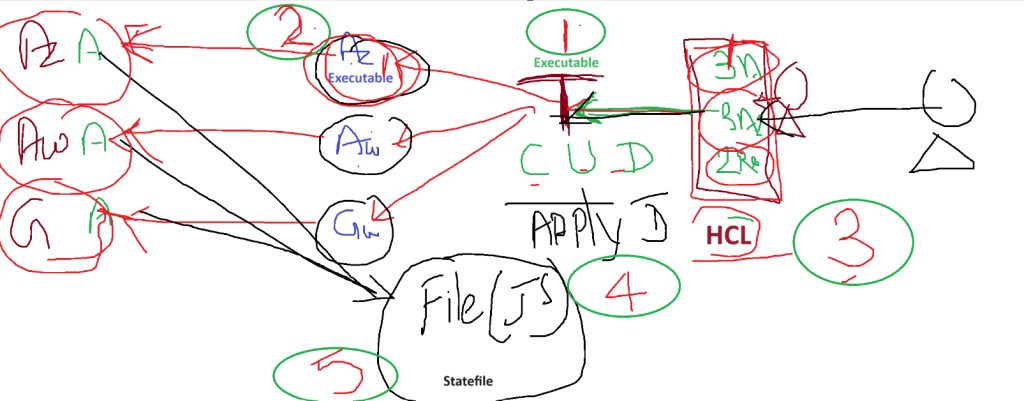
How it works?

======================================================
Step 1 - Installl Terraform

Step 2 - Install Providers

Step 3 - Write A code

Step 4 - Run a code

Step 5 - Validate the state file

Code language: JavaScript (javascript)
Installl Terraform
Step 2 – Install Terraform Providers (Plugins)
You can install providers using CODE.

How to store terraform code?
---------------------
anyfilename.tf


Directory === file1.tf  + file2.tf + file3.tf
              ================================
			ONE PROJECT
			ONE CODE
All TF code merged into ONE
			During - Apply - Destory

Azure
AWS
Github

--------------------------------------
terraform {
  required_providers {
    azurerm = {
      source = "hashicorp/azurerm"
      version = "3.75.0"
    }
  }
}

provider "azurerm" {
  # Configuration options
}
--------------------------------------
How to download providers? | First time | Upgrade
$ terraform init


-------------------------------------------------
terraform {
  required_providers {
    azurerm = {
      source = "hashicorp/azurerm"
      version = "3.75.0"
    }
	aws = {
      source = "hashicorp/aws"
      version = "5.20.0"
    }
  }
}

provider "azurerm" {
  # Configuration options
}


provider "aws" {
  # Configuration options
}Code language: PHP (php)
Step 3 – How to write a Code in Terraform?
====================================================
Rule#1 - You MUST know Provider(Azure)
Rule#2 - You MUST know the resources provider by Terrafrom


IMPORTANT - https://registry.terraform.io/providers/hashicorp/azurerm/latest/docs
https://registry.terraform.io/providers/hashicorp/azurerm/latest/docs/resources/resource_group

resource#1
	argument#1
	argument#2
	argument#3

resource#2
	argument#1
	argument#2
	argument#3

resource#3
	argument#1
	argument#2
	argument#3

resource "azurerm_resource_group" "example" {
  name     = "example"
  location = "West Europe"
}

resource "azurerm_resource_group" "example-rg" {
  name     = "example"
  location = "West Europe"
}

====================================================================================
Command workflow in Terraform
-----------------------------------
validate      Check whether the configuration is valid
plan          Show changes required by the current configuration
apply         Create or update infrastructure
show          Show the current state or a saved plan
destroy       Destroy previously-created infrastructure


How to Authenticate Azure using service princial and token/
<blockquote class="wp-embedded-content" data-secret="nzWp0J5j3i"><a href="https://www.devopsschool.com/blog/azure-how-to-create-iam-user-and-assign-service-principal-access/">Azure Tutorials – How to create IAM user and assign Service Principal Access?</a></blockquote><iframe class="wp-embedded-content" sandbox="allow-scripts" security="restricted" style="position: absolute; visibility: hidden;" title="“Azure Tutorials – How to create IAM user and assign Service Principal Access?” — DevOpsSchool.com" src="https://www.devopsschool.com/blog/azure-how-to-create-iam-user-and-assign-service-principal-access/embed/#?secret=i1a8YwKsZv#?secret=nzWp0J5j3i" data-secret="nzWp0J5j3i" width="600" height="338" frameborder="0" marginwidth="0" marginheight="0" scrolling="no"></iframe>

CID - 6046fe74-dfd2-4db6-ad2d-263b630b5b8f
TID - f34c8fc4-16b8-4de3-8110-45904e3b1d1a

SECRET _ 3XJ8Q~uvlwVL1mYFPAuMmNG5es2I~Lz~CcQV~cWg


provider "azurerm" {
  features {}
  subscription_id = "b3dbe884-c3c"
  client_id       = "6046fe74-d5b8f"
  client_secret   = "3XJ8Q~ues2I~Lz~CcQV~cWg"
  tenant_id       = "f31a"
}
Code language: HTML, XML (xml)
How to work with Github Provider
resource "github_repository" "example" {
  name        = "example-XXXXSSSSSDDDDD"
  description = "My awesome codebase"

  visibility = "public"
}


output "rg1" {
  value = azurerm_resource_group.example-rg.name
}


output "repo" {
  value = github_repository.example.git_clone_url
}Code language: JavaScript (javascript)
provider "github" {
token = "fdfsdfdsfdsfsfds"
}
Code language: JavaScript (javascript)How to display only Selected values from Statefile?
output "rg1" {
  value = azurerm_resource_group.example-rg.name
}


output "repo" {
  value = github_repository.example.git_clone_url
}Code language: JavaScript (javascript)
$ terraform apply --auto-approve