How to get SHA1-Key in Flutter?

DevOps

YOUR COSMETIC CARE STARTS HERE

Find the Best Cosmetic Hospitals

Trusted • Curated • Easy

Looking for the right place for a cosmetic procedure? Explore top cosmetic hospitals in one place and choose with confidence.

“Small steps lead to big changes — today is a perfect day to begin.”

Explore Cosmetic Hospitals Compare hospitals, services & options quickly.

✓ Shortlist providers • ✓ Review options • ✓ Take the next step with confidence

  1. Open Android Studio
  2. Open Project
  3. Reveal android folder
  4. Right click “gradlew” file and select Open in Terminal –
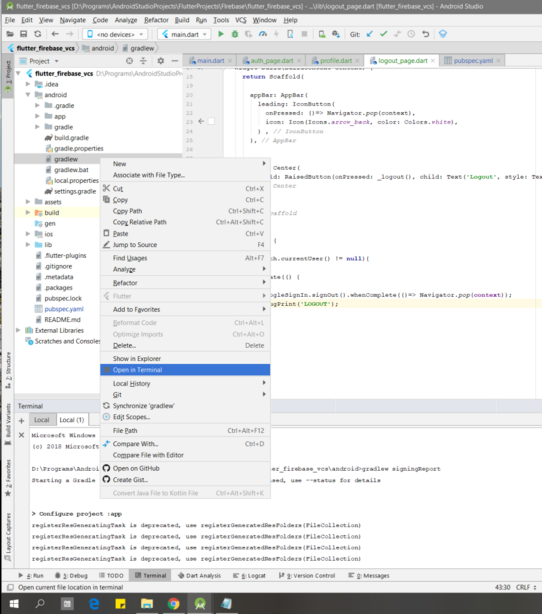
5. Go to the terminal view and paste: gradlew signingReport or ./gradlew signingReport if you’re using PowerShell or a Unix-based system like Windows.
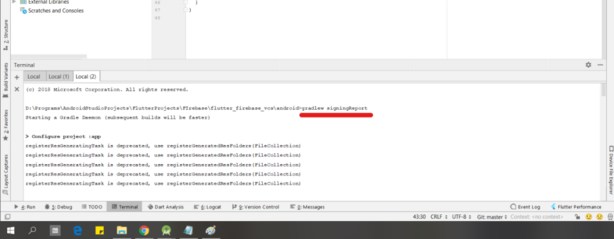
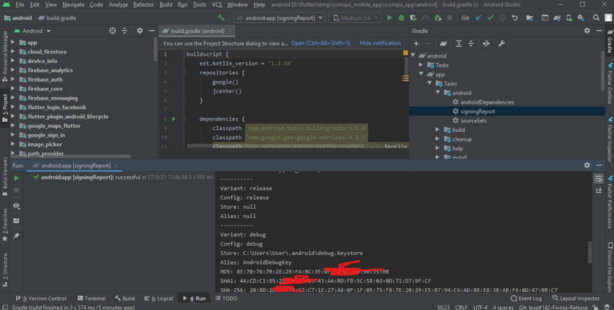
6. Press enter and scroll to “Variant: debug” to get the SHA1 key
Subscribe
Notify of
guest

This site uses Akismet to reduce spam. Learn how your comment data is processed.

0 Comments
Oldest
Newest Most Voted
Inline Feedbacks
View all comments
0
Would love your thoughts, please comment.x