Go to the project folder in the terminal.
Mac keytool -list -v -keystore ~/.android/debug.keystore -alias androiddebugkey -storepass android -keypass android

Windows keytool -list -v -keystore "\.android\debug.keystore" -alias androiddebugkey -storepass android -keypass android

Linux keytool -list -v -keystore ~/.android/debug.keystore -alias androiddebugkey -storepass android -keypass androidCode language: PHP (php)
GUI Android Studio.
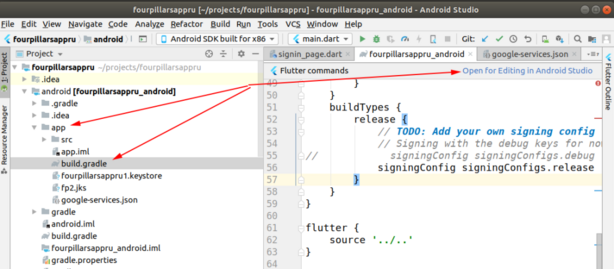
- Select android/app/build.gradle file and on the right top corner click “Open for Editing in Android Studio”
- Open Gradle panel and double click on “SigninReport”,
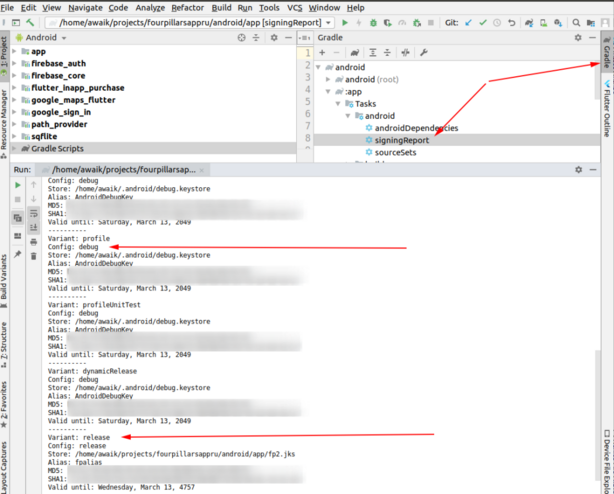
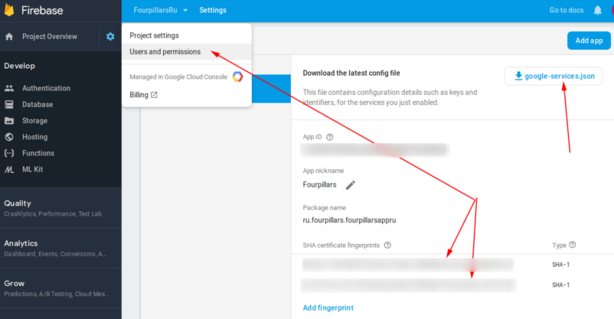
- That’s it! If you use Firebase – add these 2 keys there. You should add both keys, otherwise, without the release key, Google login will not work on the devices.