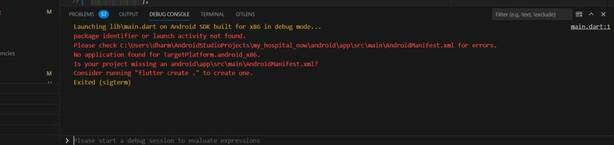
AndroidManifest.xml could not be found

DevOps

YOUR COSMETIC CARE STARTS HERE

Find the Best Cosmetic Hospitals

Trusted • Curated • Easy

Looking for the right place for a cosmetic procedure? Explore top cosmetic hospitals in one place and choose with confidence.

“Small steps lead to big changes — today is a perfect day to begin.”

Explore Cosmetic Hospitals Compare hospitals, services & options quickly.

✓ Shortlist providers • ✓ Review options • ✓ Take the next step with confidence

Error

package identifier or launch activity not found.
Please check C:\Users\dharm\AndroidStudioProjects\my_hospital_now\android\app\src\main\AndroidManifest.xml for errors.
No application found for TargetPlatform.android_x86.
Is your project missing an android\app\src\main\AndroidManifest.xml?
Consider running "flutter create ." to create one.Code language: CSS (css)
Solution

Step: 1

First of all check

Please check C:\Users\dharm\AndroidStudioProjects\my_hospital_now\android\app\src\main\AndroidManifest.xml for errors.Code language: CSS (css)

Step: 2

please try with

flutter clean

Step: 3

please try with

flutter create

Reference

stackoverflow.com

Subscribe
Notify of
guest

This site uses Akismet to reduce spam. Learn how your comment data is processed.

0 Comments
Oldest
Newest Most Voted
Inline Feedbacks
View all comments
0
Would love your thoughts, please comment.x