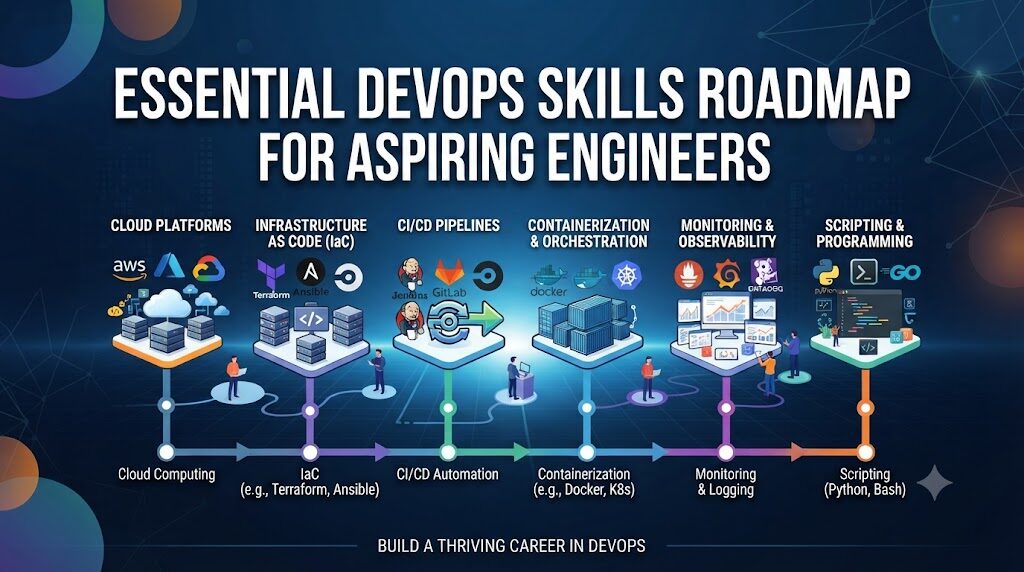
The technology landscape is shifting rapidly toward automation, cloud-native architectures, and platform-driven delivery models, making the role of the DevOps engineer more critical than ever. In this evolving environment, true career stability is not built on memorizing the latest software release, but on mastering the fundamental principles of system architecture, infrastructure automation, and continuous delivery. Employers today increasingly prioritize candidates who demonstrate practical, hands-on experience over those with theoretical knowledge alone, making it essential for learners to build a balanced skill set that bridges the gap between software development and IT operations. By focusing on foundational technical competencies through structured guidance, such as the comprehensive programs available at DevOpsSchool, aspiring engineers can transform from passive learners into active practitioners, unlocking long-term career opportunities in a high-growth industry that rewards those who can architect reliable, automated solutions for complex real-world challenges.
What Is DevOps?
DevOps is often misunderstood as a set of tools or a specific job title. In reality, it is a cultural and professional philosophy. At its heart, DevOps is about breaking down the traditional silos between developers, who want to ship features quickly, and operations teams, who prioritize system stability.
This culture emphasizes shared responsibility, where engineers across the entire development lifecycle work together to ensure that software is delivered efficiently and reliably. Automation is the primary vehicle for this, allowing teams to replace manual, error-prone processes with repeatable, high-speed workflows. Through continuous improvement and a focus on feedback loops, organizations can deliver value to users faster while maintaining a high standard of quality.
Why Core Skills Matter
In a field defined by constant change, core skills act as your anchor. When you understand the underlying principles of networking, Linux internals, or version control, you become tool-agnostic. If a specific automation platform becomes obsolete, your foundational knowledge allows you to learn its successor in days rather than months.
- Career Growth: Proficiency in the basics allows you to progress from junior tasks to architecture-level problem solving.
- Technical Confidence: Understanding how a system fails allows you to troubleshoot with calm precision.
- Better Collaboration: When you speak the language of both developers and sysadmins, you become an invaluable bridge within your team.
Core Technical Skills Every DevOps Learner Should Master
To build a strong foundation, you must balance breadth with depth. The following table provides a high-level view of the technical pillars required for a successful career.
| Skill | Why It Matters | Practical Application |
| Linux | The foundation of almost all cloud infrastructure. | Managing processes, user permissions, and log analysis. |
| Git | Essential for source control and collaboration. | Managing branching strategies and resolving merge conflicts. |
| Networking | Understanding how data travels between services. | Configuring DNS, firewalls, and load balancing rules. |
| Containers | Portable and lightweight application deployment. | Building, optimizing, and securing Docker images. |
| Kubernetes | Orchestration for large-scale production systems. | Managing pods, services, and cluster scaling. |
| CI/CD | Automating the delivery of software. | Building pipelines that test and deploy code automatically. |
| IaC | Treating infrastructure like application code. | Provisioning cloud resources using Terraform or Ansible. |
| Monitoring | Gaining visibility into system health. | Setting up dashboards and alerts for system performance. |
| Security | Protecting the entire stack (DevSecOps). | Scanning images for vulnerabilities and managing secrets. |
Linux
Linux is the operating system of the cloud. You must move beyond basic commands and understand the kernel, file systems, permissions, and process management. Start by setting up a local Linux environment and learning to write Bash scripts to automate simple system administration tasks.
Git
Git is the standard for version control. Beyond simply “pushing” code, you need to master branching strategies like GitFlow or trunk-based development. Understanding how to handle complex merges and code reviews is crucial for working in professional engineering teams.
Networking
DevOps engineers often face “it’s a network issue” scenarios. You should understand the OSI model, how DNS resolution works, how HTTP/HTTPS requests are routed, and the role of load balancers and firewalls in securing applications.
Cloud Computing
Choose a major cloud provider (AWS, Azure, or Google Cloud) and learn how to use their services. Focus on virtual machines (compute), object storage, IAM (identity management), and VPCs (virtual private clouds). Theory is useful, but building a multi-tier application in the cloud is the only way to truly grasp how these components interact.
Containers
Docker transformed how applications are packaged. Learn how to write efficient Dockerfiles, manage volumes, and handle networking between containers. A deep understanding of container layers and optimization will make your deployment pipelines much faster.
Kubernetes
Kubernetes is complex, but essential. Start by learning the core objects: Pods, Services, Deployments, and ConfigMaps. Practice deploying a simple web application and exposing it to the internet, then move on to managing stateful sets and storage.
CI/CD
Continuous Integration and Continuous Delivery are the heartbeat of DevOps. Use tools like Jenkins, GitHub Actions, or GitLab CI to automate testing and deployment. A great project is to create a pipeline that triggers a deployment every time you push code to your repository.
Infrastructure as Code (IaC)
Manual configuration is a recipe for disaster. Using tools like Terraform or Ansible allows you to define your infrastructure in code. This makes your environments reproducible and version-controlled.
Monitoring
You cannot fix what you cannot see. Learn to collect logs and metrics using tools like Prometheus and Grafana. Practice creating alerts that notify you when CPU usage spikes or a service goes down.
Security
Security must be integrated into the pipeline, not treated as an afterthought. Learn how to manage environment secrets, perform static analysis on your code, and scan your container images for known vulnerabilities.
Essential Soft Skills
Technical skills get you the interview, but soft skills get you the promotion.
- Communication: You must be able to explain complex technical concepts to non-technical stakeholders.
- Problem-Solving: The ability to decompose a massive outage into smaller, solvable components is a superpower.
- Documentation: If it isn’t documented, it didn’t happen. Writing clear runbooks and README files is vital for team efficiency.
- Adaptability: The industry changes every few years; you must be willing to unlearn and relearn.
Learning Roadmap
- Beginner: Master the Linux Command Line and Shell Scripting.
- Versioning: Become proficient in Git and collaborative workflows.
- Networking: Understand TCP/IP, DNS, and HTTP.
- Containers: Learn Docker internals and image creation.
- Automation: Develop your first CI/CD pipeline.
- Cloud: Deploy resources in AWS/Azure/GCP.
- IaC: Use Terraform to manage cloud infrastructure.
- Orchestration: Master Kubernetes basics and cluster management.
- Observability: Implement monitoring and alerting systems.
- Advanced: Dive into DevSecOps and Platform Engineering.
Hands-On Practice
Practical experience is the ultimate form of learning. Build a home lab using virtualization tools, or set up a free-tier account on a cloud provider. Create a portfolio on GitHub where you document your projects. When you encounter an error, don’t just search for the answer; read the documentation and debug the issue step-by-step.
Measuring Learning Progress
Use these KPIs to track your professional development.
| Metric | Why It Matters | Career Benefit |
| Projects Completed | Shows hands-on capability. | Strengthens portfolio. |
| GitHub Activity | Demonstrates consistent coding. | Proof of work for recruiters. |
| CI/CD Pipelines Built | Proves automation skills. | Increases deployment speed. |
| Kubernetes Deployments | Validates orchestration skills. | High-demand technical skill. |
| Cloud Labs | Shows real-world platform usage. | Better interview performance. |
| Certifications Earned | Industry recognition of knowledge. | HR keyword matching. |
Common Learning Challenges
| Challenge | Impact | Recommended Solution |
| Learning too many tools | Burnout and shallow knowledge. | Focus on one tool per category first. |
| Weak Linux knowledge | Inability to debug systems. | Spend extra time on Linux internals. |
| Lack of practice | Loss of retention. | Build one project for every concept. |
| Skipping networking | Inability to connect services. | Dedicate a month to network fundamentals. |
| Poor documentation | Inability to track progress. | Maintain a blog or repository notes. |
| Inconsistent study | Slow progress. | Use a structured learning plan. |
Best Practices for Learning DevOps
- Learn Fundamentals First: Don’t jump to Kubernetes before understanding Docker.
- Practice Daily: Consistency beats intensity.
- Build Projects: Theory only sticks when applied to a problem.
- Read Documentation: Official docs are always more accurate than third-party tutorials.
- Join Communities: Engaging with others helps you stay updated.
- Review Progress Regularly: Adjust your plan based on what you find difficult.
Real-World Example: A Learner’s Path
Consider “Alex,” a system administrator who wanted to transition into DevOps.
- Initial Knowledge: Basic Windows Server management and some internal scripting.
- Learning Roadmap: Alex spent three months mastering Linux and Bash, then moved to Git.
- Practical Projects: Alex built a CI/CD pipeline for a static website, then migrated it to a Docker container on AWS.
- Interview Preparation: Alex focused on explaining the why behind the architecture rather than just naming tools.
- Career Outcome: Alex landed a Junior DevOps Engineer role by showcasing the GitHub repository containing the documented project steps.
- Lessons Learned: Focus on understanding how components talk to each other.
Common Beginner Mistakes
- Memorizing Tools: Tools change; concepts do not. Focus on the architecture.
- Ignoring Concepts: Don’t skip the “boring” stuff like networking or security basics.
- Avoiding Troubleshooting: The moment you stop debugging an error, you stop learning.
- Weak Communication: Always explain why you made a specific architectural choice.
- Not Documenting Projects: If your work isn’t visible, it’s harder for employers to see your value.
Future Skills Every DevOps Learner Should Explore
- AI-Assisted DevOps: Learning how to use AI tools for code generation and debugging.
- Platform Engineering: Building internal platforms that abstract complexity for other developers.
- GitOps: Managing infrastructure state entirely through Git workflows.
- Kubernetes Security: Mastering admission controllers and network policies.
- Cloud-Native Development: Writing code specifically designed for distributed systems.
Certifications & Learning Paths
While projects are king, certifications help validate your knowledge for potential employers.
| Certification | Best For | Skill Level | Focus Area |
| LFCS | Linux Foundation | Beginner | Linux System Admin |
| AWS Solutions Architect | Cloud Engineers | Intermediate | Cloud Architecture |
| CKA | Kubernetes | Intermediate/Pro | Container Orchestration |
| Terraform Associate | IaC Learners | Beginner/Intermediate | Automation |
| Security+ | DevSecOps | All | Security Fundamentals |
Utilize the DevOpsSchool ecosystem to find structured learning paths that align with these industry-standard certifications.
Practical DevOps Skills Checklist
- [ ] Install and configure a Linux server.
- [ ] Manage a repository with Git branching.
- [ ] Containerize a small application with Docker.
- [ ] Deploy a containerized app to a local Kubernetes cluster.
- [ ] Write a shell script to automate a repetitive task.
- [ ] Provision cloud resources using Terraform.
- [ ] Create a basic CI/CD pipeline.
- [ ] Set up monitoring and alerts for a service.
FAQs
- Which DevOps skill should beginners learn first?Linux is the undisputed priority. Everything else runs on top of it.
- Is Linux mandatory?Yes. You cannot effectively manage cloud infrastructure without it.
- Do I need cloud experience?It is essential for modern roles. Start with the free tier of a provider like AWS.
- Is Kubernetes necessary?For mid-to-senior roles, yes. Start with the basics before jumping into complex clusters.
- How important is Git?It is the backbone of the DevOps workflow. Master it early.
- Should I learn Terraform?Yes. Infrastructure as Code is standard in every professional environment.
- How do I practice DevOps?Build a project, break it, and then fix it. Repeat.
- Which certifications are most valuable?CKA (Kubernetes) and Cloud Provider Architect certifications are highly recognized.
- Do I need to be a programmer?You need to understand scripting and basic application logic, but you don’t need to be a full-stack developer.
- How long does it take to learn?It is a continuous process. Expect to spend 6-12 months to get “job-ready.”
- Is DevOps dying because of AI?No. AI is a tool for DevOps engineers to become more efficient.
- Should I learn one cloud or all?Master one deeply first, then expand.
- What is the best way to learn?Combine courses, documentation reading, and personal projects.
- How do I deal with errors?Read the logs. The error message usually tells you exactly what is wrong.
- Is it better to specialize or generalize?Start as a generalist to understand the ecosystem, then specialize in one area.
Final Thoughts
The journey to becoming a DevOps professional is a marathon, not a sprint. Success in this field requires a persistent curiosity and a willingness to embrace the grind of troubleshooting. Focus on building strong fundamentals—Linux, networking, and scripting—before you chase the latest trends in the ecosystem. Every professional started exactly where you are today. Build projects, document your learning, and engage with the community. Consistency in your practice will eventually translate into career-defining technical expertise.