Introduction
Email client software serves as the sophisticated interface between a user and their digital communication stream, moving far beyond the basic “send and receive” functionality of early webmail. The modern email client acts as a high-performance productivity hub, integrating task management, advanced encryption, and artificial intelligence to manage the overwhelming volume of data in a professional inbox. Unlike webmail, which relies on a browser, a dedicated email client offers offline access, superior multi-account management, and a unified environment where users can consolidate disparate services like Gmail, Outlook, and IMAP into a single pane of glass.
For the enterprise and professional user, the stakes of choosing the right client involve more than just aesthetics. It is a strategic decision impacting data sovereignty, workflow automation, and security compliance. As phishing and AI-driven social engineering threats escalate, the software’s ability to provide behavioral threat detection and end-to-end encryption has become a non-negotiable requirement. Selecting the right platform ensures that communication remains fluid, secure, and integrated with the broader corporate software ecosystem.
- Best for: Executives, software developers, customer support teams, and privacy-conscious professionals.
- Not ideal for: Casual users who only check email once a week or those who prefer the standard, simplified web interfaces of a single provider.
Key Trends in Email Client Software
- AI-Native Inbox Triage: Integration of large language models to summarize long threads, draft context-aware replies, and automatically categorize priority mail.
- OpenUSD for Email Attachments: Growing support for universal standards that allow rich 3D and interactive media to be viewed directly within the client.
- Privacy-First Tracking Protection: Automated blocking of hidden tracking pixels and “spy mail” to prevent senders from knowing when or where an email was opened.
- Unified Communication Convergence: The merging of email with internal team chat and project management tools into a single “command center” interface.
- Biometric Access Control: Native support for FaceID, TouchID, and hardware security keys as a standard for desktop client entry.
- Hyper-Personalization: Viewports that adapt to the user’s current task, hiding distracting newsletters during “Deep Work” hours.
How We Selected These Tools
- Multi-Protocol Stability: Evaluation of how reliably the client handles complex IMAP, POP3, and Exchange syncs over long periods.
- Security & Encryption Depth: Analysis of native PGP, S/MIME, and OAuth 2.0 implementation for secure authentication.
- Resource Efficiency: Assessment of memory and CPU usage, ensuring the client doesn’t slow down high-performance workstations.
- Search Velocity: Testing the speed and accuracy of indexing across multi-gigabyte local archives.
- Integration Ecosystem: Strength of the API and the availability of third-party plugins for CRM and task management.
- Cross-Platform Continuity: Review of how well settings and signatures sync between desktop and mobile versions.
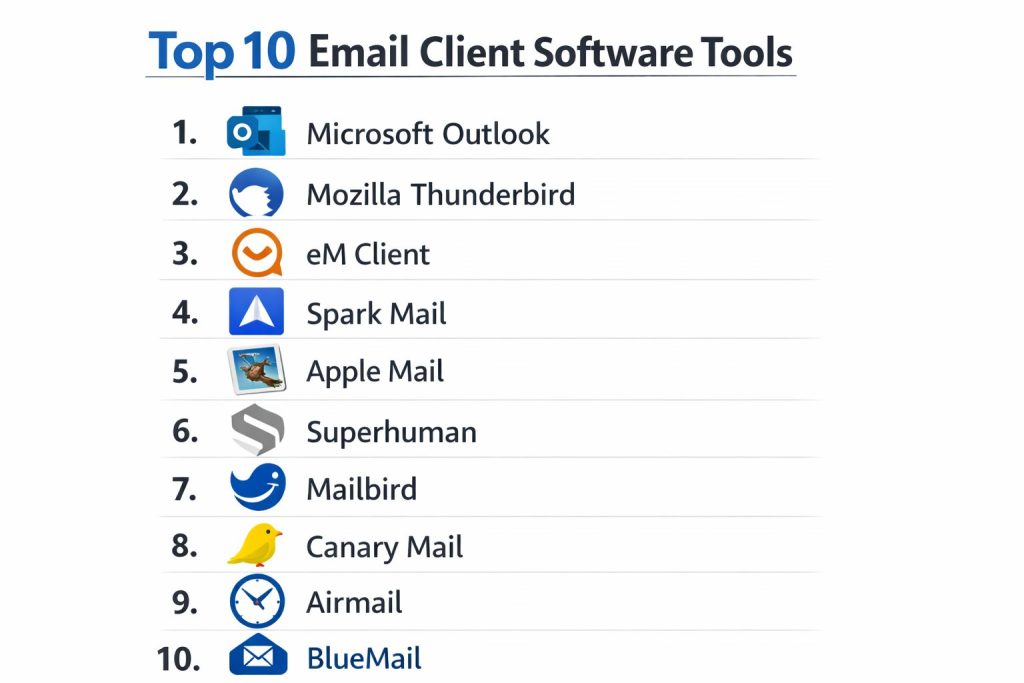
Top 10 Email Client Software Tools
1. Microsoft Outlook
Outlook remains the industrial titan of email clients, serving as the central nervous system for corporations worldwide through its deep Microsoft 365 integration.
Key Features
- Focused Inbox: An AI-sorted view that separates important professional mail from automated notifications.
- Integrated Calendar & Tasks: Seamless scheduling that turns emails into actionable calendar events or To-Do items.
- Copilot AI Assistant: Built-in generative AI for summarizing threads and drafting complex business correspondence.
- Enterprise Security: Advanced threat protection that scans attachments and links in real-time.
- Delegated Access: Allows assistants or team members to manage mailboxes and calendars on behalf of others.
Pros
- Unmatched integration with the entire Microsoft productivity suite.
- Robust offline capabilities for managing massive local archives.
Cons
- Can feel bloated and overly complex for individual users.
- High subscription cost for the full-featured desktop version.
Platforms / Deployment
- Windows / macOS / iOS / Android
- Hybrid
Security & Compliance
- SSO/SAML, MFA, and HIPAA/GDPR compliance features.
Integrations & Ecosystem
Native connections with Teams, SharePoint, and OneDrive make it the primary choice for any organization locked into the Microsoft ecosystem.
Support & Community
Direct corporate technical support and a global network of IT professionals and documentation.
2. Mozilla Thunderbird
A powerful, open-source client that offers unparalleled customization and privacy for users who want total control over their data.
Key Features
- Tabbed Email: Allows users to keep multiple emails and folders open in a browser-like tabbed interface.
- Large File Linking: Automatically offers to upload large attachments to cloud providers instead of clogging the inbox.
- Native OpenPGP Support: Built-in tools for signing and encrypting emails without external plugins.
- Add-on Manager: A vast library of community-built extensions for everything from themes to specialized security.
- Phishing Protection: Real-time warnings when an email contains suspected deceptive links or spoofed headers.
Pros
- Completely free and open-source with no hidden tracking or data mining.
- Highly portable; can be run from a USB drive as a “portable” app.
Cons
- The interface can feel dated compared to modern minimalist competitors.
- Requires manual configuration for some advanced sync features.
Platforms / Deployment
- Windows / macOS / Linux
- Desktop
Security & Compliance
- Community-vetted open-source code; supports S/MIME and OpenPGP.
Integrations & Ecosystem
Compatible with almost any IMAP/POP provider and extensible through a massive library of community-developed add-ons.
Support & Community
Driven by a passionate global community with extensive Wiki documentation and forums.
3. eM Client
A high-performance alternative to Outlook that prides itself on a sleek interface and a comprehensive set of productivity tools.
Key Features
- Instant Translation: Built-in tool that translates incoming and outgoing emails across dozens of languages.
- Watch for Replies: Notifications that alert you if a contact hasn’t replied to an important email by a certain time.
- Unified Attachment View: A centralized gallery to view every file ever sent or received across all accounts.
- Ultra-Fast Search: Indexed search that finds specific phrases in large databases in milliseconds.
- Notes & Chat: Integrated sidebar for taking notes and connecting to XMPP-based chat services.
Pros
- Extremely fast and responsive, even with massive 100GB+ databases.
- One-time purchase option provides better long-term value than subscriptions.
Cons
- Free version is limited to only two email accounts.
- Mobile app is currently less feature-rich than the desktop counterpart.
Platforms / Deployment
- Windows / macOS / iOS / Android
- Desktop
Security & Compliance
- PGP encryption support and password-protected startup options.
Integrations & Ecosystem
Full support for Google Workspace, iCloud, and Exchange, with built-in bridges for Zoom and Microsoft Teams.
Support & Community
Professional helpdesk for Pro users and an active community forum for free users.
4. Spark Mail
Spark is designed for team collaboration, treating the inbox as a shared workspace rather than a private silo.
Key Features
- Smart Inbox: Automatically bubbles up personal emails to the top while grouping newsletters and notifications.
- Shared Drafts: Allows multiple team members to compose a single email simultaneously in real-time.
- Private Team Comments: Side-chat within an email thread that is invisible to the external recipient.
- AI Writing Partner: Helps rephrase emails to change tone or summarize long corporate chains.
- Send Later & Snooze: Advanced scheduling tools to manage the timing of outgoing communication.
Pros
- Best-in-class UI/UX that makes email feel modern and less like a chore.
- Exceptional cross-device syncing of settings and signatures.
Cons
- Privacy-conscious users may dislike that some data is processed on Spark’s servers.
- Most collaborative features require a monthly subscription.
Platforms / Deployment
- Windows / macOS / iOS / Android
- Cloud-Connected
Security & Compliance
- OAuth 2.0 and secure cloud sync for account settings.
Integrations & Ecosystem
Connects with productivity tools like Trello, Evernote, and Slack to turn emails into tasks.
Support & Community
High-quality customer support and a modern library of video tutorials.
5. Apple Mail
The default choice for the Apple ecosystem, known for its deep integration with macOS hardware and uncompromising privacy features.
Key Features
- Mail Privacy Protection: Hides your IP address and prevents senders from tracking email opens.
- Handoff Support: Allows you to start an email on an iPhone and finish it instantly on a Mac.
- Mail Drop: Send massive attachments (up to 5GB) via iCloud without bouncing the recipient’s server.
- Hide My Email: Integration with iCloud+ to create random email addresses for signups to avoid spam.
- Siri Suggestions: Automatically adds flight times and event bookings from emails to your calendar.
Pros
- Completely free with no ads and minimal battery impact on laptops.
- Extremely clean, native performance that feels “part of the OS.”
Cons
- Limited advanced filtering and automation compared to power-user clients.
- Not available for Windows or Linux users.
Platforms / Deployment
- macOS / iOS / iPadOS
- Local
Security & Compliance
- Built-in S/MIME support and iCloud-grade security infrastructure.
Integrations & Ecosystem
Perfectly integrated with all Apple services including Contacts, Calendar, and Notes.
Support & Community
Standard Apple Care support and a global user base of millions.
6. Superhuman
Marketed as the “fastest email experience ever made,” Superhuman is a premium tool built for high-level executives who live in their inbox.
Key Features
- Split Inbox: Diverts different types of mail into specific work streams to maintain focus.
- Command Palette: Keyboard-driven interface that allows you to perform any action in milliseconds.
- Snippets: Robust template system for quickly inserting frequently used text or documents.
- Read Receipts: Real-time notifications of exactly when and on what device your email was read.
- Social Insights: Automatically pulls LinkedIn and Twitter data for everyone you correspond with.
Pros
- Significant productivity gains for users handling hundreds of emails daily.
- Beautifully minimalist aesthetic that reduces cognitive load.
Cons
- One of the most expensive email tools on the market ($30+/month).
- Currently limited mostly to Gmail and Outlook accounts.
Platforms / Deployment
- Windows / macOS / iOS
- Cloud-Native
Security & Compliance
- OAuth 2.0 and enterprise-grade data handling.
Integrations & Ecosystem
Focuses on deep integration with Google and Microsoft rather than a broad library of third-party plugins.
Support & Community
Includes a 1-on-1 concierge onboarding session for every new user.
7. Mailbird
A Windows-centric client that emphasizes “app consolidation,” allowing you to manage your entire digital life from one window.
Key Features
- Unified Inbox: Manage unlimited accounts from different providers in one streamlined view.
- App Sidebar: Integrations for WhatsApp, Slack, and Google Calendar directly inside the email interface.
- Speed Reader: A unique tool that flashes words at you to help you digest long emails 3x faster.
- Attachment Search: High-speed indexing specifically for finding lost files.
- Custom Layouts: Highly flexible UI that can be adjusted to match individual workflows.
Pros
- Reduces the need to switch between browser tabs and separate apps.
- Very light on system resources despite its feature set.
Cons
- macOS version has historically lagged behind the Windows version in features.
- No dedicated mobile app, requiring a separate solution for phones.
Platforms / Deployment
- Windows / macOS (Beta)
- Desktop
Security & Compliance
- Standard encryption; does not store user passwords on its own servers.
Integrations & Ecosystem
Best-in-class for social and communication integrations, including WhatsApp and LinkedIn.
Support & Community
Responsive technical support team and an extensive knowledge base.
8. Canary Mail
A security-focused client that uses AI to provide “smart” privacy and a calmer inbox experience.
Key Features
- End-to-End Encryption: Automated PGP setup that makes secure communication accessible to non-experts.
- AI Copilot: An assistant that summarizes long threads and suggests high-quality replies.
- Biometric Lock: Secure the entire application with FaceID or TouchID.
- Impersonation Detection: Alerts users if an email appears to be coming from a spoofed or fraudulent address.
- One-Click Unsubscribe: A powerful tool to quickly clean up newsletters and marketing clutter.
Pros
- One of the few clients that makes high-level encryption easy to use.
- Excellent visual design that balances security with usability.
Cons
- The AI features require a premium subscription.
- Some users may find the AI “interventions” too frequent.
Platforms / Deployment
- Windows / macOS / iOS / Android
- Desktop
Security & Compliance
- Zero-knowledge architecture and built-in PGP/SMIME.
Integrations & Ecosystem
Works with all major providers and includes deep hooks into macOS system features.
Support & Community
Strong support for privacy advocates and detailed security documentation.
9. Airmail
The power user’s choice for Apple hardware, offering an overwhelming amount of customization and integration options.
Key Features
- Extensive Actions: Send emails directly to Todoist, Evernote, Trello, or OmniFocus with one click.
- Smart Filters: Create highly specific rules for notifications, only alerting you to “VIP” senders.
- Unified Workspace: A clean way to manage dozens of accounts without the UI becoming cluttered.
- Custom Gestures: Fully remappable swipe actions for rapid triage on mobile and desktop.
- Cloud Sync: Syncs all your account settings and signatures via iCloud across all devices.
Pros
- The most customizable interface of any modern email client.
- Integrates with more third-party productivity apps than almost any competitor.
Cons
- The sheer number of settings can be overwhelming for casual users.
- Subscription-based “Pro” model is required for core features.
Platforms / Deployment
- macOS / iOS / iPadOS
- Local
Security & Compliance
- Local data processing and S/MIME support.
Integrations & Ecosystem
Unrivaled connectivity with the Mac productivity ecosystem (Things, Bear, OmniFocus).
Support & Community
Active developer support and a dedicated community of Apple power users.
10. BlueMail
A versatile, cross-platform client that excels at managing “clusters” of communication across different device types.
Key Features
- People-Centric View: Switches the inbox from a list of emails to a list of people/contacts.
- Clusters: Automatically groups emails from the same sender or service to declutter the view.
- Integrated Calendar: A full-featured calendar that syncs with all connected email accounts.
- “Later” Board: A visual task board to manage emails that have been snoozed for future action.
- MagicSync: A proprietary protocol to sync accounts across Windows, Mac, and Linux instantly.
Pros
- One of the few high-quality clients that works perfectly on Linux.
- Very effective at cleaning up high-volume, “noisy” inboxes.
Cons
- The interface can feel a bit “mobile-first” on desktop monitors.
- Free version includes occasional promotional elements.
Platforms / Deployment
- Windows / macOS / Linux / iOS / Android
- Cloud-Connected
Security & Compliance
- Standard encryption and secure MagicSync protocols.
Integrations & Ecosystem
Broad support for all IMAP and Exchange servers with decent third-party task hooks.
Support & Community
Large global user base with direct support available through the app.
Comparison Table
| Tool Name | Best For | Platform(s) Supported | Deployment | Standout Feature | Public Rating |
| 1. MS Outlook | Enterprise | Win, Mac, iOS, Android | Hybrid | 365 Integration | N/A |
| 2. Thunderbird | Privacy / OSS | Win, Mac, Linux | Desktop | OpenPGP / Add-ons | N/A |
| 3. eM Client | Productivity | Win, Mac, iOS, Android | Desktop | Native Translation | N/A |
| 4. Spark Mail | Teams | Win, Mac, iOS, Android | Cloud | Shared Drafting | N/A |
| 5. Apple Mail | Mac Users | macOS, iOS, iPadOS | Local | Ecosystem Sync | N/A |
| 6. Superhuman | Speed / Execs | Win, Mac, iOS | Cloud | Keyboard-First UX | N/A |
| 7. Mailbird | App Consolidation | Windows, macOS | Desktop | Sidebar Integrations | N/A |
| 8. Canary Mail | Security | Win, Mac, iOS, Android | Desktop | AI Privacy Copilot | N/A |
| 9. Airmail | Power Users | macOS, iOS, iPadOS | Local | App Actions (40+) | N/A |
| 10. BlueMail | Cross-Platform | Win, Mac, Lin, Mobile | Cloud | Inbox Clusters | N/A |
Evaluation & Scoring of Email Client Software
The scoring below is a comparative model intended to help shortlisting. Each criterion is scored from 1–10, then a weighted total from 0–10 is calculated using the weights listed. These are analyst estimates based on typical fit and common workflow requirements, not public ratings.
Weights:
- Core features – 25%
- Ease of use – 15%
- Integrations & ecosystem – 15%
- Security & compliance – 10%
- Performance & reliability – 10%
- Support & community – 10%
- Price / value – 15%
| Tool Name | Core (25%) | Ease (15%) | Integrations (15%) | Security (10%) | Performance (10%) | Support (10%) | Value (15%) | Total |
| 1. Outlook | 10 | 5 | 10 | 9 | 7 | 9 | 6 | 8.15 |
| 2. Thunderbird | 9 | 4 | 7 | 10 | 8 | 6 | 10 | 7.75 |
| 3. eM Client | 9 | 8 | 8 | 8 | 9 | 8 | 8 | 8.40 |
| 4. Spark Mail | 8 | 9 | 8 | 6 | 9 | 8 | 7 | 7.95 |
| 5. Apple Mail | 7 | 10 | 6 | 9 | 10 | 8 | 9 | 8.20 |
| 6. Superhuman | 9 | 7 | 6 | 7 | 10 | 10 | 4 | 7.55 |
| 7. Mailbird | 8 | 9 | 9 | 7 | 8 | 7 | 8 | 8.10 |
| 8. Canary Mail | 8 | 8 | 7 | 10 | 8 | 7 | 7 | 7.90 |
| 9. Airmail | 9 | 5 | 10 | 8 | 8 | 7 | 7 | 7.70 |
| 10. BlueMail | 7 | 8 | 7 | 7 | 8 | 7 | 8 | 7.35 |
How to interpret the scores:
- Use the weighted total to shortlist candidates, then validate with a pilot.
- A lower score can mean specialization, not weakness.
- Security and compliance scores reflect controllability and governance fit, because certifications are often not publicly stated.
- Actual outcomes vary with assembly size, team skills, templates, and process maturity.
Which Email Client Software Tool Is Right for You?
Solo / Freelancer
For the independent professional, eM Client or Mailbird offer the best balance of productivity and cost. They provide a unified view of all client accounts without the heavy enterprise overhead of Outlook.
SMB
Small businesses thrive on collaboration. Spark Mail is the strategic winner here, allowing small teams to ghost-write emails together and discuss client threads privately before hitting send.
Mid-Market
Organizations at this scale often require standardized tools. eM Client (Business Edition) or Microsoft Outlook provide the necessary administrative controls and reliable technical support for growing teams.
Enterprise
For large-scale operations, Microsoft Outlook is almost mandatory due to its deep integration with Active Directory and 365 security protocols. However, for high-security environments, Canary Mail or Thunderbird are preferred for their superior encryption handling.
Frequently Asked Questions
1. Is a desktop email client better than webmail?
Yes, clients offer offline access, faster search across multiple accounts, and better privacy by blocking tracking pixels locally.
2. Can I use Gmail with these email clients?
Almost all modern clients support Gmail through OAuth 2.0, which allows you to log in securely without sharing your actual password.
3. Do these tools work on mobile and desktop?
Most tools on this list (except Mailbird and Thunderbird) offer native apps that sync your settings and folders across all devices.
4. How does PGP encryption work in an email client?
PGP (Pretty Good Privacy) allows you to sign and encrypt emails so that only the intended recipient with the matching key can read them.
5. Can I schedule emails to be sent later?
Tools like Spark, Superhuman, and eM Client have built-in “Send Later” features that hold the email and send it at your chosen time.
6. What is a “Unified Inbox”?
It is a feature that merges all incoming mail from different accounts (Gmail, Work, Personal) into a single, chronological list.
7. Is there free email client software?
Thunderbird is completely free and open-source. Apple Mail is free for Apple users. Others like eM Client and Spark have limited free versions.
8. Do email clients store my data?
“Local” clients (Thunderbird, eM Client) store data on your computer. “Cloud-connected” clients (Spark, Superhuman) may store some data on their servers for sync.
9. Can I manage my calendar inside an email client?
Yes, most professional clients like Outlook and eM Client have fully integrated calendars that sync with Google and Exchange.
10. How do I stop getting so much spam?
Clients like Thunderbird and Canary Mail have advanced local filters that learn to identify and block spam more effectively than basic webmail.
Conclusion
Selecting the ideal email client is an essential step in mastering your professional digital workflow and securing your most sensitive communications. An email client is no longer just a window into your inbox; it is a sophisticated data management tool that must balance speed, ease of use, and advanced security. Whether you are an executive requiring the extreme velocity of Superhuman or a developer demanding the open-source transparency of Thunderbird, the right choice will fundamentally reduce your daily cognitive load. I recommend starting with a trial of two different clients—perhaps one “local” power tool and one “cloud-native” productivity suite—to determine which philosophy aligns with your professional habits.
Finding the right email client is such a headache, so I really appreciate this detailed comparison!