Introduction
IT Asset Management (ITAM) is the strategic business practice of joining financial, contractual, and inventory functions to support life cycle management and strategic decision-making for the IT environment. In the landscape, ITAM has evolved from simple spreadsheet tracking to a sophisticated discipline involving “autonomous discovery.” It involves managing the entire lifecycle of hardware and software assets—from procurement and deployment to maintenance and eventual retirement or disposal.
In the modern enterprise, ITAM is critical for maintaining security posture and ensuring fiscal responsibility. With the rise of hybrid work and edge computing, tracking “ghost assets” and managing SaaS sprawl has become a primary challenge. Modern ITAM tools now utilize AI to predict hardware failure and automate software license reclamation, ensuring that organizations only pay for what they actually use while remaining compliant with complex vendor audits.
Real-World Use Cases:
- Audit Defense: Providing accurate records during software vendor audits to avoid heavy non-compliance fines.
- Lifecycle Management: Tracking the age of laptops and servers to automate refresh cycles before hardware failure occurs.
- SaaS Optimization: Identifying underutilized software subscriptions to cut unnecessary monthly recurring costs.
- Security & Compliance: Ensuring all active devices on the network have required security patches and authorized software installed.
- Cost Allocation: Accurate chargebacks to specific departments based on their actual IT resource consumption.
Evaluation Criteria for Buyers:
- Discovery Capabilities: Can the tool find assets both on-premises and in the cloud?
- License Management: Does it offer automated tracking for complex entitlement rules?
- Integration Depth: How well does it connect with ITSM (IT Service Management) and procurement platforms?
- Automation Levels: Can it automatically reclaim licenses or trigger alerts for warranty expirations?
- Reporting & Dashboards: Are the visualizations customizable for executive-level reporting?
- Scalability: Can the database handle tens of thousands of assets without performance lag?
Mandatory Paragraph
- Best for: IT managers, Procurement officers, and CTOs in mid-to-large enterprises who need to centralize the governance of diverse hardware and software portfolios.
- Not ideal for: Micro-businesses with fewer than 10 devices or organizations looking for a simple “one-time” inventory scan rather than ongoing lifecycle management.
Key Trends in IT Asset Management Software
- AI-Driven Predictive Maintenance: Tools now analyze hardware performance data to predict when an asset will fail before it happens.
- SaaS Management Platforms (SMP) Integration: Native hooks into SaaS apps to track actual user engagement rather than just login data.
- Green ITAM: Features that track the carbon footprint and energy consumption of hardware assets for ESG reporting.
- Automated License Reclamation: Systems that automatically revoke software access if a user hasn’t opened an app in 30 days.
- Asset Intelligence: Using machine learning to clean and normalize messy hardware and software data from multiple sources.
- Security-Centric ITAM: Direct correlation between asset records and vulnerability management databases.
How We Selected These Tools (Methodology)
- Market Presence: Selection based on visibility within the Gartner Magic Quadrant and Forrester Wave reports.
- Feature Completeness: Requirement for both hardware and software asset management capabilities.
- Vendor Stability: Preference for established vendors with high reliability and long-term support roadmaps.
- Integration Ecosystem: Priority given to tools that offer “out of the box” connectors for popular ITSM and HR systems.
- Customer Feedback: Evaluation of user sentiment regarding the ease of implementation and UI clarity.
- Modernity: Focus on tools that have adapted to the 2026 demands of hybrid work and cloud-first environments.
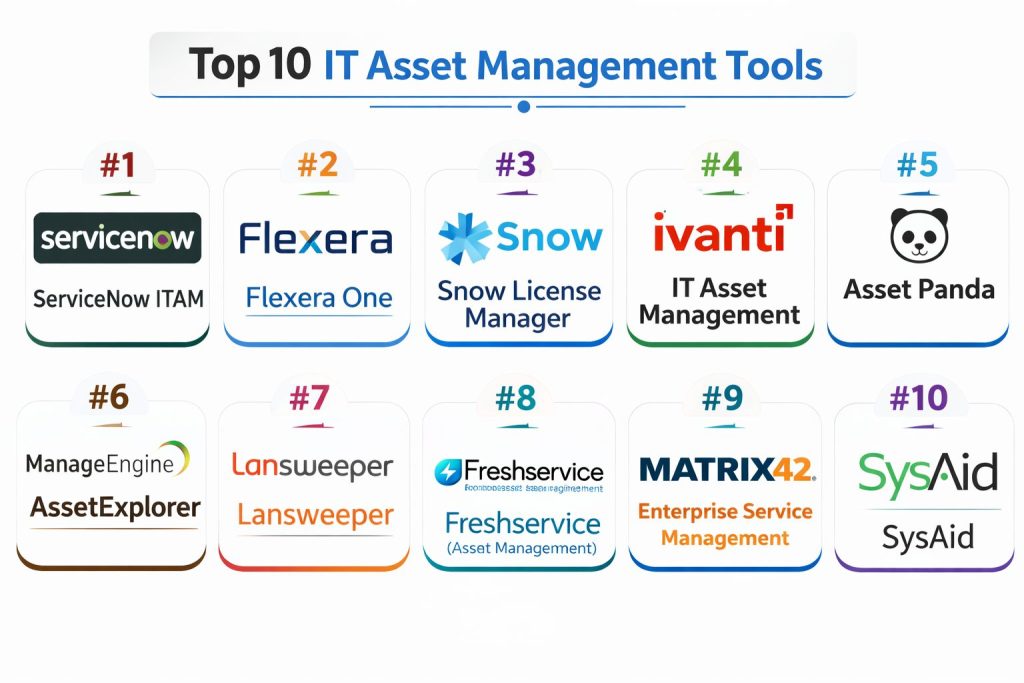
Top 10 IT Asset Management Tools
#1 — ServiceNow ITAM
A high-end enterprise solution that sits natively on the ServiceNow platform, linking ITAM directly to service delivery and workflows.
Key Features
- Hardware Asset Management (HAM): Automates the entire hardware lifecycle with mobile scanning and workflow triggers.
- Software Asset Management (SAM): Direct integration with vendors to normalize licenses and calculate compliance.
- Cloud Insights: Optimizes cloud spend by identifying oversized or unused cloud resources.
- Asset Inventory Discovery: Agentless and agent-based discovery across global networks.
- Contract Management: Centralized repository for all IT-related contracts and expirations.
Pros
- Seamlessly links assets to incident and change management.
- Extremely powerful automation for large-scale enterprise workflows.
Cons
- High cost and complex implementation.
- Can be “overkill” for organizations not already using ServiceNow.
Platforms / Deployment
- Web / Cloud
- Hybrid
Security & Compliance
- SSO/SAML, MFA, RBAC, Encryption
- ISO 27001, SOC 2, HIPAA
Integrations & Ecosystem Integrates with nearly all major enterprise software including HR (Workday), Finance (SAP), and Cloud (AWS/Azure).
- Microsoft 365
- Salesforce
- Adobe Creative Cloud
Support & Community Extensive documentation and a massive professional services network.
#2 — Flexera One
A specialized solution focused on complex software license optimization and hybrid cloud management for large organizations.
Key Features
- Technopedia: A massive library of asset data for normalization and categorization.
- Hybrid IT Visibility: View all assets from on-prem data centers to SaaS and Public Cloud.
- License Optimization: Deep logic for managing Oracle, IBM, and SAP licenses.
- Vulnerability Integration: Matches asset inventory against known security risks.
- Automated Governance: Sets policies to prevent “shadow IT” and unauthorized spend.
Pros
- Best-in-class for software audit defense and compliance.
- Highly detailed technical data normalization.
Cons
- Very technical interface that requires specialized training.
- Focused more on software/cloud than physical hardware.
Platforms / Deployment
- Web / Cloud
- Hybrid
Security & Compliance
- SSO, MFA, RBAC
- SOC 2, GDPR
Integrations & Ecosystem Strong connectors for major software vendors and IT infrastructure.
- AWS / Azure / Google Cloud
- ServiceNow
- BMC Helix
Support & Community Professional enterprise support with dedicated account managers for large clients.
#3 — Snow License Manager
A dedicated platform for managing software consumption across the entire technology stack, recently acquired and integrated by Flexera.
Key Features
- Snow Atlas: A cloud-native platform for total visibility into the technology landscape.
- SaaS Management: Identifies redundant subscriptions and forgotten accounts.
- Automatic Normalization: Cleans up messy software titles into a readable format.
- Oracle Management Option: Specialized tool for handling complex Oracle databases.
- Financial Reporting: Tracks the ROI of software spend across different departments.
Pros
- Intuitive dashboards for non-technical stakeholders.
- Strong focus on risk reduction and cost savings.
Cons
- Pricing can be high for smaller organizations.
- Integration with physical hardware is less robust than competitors.
Platforms / Deployment
- Cloud / Self-hosted
- Windows
Security & Compliance
- SSO, MFA
- ISO 27001
Integrations & Ecosystem Focuses on software vendor platforms and basic ITSM tools.
- Microsoft Teams
- Okta
- Slack
Support & Community Strong user group community and extensive online knowledge base.
#4 — Ivanti IT Asset Management
A unified platform that combines asset discovery with endpoint management and security.
Key Features
- Spend Intelligence: Visualizes total software spend and potential savings.
- Barcode Scanning: Mobile app for physical hardware inventory and tracking.
- Automation Fabric: Triggers actions like ticket creation when an asset is lost.
- License Compliance: Automated reconciliation for major vendors.
- Reclamation Workflows: Reclaims unused software automatically.
Pros
- Strong synergy between asset management and endpoint security.
- Good value for mid-market and enterprise users.
Cons
- Integration between different Ivanti modules can sometimes be complex.
- Reporting features can be less flexible than standalone tools.
Platforms / Deployment
- Web / Windows / macOS
- Cloud / Hybrid
Security & Compliance
- SSO/SAML, MFA, RBAC
- Not publicly stated
Integrations & Ecosystem Strong focus on the Ivanti Neurons platform and standard IT tools.
- Jira
- Microsoft SCCM
- Jamf
Support & Community Comprehensive support portal and global partner network.
#5 — Asset Panda
A highly flexible, cloud-based hardware asset tracking tool designed for ease of use and mobile accessibility.
Key Features
- Custom Fields: Users can build an asset database around their specific needs.
- Barcode/QR Scanning: Uses standard smartphone cameras for inventory audits.
- Check-in/Check-out: Simple interface for managing shared equipment.
- Maintenance Tracking: Logs repair history and schedules future service.
- Mobile App: Full functionality available on iOS and Android.
Pros
- Extremely easy to set up and use.
- Highly affordable for SMBs compared to enterprise suites.
Cons
- Lacks deep software license optimization (SAM) features.
- Not designed for complex data center management.
Platforms / Deployment
- Web / iOS / Android
- Cloud
Security & Compliance
- SSO, MFA, Encryption
- GDPR
Integrations & Ecosystem Focuses on common productivity and helpdesk tools.
- Zendesk
- Microsoft Active Directory
- Jamf
Support & Community Strong customer success team and helpful video tutorials.
#6 — ManageEngine AssetExplorer
A comprehensive ITAM tool that offers deep discovery and lifecycle management, often bundled with their ServiceDesk Plus product.
Key Features
- Multi-scan Discovery: Scans networks via agents, WMI, SNMP, and SSH.
- Software Compliance: Tracks license usage and notifies of over-usage.
- Purchase Order Management: Manages the entire procurement flow.
- Asset Relationship Map: Visualizes how assets are connected to services.
- Warranty Tracking: Automatically pulls warranty info from vendors like Dell and HP.
Pros
- Very affordable and great for mid-sized organizations.
- Strong integration with the ManageEngine helpdesk ecosystem.
Cons
- The UI can feel a bit dated compared to modern cloud apps.
- Advanced features often require additional modules.
Platforms / Deployment
- Windows / Linux / Web
- Cloud / Self-hosted
Security & Compliance
- SSO, MFA, RBAC
- Not publicly stated
Integrations & Ecosystem Tight integration with the ManageEngine suite and common AD tools.
- Active Directory
- Zoho Books
- Jira
Support & Community Active forums and standard enterprise support tiers.
#7 — Lansweeper
An IT asset discovery and inventory platform that excels at finding everything connected to a network without pre-installed agents.
Key Features
- Agentless Discovery: Finds IoT devices, printers, and switches automatically.
- Asset Radar: Detects assets the moment they connect to the network.
- Risk Insights: Identifies end-of-life software and hardware.
- OT Discovery: Scans operational technology in manufacturing environments.
- Cloud Inventory: Consolidates data from multiple cloud providers.
Pros
- The “gold standard” for discovering unmanaged assets (Shadow IT).
- Easy to install and provides value almost immediately.
Cons
- Not a full lifecycle management tool (limited procurement/disposal features).
- Licensing is based on asset count, which can scale up in price.
Platforms / Deployment
- Windows / Web
- Cloud / Self-hosted
Security & Compliance
- SSO, RBAC
- ISO 27001
Integrations & Ecosystem Strong data exports and API for feeding discovery data into other tools.
- ServiceNow
- HaloITSM
- Freshservice
Support & Community Strong technical documentation and a helpful user community.
#8 — Freshservice (Asset Management)
A modern, user-friendly ITSM platform that includes powerful and intuitive asset management modules.
Key Features
- Automated Discovery: Inventory probe and agent-based discovery.
- Contract Management: Tracks renewals with automated alerts.
- Inventory Management: Tracks both IT and non-IT assets.
- SaaS Management: Direct integrations to track SaaS utilization.
- Mobile Discovery: Barcode scanning for physical audits.
Pros
- Modern, clean UI that requires minimal training.
- Great for fast-growing companies that need an all-in-one helpdesk.
Cons
- SAM features are not as deep as Flexera or Snow.
- Can get expensive as you add users and assets.
Platforms / Deployment
- Web / iOS / Android
- Cloud
Security & Compliance
- SSO/SAML, MFA, RBAC
- ISO 27001, SOC 2
Integrations & Ecosystem Wide range of marketplace apps and native integrations.
- Slack / MS Teams
- Okta
- Google Workspace
Support & Community Excellent onboarding support and active customer forums.
#9 — Matrix42 Enterprise Service Management
A European-based solution that combines ITAM with service management and automated workplace management.
Key Features
- Unified Endpoint Management: Manages and secures devices while tracking them.
- License Management: Automated compliance check for cloud and on-prem.
- Automated Provisioning: Users can “shop” for software in an internal portal.
- Financial Tracking: Detailed tracking of depreciating assets.
- Compliance Dashboards: Real-time overview of license risks.
Pros
- Very strong focus on European data privacy and GDPR.
- Combines asset tracking with automated software deployment.
Cons
- Less market presence in North America compared to competitors.
- Can be complex to configure for non-standard workflows.
Platforms / Deployment
- Web / Windows
- Cloud / Hybrid
Security & Compliance
- SSO, MFA, RBAC
- GDPR (High focus), ISO 27001
Integrations & Ecosystem Strong focus on the Matrix42 ecosystem and European business software.
- Microsoft 365
- SAP
- Citrix
Support & Community Strong European presence with localized support in several languages.
#10 — SysAid
An AI-powered service management platform that integrates asset management directly into the service desk experience.
Key Features
- Network Discovery: Automatically populates the CMDB with IT assets.
- Patch Management: Integrated tool to keep software up to date and secure.
- Mobile Device Management: Tracking and managing company smartphones.
- Asset Monitoring: Alerts for CPU spikes or low disk space on servers.
- AI Chatbot: Allows users to query asset status via natural language.
Pros
- Great for small to mid-sized teams looking for “Asset + Helpdesk.”
- High level of customization for asset types and fields.
Cons
- Discovery features can be less granular than specialized tools like Lansweeper.
- Interface can feel cluttered if not configured properly.
Platforms / Deployment
- Web / Windows / Linux
- Cloud / Self-hosted
Security & Compliance
- SSO, MFA
- ISO 27001
Integrations & Ecosystem Common integrations for a mid-market service desk.
- Azure AD
- Office 365
- TeamViewer
Support & Community Good customer support and a helpful “Pathfinder” community.
Comparison Table (Top 10)
| Tool Name | Best For | Platform(s) Supported | Deployment | Standout Feature | Public Rating |
| ServiceNow ITAM | Large Enterprise | Web | Hybrid | Platform Workflow | 4.8 |
| Flexera One | SAM Compliance | Web | Hybrid | Technopedia Data | 4.7 |
| Snow License Manager | License Optimization | Win, Web | Cloud | Snow Atlas | 4.6 |
| Ivanti ITAM | Endpoint Security | Win, Mac, Web | Hybrid | Spend Intelligence | 4.5 |
| Asset Panda | Physical Tracking | Web, iOS, Android | Cloud | Custom Fields | 4.8 |
| AssetExplorer | Mid-Market | Win, Linux, Web | Hybrid | Relationship Mapping | 4.4 |
| Lansweeper | Network Discovery | Win, Web | Hybrid | Agentless Scanning | 4.9 |
| Freshservice | Ease of Use | Web, iOS, Android | Cloud | Modern UI | 4.7 |
| Matrix42 | European Enterprise | Win, Web | Hybrid | Automated Provisioning | 4.3 |
| SysAid | AI-Integrated ITAM | Win, Linux, Web | Hybrid | Integrated Patching | 4.5 |
Evaluation & Scoring of IT Asset Management Tools
| Tool Name | Core (25%) | Ease (15%) | Integrations (15%) | Security (10%) | Performance (10%) | Support (10%) | Value (15%) | Weighted Total |
| ServiceNow ITAM | 10 | 5 | 10 | 10 | 9 | 9 | 6 | 8.55 |
| Flexera One | 10 | 4 | 9 | 9 | 9 | 8 | 7 | 8.15 |
| Snow License Manager | 9 | 6 | 8 | 8 | 8 | 8 | 7 | 7.75 |
| Ivanti ITAM | 8 | 7 | 8 | 9 | 8 | 8 | 8 | 7.90 |
| Asset Panda | 6 | 10 | 7 | 8 | 9 | 9 | 9 | 7.80 |
| AssetExplorer | 8 | 7 | 8 | 7 | 8 | 8 | 9 | 7.90 |
| Lansweeper | 9 | 9 | 9 | 8 | 10 | 8 | 8 | 8.85 |
| Freshservice | 8 | 10 | 9 | 9 | 9 | 9 | 7 | 8.55 |
| Matrix42 | 8 | 6 | 7 | 10 | 8 | 8 | 7 | 7.55 |
| SysAid | 7 | 8 | 8 | 8 | 8 | 8 | 8 | 7.75 |
The scoring above represents a comparative analysis. Lansweeper scores high due to its unrivaled discovery speed and performance, while ServiceNow leads in core feature depth and security for massive organizations.
Which IT Asset Management Tool Is Right for You?
Solo / Freelancer
Asset Panda is the best fit here. It allows you to track your equipment and software licenses with a simple mobile app without needing any server infrastructure.
SMB
ManageEngine AssetExplorer or Freshservice are ideal. They provide professional-grade features without requiring a full-time administrator to manage the tool itself.
Mid-Market
Ivanti or Snow License Manager provide the right balance of complex license tracking and physical hardware management needed as an organization grows toward enterprise scale.
Enterprise
ServiceNow ITAM or Flexera One are the clear choices. These tools can handle the global complexity of thousands of assets and the rigorous security requirements of large-scale operations.
Budget vs Premium
Lansweeper and ManageEngine offer the best “Bang for your buck.” ServiceNow and Flexera are premium offerings that require a significant investment but offer unmatched automation.
Feature Depth vs Ease of Use
If you need absolute depth (especially in software compliance), Flexera is the choice. If you want something your team will actually enjoy using every day, Freshservice wins on ease of use.
Integrations & Scalability
ServiceNow is the most scalable platform on the market today. Its ability to integrate with almost any third-party API makes it a future-proof choice for evolving businesses.
Security & Compliance Needs
Organizations with high security needs (Government, Healthcare) should look toward ServiceNow or Matrix42, which offer high levels of compliance and data sovereignty controls.
Frequently Asked Questions (FAQs)
What is the difference between ITAM and ITSM?
ITAM focuses on the business value and lifecycle of assets (cost, contracts, inventory), while ITSM focuses on the delivery of IT services (tickets, incidents, changes).
How long does it take to implement an ITAM tool?
Simple cloud tools like Asset Panda can be ready in a day. Enterprise platforms like ServiceNow can take 3 to 9 months to fully configure and integrate.
Can ITAM tools find “Shadow IT”?
Yes, tools with “agentless” discovery like Lansweeper can find any device or software connected to the network that IT might not know about.
Are ITAM tools expensive?
Pricing varies from free (open source) to hundreds of thousands of dollars for enterprise subscriptions. Most charge based on the number of assets or users.
Do these tools help with security?
Absolutely. By knowing exactly what hardware and software you have, you can ensure everything is patched and authorized, which is a core part of cyber hygiene.
Can I manage cloud assets with these tools?
Yes, modern ITAM tools (especially Flexera and Snow) are designed to track “Hybrid IT,” which includes on-prem servers and cloud instances.
What is “Normalizing” data?
Normalization is the process of taking different names for the same thing (e.g., “Microsoft,” “MSFT,” “Microsoft Corp”) and turning them into one clean record.
How often should I audit my assets?
Continuous discovery is best, but formal physical audits are typically recommended once or twice a year depending on your industry regulations.
Do I need a special person to run these tools?
For SMBs, it’s usually part of a SysAdmin’s role. For Enterprises, there is often a dedicated IT Asset Manager or a whole team.
What happens if I don’t use ITAM?
Risks include failing vendor audits (leading to fines), security breaches from unmanaged devices, and wasting money on software nobody is using.
Conclusion
Successful IT Asset Management requires a shift from manual tracking to automated intelligence. Whether you choose the deep enterprise integration of ServiceNow or the rapid discovery capabilities of Lansweeper, the goal remains the same: complete visibility into your technology stack. We recommend starting with a pilot focused on your highest-spend area—whether that’s SaaS subscriptions or mobile hardware—to demonstrate immediate ROI before scaling to the entire organization.