Introduction
A Business Phone System based on Voice over Internet Protocol (VoIP) is a cloud-native communication technology that transmits voice calls and multimedia sessions over the internet rather than traditional copper wires. VoIP has matured into the central nervous system of corporate communication. No longer just a “phone service,” these platforms function as Unified Communications as a Service (UCaaS) hubs, integrating video, SMS, fax, and AI-driven intelligence into a single interface.+1
The relevance of VoIP is anchored in the permanent shift toward hybrid and distributed work. As the PSTN (Public Switched Telephone Network) switch-off nears completion globally, businesses are migrating to VoIP to gain access to 5G-optimized HD audio and AI-powered productivity features. Modern systems now utilize real-time sentiment analysis and autonomous virtual receptionists to manage high call volumes without increasing headcount.+1
Real-world use cases include:
- Hybrid Office Coordination: Seamlessly switching a live call from a desk phone to a mobile app as an employee leaves the office.
- AI-Enhanced Sales Training: Using real-time transcription and “AI Coaching” to prompt sales reps with relevant data during live prospect calls.
- Global Customer Support: Deploying local virtual numbers in 100+ countries to maintain a local presence without physical offices.
- Emergency Service Integration: Utilizing E911 and IoT sensors to automatically trigger VoIP alerts during facility emergencies.
- Automated Lead Capture: Automatically syncing call logs and voicemail transcripts directly into CRM platforms like Salesforce or HubSpot.
What buyers should evaluate (Criteria):
- Uptime Reliability: Looking for “Five-Nines” (99.999%) or “Seven-Nines” availability for mission-critical operations.
- AI Feature Depth: The quality of native AI for call summaries, action item extraction, and noise cancellation.
- Mobile App Performance: The stability of the softphone application on 5G and fluctuating Wi-Fi networks.
- Global Footprint: Availability of local PSTN replacement and DID numbers in required international regions.
- Compliance Frameworks: Native support for industry-specific regulations like HIPAA (healthcare) or PCI-DSS (payments).
- Integration Library: The breadth of “one-click” integrations with existing productivity and CRM stacks.
- Hardware Compatibility: Support for existing SIP-based desk phones or “Hardware-as-a-Service” options.
- Scalability: The ease of adding or removing lines during seasonal peaks or rapid organizational growth.
Best for: Businesses of all sizes—from solo entrepreneurs to global enterprises—requiring professional, scalable, and integrated voice communications.
Not ideal for: Organizations in extremely remote areas with unstable, high-latency satellite internet (where traditional analog lines may still offer superior reliability).
Key Trends in Business Phone Systems (VoIP)
The VoIP landscape is defined by the fusion of telecommunications with artificial intelligence and high-speed mobile infrastructure.
- Generative AI Receptionists: Highly sophisticated AI agents that can handle complex scheduling and FAQs in a natural-sounding voice.
- 5G-Native Voice: The rollout of 5G has enabled ultra-low latency and “Wideband HD” audio that surpasses the quality of traditional landlines.
- Sentiment & Intent Analysis: Systems now automatically flag “angry” or “frustrated” callers in real-time for immediate supervisor intervention.
- Omnichannel Synchronization: A single “conversation thread” that follows a customer across phone, WhatsApp, SMS, and video.
- Zero-Trust Voice Security: Biometric voice authentication and encrypted SIP trunking to prevent “Deepfake” voice fraud and toll fraud.
- WebRTC Dominance: The ability to make high-quality calls directly from any web browser without installing plugins or software.
- IoT Alert Integration: VoIP systems acting as endpoints for smart building sensors, triggering calls to security when a sensor is tripped.
- Predictive Call Volume Analytics: Using historical data to predict peak calling times and suggesting staffing adjustments in advance.
How We Selected These Tools (Methodology)
Our selection for the top 10 VoIP providers follows a weighted evaluation of technical performance and business utility:
- Carrier-Grade Infrastructure: We prioritized providers with their own global private networks rather than those just reselling other services.
- AI Maturity: Assessment focused on tools that provide actionable AI insights (recaps, coaching) rather than basic transcription.
- User Experience (UX): We tested the friction involved in everyday tasks like call transferring, three-way calling, and IVR setup.
- Administrative Simplicity: Evaluation of the “back-end” portal for managing users, numbers, and billing.
- Economic Value: Analysis of the feature-to-price ratio, specifically looking at “all-in” costs including international rates.
- Security & Resilience: Verification of data center redundancy and compliance certifications (SOC 2, ISO).
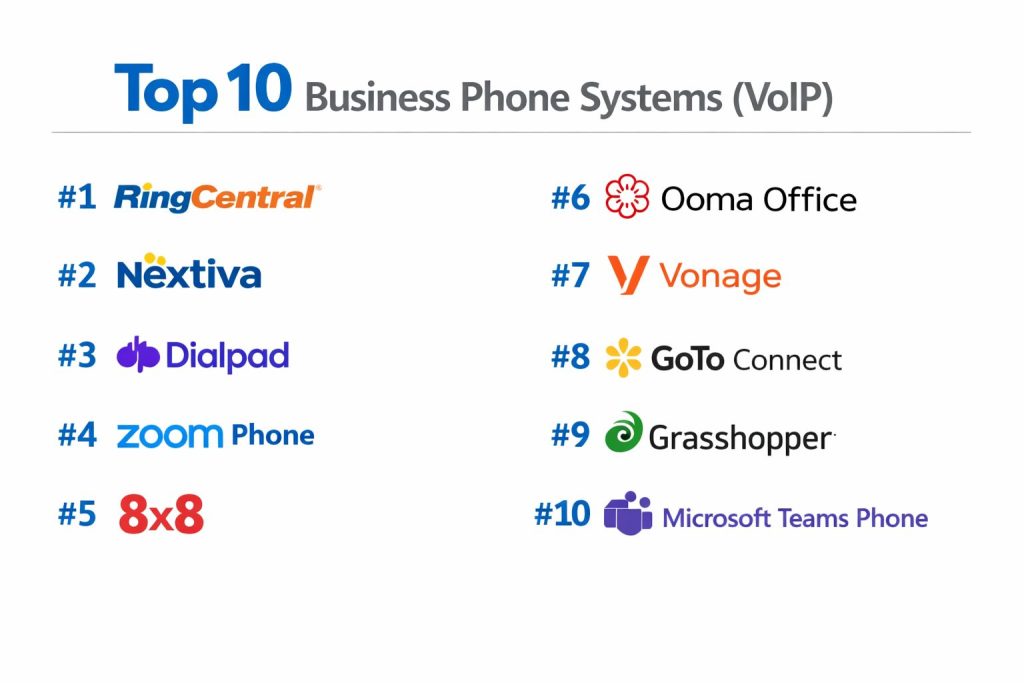
Top 10 Business Phone Systems (VoIP)
#1 — RingCentral
A titan in the UCaaS space, RingCentral remains the industry standard for enterprise-grade communication, offering a robust “all-in-one” platform.
Key Features
- RingSense AI: Provides real-time conversation intelligence and automated post-call summaries.
- 7-Nines Reliability: One of the only providers offering a 99.999% uptime SLA with global redundancy.
- Omnichannel Messaging: Integrated team chat, SMS, MMS, and digital faxing in one application.
- Advanced Video Meetings: Supports up to 500 participants with AI-driven background noise suppression.
- Analytics Portal: Granular reporting on call quality, agent performance, and system usage.
- Global Reach: Local presence and number porting in over 45 countries.
Pros
- Unmatched Feature Depth: Capable of handling the most complex enterprise telephony requirements.
- Mature Ecosystem: Over 300+ native integrations available in their App Gallery.
Cons
- UI Complexity: The interface can be overwhelming for users who only need basic calling.
- Premium Pricing: Generally sits at the higher end of the market’s price spectrum.
Platforms / Deployment
- Web / Windows / macOS / iOS / Android
- Cloud
Security & Compliance
- SSO, MFA, E2EE for video, TLS/SRTP encryption.
- SOC 2 Type II, HIPAA, GDPR, FINRA.
Integrations & Ecosystem
Deeply integrated with nearly every major enterprise SaaS tool.
- Microsoft 365 & Google Workspace
- Salesforce & ServiceNow
- Slack & Microsoft Teams
Support & Community
24/7 global support, dedicated account managers for enterprise, and a massive community of certified developers.
#2 — Nextiva
Known for “Amazing Service,” Nextiva focuses on blending VoIP with customer experience (CX) tools, making it ideal for service-oriented businesses.
Key Features
- Call Flow Builder: A visual, drag-and-drop tool for designing complex IVR and routing paths.
- NextivaOne App: A unified workspace for voice, video, chat, and basic CRM-style customer tracking.
- Threaded Conversations: Views all interactions with a single customer across all channels in one view.
- Mobile-First Design: One of the most stable and feature-rich mobile softphone apps on the market.
- Reputation Management: Integrated tools to track and respond to online reviews directly from the app.
- Automated Surveys: Send post-call surveys to measure NPS and customer satisfaction automatically.
Pros
- Exceptional Support: Consistently ranked #1 for customer service and onboarding assistance.
- Ease of Use: The setup wizard makes it accessible for non-IT personnel to deploy in minutes.
Cons
- International Limits: International calling features are less robust compared to 8×8 or RingCentral.
- Standard Plan Limits: Some of the best “CX” features are locked behind the Pro and Enterprise tiers.
Platforms / Deployment
- Web / Windows / macOS / iOS / Android
- Cloud
Security & Compliance
- 2FA, Biometric app lock, SRTP Encryption.
- SOC 2, HIPAA, PCI-DSS.
Integrations & Ecosystem
Focuses on deep CRM connectivity to enhance the “customer view.”
- HubSpot & Zendesk
- Salesforce & Oracle Sales Cloud
- Microsoft Dynamics
Support & Community
U.S.-based 24/7 phone support and a highly-regarded “Nextiva University” training portal.
#3 — Dialpad
A modern, AI-first communication platform that has built artificial intelligence into the core of its architecture rather than as an add-on.
Key Features
- Ai Recaps: Automatically generates concise summaries, action items, and keywords for every call.
- Real-Time Coaching: Provides live prompts to agents based on keywords used by the caller.
- Voice Intelligence (Vi): Tracks customer sentiment in real-time during live calls.
- Built-in Meetings: Browser-based HD video conferencing that requires no downloads.
- Department Routing: Easily segment calls to specific teams (Sales, Support) with custom rules.
- Spam Prevention: Advanced AI filtering to block robocalls and fraudulent inquiries.
Pros
- Innovation Leader: Consistently first to market with advanced AI-driven productivity tools.
- Sleek UI: One of the most modern and intuitive user interfaces in the category.
Cons
- AI Accuracy: While high, AI transcriptions can still struggle with heavy accents or industry jargon.
- Video Limitations: Large-scale webinars are not as robust as Zoom or RingCentral.
Platforms / Deployment
- Web / Windows / macOS / iOS / Android
- Cloud
Security & Compliance
- SSO, AES-256 Encryption, Scoping permissions.
- SOC 2 Type II, GDPR, HIPAA.
Integrations & Ecosystem
Designed to live inside your existing productivity suite.
- Google Workspace & Microsoft 365
- Slack
- Front & Intercom
Support & Community
Online help center and 24/7 chat/phone support for Pro/Enterprise users.
#4 — Zoom Phone
An extension of the ubiquitous video platform, Zoom Phone offers a familiar interface and simplified pricing for growing teams.
Key Features
- Familiar Interface: Users who know Zoom Meetings can use Zoom Phone with zero learning curve.
- Nomadic E911: Dynamically tracks user location to provide accurate info to emergency services.
- Hardware-as-a-Service: Options to lease enterprise-grade desk phones for a low monthly fee.
- Call Flip: Effortlessly move a call from your laptop to your mobile or desk phone.
- Shared Line Appearance: Allows multiple users to share a single extension or phone number.
- Zoom Workplace Integration: Seamlessly transition a voice call into a full Zoom video meeting.
Pros
- Aggressive Pricing: Often the most cost-effective option for teams already paying for Zoom.
- Reliability: Leverages Zoom’s massive global data center network for low-latency calls.
Cons
- Basic Features: Lacks some of the ultra-niche telephony features found in RingCentral.
- Analytics Add-on: Advanced real-time reporting often requires a separate “Power Pack” purchase.
Platforms / Deployment
- Web / Windows / macOS / Linux / iOS / Android
- Cloud
Security & Compliance
- 2FA, SSO, AES-256 Encryption.
- SOC 2 Type II, HIPAA, FedRAMP (Moderate).
Integrations & Ecosystem
Leverages the growing Zoom App Marketplace.
- Salesforce
- Microsoft Teams
- Epic (for Healthcare)
Support & Community
Tiered support levels, community forums, and a massive global user base.
#5 — 8×8
A global leader specializing in international calling and integrated cloud contact centers (CCaaS).
Key Features
- Global Reach: Offers unlimited calling to up to 48 countries in its standard plans.
- Integrated XCaaS: Combines employee communications and customer experience in one data set.
- Supervisor Tools: Listen, whisper, and barge-in features for call quality monitoring.
- Frontdesk App: A specialized interface for high-volume receptionists to manage calls.
- Smart Dialing: Automatically suggests the best time to call international clients.
- Private Network: Routes calls over their proprietary global network to minimize jitter.
Pros
- International Value: Best-in-class pricing for businesses with heavy global calling needs.
- Unified Data: Having UCaaS and CCaaS on one platform provides superior cross-department reporting.
Cons
- Interface: The admin console can feel slightly dated and technical compared to newer rivals.
- Setup Time: Global deployments can take longer to configure than simpler tools like Ooma.
Platforms / Deployment
- Web / Windows / macOS / iOS / Android
- Cloud
Security & Compliance
- SSO, SRTP Encryption, FISMA compliance.
- ISO 27001, HIPAA, GDPR, PCI-DSS.
Integrations & Ecosystem
Strong focus on CRM and business productivity tools.
- Microsoft Teams (Direct Routing)
- NetSuite & SugarCRM
- Bullhorn
Support & Community
Global 24/7 support with specialized onboarding teams for international rollouts.
#6 — Ooma Office
A plug-and-play VoIP solution specifically designed for small businesses that need professional features without IT complexity.
Key Features
- Virtual Receptionist: Automatically directs calls to the right person or department.
- Ooma AirDial: A dedicated solution for POTS replacement (elevators, alarms, etc.).
- Multi-Ring: Rings your desk phone and mobile app simultaneously so you never miss a call.
- Desktop App: Full call control and team messaging from your computer.
- Digital Faxing: Send and receive faxes via email or the Ooma portal.
- Call Park: Allows users to “park” a call and have another team member pick it up elsewhere.
Pros
- Simplicity: The easiest system on this list to set up; literally takes 15 minutes.
- Predictable Pricing: Flat-rate plans with no hidden fees or complex contracts.
Cons
- Limited Scalability: Not designed for large enterprises with 500+ employees.
- Integration Depth: Fewer “one-click” integrations than enterprise-focused competitors.
Platforms / Deployment
- Web / iOS / Android
- Cloud / Hardware
Security & Compliance
- 2FA, Encrypted voice traffic.
- SOC 2 Type II, GDPR.
Integrations & Ecosystem
Focuses on the most essential small business tools.
- Google Contacts & Microsoft Outlook
- Salesforce (Higher tiers)
Support & Community
Highly-rated 24/7 U.S.-based support for all users.
#7 — Vonage
A highly customizable platform that offers a unique modular approach through its extensive API ecosystem and business apps.
Key Features
- Vonage App Center: A modular marketplace where you can add only the features you need.
- AI Virtual Assistant: A natural-language IVR that handles routine customer inquiries.
- Visual Voicemail: High-accuracy transcription sent directly to your email or SMS.
- Business Inbox: Centralizes SMS, MMS, and Facebook Messenger in a single workspace.
- Click-to-Dial: Browser extensions that allow calling any number found on a webpage.
- Smart Numbers: Programmable numbers that can trigger specific business workflows.
Pros
- Customization: Excellent for companies that want to “build” their perfect phone system.
- Scalability: Moves effortlessly from a 1-person shop to a global enterprise.
Cons
- Hidden Costs: Pricing can increase quickly as you add “modules” from the App Center.
- Support Variability: Basic support tiers can have longer wait times than premium tiers.
Platforms / Deployment
- Web / Windows / macOS / iOS / Android
- Cloud
Security & Compliance
- SSO, TLS Encryption, IP Whitelisting.
- SOC 2, HIPAA, HITRUST.
Integrations & Ecosystem
Offers some of the deepest CRM integrations in the industry.
- Salesforce (Deepest integration)
- Microsoft Dynamics & Zoho
- G Suite
Support & Community
Global support network and an extensive developer community for API customization.
#8 — GoTo Connect
Part of the GoTo (formerly LogMeIn) suite, this tool is prized for its reliability and its legendary visual dial plan editor.
Key Features
- Visual Dial Plan Editor: A canvas where you draw your call routing logic like a flowchart.
- Wait Time Announcements: Keeps callers informed of their position in the queue.
- Hot Desking: Allows employees to log into any physical phone and have it become their extension.
- Integrated Meetings: Includes GoTo Meeting functionality for high-quality video.
- Call Recording: Unlimited cloud storage for call recordings on most plans.
- Paging & Intercom: Built-in tools for office-wide announcements.
Pros
- Routing Control: The most intuitive tool for managing complex call flows.
- Bundled Value: Excellent if you already use GoTo’s remote support or meeting tools.
Cons
- Mobile App: While functional, users report it is slightly less polished than Nextiva or Dialpad.
- AI Features: Native AI transcription and analysis are still catching up to Dialpad.
Platforms / Deployment
- Web / Windows / macOS / iOS / Android
- Cloud
Security & Compliance
- SSO, MFA, AES Encryption.
- SOC 2 Type II, HIPAA, GDPR.
Integrations & Ecosystem
Connects well with common business software.
- Slack
- Salesforce & Zendesk
- Microsoft Outlook
Support & Community
Reliable 24/7 support and a well-structured online knowledge base.
#9 — Grasshopper
A “virtual” phone system designed specifically for solo founders and micro-teams who want a professional presence without buying hardware.
Key Features
- Virtual Numbers: Add a professional business line to your personal mobile phone.
- Extensions: Create separate extensions for “Sales” or “Support” that all route to you.
- Ruby Receptionist Integration: Native connection to live answering services.
- Instant Response: Automatically sends a text to a caller if you miss their call.
- Custom Greetings: Professional recorded greetings to build brand credibility.
- Voicemail-to-Email: Forwards audio and transcripts to your inbox.
Pros
- Affordability: The lowest entry price for a “professional” business appearance.
- Zero Hardware: No need to buy desk phones; it works entirely on existing devices.
Cons
- No Video/Chat: Not a true UCaaS platform; strictly focused on voice and SMS.
- Limited Features: Lacks advanced features like call recording or complex analytics.
Platforms / Deployment
- iOS / Android / Desktop (App only)
- Cloud
Security & Compliance
- 2FA, Standard mobile encryption.
- GDPR.
Integrations & Ecosystem
- Basic integrations with Skype and Google Voice.
Support & Community
24/7 phone and email support; geared toward small business owners.
#10 — Microsoft Teams Phone
The logical choice for organizations already “all-in” on the Microsoft ecosystem, turning the Teams app into a full-featured PBX.
Key Features
- Unified Interface: Users never have to leave the Teams app to make or receive external calls.
- Direct Routing: Allows businesses to choose their own telecom provider for the actual dial tone.
- Teams AI Library: Leverages Microsoft’s massive investment in AI for live translation and meeting notes.
- Operator Connect: A simplified way to connect your existing carrier to the Teams interface.
- Cross-Device Sync: Seamlessly move a call between a Teams-certified desk phone and the PC app.
- Azure Integration: High-level security and management via the Azure active directory.
Pros
- License Efficiency: Often included in or an easy add-on to existing M365 Enterprise plans.
- Consistency: Provides a single, unified experience for internal and external communication.
Cons
- Setup Complexity: Requires a knowledgeable IT admin to configure properly.
- Feature Lag: Some specialized telephony features (like advanced paging) took longer to arrive in Teams.
Platforms / Deployment
- Web / Windows / macOS / iOS / Android
- Cloud
Security & Compliance
- Microsoft 365 Security, Intune, SSO, MFA.
- SOC 2, ISO 27001, HIPAA, FedRAMP, GDPR.
Integrations & Ecosystem
Perfectly integrated with the entire Microsoft stack.
- Power BI & Power Automate
- SharePoint & OneDrive
- Microsoft Dynamics 365
Support & Community
World-class global support and the largest network of IT partners in the world.
Comparison Table (Top 10)
| Tool Name | Best For | Platform(s) Supported | Deployment | Standout Feature | Public Rating |
| RingCentral | Enterprise Scalability | Web, Win, Mac, iOS, Android | Cloud | 7-Nines Uptime SLA | 4.6 / 5 |
| Nextiva | Customer Experience | Web, Win, Mac, iOS, Android | Cloud | Visual Call Flow Builder | 4.7 / 5 |
| Dialpad | AI & Productivity | Web, Win, Mac, iOS, Android | Cloud | Real-time Ai Recaps | 4.5 / 5 |
| Zoom Phone | Simplicity & Value | Web, Win, Mac, iOS, Android | Cloud | Zoom Ecosystem Sync | 4.4 / 5 |
| 8×8 | International Teams | Web, Win, Mac, iOS, Android | Cloud | Global PSTN Replacement | 4.3 / 5 |
| Ooma Office | Micro/Small Business | Web, iOS, Android | Hybrid | 15-Minute Setup | 4.6 / 5 |
| Vonage | Customization | Web, Win, Mac, iOS, Android | Cloud | Modular App Center | 4.2 / 5 |
| GoTo Connect | Visual Management | Web, Win, Mac, iOS, Android | Cloud | Visual Dial Plan Editor | 4.3 / 5 |
| Grasshopper | Solo Founders | iOS, Android, Desktop App | Cloud | Instant Text Response | 4.0 / 5 |
| MS Teams Phone | M365 Organizations | Web, Win, Mac, iOS, Android | Cloud | Native Teams Integration | 4.1 / 5 |
Evaluation & Scoring of Business Phone Systems (VoIP)
The following scoring model evaluates these tools based on the standard for reliability and feature sets.
| Tool Name | Core (25%) | Ease (15%) | Int. (15%) | Sec. (10%) | Perf. (10%) | Supp. (10%) | Value (15%) | Weighted Total |
| RingCentral | 10 | 6 | 10 | 10 | 10 | 9 | 7 | 8.85 |
| Nextiva | 9 | 9 | 8 | 9 | 9 | 10 | 8 | 8.85 |
| Dialpad | 9 | 8 | 9 | 8 | 8 | 8 | 9 | 8.55 |
| Zoom Phone | 8 | 10 | 8 | 8 | 9 | 8 | 10 | 8.60 |
| 8×8 | 9 | 7 | 8 | 10 | 9 | 8 | 9 | 8.45 |
| Ooma Office | 7 | 10 | 6 | 8 | 9 | 9 | 9 | 8.15 |
| Vonage | 8 | 7 | 10 | 9 | 8 | 7 | 7 | 7.90 |
| GoTo Connect | 8 | 8 | 8 | 9 | 9 | 8 | 8 | 8.20 |
| Grasshopper | 5 | 10 | 4 | 7 | 8 | 7 | 9 | 7.10 |
| MS Teams Phone | 8 | 6 | 10 | 10 | 8 | 8 | 9 | 8.25 |
Which Business Phone Systems (VoIP) Tool Is Right for You?
Solo / Freelancer
If you simply need a professional front for your business while working from your personal smartphone, Grasshopper is the clear winner. It’s affordable and requires zero new hardware.
SMB (10–50 Employees)
Ooma Office provides the best balance of professional features and extreme ease of use. If your SMB is more tech-forward and needs CRM integration, Nextiva or Zoom Phone are the top contenders.
Mid-Market (50–500 Employees)
Dialpad is ideal for companies that prioritize productivity and AI. Its automated call recaps can save managers dozens of hours a week. Alternatively, GoTo Connect is excellent for teams that need visual control over complex call routing.
Enterprise (500+ Employees)
For global scale and absolute reliability, RingCentral is the dominant choice. For organizations deeply embedded in Microsoft’s ecosystem, MS Teams Phone offers unparalleled integration and cost-efficiency.+1
Budget vs Premium
- Budget: Zoom Phone and Ooma offer the most competitive entry-level pricing.
- Premium: RingCentral and 8×8 (on higher tiers) are premium investments built for high-stakes enterprise environments.
Feature Depth vs Ease of Use
- Feature Depth: RingCentral and Vonage (via APIs) offer the most “under the hood” power.
- Ease of Use: Ooma and Grasshopper are the most user-friendly.
International Needs
If your business calls overseas daily, 8×8 is usually the most cost-effective due to its massive “Unlimited International” zones.
Frequently Asked Questions (FAQs)
Can I keep my existing business phone number?
Yes. The process is called “Porting.” Federal law in many regions (like the U.S.) requires providers to allow number porting. Most VoIP providers handle this for you during the onboarding process.
Do I need a special “VoIP phone” to use these systems?
No. While you can use specialized IP desk phones, 90% of modern users utilize “softphones”—apps on their laptops or smartphones. This eliminates the need for any hardware investment.
What happens to my phone system if the internet goes down?
Modern VoIP systems have “Failover” features. If your office internet dies, the system can automatically reroute calls to employees’ mobile apps (using 5G/LTE) or to an external landline or voicemail.
How much bandwidth does a VoIP call use?
A standard VoIP call uses roughly 85-100 kbps. Even basic broadband or 5G connections can easily handle dozens of simultaneous high-quality voice calls without any degradation.
Is VoIP secure enough for sensitive business?
Yes. Modern systems use SRTP (Secure Real-time Transport Protocol) and TLS encryption, making them more secure than traditional analog lines. Ensure your provider is SOC 2 or HIPAA compliant if you handle sensitive data.
What is an “Auto-Attendant”?
An Auto-Attendant (or IVR) is the “Press 1 for Sales, 2 for Support” menu. It allows you to direct callers to the right department without needing a live human operator.
Can I send SMS/MMS from my business number?
Yes. Most VoIP platforms include “Business SMS,” allowing you to text clients from your professional number rather than your personal one, keeping your private number private.
Does VoIP support faxing?
Yes, but typically as “Digital Fax.” You can send faxes by uploading a PDF to your portal, and incoming faxes arrive as PDF attachments in your email. Traditional fax machines may require an “ATA” adapter to work with VoIP.
What is “HD Voice”?
HD Voice (Wideband Audio) uses a broader frequency range than traditional telephony. The result is a much “fuller,” clearer sound that makes it easier to understand callers, especially in noisy environments.
How does AI improve my phone system?
AI can automatically transcribe calls, summarize meetings, detect if a customer is unhappy, and even suggest the “next best action” for a sales rep to take based on the conversation.
Conclusion
The transition to a Business VoIP system is no longer just a cost-saving measure—it is a strategic necessity for modern agility. Whether you choose the AI-heavy approach of Dialpad, the global strength of RingCentral, or the simplicity of Ooma, the result is a unified, professional communication stack that lives wherever your team does.