Introduction
Portfolio and Program Management (PPM) software consists of high-level strategic platforms designed to bridge the gap between corporate strategy and project execution. Unlike standard project management tools that focus on “how” work is done at the task level, PPM tools focus on “what” work should be done to maximize ROI and align with organizational goals. These tools have moved beyond static spreadsheets to become dynamic “Strategic Execution Offices” (SEOs), utilizing real-time data to balance resource capacity against market demands.
The relevance of PPM tools is underscored by the shift toward “Adaptive Portfolio Management.” Organizations no longer set annual budgets and wait; they now use PPM software to pivot resources quarterly or even monthly based on predictive analytics. These tools enable Enterprise PMOs (Project Management Offices) to manage multi-million dollar budgets, assess “what-if” scenarios, and ensure that every program—from IT infrastructure to new product development—contributes to the bottom line.
Real-world use cases include:
- Strategic Alignment: Linking multi-year digital transformation initiatives to annual revenue targets.
- Capacity Planning: Identifying resource gaps 6 months in advance to prevent team burnout in engineering or R&D.
- Financial Governance: Tracking CapEx and OpEx spend across hundreds of projects to ensure budget compliance.
- Risk Aggregation: Visualizing how a single vendor delay impacts an entire program’s delivery timeline.
- Mergers & Acquisitions: Consolidating different project stacks from two companies into a single unified portfolio view.
What buyers should evaluate (Criteria):
- Scenario Modeling: The ability to run “what-if” analysis on project priorities and resource shifts.
- Benefit Realization: Tools to track if a project actually delivered the promised ROI after completion.
- Methodology Agnosticism: Supporting Waterfall, Agile, and Hybrid delivery frameworks simultaneously.
- Stage-Gate Governance: Native support for formal approval phases (Ideation, Planning, Execution, Closing).
- Demand Management: A centralized intake system for new project requests with standardized scoring.
- Enterprise Security: Compliance with global standards such as ISO 27001, SOC 2, and FedRAMP.
- Resource Orchestration: Real-time visibility into skill sets and availability across the whole organization.
- Executive Dashboards: High-level “Traffic Light” reporting for C-suite stakeholders.
Key Trends in Portfolio & Program Management
The PPM landscape is defined by “Value Stream Management” and “Autonomous Governance.”
- Strategic Portfolio AI: AI now acts as a “Portfolio Analyst,” suggesting project cancellations or accelerations based on real-time market volatility.
- ESG Integration: Modern PPM tools now include “Sustainability Scorecards” to track the carbon footprint and ethical impact of every project in the portfolio.
- Shift from Projects to Products: Many platforms are rebranding as “Product Portfolio Management,” focusing on the long-term lifecycle of a product rather than a temporary project.
- Dynamic Budgeting: Real-time integration with ERP systems allows for “Continuous Funding” models rather than rigid annual budget cycles.
- Automated Status Reporting: Use of natural language processing (NLP) to generate executive summaries from team-level updates, saving PMOs hundreds of hours.
- Global Talent Clouds: Integration with HR systems to treat internal employees and external contractors as a single, liquid resource pool.
- Predictive Risk Scoring: Machine learning models that flag “At Risk” programs based on historical patterns of scope creep and resource turnover.
How We Selected These Tools (Methodology)
Our selection for the top 10 PPM tools follows a strict evaluation framework for enterprise software:
- Strategic Depth: We prioritized tools that offer genuine portfolio-level analysis, not just aggregated task lists.
- Enterprise Provenance: We looked for established vendors with a history of supporting Fortune 500 deployments.
- Innovation Velocity: Preference was given to platforms that have successfully integrated AI into capacity planning and risk forecasting.
- Market Presence: Evaluation of user feedback, Gartner/Forrester rankings, and community support in 2026.
- Integration Maturity: How well the tool interacts with the broader enterprise stack (ERP, CRM, HRM).
- Scalability: The ability of the platform to maintain performance while managing thousands of concurrent initiatives.
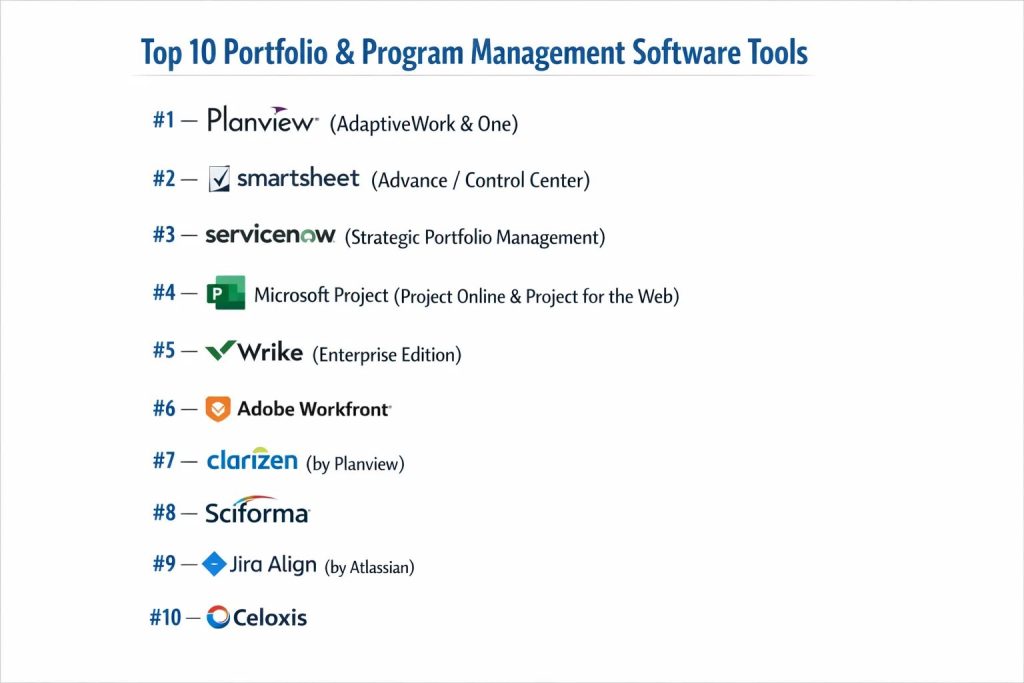
Top 10 Portfolio & Program Management Software Tools
#1 — Planview (AdaptiveWork & One)
A market leader in Strategic Portfolio Management (SPM), Planview provides an end-to-end platform that connects strategy to delivery across the entire enterprise.
Key Features
- Strategy-to-Outcome Mapping: Connects high-level objectives directly to team-level work.
- What-If Scenario Modeling: Advanced simulation engine to test the impact of changing project priorities.
- Professional Services Automation (PSA): Deep tools for managing billable resources and project finances.
- Strategic Roadmapping: Visualizes long-term plans and cross-program dependencies.
- Outcome Tracking: Measures the actual business value realized vs. the original business case.
- Agile Program Management: Supports SAFe and other scaled agile frameworks.
Pros
- Unmatched Depth: The most robust tool for complex, global enterprise portfolios.
- Comprehensive Reporting: Powerful analytics that can satisfy the most demanding CFOs.
Cons
- Complexity: Requires a significant investment in training and a dedicated administrator.
- Implementation Time: Large-scale rollouts can take several months to fully configure.
Platforms / Deployment
- Web / iOS / Android
- Cloud / Hybrid
Security & Compliance
- SOC 2 Type II, ISO 27001, FedRAMP, HIPAA.
Integrations & Ecosystem
Deep native integrations with enterprise systems.
- SAP & Oracle ERP
- Jira & Azure DevOps
- Salesforce
- Microsoft 365
Support & Community
Planview offers “Planview Academy,” global user groups, and 24/7 premium support.
#2 — Smartsheet (with Advance/Control Center)
A flexible, spreadsheet-inspired platform that uses its “Control Center” to provide powerful portfolio-level governance and automated project provisioning.
Key Features
- Control Center: Automates the creation of new project sheets, dashboards, and reports for consistency.
- Portfolio Reporting: Aggregates data from thousands of sheets into real-time executive views.
- Resource Management: Capacity planning and time tracking integrated directly into project views.
- Data Shuttle: Automatically syncs data with other enterprise databases without manual entry.
- Dynamic View: Selective sharing of project data with external vendors while maintaining security.
- Automated Workflows: Logic-based triggers to move projects through stage-gate approvals.
Pros
- High Adoption: Most users find it intuitive due to the familiar grid-like interface.
- Fast Deployment: Can be set up significantly faster than traditional PPM suites.
Cons
- Add-on Costs: Many advanced PPM features require “Advance” or “Control Center” tiers.
- Formula Complexity: Extremely complex portfolios may require sophisticated spreadsheet logic.
Platforms / Deployment
- Web / iOS / Android
- Cloud
Security & Compliance
- SOC 2, ISO 27001, GDPR, HIPAA, FedRAMP (Smartsheet Gov).
Integrations & Ecosystem
- Microsoft Teams & Slack
- Power BI & Tableau
- Adobe Creative Cloud
Support & Community
Large community forum, professional certification programs, and active template marketplace.
#3 — ServiceNow (Strategic Portfolio Management)
Part of the Now Platform, ServiceNow SPM aligns work with business strategy and provides a unified view of all digital and non-digital investments.
Key Features
- Demand Management: Centralized intake for all IT and business requests with scoring rubrics.
- Financial Planning: Tracks budgets, actuals, and forecasts across the entire portfolio.
- Resource Management: Real-time visibility into staff capacity and skill sets across the enterprise.
- Alignment Planner Workspace: A visual roadmap tool to plan and prioritize work based on goals.
- Scenario Planning: Compare different portfolio compositions based on budget and resource constraints.
- Project Intelligence: AI-powered suggestions for project health and risk mitigation.
Pros
- Unified Platform: Ideal for organizations already using ServiceNow for ITSM or HR.
- Enterprise Governance: Strongest stage-gate and audit trail capabilities on the market.
Cons
- User Interface: Can feel very “technical” and rigid for non-IT users.
- Price Point: Generally targeted at the high-end enterprise market with premium pricing.
Platforms / Deployment
- Web / iOS / Android
- Cloud
Security & Compliance
- SOC 1 & 2, ISO 27001, HIPAA, FedRAMP High.
Integrations & Ecosystem
- Seamless with all other ServiceNow modules (ITSM, ITOM, HR).
- Jira & Azure DevOps
- SAP
Support & Community
Extensive global partner network and the “Now Learning” certification portal.
#4 — Microsoft Project (Project Online & Project for the Web)
The traditional powerhouse of project management, now evolved into a cloud-based PPM solution integrated with the Power Platform.
Key Features
- Portfolio Analysis: Advanced engine for analyzing project proposals and optimizing for constraints.
- Resource Leveling: Industry-leading tools for resolving resource over-allocations.
- Power BI Integration: Native, high-level reporting dashboards for all project data.
- Timesheet Management: Centralized time collection for payroll and project costing.
- Roadmap: A high-level view that allows PMs to aggregate projects into a single timeline.
- Copilot in Project: AI that generates plans and summarizes status reports.
Pros
- Standardization: Most professional PMs are already trained in Microsoft Project logic.
- Office 365 Synergy: Perfect integration with Teams, SharePoint, and Excel.
Cons
- Legacy Feel: Project Online can feel dated compared to modern “Work OS” platforms.
- Licensing Complexity: Managing different licenses (Plan 1, 3, 5) can be confusing for IT teams.
Platforms / Deployment
- Web / Windows / iOS / Android
- Cloud / On-Premise
Security & Compliance
- Part of the Microsoft Trust Center (SOC 2, ISO, HIPAA, FedRAMP).
Integrations & Ecosystem
- Full Microsoft 365 Stack
- Azure DevOps
- GitHub
Support & Community
Unrivaled global ecosystem of consultants, trainers, and user communities.
#5 — Wrike (Enterprise Edition)
A high-performance work management platform that has expanded into the PPM space with advanced resource management and custom enterprise governance.
Key Features
- PPM Dashboards: Aggregates project health, budget status, and resource utilization.
- Work Intelligence: AI that identifies projects “at risk” and suggests corrective actions.
- Custom Request Forms: Standardizes the intake of new programs and automates project creation.
- Budget Tracking: Manage project costs and financial performance within the task environment.
- Resource Bookings: Formal resource request and approval system for project managers.
- Dynamic Request Forms: Conditional logic to route project requests to the right stakeholders.
Pros
- Versatility: Equally effective for marketing, IT, and operations teams.
- Speed: One of the fastest interfaces in the enterprise category.
Cons
- Scaling: Managing very large portfolios (1,000+ active projects) requires strict folder discipline.
- Learning Curve: The density of features can be high for casual users.
Platforms / Deployment
- Web / Win / Mac / iOS / Android
- Cloud
Security & Compliance
- SOC 2 Type II, ISO 27001, GDPR, Wrike Lock (Encryption).
Integrations & Ecosystem
- Slack & Microsoft Teams
- Salesforce
- Tableau
Support & Community
24/7 support, dedicated account managers for enterprise, and active community forums.
#6 — Adobe Workfront
A specialized enterprise PPM tool that excels in creative orchestration and marketing program management, now fully integrated into the Adobe ecosystem.
Key Features
- Scenario Planner: High-level planning tool for continuous portfolio prioritization.
- Resource Planner: Visualizes team capacity against demand for creative and IT resources.
- Strategic Goals: Directly links individual tasks to company-wide strategic objectives.
- Native Proofing: Integrated review and approval tools for digital assets.
- Workfront Fusion: A powerful integration layer to connect Workfront to the entire SaaS stack.
- Agile + Waterfall: Supports true hybrid project delivery workflows.
Pros
- Creative King: The best choice for marketing organizations and creative agencies.
- Enterprise Scale: Built to handle thousands of users across global regions.
Cons
- Implementation Cost: Professional services are almost always required for setup.
- Pricing: Targeted at large enterprises; not viable for most SMBs.
Platforms / Deployment
- Web / iOS / Android
- Cloud
Security & Compliance
- SOC 2 Type II, ISO 27001, HIPAA.
Integrations & Ecosystem
- Adobe Creative Cloud (Photoshop, InDesign, etc.)
- Adobe Experience Manager
- Microsoft 365
Support & Community
Robust training via “Workfront One” and a dedicated customer success program.
#7 — Clarizen (by Planview)
Now part of the Planview family, Clarizen remains a standalone favorite for its highly configurable, cloud-native approach to enterprise PPM and PSA.
Key Features
- Real-time 360 Degree View: Live dashboards that update as soon as a task is completed.
- Financial Management: Tracks project revenue, costs, and profitability in real-time.
- Collaborative Planning: Allows teams to brainstorm and plan projects in a shared workspace.
- Capacity Planning: Advanced tools to balance skills and availability across portfolios.
- Governance Filters: Customizable rules to ensure all projects follow company policy.
- Workflow Automation: Powerful engine to automate project status changes and notifications.
Pros
- Configuration: One of the most flexible data models in the PPM market.
- UI/UX: Generally considered more modern and “usable” than traditional enterprise tools.
Cons
- Consolidation Risk: Since being acquired by Planview, users may face long-term migration paths.
- Advanced Features: Some deep reporting features require significant technical knowledge to set up.
Platforms / Deployment
- Web / iOS / Android
- Cloud
Security & Compliance
- SOC 2 Type II, ISO 27001, GDPR.
Integrations & Ecosystem
- Salesforce (Best-in-class integration)
- Jira
- Box & Google Drive
Support & Community
Active user forums and a professional services network for custom deployments.
#8 — Sciforma
A specialized PPM tool focused on strategic alignment and execution for mid-market and enterprise companies in manufacturing, healthcare, and finance.
Key Features
- Idea & Demand Management: Standardized scoring models to select the right projects.
- Strategic Roadmapping: Visualizes how portfolios evolve over multiple years.
- Capacity Planning: Detects resource bottlenecks before they impact project delivery.
- Financial Control: Full tracking of project budgets, forecasts, and actuals.
- Time Tracking: Integrated timesheets for accurate resource costing.
- Project Monitoring: Automated health checks and KPI tracking.
Pros
- Methodology Support: Strong support for Critical Chain Project Management (CCPM).
- Focus: Less “clutter” than general-purpose tools; highly focused on PPM.
Cons
- Limited Ecosystem: Smaller marketplace of third-party integrations compared to Microsoft or Smartsheet.
- Visual Appeal: UI is functional but less contemporary than “Work OS” competitors.
Platforms / Deployment
- Web / iOS / Android
- Cloud / On-Premise
Security & Compliance
- SOC 2, ISO 27001, GDPR.
Integrations & Ecosystem
- SAP & Oracle
- Microsoft 365
- Jira
Support & Community
High-touch customer support and specialized consulting for regulated industries.
#9 — Jira Align (by Atlassian)
Designed for organizations practicing “Scaled Agile,” Jira Align connects team-level work in Jira to high-level strategic business goals.
Key Features
- Strategic Snapshots: High-level views of corporate strategy and OKRs.
- Program Board: Visualizes dependencies between different agile squads in real-time.
- Backlog Prioritization: Tools to rank epics and features based on business value.
- Portfolio Funding: Tracks lean budgeting and investment themes.
- Roadmaps: Dynamic timelines that update as teams finish sprints.
- Risk Management: ROAM (Resolved, Owned, Accepted, Mitigated) analysis for programs.
Pros
- Agile Purity: The undisputed leader for organizations undergoing an Agile Transformation.
- Atlassian Ecosystem: Direct, native sync with Jira Software.
Cons
- Niche: Not suitable for traditional Waterfall-heavy organizations (e.g., Construction).
- Complexity: Requires a very high level of Agile maturity to be effective.
Platforms / Deployment
- Web / Cloud
Security & Compliance
- SOC 2 Type II, ISO 27001, GDPR.
Integrations & Ecosystem
- Jira Software (Required for full value)
- Confluence
- Trello
Support & Community
Supported by the massive global Atlassian partner network and “Atlassian University.”
#10 — Celoxis
A comprehensive, all-in-one PPM platform known for its powerful scheduling engine and affordability relative to enterprise giants.
Key Features
- Powerful Scheduling: Handles complex dependencies and inter-project constraints.
- Project Tracking: Real-time dashboards with visual “Traffic Light” health indicators.
- Resource Optimization: Capacity planning across different roles and geographical regions.
- Financial Management: Tracks profit margins and cost variances at the portfolio level.
- Collaboration Suite: Built-in client portal, file sharing, and discussion boards.
- Custom Reporting: A highly intuitive reporting engine with drill-down capabilities.
Pros
- Value for Money: Offers enterprise-grade PPM features at a much lower price point.
- Flexibility: Available as both a Cloud and On-Premise solution.
Cons
- Brand Awareness: Smaller global footprint than Microsoft or Planview.
- AI Features: While evolving, their predictive AI is currently less advanced than competitors.
Platforms / Deployment
- Web / iOS / Android
- Cloud / On-Premise
Security & Compliance
- SOC 2, GDPR.
Integrations & Ecosystem
- QuickBooks & Xero
- Slack
- Salesforce
Support & Community
Good reputation for responsive customer support and a dedicated onboarding team.
Comparison Table (Top 10 PPM Tools)
| Tool Name | Best For | Platform(s) Supported | Deployment | Standout Feature | Public Rating |
| Planview | Global Strategy | Web, iOS, Android | Cloud/Hybrid | What-if Modeling | 4.6 / 5 |
| Smartsheet | Grid-Native PPM | Web, iOS, Android | Cloud | Control Center | 4.7 / 5 |
| ServiceNow | IT Governance | Web, iOS, Android | Cloud | Strategic Planning | 4.5 / 5 |
| Microsoft Project | Traditional PMO | Web, Win, iOS, Android | Cloud/On-Prem | Copilot AI | 4.4 / 5 |
| Wrike | Cross-Team Scale | Web, Win, Mac, iOS | Cloud | Work Intelligence | 4.5 / 5 |
| Adobe Workfront | Creative Portfolios | Web, iOS, Android | Cloud | Scenario Planner | 4.3 / 5 |
| Clarizen | Configurable PPM | Web, iOS, Android | Cloud | 360-Degree Views | 4.4 / 5 |
| Sciforma | Manufacturing/HC | Web, iOS, Android | Cloud/On-Prem | CCPM Support | 4.2 / 5 |
| Jira Align | Scaled Agile | Web | Cloud | Program Board | 4.5 / 5 |
| Celoxis | Mid-Market Value | Web, iOS, Android | Cloud/On-Prem | Scheduling Engine | 4.6 / 5 |
Evaluation & Scoring of PPM Software
The following scoring model evaluates these tools based on their 2026 performance levels and strategic depth.
| Tool Name | Core (25%) | Ease (15%) | Int. (15%) | Sec. (10%) | Perf. (10%) | Supp. (10%) | Value (15%) | Weighted Total |
| Planview | 10 | 4 | 9 | 10 | 9 | 10 | 6 | 8.15 |
| Smartsheet | 8 | 9 | 9 | 9 | 9 | 9 | 8 | 8.60 |
| ServiceNow | 10 | 4 | 10 | 10 | 9 | 10 | 5 | 8.15 |
| Microsoft Project | 9 | 5 | 10 | 10 | 8 | 9 | 7 | 8.10 |
| Wrike | 8 | 8 | 9 | 9 | 10 | 9 | 8 | 8.55 |
| Adobe Workfront | 9 | 6 | 9 | 9 | 9 | 8 | 6 | 7.85 |
| Clarizen | 9 | 7 | 8 | 8 | 9 | 8 | 7 | 8.00 |
| Sciforma | 9 | 5 | 7 | 9 | 8 | 8 | 8 | 7.70 |
| Jira Align | 10 | 3 | 10 | 9 | 9 | 9 | 6 | 7.85 |
| Celoxis | 8 | 8 | 7 | 8 | 9 | 9 | 10 | 8.25 |
How to interpret these scores:
- Core (25%): Measures high-level portfolio features like scenario modeling and financial tracking.
- Value (15%): A high score indicates a better balance of enterprise features vs. total cost of ownership.
- Security (10%): A 10/10 indicates the presence of high-level government certifications (FedRAMP/SOC 2).
Which PPM Software Tool Is Right for You?
Enterprise IT Organizations
If you are already embedded in the ServiceNow ecosystem for ticket management, their SPM module is the logical choice to unify your IT governance. Alternatively, Planview provides the deepest features for non-IT specific global strategy.
Marketing & Creative Operations
Adobe Workfront is the gold standard for large-scale creative work. Its ability to manage digital asset lifecycles alongside project milestones is unmatched in the PPM space.
Scaled Agile Teams
If your organization is moving away from Waterfall and adopting frameworks like SAFe, Jira Align is the only tool designed from the ground up to support that level of agile transformation.
Mid-Sized Growth Companies
Celoxis and Wrike offer the best path for mid-sized firms that have outgrown basic project tools but aren’t ready for the million-dollar price tag of Planview or ServiceNow.
Spreadsheet-Native Teams
For teams that love Excel but need enterprise governance, Smartsheet (with Control Center) offers the most seamless transition. It allows you to maintain a grid-based workflow while adding a “Governance” layer on top.
Highly Regulated Industries
For manufacturing, defense, or healthcare organizations that require on-premise deployments and strict audit trails, Sciforma and Microsoft Project (On-Premise) remain the strongest candidates.
Budget-Conscious PMOs
Celoxis provides the highest “feature-per-dollar” ratio, making it a favorite for PMOs that need to prove ROI quickly without a massive upfront software investment.
Frequently Asked Questions (FAQs)
What is the difference between Project Management and PPM?
Project Management focuses on delivering a single project (the “how”). PPM focuses on managing a collection of projects as a strategic portfolio to maximize ROI and alignment (the “what” and “why”).
Do I need a dedicated PMO to use PPM software?
While not strictly required, PPM software is most effective when managed by a Project Management Office (PMO) that can standardize processes, scoring rubrics, and reporting cycles across the organization.
Is AI actually useful in PPM?
Yes. AI is used for “Resource Forecasting”—predicting which teams will be overbooked months in advance—and “Sentiment Analysis,” which flags project risks by analyzing team communication trends.
How long does it take to implement a PPM tool?
For tools like Smartsheet or Wrike, implementation can take 4–8 weeks. For heavyweight platforms like Planview or ServiceNow, expect 4–9 months for a full enterprise rollout.
Can these tools handle both Agile and Waterfall projects?
Yes, most top-tier tools now support “Hybrid” project management. You can track a Waterfall infrastructure project and an Agile software sprint in the same portfolio view.
What is “What-If” Scenario Modeling?
It is a feature that allows you to simulate changes—such as “What if we cut the budget by 20%?” or “What if Project X is delayed?”—to see how it impacts the rest of the portfolio before making a real decision.
How much does PPM software cost?
Enterprise pricing is usually tiered. Basic users may cost $15–$25/month, but “Project Manager” or “Portfolio Admin” licenses often range from $45 to $100+ per user per month.
Are PPM tools secure enough for government work?
Yes, tools like Smartsheet Gov, Microsoft Project, and Planview offer FedRAMP-certified versions specifically for government agencies and contractors.
Can PPM software integrate with my HR system?
Most enterprise PPM tools (like ServiceNow and Planview) integrate with HR systems like Workday or Oracle HCM to sync employee skills, availability, and labor costs.
What is “Demand Management” in a PPM context?
Demand management is the process of collecting all new project ideas and requests in one place, scoring them against business goals, and deciding which ones should be funded and executed.
Conclusion
The selection of a Portfolio & Program Management (PPM) tool is a strategic decision that affects the entire organization’s ability to execute. For those deep in IT, ServiceNow is the frontrunner; for those needing maximum flexibility, Smartsheet and Wrike offer the best paths. Ultimately, the tool must serve your organizational maturity—don’t buy a Ferrari if your team is still learning to ride a bicycle.