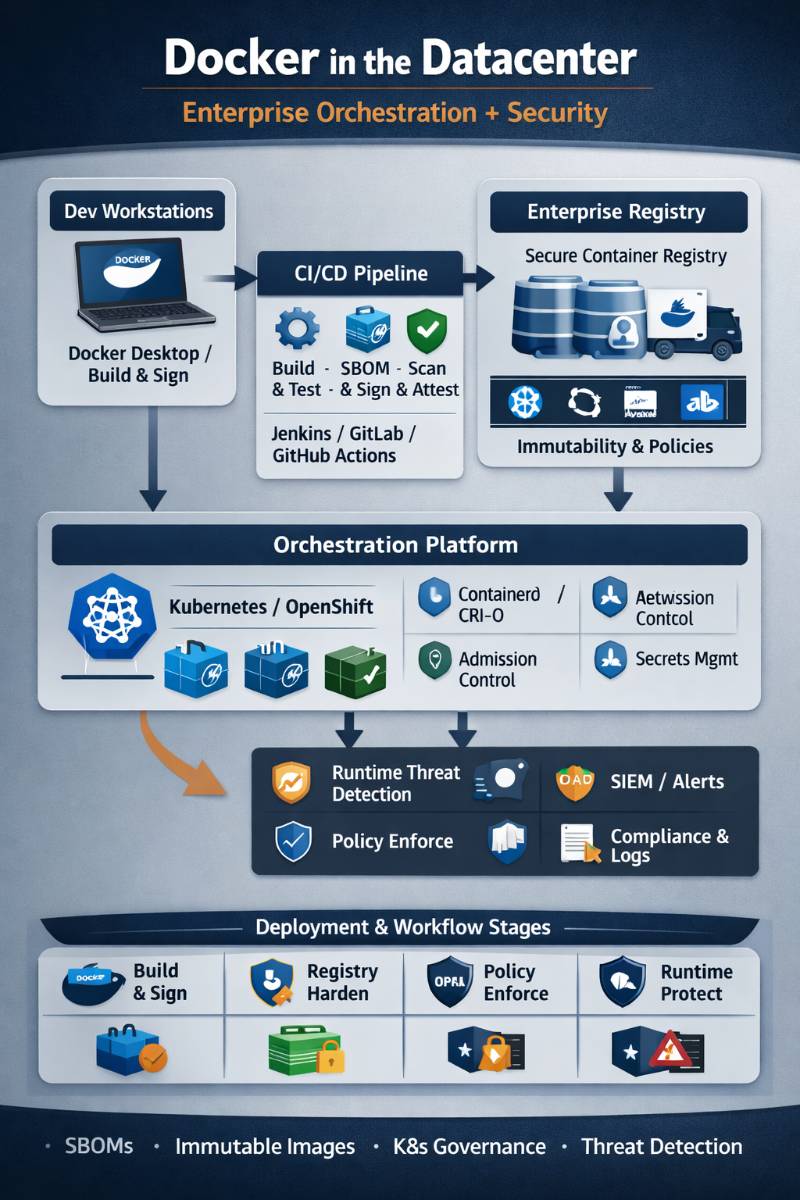
I’ll be blunt from 20+ years of shipping systems: Docker is not “the platform” in an enterprise datacenter. Docker is the developer experience + image packaging standard that feeds an orchestration platform (usually Kubernetes or OpenShift) and a security program (supply chain + runtime controls). If you treat Docker like the whole story, you end up with snowflake hosts, unpatchable images, and “it worked on my laptop” outages.
Below is how I design, implement, and operate Docker-based container platforms end-to-end in real datacenters—small setups to regulated enterprises—focusing on orchestration and security with practical gates and failure modes.
1) What / Why / When / Where / How
What “Docker at the Datacenter” really means
In enterprise terms, Docker typically shows up in four places:
- Build & packaging: Dockerfiles, BuildKit/buildx, image tagging, multi-arch builds.
- Developer runtime: Docker Desktop / Linux Docker Engine for local dev.
- Distribution: Pushing images to a registry (Harbor / Artifactory / ECR / ACR / GCR, etc.).
- Security controls: SBOMs, vulnerability scanning, policy evaluation, signing/attestations.
And in production orchestration:
- Kubernetes does not use Docker Engine as its runtime anymore (dockershim is gone). Production clusters run containerd / CRI-O and pull OCI images built by Docker tooling. ()
Why enterprises standardize on Docker images
Because images give you:
- Consistent deployment units (app + deps)
- Faster environment parity
- Repeatable CI/CD
- A base for supply-chain security (SBOM/provenance/signing)
When containers (and Docker images) are the right choice
Good fit
- Stateless microservices, APIs, batch jobs
- CI runners/build agents
- Standardized packaging for polyglot stacks
- Repeatable, immutable deployments
Be careful / not ideal
- Stateful systems without a mature storage strategy
- Ultra-low-latency workloads where kernel noise matters
- Legacy apps that assume mutable hosts and in-place upgrades
Where this runs in a datacenter
- Bare metal (best performance, best isolation control)
- VMware / private cloud (common, operationally familiar)
- Hybrid (on-prem + public cloud)
- Air-gapped segments for regulated workloads
How you make it work
You need an end-to-end method:
- Build discipline (repeatable, minimal, signed)
- Registry discipline (private, governed, replicated)
- Orchestrator discipline (K8s/OpenShift + policies)
- Security discipline (supply chain + runtime + incident response)
2) Core Concepts & Mental Models (How I Teach Senior Engineers)
Mental Model A: “Image Supply Chain = Software Factory”
Think of every image as a manufactured artifact:
- Inputs: base image + source code + dependencies
- Process: build steps, tests, scanners, SBOM/provenance generation
- Outputs: immutable image + metadata + signatures
- Quality gates: policy checks, vulnerability thresholds, provenance requirements
Modern Docker-native tooling increasingly bakes this in (SBOM + policies). For example, Docker Scout Policy Evaluation adds explicit rules for artifact quality and supply-chain requirements. ()
Mental Model B: “Orchestration is about intent, not containers”
In enterprise, we don’t “run containers”—we run desired state:
- replicas, rollout strategy, health checks
- resource guarantees/limits
- network identity and access
- secrets and config injection
- policy enforcement
Docker helps you package. Orchestrators help you operate.
Mental Model C: “Security has layers—if one layer fails, another catches it”
Container security is never a single tool. I always split it into:
- Build-time security (SBOM, scanning, provenance, signing)
- Registry security (admission rules, immutability, replication)
- Deploy-time security (admission controls, pod standards)
- Runtime security (behavior detection, syscall policies, eBPF)
- Host & network security (kernel hardening, segmentation)
NIST’s container security guidance still frames the risk areas well (image, registry, orchestrator, host, runtime). ()
3) Orchestration Choices in Enterprise (Decision Matrix I Actually Use)
The short version
- Compose: single-host, dev/test, small internal tooling
- Swarm: simple clustering, smaller ops teams, but fewer enterprise patterns
- Kubernetes: default for serious enterprise orchestration
- OpenShift: enterprise Kubernetes with strong governance & platform features
- Nomad: viable in some orgs (Hashi ecosystem), fewer K8s-native tools
Docker still documents Swarm mode as a clustering/orchestration option.
Decision matrix
| Option | Where I use it | Strengths | Weaknesses / hidden costs |
|---|---|---|---|
| Docker Compose | Single-node apps, dev, PoCs | Simple, fast | Not a platform; no multi-node HA |
| Docker Swarm | Small/medium internal platforms | Easy to operate vs K8s | Smaller ecosystem; fewer policy/security primitives |
| Kubernetes | Most enterprise platforms | Best ecosystem, policy, observability | Steeper learning curve; platform engineering required |
| OpenShift | Regulated/large enterprise | Built-in governance + enterprise workflows | Cost + platform complexity |
| Nomad | Mixed workloads, Hashi shops | Simpler than K8s for some | Smaller cloud-native ecosystem |
My rule: if you expect multi-team scale, multi-tenancy, strong policy enforcement, or regulated controls, you almost always land on Kubernetes/OpenShift.
4) Security: What I Enforce (and Why)
4.1 Build-time: reduce risk before runtime
What I enforce as “non-negotiable” gates:
- Pin base images by digest (not mutable tags like
latest) - Generate SBOM for every build
- Sign images (keyless or key-based)
- Attach provenance/attestations (SLSA-style)
- Fail builds on critical issues (policy-driven)
Docker is pushing hard on hardened bases and supply-chain metadata. Their Docker Hardened Images emphasize reduced vulnerabilities plus SBOMs and provenance signals. ()
For image signing, I use Sigstore cosign in many pipelines because it’s practical and widely supported. ()
4.2 Deploy-time: stop bad workloads from entering the cluster
In Kubernetes, I align workloads to Pod Security Standards (Privileged / Baseline / Restricted) and enforce with admission. ()
What I’ve learned the hard way:
If you don’t enforce at admission time, you’ll end up trying to “hunt and fix” risky workloads later—painful, political, and slow.
4.3 Runtime: detect what slipped through
Even with strong build gates, you need runtime coverage:
- syscall monitoring (Falco / eBPF-based tools)
- container escapes and suspicious child processes
- unexpected network egress
- crypto-mining behaviors
- privilege escalation patterns
4.4 Desktop/Dev environment security matters too
Enterprises often forget dev endpoints are part of the attack surface. Docker provides Enhanced Container Isolation for Docker Desktop to harden isolation on developer machines. ()
5) Reference Architecture (Enterprise Datacenter)
Here’s the reference architecture I use (conceptually) for most enterprises:
Dev Workstations
  - Docker Desktop / Docker Engine
  - Local policies + ECI (where applicable)

        | (git push / PR)
        v

CI System (Jenkins/GitLab/GitHub Actions)
  - BuildKit/buildx
  - Unit/integration tests
  - SBOM generation
  - Vulnerability scan
  - Policy evaluation
  - Sign + attest

        | (push OCI image + metadata)
        v

Enterprise Registry (Harbor/Artifactory/ECR/ACR)
  - Immutable tags / retention
  - Replication (DC1 <-> DC2)
  - Access control (RBAC)
  - Admission policies (only signed images)

        | (pull)
        v

Orchestrator (Kubernetes / OpenShift)
  - containerd/CRI-O runtime
  - Admission (PSS + OPA/Kyverno)
  - Network policies (CNI like Cilium/Calico)
  - Secrets (Vault / external secrets)
  - Observability (Prometheus + logs + traces)

        | (telemetry)
        v

Security + Operations
  - SIEM/SOAR integration
  - Runtime detection
  - Incident response playbooks
  - SLOs + DORA + cost KPIs
Code language: HTML, XML (xml)
6) End-to-End Methodology (Phases, Gates, Decision Points)
Phase 0 — Platform decision gate (don’t skip this)
Decisions I force early:
- Orchestrator: K8s vs OpenShift vs Swarm
- Tenant model: single-tenant vs multi-tenant clusters
- Registry: on-prem vs managed vs hybrid replication
- Compliance: air-gap requirements? audit trails? retention?
Gate: You don’t start migrating apps until you can answer:
“How do I patch base images and roll changes fleet-wide in <30 days?”
Phase 1 — Build standardization
- Standard Dockerfile patterns
- Base image policy (approved bases only)
- Tagging standard:
app:semver,app:gitsha, plus digests - Multi-arch builds if needed
Gate: every image must be reproducible and traceable to a commit.
Phase 2 — Supply-chain security pipeline
- SBOM generation and storage
- Vulnerability scanning
- Policy evaluation (fail builds on policy)
- Signing + provenance
This is where tooling like Docker Scout policy evaluation can fit if your org is Docker-centric. ()
Gate: cluster only pulls images that pass policy + are signed.
Phase 3 — Registry hardening
- Private registry + RBAC
- Immutable tags for releases
- Replication across datacenters
- Garbage collection + retention (avoid registry turning into a trash heap)
Gate: image availability survives a datacenter outage (DR tested).
Phase 4 — Orchestrator foundation
- Cluster lifecycle management
- Ingress/LB patterns
- Storage classes & backup
- Node hardening + runtime choice (containerd/CRI-O)
Gate: you can do a safe canary rollout + rollback under load.
Phase 5 — Workload onboarding
Start with:
- stateless, low-risk services
- clear health checks
- clear resource envelopes (requests/limits)
Then move to:
- stateful workloads with well-tested storage and backup
Gate: app teams must meet operational SLO definitions before production cutover.
Phase 6 — Operations + incident response
- golden signals + SLOs
- runtime security playbooks
- CVE patch SLAs
- disaster recovery exercises
7) Best Practices vs Anti-Patterns (Stuff I’ve Seen Blow Up)
Best practices I insist on
- Rootless where possible (or at least non-root containers)
- Distroless/minimal images for runtime
- Multi-stage builds (builder image ≠ runtime image)
- No shell in production images unless justified
- Read-only root filesystem where feasible
- Explicit egress controls (deny-by-default in regulated zones)
- Admission control is mandatory for enterprise scale (PSS + policy-as-code)
Anti-patterns I block in reviews
latesttags in production- Mounting
/var/run/docker.sockinto containers (instant privilege escalations) - Running privileged containers “because it’s easier”
- Baking secrets into images
- Treating the registry like a dumping ground (no retention/GC)
- “Scan once, deploy forever” (no rebuild cadence)
8) Tooling Map (What to Use, and When)
Build & packaging
| Need | Tools I pick | Notes |
|---|---|---|
| Fast, modern Docker builds | BuildKit / buildx | Default choice in most Docker-based shops |
| Rootless builds in CI | buildah / kaniko | Useful in restricted CI environments |
| Multi-arch builds | buildx | Standard approach for AMD64/ARM64 |
Registry
| Need | Tools |
|---|---|
| On-prem governed registry | Harbor |
| Artifact + repo ecosystem | JFrog Artifactory / Sonatype Nexus |
| Cloud-native | ECR / ACR / GCR |
Scanning & SBOM
| Need | Tools |
|---|---|
| Quick vuln scanning | Trivy / Grype |
| SBOM generation | Syft / CycloneDX tools |
| Policy-driven posture | Docker Scout policies, OPA-based checks |
(Docker Scout has explicit policy evaluation support you can build gates around. ())
Signing & provenance
| Need | Tools |
|---|---|
| Keyless signing | cosign (Sigstore) () |
| Attestations/provenance | cosign attest / SLSA-aligned provenance |
| Enterprise trust distribution | integrate with registry + admission policies |
Kubernetes policy & governance
| Need | Tools |
|---|---|
| Enforce Pod Security Standards | Pod Security Admission () |
| Policy as code | OPA Gatekeeper / Kyverno |
| Compliance checks | kube-bench, CIS benchmarks () |
9) Real-world Use Cases (Small → Enterprise; Regulated vs Non)
Small (1–10 services)
- Docker Compose or a small K8s distro
- Simple private registry
- Basic scanning + rebuild cadence
Main risk: no discipline → images drift, secrets leak, patching never happens.
Medium (10–100 services)
- Kubernetes with a strong platform baseline
- Central CI templates for Docker builds
- Standard observability stack
Main risk: platform becomes “DIY PaaS” with no ownership model.
Enterprise (100+ services, many teams)
- Kubernetes/OpenShift with multi-tenancy controls
- Strong admission control
- Artifact governance + signing required
- Runtime detection integrated into SOC/SIEM
Main risk: governance fights (“security slows us down”) unless you automate gates and provide paved roads.
Regulated environments (finance/health/gov)
What changes:
- Air-gapped or controlled connectivity
- Private registry replication + strict retention/audit
- Mandatory SBOM + provenance + signing
- Strong egress restrictions + audit logging
- Formal exception process (time-boxed)
10) Pros, Cons, Hidden Costs, Failure Modes
Pros
- Faster deploy cycles with immutable artifacts
- Better reproducibility than “golden VM images”
- Strong foundation for DevSecOps automation
Cons / hidden costs
- Image sprawl (storage and retention pain)
- Patch pressure: you must rebuild often
- Policy complexity: misconfigured admission breaks deployments
- Skills cost: platform engineering is real engineering
- Observability noise: you need good signal design
Failure modes I see repeatedly
- Registry outage blocks deploys (no replication, no caching strategy)
- Base image CVE storms (no rebuild cadence)
- Over-permissive policies (easy now, breach later)
- Over-restrictive policies (breaks prod, teams bypass controls)
11) Checklists (My go/no-go lists)
Pre-implementation checklist
- Orchestrator decision finalized (K8s/OpenShift/other)
- Registry selected + replication plan defined
- Base image policy defined (allowed images, pinned digests)
- CI templates agreed (build, scan, SBOM, sign)
- Incident ownership model agreed (who is on-call for platform?)
Implementation checklist
- SBOM generated and stored per build
- Vulnerability scanning enforced with thresholds
- Signing + provenance in place
- Admission policies active (PSS + org policies)
- Namespace tenancy model implemented
- Network policies baseline applied
- Secrets management integrated (no plaintext secrets in manifests)
Rollout checklist
- Canary strategy proven under load
- Rollback tested and timed
- Runbooks written (deploy, rollback, incident triage)
- DR test: registry + cluster restore
- Exception process defined (time-boxed)
Operations checklist
- CVE patch SLA defined (e.g., critical within X days)
- Image rebuild cadence implemented
- Policy drift monitoring (who changed what?)
- DORA metrics tracked per team/service
- Runtime alerts wired into SOC/on-call
12) Metrics & Success Criteria (KPIs I Track)
Delivery (DORA)
- Deployment frequency
- Lead time for changes
- Change failure rate
- MTTR
Reliability/SLOs
- Availability SLO per service
- Error rate + latency (p95/p99)
- Saturation (CPU/mem throttling, disk IO, network)
Security
- Mean time to remediate critical CVEs in base images
- % of workloads running as non-root
- % images signed + with provenance
- Admission denials trend (are teams fighting policies?)
ROI indicators
- Reduced outage hours from configuration drift
- Reduced mean deploy time
- Fewer “hotfix-in-prod” events
- Lower audit effort due to automated evidence (SBOM/provenance)
13) Common Challenges + Fix Patterns (How I Troubleshoot)
“Works locally, fails in cluster”
Patterns I check:
- missing env vars/config maps
- filesystem assumptions (read-only rootfs)
- wrong CPU arch (multi-arch build issue)
- DNS/service discovery differences
Container crash loops
I look for:
- bad health checks (too strict, too soon)
- OOMKilled → fix requests/limits + memory leaks
- dependency readiness (DB not ready; add init containers or backoff)
Registry pain
- Pull throttling / slow pulls → add caching proxies, tune concurrency
- Tag chaos → enforce immutability for release tags, promote via digest
Security policies blocking teams
- Start with baseline, then ratchet to restricted
- Provide “paved road” templates so teams don’t write YAML from scratch
Pod Security Standards give you clear policy levels to graduate through. ()
14) Future Trends (Next 12–24 Months, and AI Impact)
Here’s what I expect to matter most soon:
- Stronger supply-chain enforcement becomes normal
SBOM + provenance + signing won’t be “nice to have”; it’ll be procurement and audit baseline. Docker’s push toward hardened images and policy-driven evaluation is aligned with this direction. () - “Hardened by default” base images grow
More teams adopt curated minimal bases to cut CVE noise and reduce attack surface. () - Runtime isolation options expand
gVisor/Kata/Confidential Containers will be used more for multi-tenant and regulated workloads (especially where “container escape” risk is unacceptable). - Policy-as-code becomes productized
Instead of tribal knowledge, orgs codify deployment rules and compliance evidence. - AI/AIOps helps with triage, not with responsibility
AI will accelerate: log summarization, anomaly detection, “why did rollout fail?” clustering, and CVE prioritization. But ownership still matters—AI doesn’t fix broken SLOs or messy governance.
A final practitioner note (how I keep this from becoming bureaucracy)
If you want this to succeed enterprise-wide: make the secure path the easiest path.
- Provide build templates
- Provide approved base images
- Provide golden Helm charts/manifests
- Automate evidence collection
- Keep exceptions rare, time-boxed, and visible
If you want, I can also provide:
- a sample enterprise policy set (build gates + admission rules) in human-readable form, and
- a rollout plan tailored to your environment (VMware/on-prem, air-gapped, regulated, etc.).