MOTOSHARE 🚗🏍️
Turning Idle Vehicles into Shared Rides & Earnings
From Idle to Income. From Parked to Purpose.
Earn by Sharing, Ride by Renting.
Where Owners Earn, Riders Move.
Owners Earn. Riders Move. Motoshare Connects.
With Motoshare, every parked vehicle finds a purpose.
Owners earn. Renters ride.
🚀 Everyone wins.

What is Secure Sockets Layer (SSL)?
Secure Sockets Layer (SSL) is a widely adopted cryptographic protocol designed to provide secure communication over a computer network, primarily the Internet. SSL was originally developed by Netscape in the mid-1990s to establish encrypted links between web servers and browsers, ensuring confidentiality, integrity, and authentication of data transmitted.
SSL creates a secure channel by encrypting data exchanged between client and server, preventing eavesdropping, tampering, and message forgery. It protects sensitive information such as login credentials, credit card numbers, and private communications. Although SSL has largely been succeeded by Transport Layer Security (TLS), the term “SSL” remains commonly used to describe this family of protocols.
SSL operates between the transport and application layers of the OSI model and is the backbone of secure internet protocols such as HTTPS, FTPS, and SMTPS.
Major Use Cases of Secure Sockets Layer
SSL has become fundamental in securing a wide range of internet communications. Key use cases include:
- Securing Web Traffic (HTTPS):
SSL encrypts HTTP traffic, transforming it into HTTPS, the secure version of HTTP. This is the most common SSL use case, safeguarding website-user interactions like online banking, e-commerce, and social media. - Email Security:
Protocols such as SMTPS, IMAPS, and POP3S use SSL to protect email transmissions between clients and mail servers, preventing interception of sensitive communications. - Virtual Private Networks (VPNs):
SSL VPNs provide secure remote access to enterprise networks without requiring traditional VPN clients, leveraging SSL encryption for confidentiality and authentication. - File Transfers:
Secure versions of FTP (FTPS) use SSL to encrypt data transfers, ensuring files aren’t intercepted or modified in transit. - Authentication and Data Integrity:
SSL certificates issued by Certificate Authorities (CAs) provide server authentication and digital signatures, helping users verify the identity of websites or services. - Application Layer Security:
Beyond web, SSL secures application protocols like LDAP, database connections, and messaging systems.
How Secure Sockets Layer Works Along with Architecture
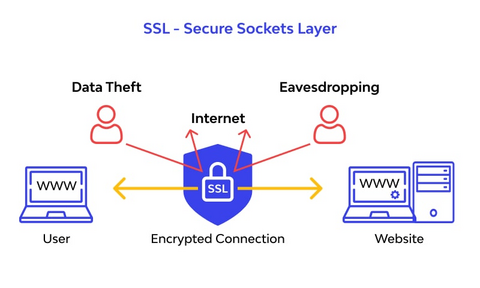
SSL functions through a layered architecture combining cryptographic algorithms, protocols, and certificates to establish secure sessions. Its architecture can be broken down into two main layers:
1. SSL Handshake Protocol
The handshake protocol sets up the secure connection and negotiates encryption parameters between client and server:
- ClientHello:
The client initiates the handshake by sending supported SSL versions, cipher suites (encryption algorithms), and a random number. - ServerHello:
The server responds with selected SSL version, cipher suite, its own random number, and its digital certificate containing the public key. - Authentication and Pre-Master Secret:
The client verifies the server’s certificate against trusted Certificate Authorities. Then the client generates a pre-master secret, encrypts it with the server’s public key, and sends it. - Session Key Generation:
Both client and server use the exchanged random numbers and pre-master secret to independently generate the same symmetric session keys for encryption and message authentication. - Handshake Completion:
The client and server exchange Finished messages encrypted with the session key, confirming the handshake’s success.
2. SSL Record Protocol
Once the handshake completes, the SSL Record Protocol takes over for secure data transmission:
- Fragmentation:
Data from the application layer is fragmented into manageable blocks. - Compression (Optional):
Data may be compressed before encryption to reduce size. - Message Authentication Code (MAC):
A MAC is computed and appended to each block to ensure integrity. - Encryption:
The block (data + MAC) is encrypted using the symmetric session key. - Transmission:
Encrypted data is sent over the network. - Decryption and Verification:
On the receiving end, the data is decrypted and MAC verified before being passed up to the application layer.
Basic Workflow of Secure Sockets Layer
Here’s the typical SSL workflow from the client-server interaction perspective:
- Client initiates connection to the server over TCP/IP.
- SSL Handshake starts, negotiating protocol version, cipher suites, and authentication.
- Server sends its digital certificate, which client validates.
- Client sends encrypted pre-master secret using server’s public key.
- Both parties generate symmetric session keys based on shared secrets.
- Handshake concludes, and secure symmetric encryption begins.
- Data transfer occurs encrypted using the session keys.
- Connection terminates gracefully or due to timeout/error.
Step-by-Step Getting Started Guide for Secure Sockets Layer
To implement SSL on your server and secure your web application, follow these practical steps:
Step 1: Obtain an SSL Certificate
- Generate a Certificate Signing Request (CSR) on your server.
- Submit CSR to a trusted Certificate Authority (CA) (e.g., Let’s Encrypt, DigiCert, Comodo).
- Receive the signed SSL certificate files from the CA.
Step 2: Install SSL Certificate on the Server
- For web servers like Apache, Nginx, or IIS, install the certificate, private key, and CA bundle as per the server’s documentation.
- Configure the server to enable HTTPS by specifying the SSL certificate locations and enabling SSL modules.
Step 3: Configure Web Server for SSL
- Enable SSL/TLS protocols and disable outdated versions (SSL 2.0/3.0).
- Select strong cipher suites (e.g., AES, ChaCha20).
- Enable HTTP Strict Transport Security (HSTS) to enforce HTTPS.
Step 4: Test SSL Configuration
- Use tools like SSL Labs’ SSL Test (https://www.ssllabs.com/ssltest/) to verify configuration, certificate validity, and security.
Step 5: Redirect HTTP to HTTPS
- Configure server or application-level redirects to force secure connections.
Step 6: Maintain SSL Certificate
- Monitor expiration and renew certificates promptly.
- Keep server software updated to patch vulnerabilities.