MOTOSHARE 🚗🏍️
Turning Idle Vehicles into Shared Rides & Earnings
From Idle to Income. From Parked to Purpose.
Earn by Sharing, Ride by Renting.
Where Owners Earn, Riders Move.
Owners Earn. Riders Move. Motoshare Connects.
With Motoshare, every parked vehicle finds a purpose.
Owners earn. Renters ride.
🚀 Everyone wins.
Introduction
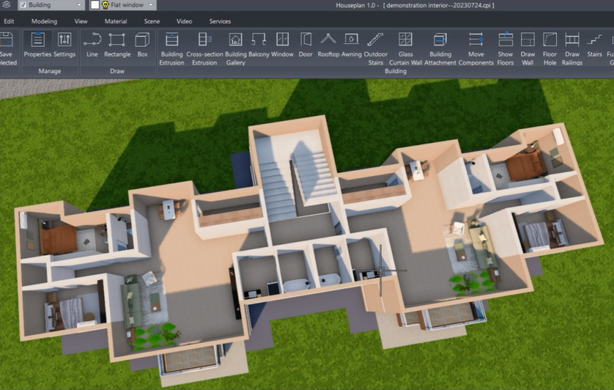
In the ever-evolving world of design, real estate, and architecture, floor plan software has become an essential tool. As the demand for creating efficient, precise, and visually appealing layouts continues to rise, choosing the right floor plan software has never been more important. In 2025, floor plan tools are no longer just for architects and designers – they are being used by real estate agents, interior designers, and even DIY homeowners to create accurate blueprints and conceptual designs.
Floor plan software tools have evolved to include advanced features like 3D modeling, virtual tours, integration with smart home technologies, and even augmented reality (AR). The ease of use and ability to quickly generate accurate layouts has made these tools indispensable for professionals and hobbyists alike. With so many options available, it can be challenging to determine which one suits your needs best.
This blog post delves into the top 10 floor plan software tools of 2025, comparing their features, benefits, and drawbacks, helping you make an informed decision for your next project.
Top 10 Floor Plan Software Tools in 2025
1. SketchUp
Short Description:
SketchUp is one of the most popular floor plan tools for professionals, offering powerful 3D modeling capabilities. Ideal for architects and interior designers, SketchUp’s intuitive interface allows users to easily create detailed floor plans and models.
Key Features:
- 3D modeling and visualization
- Extensive library of pre-built components
- Real-time collaboration with team members
- Easy-to-use interface with drag-and-drop functionality
- Integration with third-party plugins and extensions
Pros:
- Extensive community with tutorials and resources
- Free version available for basic use
- Highly customizable
Cons:
- Can have a steep learning curve for beginners
- Requires a subscription for advanced features
- Limited rendering capabilities in the free version
2. AutoCAD
Short Description:
AutoCAD is a professional-grade CAD software that is widely used for architectural and engineering floor plans. With its precise drafting tools, AutoCAD is perfect for creating highly detailed and customizable blueprints.
Key Features:
- Precision drafting and design tools
- 2D and 3D modeling
- Extensive library of templates and symbols
- Cloud collaboration for real-time editing
- High-quality rendering options
Pros:
- Industry-standard tool trusted by professionals
- Comprehensive set of drawing and editing tools
- Compatible with other Autodesk products
Cons:
- High subscription cost
- Steep learning curve for beginners
- System-intensive and requires high-end hardware
3. RoomSketcher
Short Description:
RoomSketcher is a versatile and user-friendly floor plan tool aimed at both professionals and home enthusiasts. It allows users to create detailed 2D and 3D floor plans, as well as visualize spaces in real time.
Key Features:
- Easy drag-and-drop interface
- 3D visualization and walkthroughs
- Customizable floor plans with different materials
- Cloud-based storage for easy access
- Virtual staging feature for real estate presentations
Pros:
- Affordable pricing for individual users
- No installation required as it’s cloud-based
- Excellent for quick visualization and presentations
Cons:
- Limited customization options in the free version
- Rendering can be slower for large projects
- Some advanced features are locked behind a paywall
4. Sweet Home 3D
Short Description:
Sweet Home 3D is an open-source floor plan software that’s perfect for homeowners and interior designers. It offers both 2D and 3D views to help visualize layouts with ease.
Key Features:
- Free, open-source software
- 2D and 3D view for easy layout adjustments
- Easy-to-use drag-and-drop interface
- Supports importing additional 3D models
- Multiple furniture and appliance options
Pros:
- Free to use and highly customizable
- Simple and intuitive user interface
- Large community for support and resources
Cons:
- Limited advanced features
- 3D rendering can be slow
- Lacks professional-grade architectural tools
5. Revit
Short Description:
Revit, by Autodesk, is a BIM (Building Information Modeling) tool that allows users to create highly detailed and collaborative floor plans. It’s ideal for large-scale architecture projects and construction management.
Key Features:
- Full BIM support for detailed, accurate plans
- Multi-user collaboration in real-time
- Parametric design for flexible adjustments
- 3D rendering and visualization
- Integration with other Autodesk products
Pros:
- Industry-standard tool for professionals
- Supports both architectural and MEP (Mechanical, Electrical, Plumbing) design
- Highly efficient in collaborative workflows
Cons:
- Expensive subscription cost
- Steep learning curve for new users
- System-intensive and requires powerful hardware
6. Floorplanner
Short Description:
Floorplanner is a powerful and user-friendly floor plan tool that allows you to create detailed 2D and 3D floor plans. Perfect for both real estate agents and interior designers, it provides an intuitive platform for easy design.
Key Features:
- Easy drag-and-drop tool for quick designs
- Real-time 3D visualization
- Library of furniture and design options
- Integration with real estate listings
- Cloud-based platform for access anywhere
Pros:
- Simple and quick for beginners to use
- Affordable pricing for professionals and homeowners
- Great for real estate and interior design purposes
Cons:
- Limited customization options in the free version
- Basic 3D rendering compared to more professional tools
- Limited export options in the free version
7. Home Designer Suite
Short Description:
Home Designer Suite is a design software from Chief Architect that’s perfect for home renovations and interior design. It provides easy-to-use tools for floor planning, 3D visualization, and virtual tours.
Key Features:
- 3D visualization and walkthroughs
- Automated building tools for quick designs
- Advanced design features like terrain modeling and materials lists
- Virtual staging and interior design tools
- Integration with other Chief Architect products
Pros:
- Excellent for DIY home design and renovations
- Powerful 3D visualization tools
- Highly detailed design tools for interiors
Cons:
- Expensive for individual users
- Can be overwhelming for beginners
- Lacks advanced architectural tools
8. Planner 5D
Short Description:
Planner 5D is a floor planning software that caters to both amateurs and professionals. It allows users to create detailed floor plans with 3D visualization, offering a unique and creative design experience.
Key Features:
- Drag-and-drop interface for ease of use
- 2D and 3D floor plans
- Large catalog of furniture, fixtures, and materials
- Supports virtual reality (VR) walkthroughs
- Cross-platform support (Windows, macOS, iOS)
Pros:
- Great for beginners and non-design professionals
- Affordable pricing for basic designs
- Cloud storage for easy access across devices
Cons:
- Limited customization in the free version
- 3D rendering can be slow
- Advanced features are locked behind premium plans
9. Cedreo
Short Description:
Cedreo is a professional 3D floor plan software designed for homebuilders, interior designers, and real estate agents. It focuses on providing high-quality 3D models for presentations and client proposals.
Key Features:
- 2D and 3D floor planning tools
- High-quality 3D rendering
- Customizable materials and finishes
- Easy-to-use interface for quick designs
- Cloud-based for easy collaboration
Pros:
- High-quality visuals for client presentations
- Fast and efficient for generating floor plans
- User-friendly interface for quick learning
Cons:
- Expensive for small businesses
- Limited free features
- Requires a stable internet connection for cloud-based features
10. Roomstyler 3D Home Planner
Short Description:
Roomstyler 3D Home Planner is an online tool that helps users create floor plans and interior designs. It’s perfect for interior designers, real estate agents, and home decorators looking for a simple and intuitive solution.
Key Features:
- Free-to-use with a large catalog of furniture
- 3D visualization with real-time adjustments
- User-friendly interface with drag-and-drop functionality
- Ability to view designs in VR
Pros:
- Simple and easy to use for beginners
- Free to use with basic features
- Excellent for quick design mockups
Cons:
- Limited advanced design features
- Basic 3D rendering compared to other tools
- Lacks integration with architectural tools
Comparison Table
| Tool Name | Best For | Platform(s) Supported | Standout Feature | Pricing | Rating |
|---|---|---|---|---|---|
| SketchUp | Architects, Interior Designers | Web, Desktop | 3D Modeling & Visualization | Free / $299/year | 4.5/5 |
| AutoCAD | Professional Architects | Windows, macOS | Precision Drafting | $1,690/year | 4.6/5 |
| RoomSketcher | Homeowners, Real Estate Agents | Web, iOS, Android | 3D Visualization | Free / $49/year | 4.3/5 |
| Sweet Home 3D | DIY Designers, Homeowners | Windows, macOS, Linux | Open-source and free | Free | 4.2/5 |
| Revit | Large Construction Projects | Windows | BIM Integration | $2,310/year | 4.7/5 |
| Floorplanner | Real Estate Professionals | Web | Real-time 3D Visualizations | Free / $15/month | 4.1/5 |
| Home Designer Suite | Homeowners, DIY Designers | Windows | Automated Design Tools | $99 | 4.4/5 |
| Planner 5D | Homeowners, Real Estate Agents | Web, iOS, Android | VR Walkthroughs | Free / $9.99/month | 4.3/5 |
| Cedreo | Homebuilders, Real Estate Agents | Web | High-Quality 3D Renderings | $49/month | 4.5/5 |
| Roomstyler 3D Planner | Interior Designers, Homeowners | Web | Easy-to-use Interface | Free | 4.0/5 |
Which Floor Plan Software Tool is Right for You?
When selecting the best floor plan software, consider the following:
- For Architects & Large Projects: Choose AutoCAD or Revit if you need professional-grade precision and the ability to handle complex building plans. These tools are ideal for large-scale projects but come at a higher price.
- For Homeowners & DIY Designers: RoomSketcher and Planner 5D are great options. They are affordable and simple to use while still providing great visualization.
- For Real Estate Professionals: Floorplanner and Cedreo offer fast and efficient solutions for creating floor plans and visualizing homes for clients.
- For Interior Designers: Sweet Home 3D and Home Designer Suite offer comprehensive interior design capabilities, ideal for room layouts and home renovation projects.
Conclusion
Floor plan software tools are integral to modern design, offering diverse features to suit various industries, from architecture to real estate. In 2025, these tools are becoming increasingly accessible and affordable, making them valuable for professionals and hobbyists alike. Whether you’re creating detailed blueprints, designing homes, or planning renovations, the tools listed above provide powerful solutions.
Be sure to try the demos or free trials to find the best fit for your needs. The world of floor plan software is evolving quickly, so make sure to choose a tool that aligns with your project’s requirements and budget.
FAQs
1. What is the best floor plan software for beginners?
For beginners, Sweet Home 3D and Planner 5D are excellent choices, offering user-friendly interfaces and a large selection of features to create basic designs.
2. Can I create 3D floor plans with these tools?
Yes, most of these tools, including RoomSketcher, Floorplanner, and Cedreo, offer 3D visualization for detailed and immersive floor plan designs.
3. Are there free floor plan tools available?
Yes, tools like Sweet Home 3D and Roomstyler 3D Planner offer free versions that include basic features for creating floor plans.
4. How do I choose the right floor plan software for my needs?
Consider factors such as your project’s scale, your level of expertise, and the features you need. For professional, high-precision work, AutoCAD or Revit are ideal, while Planner 5D and RoomSketcher work well for casual or beginner users.