MOTOSHARE 🚗🏍️
Turning Idle Vehicles into Shared Rides & Earnings
From Idle to Income. From Parked to Purpose.
Earn by Sharing, Ride by Renting.
Where Owners Earn, Riders Move.
Owners Earn. Riders Move. Motoshare Connects.
With Motoshare, every parked vehicle finds a purpose.
Owners earn. Renters ride.
🚀 Everyone wins.
Introduction
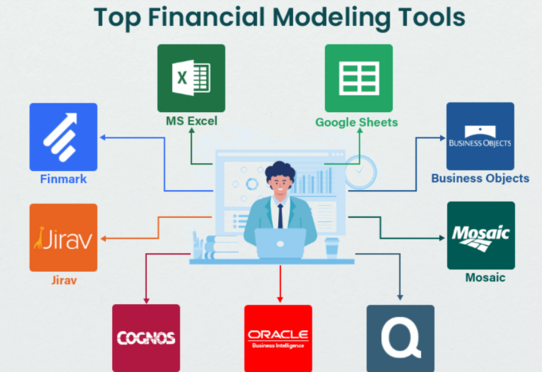
In the fast-evolving landscape of finance, financial modeling tools have become indispensable for analysts, accountants, financial planners, and businesses alike. These tools allow professionals to create accurate financial forecasts, analyze company performance, and model various financial scenarios with ease. Financial modeling software is essential for making informed decisions that drive business success, from budgeting and financial planning to risk analysis and investment management.
As the business world continues to embrace technology, financial modeling tools have advanced, offering a wide range of capabilities that can cater to diverse business needs. In 2025, these tools are expected to feature AI integrations, data visualization, and real-time collaboration, among other enhancements. Choosing the right financial modeling tool depends on various factors such as company size, budget, industry, and specific financial modeling needs.
In this post, we’ll explore the top 10 financial modeling tools in 2025, their features, pros, cons, and comparison to help you make an informed decision.
Top 10 Financial Modeling Tools in 2025
1. Microsoft Excel
Short Description:
Microsoft Excel is the most widely used financial modeling tool, known for its flexibility, powerful functions, and familiarity. It remains the go-to tool for many financial professionals, offering a robust platform for creating financial models.
Key Features:
- Advanced formulas and functions for detailed analysis.
- Pivot tables and charts for data visualization.
- Compatibility with other software (e.g., Power BI, Access).
- Extensive templates available for financial modeling.
- Ability to handle large datasets and complex calculations.
Pros:
- Widely used, with a large support community.
- Familiar interface for many professionals.
- Extensive add-ins and integrations with other software.
Cons:
- Steep learning curve for advanced features.
- No real-time collaboration unless using Office 365.
- Can become cumbersome with large datasets or overly complex models.
2. Quantrix
Short Description:
Quantrix is a powerful modeling tool that focuses on multi-dimensional financial modeling. It’s designed for users who need to create highly detailed, dynamic financial models with complex assumptions.
Key Features:
- Multi-dimensional modeling capabilities.
- User-friendly interface with drag-and-drop functionality.
- Real-time collaboration and cloud-based access.
- Strong scenario analysis and forecasting features.
- Customizable templates for specific financial sectors.
Pros:
- Highly customizable and flexible for various industries.
- Scalable for large businesses with complex needs.
- Real-time collaboration and cloud integration.
Cons:
- Can be expensive for smaller businesses.
- Requires training to fully utilize advanced features.
- Limited support for some basic functions compared to Excel.
3. Adaptive Insights
Short Description:
Adaptive Insights is a cloud-based financial modeling software that specializes in budgeting, forecasting, and reporting. It offers real-time updates and collaboration for finance teams.
Key Features:
- Automated financial reporting and forecasting.
- Real-time collaboration with cloud access.
- Pre-built templates for budgeting and planning.
- Integration with other business software (ERP, CRM).
- Scenario analysis and what-if modeling.
Pros:
- Cloud-based access for team collaboration.
- Easy to use with automated features.
- Integration with major ERPs and CRMs.
Cons:
- May not be as flexible as Excel for some advanced modeling tasks.
- Pricing can be steep for smaller businesses.
- Limited customization compared to other specialized tools.
4. Planful (formerly Host Analytics)
Short Description:
Planful is a comprehensive financial modeling and performance management platform designed to assist finance teams with budgeting, planning, forecasting, and reporting.
Key Features:
- Budgeting and planning tools with version control.
- Integrated financial reporting and analytics.
- Collaboration features for team-based forecasting.
- Scenario modeling for financial planning.
- Real-time data visualization and analysis.
Pros:
- Comprehensive solution for budgeting, forecasting, and reporting.
- Real-time collaboration capabilities.
- Easy-to-use interface with powerful reporting tools.
Cons:
- Can be overwhelming for small businesses.
- Pricing is on the higher end.
- Some users report a steep learning curve for advanced features.
5. Finsight
Short Description:
Finsight is a cloud-based financial modeling and business intelligence tool that helps users make data-driven financial decisions through insightful reporting and forecasting.
Key Features:
- Powerful financial analytics and data modeling.
- Real-time dashboard for performance tracking.
- Integration with accounting and ERP systems.
- Forecasting and scenario planning tools.
- Multi-user collaboration capabilities.
Pros:
- User-friendly interface.
- Real-time data analysis and visualization.
- Strong integration with other business tools.
Cons:
- May lack some of the advanced features of traditional modeling tools.
- Limited offline capabilities.
- Pricing can be an issue for smaller companies.
6. Tiller Money
Short Description:
Tiller Money focuses on automating financial tracking and modeling by syncing your financial data with Google Sheets, providing users with an efficient way to create personalized financial models.
Key Features:
- Automatic data syncing from financial accounts.
- Google Sheets-based, offering customizable templates.
- Real-time budget and expense tracking.
- Scenario analysis and forecasting features.
- Easy-to-understand reports and dashboards.
Pros:
- Seamless integration with Google Sheets.
- Affordable pricing for small businesses and individuals.
- Customizable templates and models.
Cons:
- Limited features for large businesses or complex models.
- Not as robust as other dedicated modeling tools.
- Dependent on Google Sheets, limiting offline functionality.
7. Xero
Short Description:
Xero is a comprehensive accounting software with financial modeling capabilities, designed for small to medium-sized businesses to handle accounting, forecasting, and reporting.
Key Features:
- Financial reporting and analytics tools.
- Integration with banking, payment systems, and other software.
- Real-time financial updates and forecasting.
- Cloud-based access for multi-user collaboration.
- User-friendly interface for finance teams.
Pros:
- Easy-to-use interface.
- Affordable and suitable for small businesses.
- Strong integration capabilities with third-party tools.
Cons:
- Limited advanced financial modeling features.
- May not suit large enterprises with complex modeling needs.
- Limited customization compared to dedicated tools.
8. Vena Solutions
Short Description:
Vena Solutions provides a robust financial planning and analysis platform that allows teams to create detailed financial models, budgets, and forecasts.
Key Features:
- Integrated planning and budgeting tools.
- Real-time collaboration and approval workflows.
- Scenario modeling for financial forecasting.
- Extensive reporting and analytics features.
- Integration with other financial software and ERPs.
Pros:
- Easy integration with Excel for flexible modeling.
- Cloud-based access for remote collaboration.
- Strong data analysis and reporting features.
Cons:
- Steep learning curve for advanced features.
- Pricing is on the higher end.
- Some users find the interface difficult to navigate.
9. IBM Planning Analytics (formerly Cognos TM1)
Short Description:
IBM Planning Analytics is an AI-powered financial modeling and planning tool that provides businesses with advanced financial forecasting, budgeting, and reporting capabilities.
Key Features:
- AI-powered financial forecasting and scenario modeling.
- Integrated financial and operational planning.
- Powerful data visualization and reporting tools.
- Cloud-based with on-premise deployment options.
- Collaboration features for team-based planning.
Pros:
- Advanced analytics and AI capabilities for accurate forecasting.
- Strong data visualization and reporting tools.
- Scalable for large enterprises.
Cons:
- Complex setup process and steep learning curve.
- High pricing may not be suitable for small businesses.
- Some features require additional customization.
10. FinModeling
Short Description:
FinModeling is a cloud-based financial modeling platform designed to simplify financial analysis and forecasting. It is ideal for financial analysts and businesses that require quick, accurate models.
Key Features:
- Template-based financial modeling.
- Real-time collaboration and updates.
- Easy integration with accounting and ERP systems.
- Scenario and sensitivity analysis tools.
- User-friendly interface for quick model setup.
Pros:
- Affordable pricing for smaller businesses.
- Quick to implement with customizable templates.
- Cloud-based access for remote collaboration.
Cons:
- Limited advanced modeling capabilities compared to Excel or Quantrix.
- Less customizable for large businesses with complex needs.
- Some users report limitations in integrating with other financial systems.
Comparison Table
| Tool Name | Best For | Platform(s) Supported | Standout Feature | Pricing | Rating (G2) |
|---|---|---|---|---|---|
| Microsoft Excel | General Financial Modeling | Windows, Mac | Flexibility and familiarity | Free with Office | 4.5/5 |
| Quantrix | Complex Financial Models | Windows, Mac, Cloud | Multi-dimensional modeling | Starts at $1,200/year | 4.7/5 |
| Adaptive Insights | Budgeting & Forecasting | Cloud | Automated reporting | Custom Pricing | 4.6/5 |
| Planful | Financial Performance | Cloud | Integrated forecasting & reporting | Custom Pricing | 4.4/5 |
| Finsight | Data-driven Decision Making | Cloud | Data analytics & reporting | Custom Pricing | 4.3/5 |
| Tiller Money | Personal Finance | Web-based (Google Sheets) | Google Sheets integration | Starts at $79/year | 4.2/5 |
| Xero | Small Business Accounting | Cloud | Integration with financial accounts | Starts at $12/month | 4.5/5 |
| Vena Solutions | Enterprise Financial Planning | Cloud | Excel Integration | Custom Pricing | 4.6/5 |
| IBM Planning Analytics | AI-Powered Forecasting | Cloud, On-premise | AI-powered insights & forecasting | Custom Pricing | 4.5/5 |
| FinModeling | Simple Financial Modeling | Cloud | Template-based ease of use | Starts at $29/month | 4.2/5 |
Which Financial Modeling Tool is Right for You?
Decision-Making Guide:
- Small businesses or startups: Consider Tiller Money or Xero for simplicity and affordability.
- Medium-sized businesses: Adaptive Insights or Vena Solutions would be ideal for integrated financial planning and forecasting.
- Large enterprises: For complex and multi-dimensional models, Quantrix or IBM Planning Analytics is the way to go.
- Data-centric industries: Finsight offers powerful analytics and decision-making tools.
Conclusion
Financial modeling tools have come a long way in 2025, offering advanced capabilities that support more efficient forecasting, budgeting, and scenario analysis. These tools not only empower financial professionals but also enhance the decision-making process for businesses of all sizes. Whether you’re an individual, a small startup, or a large enterprise, there is a financial modeling tool that can cater to your specific needs.
We encourage you to explore these tools further, take advantage of free trials or demos, and choose the one that aligns with your financial modeling requirements.
FAQs
- What is a financial modeling tool?
A financial modeling tool is software that helps businesses create detailed financial forecasts, models, and budgets to support strategic decision-making. - What are the benefits of financial modeling?
Financial modeling helps businesses forecast financial outcomes, analyze risk, and make informed decisions based on real data. - Which financial modeling tool is best for small businesses?
Tiller Money and Xero are great options for small businesses due to their affordability and ease of use. - Are financial modeling tools cloud-based?
Many financial modeling tools, including Adaptive Insights and Vena Solutions, are cloud-based, allowing for real-time collaboration and access from anywhere. - Can financial modeling tools integrate with other software?
Yes, most financial modeling tools like Quantrix, Planful, and Xero offer integrations with accounting, ERP, and CRM systems for seamless data exchange.